English
Learning Objective 5.1.A: Explain how adversaries can exploit application and file vulnerabilities to cause loss, damage, disruption, or destruction.
- 5.1.A.1 An adversary can read any unencrypted files if they have access to the device or drive storing the files.
- 5.1.A.2 Computers have standard users and administrative users. Administrative users have access to control system settings and can typically access any files or applications on a system. If regular users are given administrative privileges on a computer, and an adversary can compromise a user’s account, then the adversary will have elevated privileges on the system.
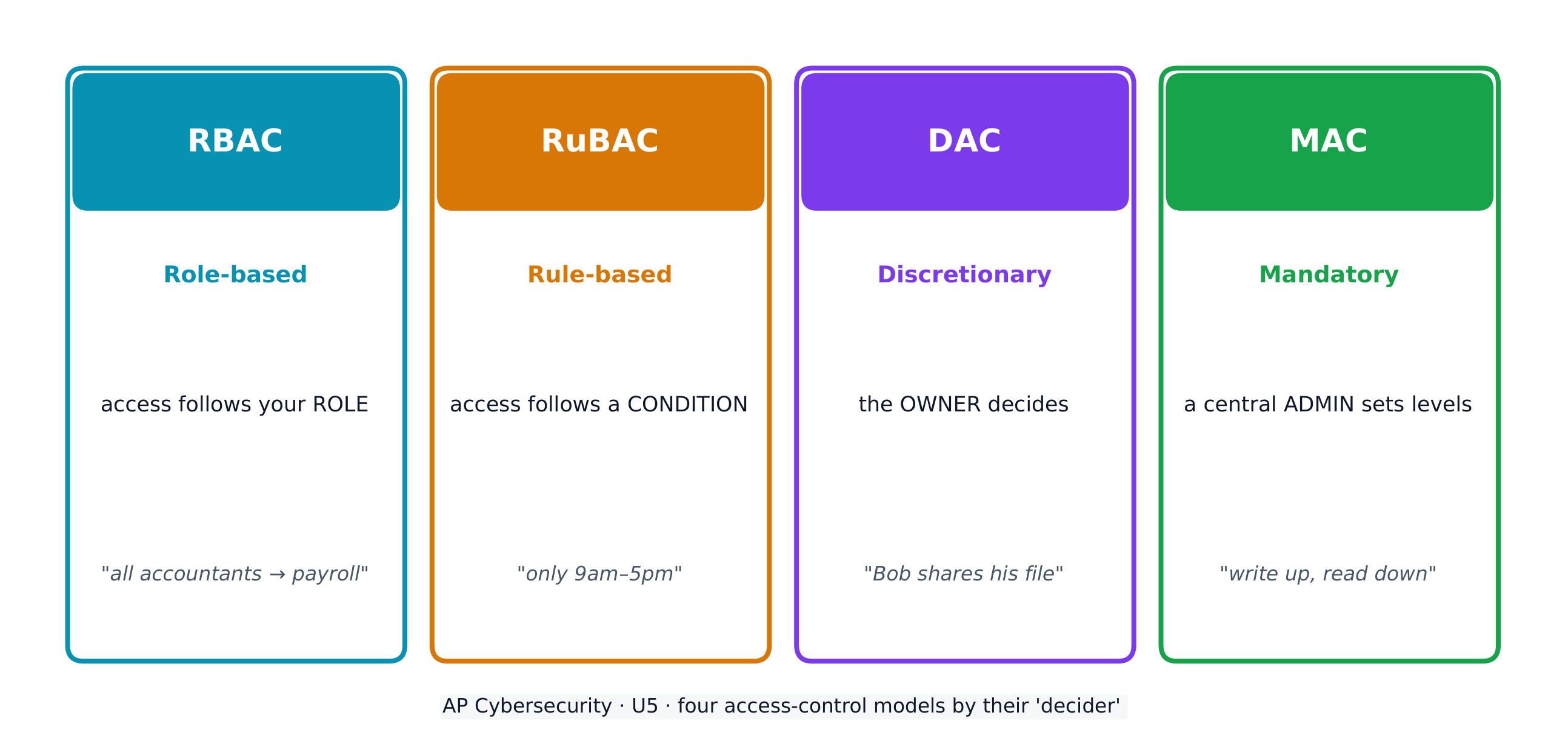
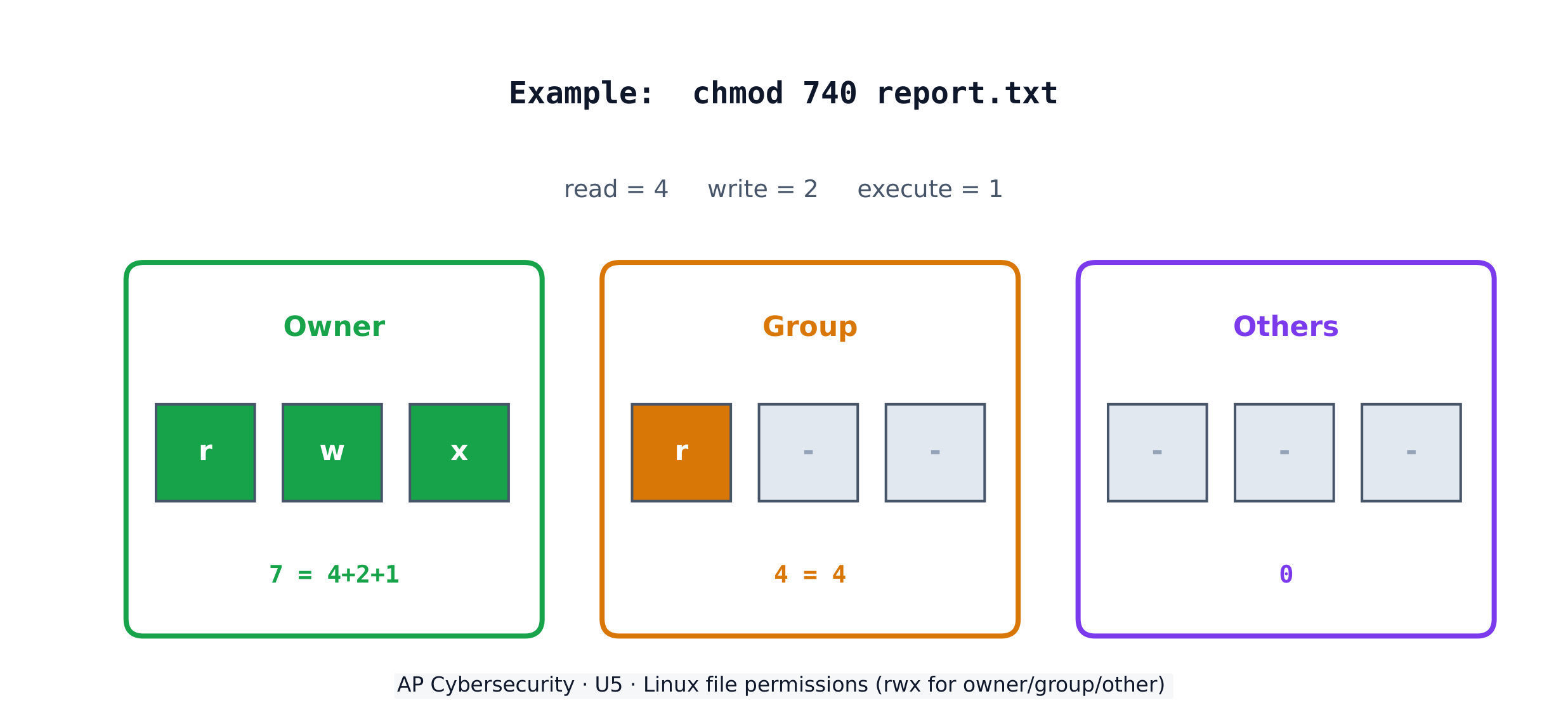
- 5.1.A.3 When access control settings are weakly configured, many users often have permission to view and sometimes even edit files on a system. Adversaries can take advantage of weak access control settings to steal or destroy files or disrupt an application.
Learning Objective 5.1.B: Explain how application attacks exploit vulnerabilities.
- 5.1.B.1 Applications are programs that run instructions on computers; they are executable data. Some applications run locally on a user’s computer, while other applications, like web applications, run on a server and are accessed by users through a network.
- 5.1.B.2 Many applications take user input through open-ended input fields where users can type characters (e.g., letters, numbers, punctuation). Developers should include user input checks in their application, such as numeric input when asked for a number of items, to ensure that the user input matches what is expected; the application should reject input outside of the expected parameters. This process of verifying that user input meets expected criteria before processing it is called data validation. Applications that fail to validate user input are vulnerable to injection-type attacks, where adversaries insert unexpected character strings in input fields to alter the behavior of a program.
- 5.1.B.3 Structured query language (SQL) is a computer language used to request information from databases and make changes to databases or entries in databases. Applications that query a database using unvalidated or unsanitized input from users are vulnerable.
- 5.1.B.4 An SQL-injection attack places SQL commands and control characters into a user-input field in an application, which can lead to a breach of confidentiality by causing the application to return more information than it should, or a breach of integrity by modifying or deleting data in the database.
- 5.1.B.5 Websites are written using hypertext markup language (HTML), and many websites use Javascript to create dynamic content on websites or web applications. Because Javascript commands run in the browser of the user visiting the website, those commands can access sensitive data stored in the browser like usernames, passwords, and cryptographic keys.
- 5.1.B.6 A cross site scripting (XSS) attack injects malicious code into a website that a user’s browser then executes. The malicious code can be embedded in a link the user clicks (a Type I or Reflected XSS attack) or it can be inserted onto a website through a comment field, forum post, or visitor log, which would affect any user visiting that website (a Type II or Stored XSS attack).
- 5.1.B.7 When applications take user input, that input is written to a buffer. A buffer is a designated section of computer memory with a fixed size. If the amount of data the user enters exceeds the size of the buffer, it can overflow into adjacent memory locations and overwrite other parts of the computer’s memory.
- 5.1.B.8 A buffer overflow attack feeds more data into memory than was allotted, which can cause a system to crash or to execute code outside the scope of a program’s security policy, effectively allowing the adversary to perform unauthorized actions on a computer, such as accessing, modifying, or deleting files.
- 5.1.B.9 The files that run web applications are stored in directories on servers. When users access web applications, their browsers send GET requests using hypertext transfer protocol (HTTP). A GET request accesses a file somewhere in the filesystem of the server.
- 5.1.B.10 In a directory traversal attack, adversaries modify URLs and GET requests to attempt to access sensitive data (e.g., usernames and passwords) on a server’s file system.
- Illustrative examples for 5.1.B.10:
- A web server stores images for a website it hosts in the /var/www/images/ directory. An adversary modifies a URL requesting an image to ../../../etc/passwd. The .. moves one directory up in the file system; so the three consecutive .. returns the path to the root, and from there the adversary is attempting to access the passwd file that would return a list of all the authorized usernames on the device.
- Illustrative examples for 5.1.B.10:
Learning Objective 5.1.C: Assess and document risks from application and data vulnerabilities.
- 5.1.C.1 Data security risks can involve a compromise of confidentiality when unauthorized persons can access sensitive data, integrity when data can be manipulated or altered from its intended state, and availability when data can be destroyed or encrypted to prevent others from accessing it.
- 5.1.C.2 High risks from data vulnerabilities often involve highly sensitive data (e.g., data that is governed by laws or regulations) that could be compromised through a highly likely exploit.
- Illustrative examples for 5.1.C.2:
- The company developing the next jet engine that will be used by the Air Force in its planes is storing the technical specifications for the engine on an unencrypted drive.
- Illustrative examples for 5.1.C.2:
- 5.1.C.3 Moderate risks from data vulnerabilities often involve sensitive data not having strong enough encryption or strict enough access controls.
- Illustrative examples for 5.1.C.3:
- A company stores its customers’ PII in a spreadsheet, and the spreadsheet is encrypted using a small key.
- Illustrative examples for 5.1.C.3:
- 5.1.C.4 Low risks from data vulnerabilities often involve less sensitive information being encrypted with shorter keys or having access controls that are not strict enough.
- Illustrative examples for 5.1.C.4:
- An organization’s CEO stores his private memos to his executive staff on a company share drive that is unencrypted and has no access controls.
- Illustrative examples for 5.1.C.4:
العربية
هدف التعلم 5.1.A: شرح كيف يمكن للخصوم استغلال ثغرات التطبيقات والملفات لإحداث خسائر أو أضرار أو اضطراب أو تدمير.
- 5.1.A.1 يمكن للخصوم قراءة أي ملفات غير مشفرة إذا حصلوا على وصول إلى الجهاز أو المحرك الذي يخزن الملفات.
- 5.1.A.2 تمتلك الحواسيب مستخدمين عاديين ومستخدمي إدارة النظام. يمتلك مستمرو النظام صلاحية الوصول إلى إعدادات التحكم في النظام ويمكنهم عادةً الوصول إلى أي ملفات أو تطبيقات على النظام. إذا مُنح مستخدمون عاديون صلاحيات إدارية على حاسوب، واستطاع مهاجم اختراق حساب مستخدم، فسيكتسب المهاجم صلاحيات مرتفعة على النظام.
- 5.1.A.3 عندما تكون إعدادات التحكم في الوصول ضعيفة، غالبًا ما يكون لدى العديد من المستخدمين إذن عرض الملفات وأحيانًا حتى تعديلها على النظام. يمكن للمهاجمين الاستفادة من إعدادات التحكم في الوصول الضعيفة لسرقة أو تدمير الملفات أو تعطيل تطبيق.
الهدف التعليمي 5.1.B: اشرح كيف تستغل هجمات التطبيقات الثغرات.
- 5.1.B.1 التطبيقات هي برامج تنفذ تعليمات على الحواسيب؛ وهي بيانات قابلة للتنفيذ. تعمل بعض التطبيقات محليًا على حاسوب المستخدم، بينما تعمل تطبيقات أخرى، مثل تطبيقات الويب، على خادم وتتم الوصول إليها من قبل المستخدمين عبر شبكة.
- 5.1.B.2 تأخذ العديد من التطبيقات مدخلات المستخدم من خلال حقول إدخال مفتوحة حيث يمكن للمستخدمين كتابة أحرف (مثل الأحرف الأبجدية والأرقام وعلامات الترقيم). يجب على المطورين تضمين فحص لمدخلات المستخدم في تطبيقاتهم، مثل المدخلات الرقمية عند طلب عدد من العناصر، للتأكد من أن مدخلات المستخدم تتطابق مع المتوقع؛ ويجب على التطبيق رفض المدخلات خارج المعايير المتوقعة. يُسمى هذه العملية، التي تتضمن التحقق من أن مدخلات المستخدم تلبي المعايير المتوقعة قبل معالجتها، بالتحقق من صحة البيانات. التطبيقات التي تفشل في التحقق من صحة مدخلات المستخدم تكون عرضة لهجمات الحقن، حيث يقوم المهاجمون بإدخال سلاسل أحرف غير متوقعة في حقول الإدخال لتغيير سلوك البرنامج.
- 5.1.B.3 لغة الاستعلام المهيكل (SQL) هي لغة حاسوب تُستخدم لطلب المعلومات من قواعد البيانات وإجراء تغييرات عليها أو على سجلاتها. التطبيقات التي تقوم بالاستعلام عن قاعدة بيانات باستخدام مدخلات غير مصادق عليها أو غير معقمة من المستخدمين تكون عرضة للخطر.
- 5.1.B.4 هجوم حقن SQL يوضع فيه أوامر SQL وأحرف تحكم في حقل إدخال المستخدم داخل تطبيق، مما قد يؤدي إلى انتهاك السرية من خلال جعل التطبيق يعيد معلومات أكثر مما ينبغي، أو انتهاك النزاهة من خلال تعديل أو حذف البيانات في قاعدة البيانات.
- 5.1.B.5 تُكتب المواقع باستخدام لغة علامات النص التشعبي (HTML)، وتستخدم العديد من المواقع جافاسكريبت لإنشاء محتوى ديناميكي على المواقع أو تطبيقات الويب. نظرًا لأن أوامر جافاسكريبت تعمل في متصفح المستخدم الذي يزور الموقع، فإن تلك الأوامر يمكنها الوصول إلى البيانات الحساسة المخزنة في المتصفح مثل أسماء المستخدمين وكلمات المرور والمفاتيح المشفرة.
- 5.1.B.6 هجوم البرمجة عبر المواقع (XSS) يحقن كودًا ضارًا في موقع ويب يقوم متصفح المستخدم بتنفيذه بعد ذلك. يمكن دمج الكود الضار في رابط يضغط عليه المستخدم (هجوم XSS المنعكس من النوع الأول أو Type I) أو يمكن إدراجه في موقع ويب من خلال حقل تعليقات أو منشور منتدى أو سجل الزوار، مما سيؤثر على أي مستخدم يزور ذلك الموقع (هجوم XSS المخزن من النوع الثاني أو Type II).
- 5.1.B.7 عندما تأخذ التطبيقات مدخلات المستخدم، يتم كتابة هذه المدخلات إلى ذاكرة مؤقتة (Buffer). الذاكرة المؤقتة هي جزء مخصص من ذاكرة الحاسوب بحجم ثابت. إذا تجاوزت كمية البيانات التي يدخلها المستخدم حجم الذاكرة المؤقتة، فقد تتدفق إلى مواقع الذاكرة المجاورة وتغطي أجزاء أخرى من ذاكرة الحاسوب.
- 5.1.B.8 هجوم تجاوز الذاكرة المؤقتة (Buffer Overflow) يغذي المزيد من البيانات إلى الذاكرة مما تم تخصيصه لها، مما قد يتسبب في انهيار النظام أو تنفيذ كود خارج نطاق سياسة أمان البرنامج، مما يسمح عمليًا للمهاجم بإجراء إجراءات غير مصرح بها على الحاسوب، مثل الوصول إلى الملفات أو تعديلها أو حذفها.
- 5.1.B.9 يتم تخزين ملفات تشغيل تطبيقات الويب في مجلدات على الخوادم. عندما يصل المستخدمون إلى تطبيقات الويب، يرسل متصفحوهم طلبات GET باستخدام بروتوكول نقل النصوص التشعبي (HTTP). يطلب طلب GET ملفًا موجودًا في أي مكان في نظام الملفات الخاص بالخادم.
- 5.1.B.10 في هجوم تجوال المجلدات (Directory Traversal)، يعدل المهاجمون روابط URL وطلبات GET لمحاولة الوصول إلى بيانات حساسة (مثل أسماء المستخدمين وكلمات المرور) على نظام ملفات الخادم.
- أمثلة توضيحية لـ 5.1.B.10:
- يخزن خادم الويب الصور لموقع ويب يستضيفه في مجلد /var/www/images/. يعدل المهاجم رابط طلب صورة إلى ../../../etc/passwd. ينقل .. مجلدًا واحدًا للأعلى في نظام الملفات؛ لذا فإن ثلاث نقاط متتالية .. تعيد مسار الجذر، ومن هناك يحاول المهاجم الوصول إلى ملف passwd الذي سيُرجع قائمة بجميع أسماء المستخدمين المصرح لهم على الجهاز.
- أمثلة توضيحية لـ 5.1.B.10:
الهدف التعليمي 5.1.C: تقييم ومخاطر من ثغرات التطبيقات والبيانات.
- 5.1.C.1 يمكن أن تشمل مخاطر أمن البيانات انتهاك السرية عندما يتمكن أشخاص غير مصرح لهم من الوصول إلى بيانات حساسة، والنزاهة عندما يمكن التلاعب بالبيانات أو تغييرها عن حالتها المقصودة، والتوافر عندما يمكن تدمير البيانات أو تشفيرها لمنع الآخرين من الوصول إليها.
- 5.1.C.2 غالبًا ما تتعلق المخاطر العالية الناتجة عن ثغرات البيانات بالبيانات عالية الحساسية (مثل البيانات الخاضعة للقوانين أو اللوائح) التي يمكن أن تتعرض للاختراق من خلال استغلال محتمل بشكل كبير.
- أمثلة توضيحية لـ 5.1.C.2:
- تخزن الشركة المطورة لمحرك الطائرات النفاثة القادم الذي سيتم استخدامه من قبل سلاح الجو في طائراتها المواصفات الفنية للمحرك على قرص غير مشفر.
- أمثلة توضيحية لـ 5.1.C.2:
- 5.1.C.3 غالبًا ما تتعلق المخاطر المتوسطة الناتجة عن ثغرات البيانات بعدم امتلاك بيانات حساسة تشفيرًا قويًا بما يكفي أو ضوابط وصول صارمة بما يكفي.
- أمثلة توضيحية لـ 5.1.C.3:
- تخزن شركة ما المعلومات الشخصية للعملاء (PII) الخاصة بهم في جدول بيانات، ويتم تشفير جدول البيانات باستخدام مفتاح صغير.
- أمثلة توضيحية لـ 5.1.C.3:
- 5.1.C.4 المخاطر المنخفضة الناتجة عن ثغرات البيانات غالباً ما تتضمن تشفير معلومات أقل حساسية بمفاتيح أقصر أو امتلاك ضوابط وصول غير صارمة بما يكفي.
- أمثلة توضيحية لـ 5.1.C.4:
- يخزن رئيس تنفيذي المؤسسة مذكراته الخاصة لموظفي الإدارة التنفيذية على محرك مشاركة تابع للشركة، وهو غير مشفر ولا يحتوي على ضوابط وصول.
- أمثلة توضيحية لـ 5.1.C.4: