Skip to content · ⁨الانتقال إلى المحتوى⁩

Creative Development · ⁨التطوير الإبداعي⁩

AP Computer Science Principles · ⁨AP مبادئ علوم الحاسوب⁩ · Topic 1 · ⁨الموضوع 1⁩

Video lesson for this topic · ⁨درس فيديو لهذا الموضوع⁩ Open the video page · ⁨افتح صفحة الفيديو⁩
6:15

التطوير الإبداعي

إليك برنامج يطبع المتوسط الحسابي لعددين. يعمل. لا يتوقف عن العمل. يطبع إجابة — والإجابة خاطئة. أعطه أربعة وستة…

English narration · English + 中文 subtitles burned in · ⁨سرد باللغة الإنجليزية · ترجمة مدمجة بالإنجليزية + الصينية⁩

1.1

Collaboration · ⁨التعاون⁩

Syllabus · ⁨المنهج⁩
English

Enduring Understanding (CRD-1): Incorporating multiple perspectives through collaboration improves computing innovations as they are developed.

Learning Objective CRD-1.A: Explain how computing innovations are improved through collaboration. [Skill 1.C]

  • CRD-1.A.1 A computing innovation includes a program as an integral part of its function.
  • CRD-1.A.2 A computing innovation can be physical (e.g., self-driving car), nonphysical computing software (e.g., picture editing software), or a nonphysical computing concept (e.g., e-commerce).
  • CRD-1.A.3 Effective collaboration produces a computing innovation that reflects the diversity of talents and perspectives of those who designed it.
  • CRD-1.A.4 Collaboration that includes diverse perspectives helps avoid bias in the development of computing innovations.
  • CRD-1.A.5 Consultation and communication with users are important aspects of the development of computing innovations.
  • CRD-1.A.6 Information gathered from potential users can be used to understand the purpose of a program from diverse perspectives and to develop a program that fully incorporates these perspectives.

Learning Objective CRD-1.B: Explain how computing innovations are developed by groups of people. [Skill 1.C]

  • CRD-1.B.1 Online tools support collaboration by allowing programmers to share and provide feedback on ideas and documents.
  • CRD-1.B.2 Common models such as pair programming exist to facilitate collaboration.

Learning Objective CRD-1.C: Demonstrate effective interpersonal skills during collaboration. [Skill 1.C]

  • CRD-1.C.1 Effective collaborative teams practice interpersonal skills, including but not limited to:
    • communication
    • consensus building
    • conflict resolution
    • negotiation
العربية

فهم دائم (CRD-1): دمج وجهات نظر متعددة من خلال التعاون يحسن الابتكارات الحاسوبية أثناء تطويرها.

هدف التعلم CRD-1.A: اشرح كيف تتحسن الابتكارات الحاسوبية من خلال التعاون. [مهارة 1.C]

  • CRD-1.A.1 تتضمن الابتكار الحاسوبي برنامجًا كجزء لا يتجزأ من وظيفته.
  • CRD-1.A.2 يمكن أن يكون الابتكار الحاسوبي ماديًا (مثل سيارة ذاتية القيادة)، أو برمجيات حاسوبية غير مادية (مثل برامج تعديل الصور)، أو مفهوم حاسوبي غير مادي (مثل التجارة الإلكترونية).
  • CRD-1.A.3 ينتج التعاون الفعال ابتكارًا حاسوبيًا يعكس تنوع المهارات ووجهات النظر لأولئك الذين صمموه.
  • CRD-1.A.4 يساعد التعاون الذي يتضمن وجهات نظر متنوعة في تجنب التحيز في تطوير الابتكارات الحاسوبية.
  • CRD-1.A.5 الاستشارة والتواصل مع المستخدمين جوانب مهمة من تطوير الابتكارات الحاسوبية.
  • CRD-1.A.6 يمكن استخدام المعلومات المستخرجة من المستخدمين المحتملين لفهم غرض البرنامج من وجهات نظر متنوعة وتطوير برنامج يدمج هذه الوجهات نظر بشكل كامل.

هدف التعلم CRD-1.B: اشرح كيف يتم تطوير الابتكارات الحاسوبية من قبل مجموعات من الناس. [مهارة 1.C]

  • CRD-1.B.1 تدعم الأدوات عبر الإنترنت التعاون من خلال السماح للمبرزين بمشاركة الأفكار والمستندات وتقديم التعليقات عليها.
  • CRD-1.B.2 توجد نماذج شائعة مثل البرمجة الزوجية لسهولة التعاون.

هدف التعلم CRD-1.C: إظهار مهارات تواصل فعالة أثناء التعاون. [مهارة 1.C]

  • CRD-1.C.1 فرق التعاون الفعالة تطبق مهارات التواصل بين الأشخاص، بما في ذلك على سبيل المثال لا الحصر:
    • التواصل
    • بناء الإجماع
    • حل النزاعات
    • التفاوض

Source: College Board AP Course and Exam Description · ⁨المصدر: وصف دورة وامتحان College Board AP⁩

English

Computing is a collaborative 协作 activity. Working in a team brings more perspectives, catches more errors, and produces better programs than working alone. Good collaboration uses consensus building, clear communication, and each member's strengths. Pair programming 结对编程 – two people at one computer, one typing and one reviewing – is a common practice. On the exam, you should be able to explain how collaboration improved a program (more ideas, fewer bugs, wider testing).

العربية
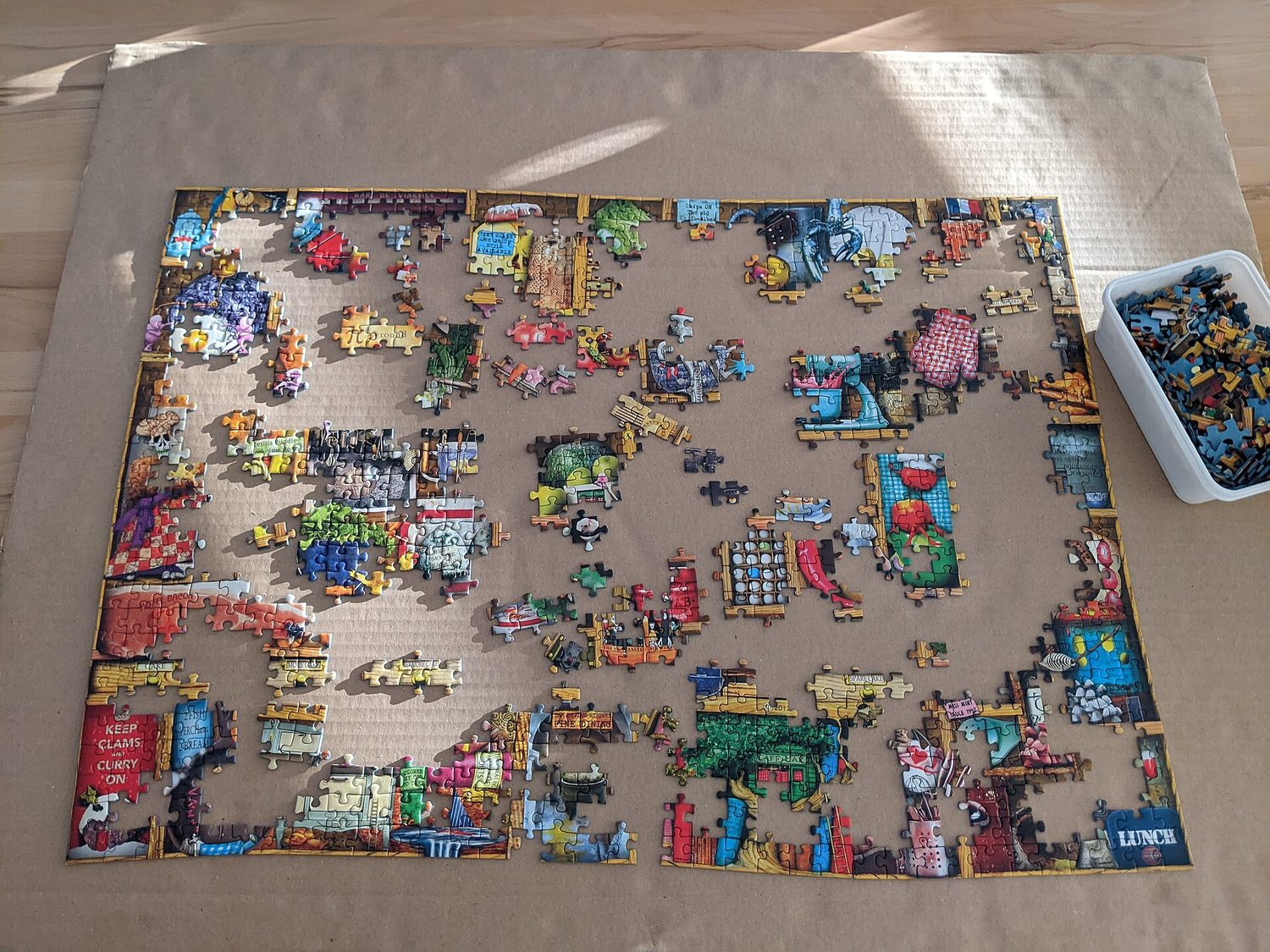
لغز جigsaw قيد الإنشاء: التعاون والتصميم المعياري يكملان الحل معاً

علم الحاسوب نشاط تعاوني. العمل في فريق يجلب وجهات نظر أكثر، يكشف أخطاء أكثر، وينتج برامج أفضل من العمل الفردي. التعاون الجيد يستخدم بناء الإجماع، التواصل الواضح، وقدرات كل عضو. البرمجة الزوجية – شخصان عند جهاز كمبيوتر واحد، أحدهما يكتب والآخر يراجع – ممارسة شائعة. في الامتحان، يجب أن تكون قادراً على شرح كيف حسّن التعاون البرنامج (أفكار أكثر، أخطاء أقل، اختبار أوسع).

Vocabulary · ⁨مفردات⁩ Train · ⁨تدريب⁩
English العربية
collaborative/kəˈlæbrətɪv/ تعاوني
Pair programming/peə ˈprəʊɡræmɪŋ/ البرمجة الزوجية
input/ˈɪnpʊt/ مدخلات
output/ˈaʊtpʊt/ نقرة فأرة تُبدأ عملاً هي مثال على
iterative/ˈɪtərətɪv/ تكرارية
decomposition/ˌdiːkɒmpəˈzɪʃn/ تحلل
Comments/ˈkɒments/ التعليقات
surveys/ˈsɜːveɪz/ استطلاعات
diagrams representing the layout of the user interface مخططات تمثل تخطيط واجهة المستخدم
event/ɪˈvent/ مخرجات
event handler/ɪˈvent ˈhændlə/ معالج الأحداث
debugging/ˈdiːbʌɡɪŋ/ تصحيح الأخطاء
syntax error/ˈsɪntæks ˈerə/ خطأ صياغة
runtime error/ˈrʌntaɪm ˈerə/ خطأ وقت التشغيل
logic error/ˈlɒdʒɪk ˈerə/ خطأ منطق
1.2

Program Function and Purpose · ⁨وظيفة البرنامج والغرض منه⁩

Syllabus · ⁨المنهج⁩
English

Enduring Understanding (CRD-2): Developers create and innovate using an iterative design process that is user-focused, that incorporates implementation/feedback cycles, and that leaves ample room for experimentation and risk-taking.

Learning Objective CRD-2.A: Describe the purpose of a computing innovation. [Skill 1.A]

  • CRD-2.A.1 The purpose of computing innovations is to solve problems or to pursue interests through creative expression.
  • CRD-2.A.2 An understanding of the purpose of a computing innovation provides developers with an improved ability to develop that computing innovation.

Learning Objective CRD-2.B: Explain how a program or code segment functions. [Skill 4.A]

  • CRD-2.B.1 A program is a collection of program statements that performs a specific task when run by a computer. A program is often referred to as software.
  • CRD-2.B.2 A code segment is a collection of program statements that is part of a program.
  • CRD-2.B.3 A program needs to work for a variety of inputs and situations.
  • CRD-2.B.4 The behavior of a program is how a program functions during execution and is often described by how a user interacts with it.
  • CRD-2.B.5 A program can be described broadly by what it does, or in more detail by both what the program does and how the program statements accomplish this function.

Learning Objective CRD-2.C: Identify input(s) to a program. [Skill 3.A]

  • CRD-2.C.1 Program inputs are data sent to a computer for processing by a program. Input can come in a variety of forms, such as tactile, audio, visual, or text.
  • CRD-2.C.2 An event is associated with an action and supplies input data to a program.
  • CRD-2.C.3 Events can be generated when a key is pressed, a mouse is clicked, a program is started, or any other defined action occurs that affects the flow of execution.
  • CRD-2.C.4 Inputs usually affect the output produced by a program.
  • CRD-2.C.5 In event-driven programming, program statements are executed when triggered rather than through the sequential flow of control.
  • CRD-2.C.6 Input can come from a user or other programs.

Learning Objective CRD-2.D: Identify output(s) produced by a program. [Skill 3.A]

  • CRD-2.D.1 Program outputs are any data sent from a program to a device. Program output can come in a variety of forms, such as tactile, audio, visual, or text.
  • CRD-2.D.2 Program output is usually based on a program's input or prior state (e.g., internal values).
العربية

فهم دائم (CRD-2): المطورون يبتكرون ويبتكرون باستخدام عملية تصميم تكرارية تركز على المستخدم، وتدمج دورات التنفيذ/التغذية الراجعة، وتترك مجالًا واسعًا للتجربة والمخاطرة.

هدف التعلم CRD-2.A: صف غرض الابتكار الحاسوبي. [مهارة 1.A]

  • CRD-2.A.1 غرض الابتكارات الحاسوبية هو حل المشكلات أو السعي وراء الاهتمامات من خلال التعبير الإبداعي.
  • CRD-2.A.2 فهم غرض الابتكار الحاسوبي يوفر للمطورين قدرة محسنة على تطوير هذا الابتكار الحاسوبي.

هدف التعلم CRD-2.B: اشرح كيف يعمل برنامج أو مقطع كود. [مهارة 4.A]

  • CRD-2.B.1 البرنامج هو مجموعة من عبارات البرنامج تنفذ مهمة محددة عند تشغيلها بواسطة جهاز كمبيوتر. غالبًا ما يُشار إلى البرنامج بـ البرمجيات.
  • CRD-2.B.2 مقطع الكود هو مجموعة من عبارات البرنامج تكون جزءًا من برنامج.
  • CRD-2.B.3 يحتاج البرنامج إلى العمل لمجموعة متنوعة من المدخلات والمواقف.
  • CRD-2.B.4 سلوك البرنامج هو كيفية عمل البرنامج أثناء التنفيذ وغالبًا ما يُوصف بكيفية تفاعل المستخدم معه.
  • CRD-2.B.5 يمكن وصف البرنامج بشكل عام بما يقوم به، أو بتفصيل أكبر من خلال ما يقوم به البرنامج وكيفية تحقيق جمل البرنامج لهذه الوظيفة.

هدف التعلم CRD-2.C: تحديد المدخلات(ات) للبرنامج. [مهارة 3.A]

  • CRD-2.C.1 مدخلات البرنامج هي بيانات تُرسل إلى جهاز الحاسوب لمعالجتها بواسطة برنامج. قد تأتي المدخلات بأشكال متنوعة، مثل اللمس، والصوت، والمرئي، أو النص.
  • CRD-2.C.2 يرتبط حدث بإجراء ويوفر بيانات مدخلات للبرنامج.
  • CRD-2.C.3 يمكن توليد الأحداث عند الضغط على مفتاح، أو النقر بالماوس، أو بدء برنامج، أو حدوث أي إجراء آخر محدد يؤثر على تدفق التنفيذ.
  • CRD-2.C.4 عادةً ما تؤثر المدخلات على المخرجات التي ينتجها البرنامج.
  • CRD-2.C.5 في البرمجة القائمة على الأحداث، يتم تنفيذ جمل البرنامج عند التفعيل بدلاً من خلال التدفق المتسلسل للتحكم.
  • CRD-2.C.6 يمكن أن تأتي المدخلات من مستخدم أو برامج أخرى.

هدف التعلم CRD-2.D: تحديد المخرجات(ات) التي ينتجها البرنامج. [مهارة 3.A]

  • CRD-2.D.1 مخرجات البرنامج هي أي بيانات تُرسل من برنامج إلى جهاز. يمكن أن تأتي مخرجات البرنامج بأشكال متنوعة، مثل اللمس، والصوت، والمرئي، أو النص.
  • CRD-2.D.2 عادةً ما تعتمد مخرجات البرنامج على مدخلات البرنامج أو حالته السابقة (مثل القيم الداخلية).

Source: College Board AP Course and Exam Description · ⁨المصدر: وصف دورة وامتحان College Board AP⁩

English

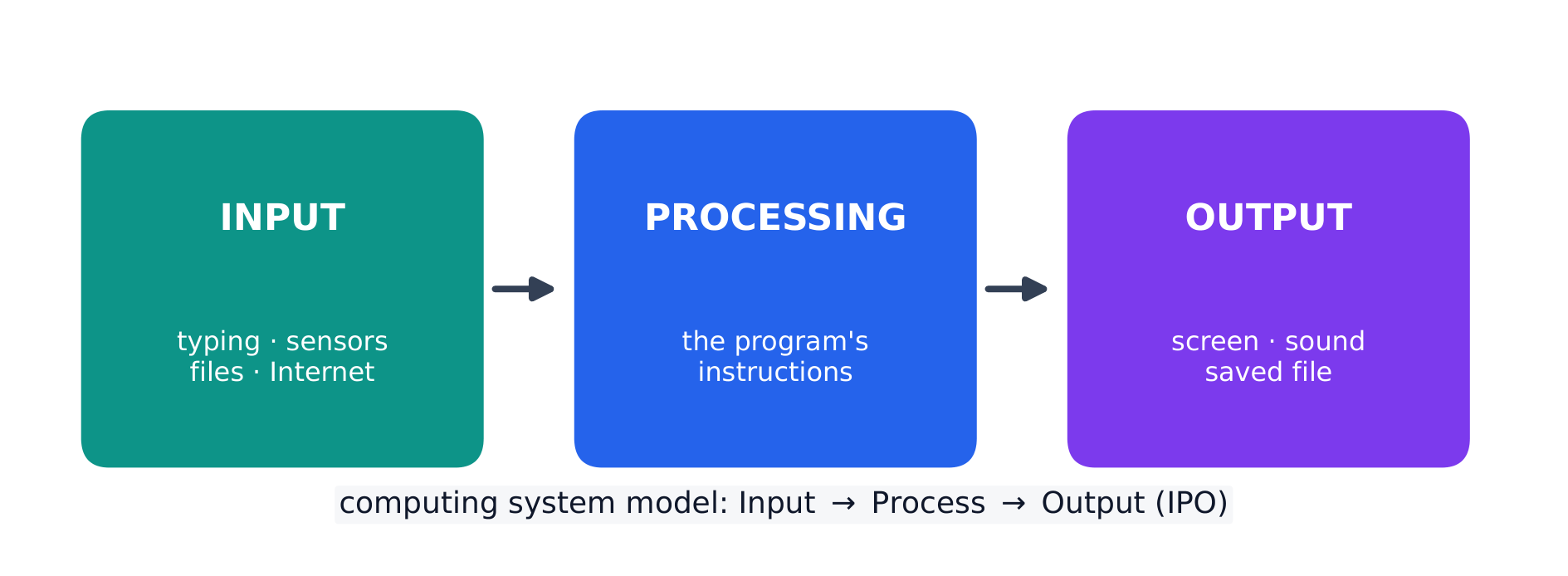
Every program is written for a purpose – it solves a problem or pursues an interest. A program takes input 输入, processes it, and produces output 输出. Inputs can come from a user, a device, a file, or another program; outputs can be visual, audible, textual, or a signal to a device. Being able to state a program's purpose, and describe its inputs and outputs clearly, is a core skill (and part of the Create performance task).

العربية

كل برنامج كُتب لغرض ما – يحل مشكلة أو يطبع اهتماماً. يأخذ البرنامج مدخلات، يعالجها، وينتج مخرجات. المدخلات يمكن أن تأتي من مستخدم، جهاز، ملف، أو برنامج آخر؛ المخرجات يمكن أن تكون مرئية، سمعية، نصية، أو إشارة لجهاز. القدرة على صياغة غرض البرنامج ووصف مدخلاته ومخرجاته بوضوح هي مهارة جوهرية (وتجزء من مهمة الأداء Create).

كل برنامج يتحلل إلى مدخلات، معالجة، ومخرجات
كل برنامج يتبع نموذج المدخلات-المعالجة-المخرجات
Explore · ⁨استكشف⁩

Explore the input → processing → output model · ⁨استكشف نموذج الإدخال → المعالجة → المخرج⁩

Step through the IPO model. Every program takes some input, performs processing on it by following its instructions, then produces output — trace one weather-app example along the pipeline. · ⁨مرّ بـ نموذج IPO. كل برنامج يأخذ بعض المدخلات، يقوم معالجة عليها بتوجيه تعليماته، ثم ينتج مخرجات — تتبع مثال تطبيق الطقس عبر هذا المسار.⁩

1.3

Program Design and Development · ⁨تصميم وتطوير البرامج⁩

Syllabus · ⁨المنهج⁩
English

Enduring Understanding (CRD-2): Developers create and innovate using an iterative design process that is user-focused, that incorporates implementation/feedback cycles, and that leaves ample room for experimentation and risk-taking.

Learning Objective CRD-2.E: Develop a program using a development process. [Skill 1.B]

  • CRD-2.E.1 A development process can be ordered and intentional, or exploratory in nature.
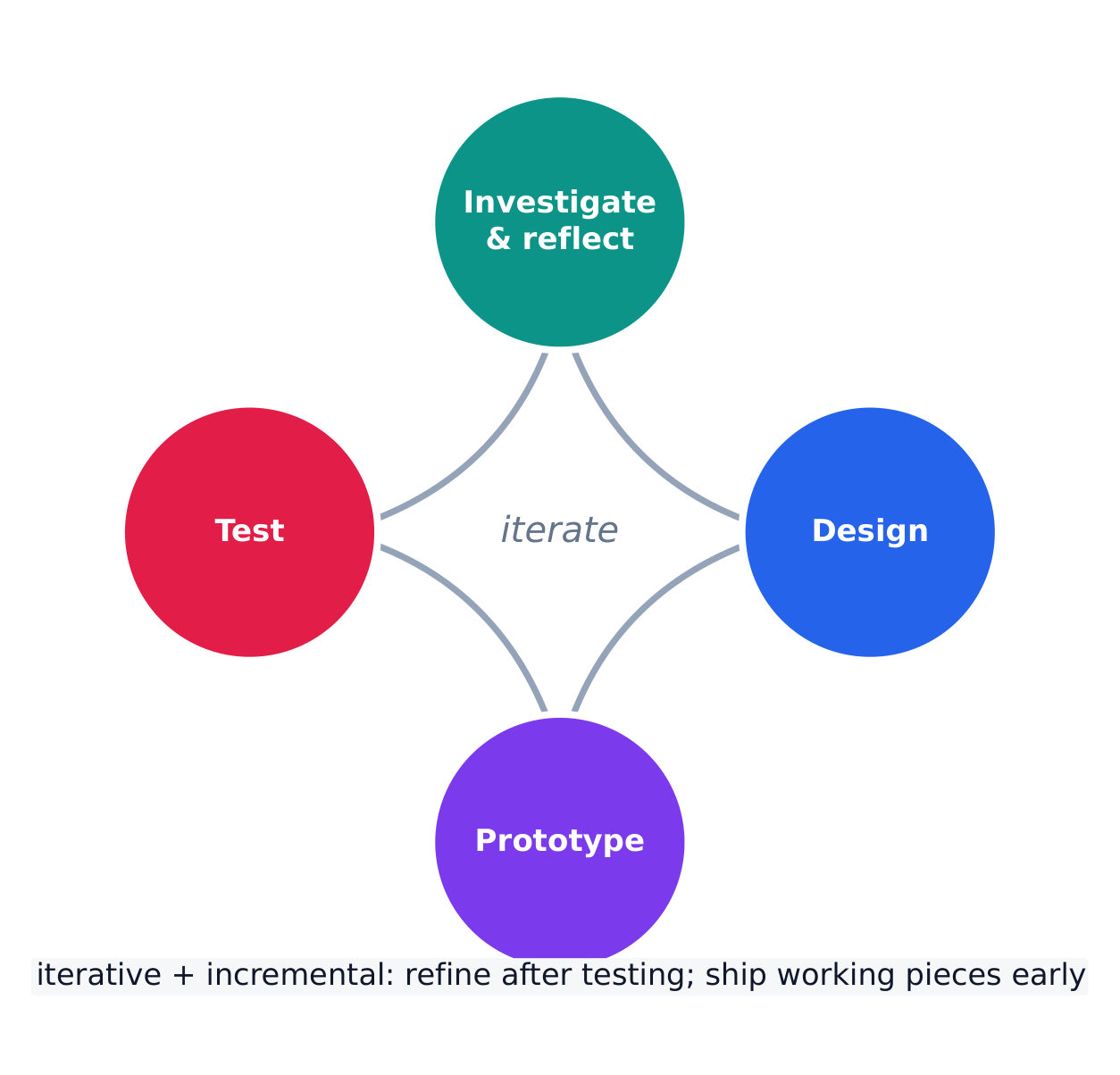
  • CRD-2.E.2 There are multiple development processes. The following phases are commonly used when developing a program:
    • investigating and reflecting
    • designing
    • prototyping
    • testing
  • CRD-2.E.3 A development process that is iterative requires refinement and revision based on feedback, testing, or reflection throughout the process. This may require revisiting earlier phases of the process.
  • CRD-2.E.4 A development process that is incremental is one that breaks the problem into smaller pieces and makes sure each piece works before adding it to the whole.

Learning Objective CRD-2.F: Design a program and its user interface. [Skill 1.B]

  • CRD-2.F.1 The design of a program incorporates investigation to determine its requirements.
  • CRD-2.F.2 Investigation in a development process is useful for understanding and identifying the program constraints, as well as the concerns and interests of the people who will use the program.
  • CRD-2.F.3 Some ways investigation can be performed are as follows:
    • collecting data through surveys
    • user testing
    • interviews
    • direct observations
  • CRD-2.F.4 Program requirements describe how a program functions and may include a description of user interactions that a program must provide.
  • CRD-2.F.5 A program's specification defines the requirements for the program.
  • CRD-2.F.6 In a development process, the design phase outlines how to accomplish a given program specification.
  • CRD-2.F.7 The design phase of a program may include:
    • brainstorming
    • planning and storyboarding
    • organizing the program into modules and functional components
    • creation of diagrams that represent the layouts of the user interface
    • development of a testing strategy for the program

Learning Objective CRD-2.G: Describe the purpose of a code segment or program by writing documentation. [Skill 4.A]

  • CRD-2.G.1 Program documentation is a written description of the function of a code segment, event, procedure, or program and how it was developed.
  • CRD-2.G.2 Comments are a form of program documentation written into the program to be read by people and do not affect how a program runs.
  • CRD-2.G.3 Programmers should document a program throughout its development.
  • CRD-2.G.4 Program documentation helps in developing and maintaining correct programs when working individually or in collaborative programming environments.
  • CRD-2.G.5 Not all programming environments support comments, so other methods of documentation may be required.

Learning Objective CRD-2.H: Acknowledge code segments used from other sources. [Skill 1.C]

  • CRD-2.H.1 It is important to acknowledge any code segments that were developed collaboratively or by another source.
  • CRD-2.H.2 Acknowledgement of a code segment(s) written by someone else and used in a program can be in the program documentation. The acknowledgement should include the origin or original author's name.
العربية

فهم دائم (CRD-2): المطورون يبتكرون ويبتكرون باستخدام عملية تصميم تكرارية تركز على المستخدم، وتدمج دورات التنفيذ/التغذية الراجعة، وتترك مجالًا واسعًا للتجربة والمخاطرة.

هدف التعلم CRD-2.E: تطوير برنامج باستخدام عملية تطوير. [مهارة 1.B]

  • CRD-2.E.1 يمكن أن تكون عملية التطوير مرتبة ومقصودة، أو استكشافية بطبيعتها.
  • CRD-2.E.2 توجد عمليات تطوير متعددة. المراحل التالية شائعة الاستخدام عند تطوير برنامج:
    • الاستكشاف والتأمل
    • التصميم
    • بناء النموذج الأولي
    • الاختبار
  • CRD-2.E.3 تتطلب عملية التطوير التكراري التحسين والمراجعة بناءً على التغذية الراجعة، أو الاختبار، أو التأمل طوال العملية. قد يتطلب ذلك العودة إلى مراحل سابقة من العملية.
  • CRD-2.E.4 عملية التطوير التدريجي هي التي تقسم المشكلة إلى أجزاء أصغر وتتأكد من عمل كل جزء قبل إضافته إلى الكل.

هدف التعلم CRD-2.F: تصميم برنامج وواجهة المستخدم الخاصة به. [مهارة 1.B]

  • CRD-2.F.1 يتضمن تصميم البرنامج استكشافاً لتحديد متطلباته.
  • CRD-2.F.2 يكون الاستكشاف في عملية التطوير مفيداً لفهم وتحديد قيود البرنامج، بالإضافة إلى اهتمامات ومشاعر الأشخاص الذين سيستخدمون البرنامج.
  • CRD-2.F.3 بعض طرق إجراء الاستكشاف كما يلي:
    • جمع البيانات من خلال الاستطلاعات
    • اختبار المستخدمين
    • المقابلات
    • الملاحظات المباشرة
  • CRD-2.F.4 تصف متطلبات البرنامج كيفية عمل البرنامج وقد تتضمن وصفاً للتفاعلات التي يجب أن يوفرها البرنامج مع المستخدم.
  • CRD-2.F.5 تحدد مواصفات البرنامج متطلباته.
  • CRD-2.F.6 في عملية التطوير، ترسم مرحلة التصميم كيف يمكن إنجاز مواصفات برنامج معينة.
  • CRD-2.F.7 قد تشمل مرحلة تصميم البرنامج ما يلي:
    • العصف الذهني
    • التخطيط ورسم المشاهد
    • تنظيم البرنامج في وحدات ومكونات وظيفية
    • إنشاء مخططات تمثل تخطيطات واجهة المستخدم
    • تطوير استراتيجية اختبار للبرنامج

هدف التعلم CRD-2.G: وصف الغرض من قطعة كود أو برنامج عن طريق كتابة التوثيق. [مهارة 4.A]

  • CRD-2.G.1 توثيق البرنامج هو وصف مكتوب لوظيفة قطعة كود، أو حدث، أو إجراء، أو برنامج وكيف تم تطويره.
  • CRD-2.G.2 التعليقات هي شكل من أشكال توثيق البرنامج يُكتب داخل البرنامج ليقرأه البشر ولا تؤثر على طريقة تشغيل البرنامج.
  • CRD-2.G.3 يجب على المبرمجين توثيق البرنامج طوال فترة تطويره.
  • CRD-2.G.4 يساعد توثيق البرنامج في تطوير وصيانة برامج صحيحة عند العمل بشكل فردي أو في بيئات برمجة تعاونية.
  • CRD-2.G.5 لا تدعم جميع بيئات البرمجة التعليقات، لذا قد تكون هناك حاجة لطرق أخرى للتوثيق.

هدف التعلم CRD-2.H: الاعتراف بقطع الكود المستخدمة من مصادر أخرى. [مهارة 1.C]

  • CRD-2.H.1 من المهم الاعتراف بأي قطع كود طُورت بشكل تعاوني أو بواسطة مصدر آخر.
  • CRD-2.H.2 يمكن أن يكون الاعتراف بقطعة(قطاعات) كود كتبها شخص آخر ومُستخدمة في البرنامج ضمن توثيق البرنامج. يجب أن يشمل الاعتراس أصل الكود أو اسم المؤلف الأصلي.

Source: College Board AP Course and Exam Description · ⁨المصدر: وصف دورة وامتحان College Board AP⁩

English

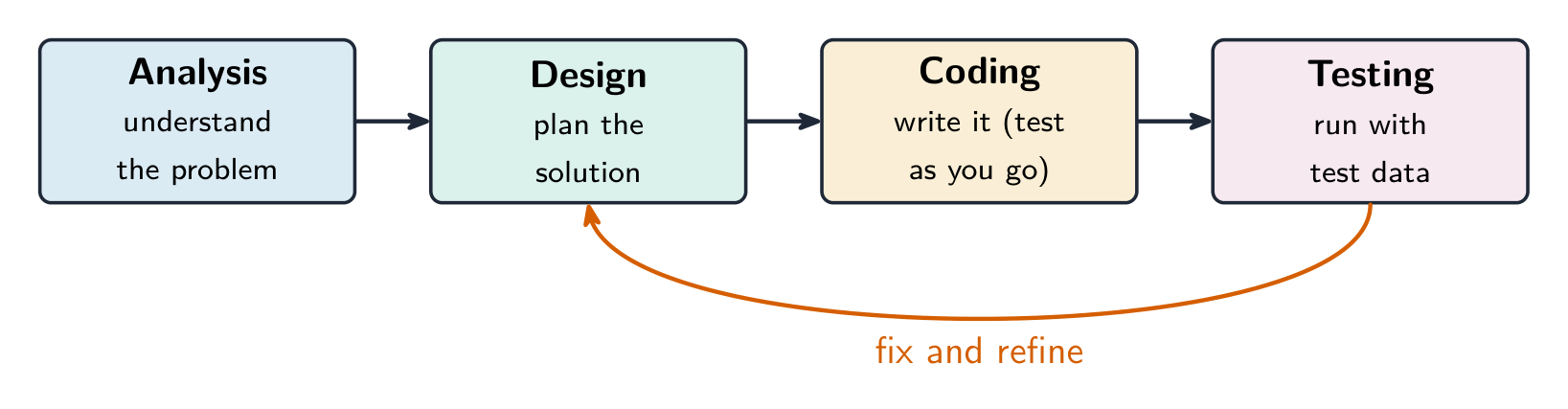
Programs are built through an iterative 迭代 process, not in one straight line: investigate the problem and users, design (often with a diagram or written plan), implement in code, and test – then repeat. A large problem is broken into smaller pieces (decomposition 分解). Comments 注释 and clear naming document the design so others (and your future self) can understand it. Development is incremental – build and test a small piece, then add the next.

Investigating what users actually need

Before any code is written, the developer investigates the problem and the people who will use the program. Three ways to do that:

  • surveys 调查问卷 sent to potential users, which collect data from many people quickly;
  • interviews and direct observation of users doing the task by hand;
  • studying existing solutions to see what already works and what frustrates people.

The findings are turned into a design. Two artefacts do that: a program requirements list saying exactly what the program must do, and diagrams representing the layout of the user interface 用户界面 — sketches showing which controls appear where, and what each one does when used. Designing the interface on paper first is cheaper than discovering after coding that the buttons are in the wrong place.

Events, and programs that wait

Not every program runs straight through from top to bottom. An event 事件 is generated when a key is pressed, a mouse is clicked, a program is started, or any other defined action occurs — and an event changes the flow of execution: the program pauses what it was doing and runs the code attached to that event, called an event handler 事件处理程序.

This is why a program with a graphical interface can appear to be doing nothing: it is waiting for the next event. The order in which those events arrive is decided by the user, not by the programmer, so the same program can run its blocks in a different order each time it is used.

العربية
مبرمج يصحح أخطاء في محطة عمل متعددة الشاشات — التصميم والتكرار

تُبنى البرامج عبر عملية تكرارية، وليس في خط مستقيم واحد: استقصِ المشكلة والمستخدمين، صمّم (غالباً باستخدام مخطط أو خطة مكتوبة)، نفذ الكود، وختبر – ثم كرر. يتم تقسيم المشكلات الكبيرة إلى أجزاء أصغر (التجزئة). تُوثّق التعليقات وتسميات واضحة التصميم حتى يتمكن الآخرون (وأنت في المستقبل) من فهمه. التطوير تدريجي – بنِ واختبر جزءاً صغيراً، ثم أضف الجزء التالي.

مراحل تطوير البرنامج، مع إعادة الاختبار لإصلاح وتحسين
يتم بناء البرمجيات عبر عملية تطوير تكرارية وتدرجية

استقصاء ما يحتاجه المستخدمون حقاً

قبل كتابة أي كود، يستقصي المطور المشكلة والأشخاص الذين سيستخدمون البرنامج. ثلاث طرق للقيام بذلك:

  • استبيانات تُرسل للمستخدمين المحتملين، لجمع البيانات من عدد كبير من الناس بسرعة؛
  • مقابلات ومراقبة مباشرة للمستخدمين أثناء أداء المهمة يدوياً؛
  • دراسة الحلول الموجودة لمعرفة ما يعمل بالفعل وما يسبب الإحباط للناس.

تُحوّل النتائج إلى تصميم. يقوم عنصران بذلك: قائمة متطلبات البرنامج التي تحدد بدقة ما يجب على البرنامج فعله، ومخططات تمثل تخطيط واجهة المستخدم – رسومات توضح أي الأزرار تظهر أين، وماذا تفعل كل منها عند استخدامها. تصميم الواجهة على الورق أولاً أرخص من اكتشاف بعد كتابة الكود أن الأزرار في المكان الخطأ.

الأحداث، والبرامج التي تنتظر

لا يعمل كل برنامج بشكل مباشر من الأعلى إلى الأسفل. يتم توليد حدث عند الضغط على مفتاح، أو النقر بالماوس، أو بدء البرنامج، أو حدوث أي إجراء آخر محدد – ويغير الحدث مسار التنفيذ: يتوقف البرنامج عن ما كان يفعله وينفذ الكود المرتبط بهذا الحدث، والذي يُسمى معالج الأحداث.

ولهذا قد يبدو أن برنامجاً ذو واجهة رسومية لا يفعل شيئاً: فهو ينتظر الحدث التالي. ترتيب وصول هذه الأحداث يحدده المستخدم، وليس المبرمج، لذا يمكن لنفس البرنامج تنفيذ كتبه بترتيب مختلف في كل مرة يستخدم فيها.

Explore · ⁨استكشف⁩

Loop through the iterative development process · ⁨مرّ بعملية التطوير التكرارية⁩

Development is iterative — you repeat the stages, improving the program a little on each pass. Step around the loop and notice it returns to the start rather than ending after one run. · ⁨التطوير تكراري — تكرار المراحل، وتحسين البرنامج قليلاً في كل دورة. مرّ حول الحلقة ولاحظ أنها تعود للبداية بدلاً من الانتهاء بعد تشغيل واحد.⁩

1.4

Identifying and Correcting Errors · ⁨تحديد الأخطاء وتصحيحها⁩

Syllabus · ⁨المنهج⁩
English

Enduring Understanding (CRD-2): Developers create and innovate using an iterative design process that is user-focused, that incorporates implementation/feedback cycles, and that leaves ample room for experimentation and risk-taking.

Learning Objective CRD-2.I: For errors in an algorithm or program: a. Identify the error. [Skill 4.C] b. Correct the error. [Skill 4.C]

  • CRD-2.I.1 A logic error is a mistake in the algorithm or program that causes it to behave incorrectly or unexpectedly.
  • CRD-2.I.2 A syntax error is a mistake in the program where the rules of the programming language are not followed.
  • CRD-2.I.3 A run-time error is a mistake in the program that occurs during the execution of a program. Programming languages define their own run-time errors.
  • CRD-2.I.4 An overflow error is an error that occurs when a computer attempts to handle a number that is outside of the defined range of values.
  • CRD-2.I.5 The following are effective ways to find and correct errors:
    • test cases
    • hand tracing
    • visualizations
    • debuggers
    • adding extra output statement(s)

Learning Objective CRD-2.J: Identify inputs and corresponding expected outputs or behaviors that can be used to check the correctness of an algorithm or program. [Skill 4.C]

  • CRD-2.J.1 In the development process, testing uses defined inputs to ensure that an algorithm or program is producing the expected outcomes. Programmers use the results from testing to revise their algorithms or programs.
  • CRD-2.J.2 Defined inputs used to test a program should demonstrate the different expected outcomes that are at or just beyond the extremes (minimum and maximum) of input data.
  • CRD-2.J.3 Program requirements are needed to identify appropriate defined inputs for testing.
العربية

فهم دائم (CRD-2): المطورون يبتكرون ويبتكرون باستخدام عملية تصميم تكرارية تركز على المستخدم، وتدمج دورات التنفيذ/التغذية الراجعة، وتترك مجالًا واسعًا للتجربة والمخاطرة.

هدف التعلم CRD-2.I: للأخطاء في خوارزمية أو برنامج: أ. تحديد الخطأ. [مهارة 4.C] ب. تصحيح الخطأ. [مهارة 4.C]

  • CRD-2.I.1 الخطأ المنطقي هو خطأ في الخوارزمية أو البرنامج يتسبب في سلوكه بشكل غير صحيح أو غير متوقع.
  • CRD-2.I.2 الخطأ اللغوي هو خطأ في البرنامج حيث لا تُتبع قواعد لغة البرمجة.
  • CRD-2.I.3 خطأ وقت التشغيل هو خطأ في البرنامج يحدث أثناء تنفيذ البرنامج. تحدد لغات البرمجة أخطاء وقت التشغيل الخاصة بها.
  • CRD-2.I.4 خطأ الاندفاع هو خطأ يحدث عندما يحاول الحاسوب التعامل مع رقم يقع خارج نطاق القيم المعرف.
  • CRD-2.I.5 الطرق الفعالة لإيجاد الأخطاء وتصحيحها هي:
    • حالات الاختبار
    • تتبع يدوي
    • التصورات البصرية
    • أدوات تصحيح الأخطاء
    • إضافة جملة(ات) إخراج إضافية

هدف التعلم CRD-2.J: تحديد المدخلات والمخرجات المتوقعة أو السلوكيات المقابلة التي يمكن استخدامها للتحقق من صحة خوارزمية أو برنامج. [مهارة 4.C]

  • CRD-2.J.1 في عملية التطوير، يستخدم الاختبار مدخلات محددة للتأكد من أن الخوارزمية أو البرنامج ينتج النتائج المتوقعة. يستخدم المبرمجون نتائج الاختبار لمراجعة خوارزمياتهم أو برامجهم.
  • CRD-2.J.2 يجب أن تُظهر المدخلات المحددة المستخدمة لاختبار البرنامج مخرجات متوقعة مختلفة تكون عند حدود البيانات المدخلة القصوى (الحد الأدنى والأقصى) أو قريبًا منها.
  • CRD-2.J.3 متطلبات البرنامج ضرورية لتحديد المدخلات المحددة المناسبة للاختبار.

Source: College Board AP Course and Exam Description · ⁨المصدر: وصف دورة وامتحان College Board AP⁩

English

A bug is an error in a program; debugging 调试 is finding and fixing it. Three kinds:

  • a syntax error 语法错误 breaks the language's rules, so the program will not run;
  • a runtime error 运行时错误 crashes the program while it runs (e.g. dividing by zero);
  • a logic error 逻辑错误 lets it run but gives the wrong result.

Find bugs by testing with different inputs, adding print statements to see values, and hand-tracing the code. Choose the test inputs deliberately: they should demonstrate the different expected outcomes at or just beyond the extremes — the minimum and maximum values the program should accept, and a value just outside each of them. A program that works on ordinary data very often fails on an empty list, a zero, or a value one past the end of a range, so those are the inputs worth trying first. Fixing one bug at a time and re-testing is the reliable method.

Exam skill: be able to name the type of an error and describe a testing strategy that would catch it – a recurring multiple-choice and Create-task theme.

Worked example. A program meant to print the average of two numbers instead runs avg = a + b / 2. Tracing the order of operations, / runs before +, so it computes $a+\tfrac{b}{2}$ rather than the average. Add parentheses to fix it: avg = (a + b) / 2. Testing with $a=4,\ b=6$ confirms the fix — the buggy line gives $4+3=7$, the corrected line gives $\tfrac{10}{2}=5$. Testing with known inputs is exactly how you find and confirm a logic error.

العربية

الخلل البرمجي هو خطأ في البرنامج؛ إصلاح الأخطاء هو العثور عليه وإصلاحه. ثلاثة أنواع:

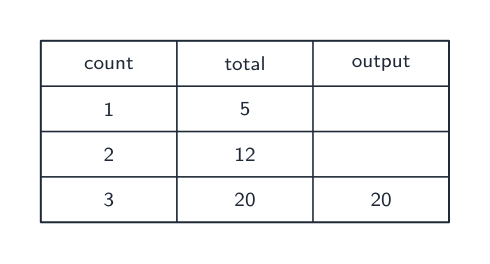
جدول التتبع يسجل قيمة كل متغير أثناء تشغيل البرنامج، لإيجاد الأخطاء
  • خطأ في الصياغة يخالف قواعد اللغة، لذلك لن يعمل البرنامج؛
  • خطأ وقت التشغيل يتسبب في انهيار البرنامج أثناء عمله (مثل القسمة على صفر)؛
  • خطأ منطقي يسمح له بالعمل لكن يعطي نتيجة خاطئة.

ابحث عن الأخطاء عن طريق الاختبار بمدخلات مختلفة، وإضافة أوامر طباعة لرؤية القيم، وتتبع الكود يدوياً. اختر مدخلات الاختبار بعناية: يجب أن توضح النتائج المتوقعة المختلفة عند أو بالقرب من الحواف القصوى – القيم الدنيا والعلى التي يجب أن يقبلها البرنامج، وقيمة خارج كل منها بقليل. غالباً ما يفشل برنامج يعمل على بيانات عادية عند قائمة فارغة، أو صفر، أو قيمة واحدة بعد نهاية نطاق معين، لذا فهي المدخلات التي تستحق تجربتها أولاً. إصلاح خلل واحد في كل مرة وإعادة الاختبار هي الطريقة الموثوقة.

مهارة الامتحان: كن قادراً على تسمية نوع الخطأ ووصف استراتيجية اختبار ستكشف عنه – وهو موضوع متكرر في أسئلة الاختيار من متعدد ومهام الإنشاء.

ثلاثة أنواع من أخطاء البرمجة: الصياغة، المنطق، ووقت التشغيل

مثال محلول. برنامج مُصمم لطباعة متوسط عددين يقوم بدلاً من ذلك بتنفيذ avg = a + b / 2. بتتبع ترتيب العمليات، / يعمل قبل +، لذا يحسب $a+\tfrac{b}{2}$ بدلاً من المتوسط. أضف أقواس لحل المشكلة: avg = (a + b) / 2. الاختبار باستخدام $a=4,\ b=6$ يؤكد الإصلاح — السطر الخاطئ يعطي $4+3=7$، والسطر المصحح يعطي $\tfrac{10}{2}=5$. اختبار المدخلات المعروفة هو بالضبط كيف تجد وتؤكد خطأ المنطق.

Explore · ⁨استكشف⁩

Trace the guessing-game logic and spot a logic error · ⁨تتبع منطق لعبة التخمين واكتشف خطأ منطقياً⁩

Drag the guess and watch which branch runs. A logic error would send the same guess down the wrong branch — the program still runs, but gives the wrong message. The secret number here is 50. · ⁨اسحب التخمين وانظر أي فرع سيتم تنفيذه. خطأ منطقي قد يوجه نفس التخمين إلى فرع خاطئ — البرنامج لا يزال يعمل، لكنه يعطي رسالة غير صحيحة. الرقم السري هنا هو 50.⁩

1.4

Exam tips · ⁨نصائح للامتحان⁩

English
  • Much of CSP is assessed through the Create and written performance tasks — explain your reasoning clearly, not just your result.
  • Know the benefits of collaboration and how diverse perspectives reduce bias in a program.
  • Use precise vocabulary (iterative development, program requirements) when you describe a design process.
  • Give and take feedback constructively; credit collaborators and sources.
  • Break a large problem into smaller modules that a team can build in parallel.
العربية
  • يتم تقييم الكثير من CSP من خلال مهام الإنشاء وأداء الكتابة – اشرح استدراكك بوضوح، وليس فقط نتيجتك.
  • تعرف فوائد التعاون وكيف تقلل وجهات النظر المتنوعة من التحيز في البرنامج.
  • استخدم مفردات دقيقة (التطوير التكراري، متطلبات البرنامج) عندما تصف عملية التصميم.
  • قدم واستقبل الملاحظات بشكل بناء؛ أعطِ الائتمان للمشاركين والمصادر.
  • قم بتقسيم مشكلة كبيرة إلى وحدات أصغر يمكن لفريق بنائها بالتوازي.

Interactive lessons on this topic · ⁨دروس تفاعلية حول هذا الموضوع⁩

Work through it step by step, with instant-check exercises. · ⁨ا-working عليه خطوة بخطوة، مع تمارين تحقق فوري.⁩

Past Papers · ⁨أوراق الامتحانات السابقة⁩

More topics in AP Computer Science Principles · ⁨AP مبادئ علوم الحاسوب⁩ · ⁨المزيد من المواضيع في AP Computer Science Principles · ⁨AP مبادئ علوم الحاسوب⁩⁩

Log in or create account · ⁨تسجيل الدخول أو إنشاء حساب⁩

IGCSE, A-Level & AP