Files · 文件
| English | 中文 | Pinyin · 拼音 |
|---|---|---|
| file/faɪl/ | 文件 | wén jiàn |
| text file/tekst faɪl/ | 文本文件 | wén běn wén jiàn |
| secondary storage/ˈsekəndəri ˈstɔːrɪdʒ/ | 辅助存储器 | fǔ zhù cún chǔ qì |
| persistence/pəˈsɪstəns/ | 持久性 | chí jiǔ xìng |
| end of file/end ɒv faɪl/ | 文件结束 | wén jiàn jié shù |
| separator/ˈsepəreɪtə/ | 分隔符 | fēn gé fú |
| sequential/siːˈkwenʃl/ | 顺序 | shùn xù |
The game that remembered
- Until 1987, switching off a games console erased everything. Every session started from the first screen; a long game was a long afternoon or nothing.
- The Legend of Zelda shipped with a small battery inside the cartridge that kept a few hundred bytes alive. For the first time a home game could save, and pick up where you left off.
- Every high score, every document, every setting you have ever kept exists for the same reason: RAM forgets when the power goes, and a file 文件 does not.
- This lesson is why files exist and how pseudocode reads and writes a text file, line by line.
会记忆的游戏
- 1987 年之前,关掉游戏机就抹掉一切。每次都从第一个画面开始;一个很长的游戏要么是一个很长的下午,要么什么都不是。
- 《塞尔达传说》的卡带里装了一块小电池,让几百个字节保持存活。家用游戏第一次可以保存,从上次离开的地方继续。
- 你保留过的每一个最高分、每一份文档、每一项设置,存在的原因都一样:断电时 RAM 会忘记,而文件(file)不会。
- 这一课讲文件为什么存在,以及伪代码怎样逐行读写文本文件。
Why files
- Variables live in RAM and disappear when the program ends. A file on secondary storage 辅助存储器 keeps data between program runs: persistence 持久性.
- Files let one program's output become another program's input, so data can be shared.
- A file can hold more than fits in memory, and a program can restart from a saved state.
The variable is gone at the end of the run; the file is still there tomorrow
为什么需要文件
- 变量活在 RAM 里,程序结束就消失。辅助存储器(secondary storage)上的文件在程序运行之间保留数据:持久性(persistence)。
- 文件让一个程序的输出成为另一个程序的输入,数据因此可以共享。
- 文件能保存比内存装得下的更多的数据,程序也能从保存的状态重新开始。

运行结束时变量已不在;文件明天还在
Why does a program write data to a file rather than keeping it in a variable? · 为什么一个程序把数据写到一个文件,而不是把它保存在一个变量里?
RAM is volatile, so data is lost on exit. A file on secondary storage persists between runs. · RAM 是易失的,所以数据在退出时丢失。辅助存储上的一个文件在运行之间持久存在。
Text files and the three modes
- A text file 文本文件 stores data as lines of characters, which a program reads and writes one line at a time, from the start. That sequence of lines is what lets a loop work through it.
OPENFILE … FOR READreads from the first line.FOR WRITEcreates a new file, or overwrites an existing one.FOR APPENDadds new lines at the end, keeping what is there.- Open before use, close after. A file has one mode at a time.
文本文件和三种模式
- 文本文件(text file)把数据存为字符行,程序从开头起一行一行地读写。正是这个行序列让循环能遍历它。
OPENFILE … FOR READ从第一行读。FOR WRITE创建新文件,或覆盖已有文件。FOR APPEND在末尾添加新行,保留已有内容。- 用前打开,用后关闭。一个文件一次只有一种模式。
Match each file-open mode to what it does. · 把每个文件打开模式与它做的事配对。
READ reads; WRITE replaces from scratch; APPEND adds to the end without losing what is there. · READ 读;WRITE 从头替换;APPEND 加到末尾而不丢失那里的东西。
To add lines to the end of an existing file without losing its contents, open it FOR ____. · 要在已有文件末尾添加行而不丢失其内容,应以 FOR ____ 打开它。
WRITE would start the file empty. APPEND keeps what is there and writes after it. · WRITE 会让文件从空开始。APPEND 保留已有内容并在其后写入。
Reading every line
EOFtests for the end of file 文件结束. Test it before each read: reading past the end is an error.CLOSEFILEmatters: buffered data may be lost and other programs locked out of a file left open.
读每一行
OPENFILE "data.txt" FOR READ
WHILE NOT EOF("data.txt") DO
    READFILE "data.txt", LineString
    OUTPUT LineString
ENDWHILE
CLOSEFILE "data.txt"
EOF测试文件结束(end of file)。在每次读之前测试:读过末尾是错误。CLOSEFILE很重要:缓冲的数据可能丢失,其他程序可能被一个未关闭的文件锁在外面。
Handling a file: open → use → close · 处理一个文件:打开 → 使用 → 关闭
Step through the lifecycle every file follows. The two easy-to-forget parts are testing EOF while reading in a loop, and always closing at the end. · 逐步走过每个文件遵循的生命周期。两个容易忘记的部分是在一个循环中读时测试 EOF,以及在末尾总是关闭。
What does EOF test for? · EOF 测试什么?
EOF (end of file) is checked before each read so the loop stops when there is no more data. · EOF(文件结束)在每次读之前被检查,这样当没有更多数据时循环停止。
Why must you always close a file after using it? · 为什么你必须在使用一个文件后总是关闭它?
Closing flushes buffered writes to disk and releases the lock so other programs can use the file. · 关闭把缓冲的写入刷到磁盘并释放锁,这样其他程序能使用文件。
Writing lines
WRITEstarts the file empty. To add to a log that must keep its history, open itFOR APPENDinstead.- A text file holds strings: a number is converted with
NUM_TO_STRon the way out.
写行
OPENFILE "log.txt" FOR WRITE
FOR i ← 1 TO 100
    WRITEFILE "log.txt", "Event " & NUM_TO_STR(i)
NEXT i
CLOSEFILE "log.txt"
WRITE让文件从空开始。要往必须保留历史的日志里添加,应改用FOR APPEND打开。- 文本文件保存的是字符串:数字在写出时用
NUM_TO_STR转换。
Worked example: the last three lines of a file
- Write a procedure
LastLines(FileName)that outputs the last three lines of a text file, in order.
- Each new line pushes the previous ones along, so at
EOFthe three variables hold the last three lines; a shorter file outputs empty strings. For the first five lines, count the reads and stop at five or atEOF, whichever comes first. An empty file makesEOFtrue immediately after opening.
例题:文件的最后三行
- 编写过程
LastLines(FileName),按顺序输出文本文件的最后三行。
PROCEDURE LastLines(BYVAL FileName : STRING)
    DECLARE LineX, LineY, LineZ : STRING
    LineX ← ""
    LineY ← ""
    LineZ ← ""
    OPENFILE FileName FOR READ
    WHILE NOT EOF(FileName) DO
        LineX ← LineY
        LineY ← LineZ
        READFILE FileName, LineZ
    ENDWHILE
    CLOSEFILE FileName
    OUTPUT LineX
    OUTPUT LineY
    OUTPUT LineZ
ENDPROCEDURE
- 每读一行都把前面的行往前推,所以到
EOF时三个变量正好保存最后三行;更短的文件会输出空字符串。要输出前五行,数一数读了几次,到五次或到EOF就停,以先到者为准。空文件在打开后EOF立即为真。
Put the steps of the LastLines procedure in order. · 把 LastLines 过程的步骤按顺序排列。
Initialise, open, loop with the shift before the read, close, output. Shifting after the read would lose the newest line. · 初始化、打开、在读之前移位的循环、关闭、输出。读之后再移位会丢掉最新的一行。
Fields in a line
- A record is written as one line, its fields joined by a separator 分隔符 character, and each number or Boolean converted with
NUM_TO_STR(and read back withSTR_TO_NUM, or by comparing with"TRUE"). - Choose a separator that can never appear in the data: a comma or
|for names and numbers; never a space when a name may contain one. - Reading back: read the line, split it at the separator, convert each field to its type, store it in the record.
Join with a separator to write; split and convert to read
一行中的字段
- 一条记录写成一行,各字段用一个分隔符(separator)字符连接,每个数字或布尔值用
NUM_TO_STR转换(读回时用STR_TO_NUM,或与"TRUE"比较)。 - 选一个绝不会出现在数据中的分隔符:姓名和数字用逗号或
|;姓名可能含空格时绝不用空格。 - 读回:读一行,在分隔符处拆开,把每个字段转换成它的类型,存入记录。
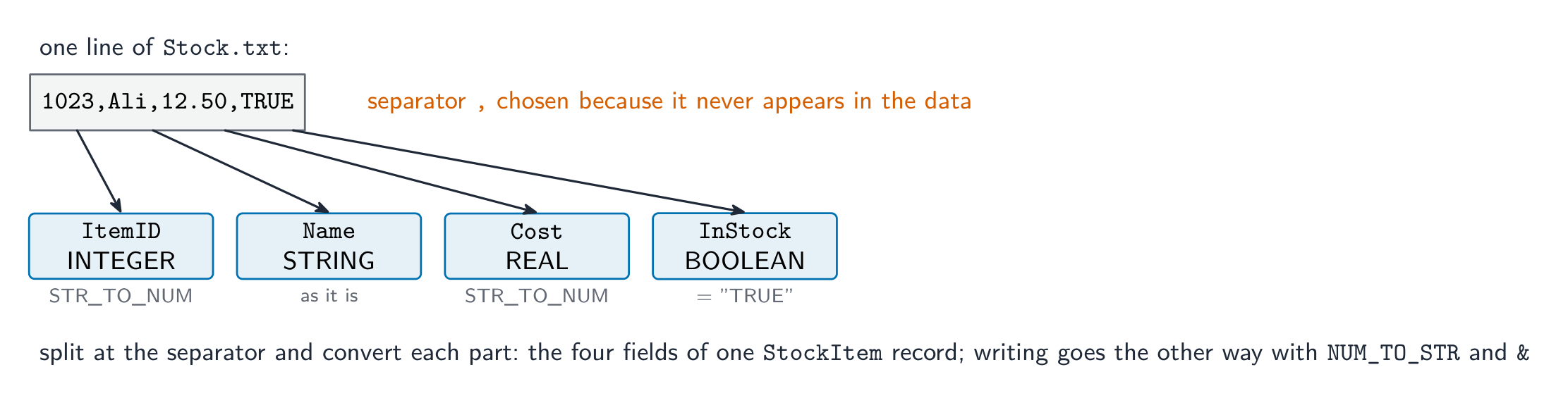
写时用分隔符连接;读时拆开并转换
A line stores a player's full name and score. Which separator is the safest choice? · 一行存储玩家的全名和分数。哪个分隔符最安全?
The separator must never occur inside a field. A full name contains a space, and a score contains digits. · 分隔符绝不能出现在字段内部。全名含空格,分数含数字。
An INTEGER can be written to a text file directly, without converting it to a string first. · INTEGER 可以直接写入文本文件,无需先转换为字符串。
A text file holds lines of characters. Convert with NUM_TO_STR to write and STR_TO_NUM to read back. · 文本文件保存字符行。写时用 NUM_TO_STR 转换,读回用 STR_TO_NUM。
Worked example: save a record, load it back
- A record
Playerhas fieldsName : STRINGandScore : INTEGER. Write pseudocode to append it toscores.txtas one line, and to read one line back into the record.
- The marks: the right mode, the conversion of the number in both directions, a separator that cannot occur in a name, and both files closed.
例题:保存一条记录,再读回来
- 记录
Player有字段Name : STRING和Score : INTEGER。编写伪代码把它作为一行追加到scores.txt,再把一行读回记录。
OPENFILE "scores.txt" FOR APPEND
WRITEFILE "scores.txt", Player.Name & "," & NUM_TO_STR(Player.Score)
CLOSEFILE "scores.txt"

OPENFILE "scores.txt" FOR READ
READFILE "scores.txt", Line
Pos ← POSITION(Line, ",")
Player.Name ← LEFT(Line, Pos - 1)
Player.Score ← STR_TO_NUM(MID(Line, Pos + 1, LENGTH(Line) - Pos))
CLOSEFILE "scores.txt"
- 得分点:正确的模式、数字双向的转换、一个不可能出现在姓名里的分隔符,以及两次都关闭文件。
To store a record as one line of a text file, a program must: select all · 所有 that apply. · 要把一条记录存为文本文件的一行,程序必须:选出所有适用的。
Convert, join, write, close. A text file has no binary layout; that is what a binary file would do. · 转换、连接、写出、关闭。文本文件没有二进制布局;那是二进制文件做的事。
Serial and direct access
- A text file is serial 顺序 (sequential): it is read in order from the start, so finding one line means reading every line before it.
- Direct (random) access jumps straight to a record at a calculated position without reading the others; it needs fixed-length records, which text files do not have.
- For the syllabus, the text-file loop above is the model: open, test
EOF, read, close.
顺序访问和直接访问
- 文本文件是顺序(sequential)的:从开头按顺序读,所以找一行意味着读完它前面的每一行。
- 直接(随机)访问按计算出的位置直接跳到一条记录,不读其他记录;它需要定长记录,而文本文件没有。
- 就大纲而言,上面的文本文件循环是范本:打开、测
EOF、读、关闭。
Direct (random) access lets a program jump straight to a record without reading the others first. · 直接(随机)访问让一个程序直接跳到一条记录,而不先读其他的。
Serial access must read from the start. · 串行访问必须从开始读。
Marks that slip away
- Reading past the end. Test
EOFbefore everyREADFILE. - Opening
FOR WRITEwhen the file must keep its contents. That isAPPEND. - Writing a number without
NUM_TO_STR, or reading it back withoutSTR_TO_NUM. A text file holds strings. - Forgetting
CLOSEFILE, or using a file beforeOPENFILE. Both lose the mark for the file handling.
容易丢掉的分
- 读过末尾。每次
READFILE之前都要测EOF。 - 文件必须保留内容时却用
FOR WRITE打开。那应该是APPEND。 - 写数字不用
NUM_TO_STR,或读回不用STR_TO_NUM。文本文件保存字符串。 - 忘记
CLOSEFILE,或在OPENFILE之前使用文件。两者都丢掉文件处理的分。
You've got it
- files give persistence: data survives the end of the program, can be shared, and can exceed memory
OPENFILE … FOR READ | WRITE | APPEND→READFILE/WRITEFILE→CLOSEFILE;WRITEoverwrites,APPENDadds at the end- test
EOFbefore each read; convert numbers withNUM_TO_STRout andSTR_TO_NUMback - one record = one line, fields joined by a separator that never appears in the data
你掌握了
- 文件带来持久性:数据在程序结束后存活、可以共享、可以超过内存
OPENFILE … FOR READ | WRITE | APPEND→READFILE/WRITEFILE→CLOSEFILE;WRITE覆盖,APPEND在末尾添加- 每次读之前测
EOF;数字写出用NUM_TO_STR,读回用STR_TO_NUM - 一条记录 = 一行,字段用一个绝不出现在数据中的分隔符连接