| 考生应能: | 注释与指导 |
|---|---|
| 1 声明并使用 变量 和 常量 | |
| 2 理解并使用基本 数据类型 | • 包括:– 整数 – 实数 – 字符 – 字符串 – 布尔值 |
| 3 理解并使用 输入 和 输出 | |
| 4 (a) 理解并使用 顺序 的概念 | |
| (b) 理解并使用 选择 的概念 | • 包括:– IF 语句 – CASE 语句 |
| (c) 理解并使用 迭代 的概念 | • 包括:– 计数控制循环 – 前条件循环 – 后条件循环 |
| (d) 理解并使用 累加 和 计数 的概念 | |
| (e) 理解并使用 字符串处理 的概念 | • 包括:– 长度 – 子串 – 大写转换 – 小写转换 • 字符串的第一个字符位置可以是零或一 |
| (f) 理解并使用 算术、关系 和 逻辑运算符 | • 算术运算,仅限于:– + – – – / – * – ^ (乘方) – MOD – DIV • 关系运算,仅限于:– = – < – <= – > – >= – <> (不等于) • 逻辑运算,仅限于:– AND – OR – NOT |
| 5 理解并使用 嵌套语句 | • 包括嵌套选择和嵌套迭代 • 考生无需编写超过三层的嵌套语句 |
| 6 (a) 理解 过程、函数 和 参数 的含义 (b) 定义并使用过程与函数,可带参数也可不带参数 (c) 理解并使用局部变量和全局变量 | • 过程和函数最多可包含三个参数 |
| 7 理解并使用 库例程 | • 包括:– MOD – DIV – ROUND – RANDOM |
| 8 理解如何创建可 维护的程序 | • 包括恰当使用:– 具有语义的标识符 – 编程语言提供的注释功能 – 过程与函数 – 相关且恰当的语法注释 • 对以下项目使用具有语义的标识符:– 变量 – 常量 – 数组 – 过程与函数 |
程序设计
IGCSE 计算机科学 · 知识点 8
 13:10
13:10
编程
这里有一个简短的程序。它读取五个测验分数并打印总分。这五个分数分别是八、九、七、六和十,所以总分应该是四十。观看……
英语旁白 · 英中内嵌字幕
8.1
编程概念

教学大纲
来源:Cambridge International 教学大纲
English
A variable 变量 is a named store that holds a value which can change while the program runs. A constant 常量 is a named store whose value is fixed and does not change.

You should declare 声明 them (say their name and type) before use:
DECLARE Score : INTEGER
DECLARE Name : STRING
CONSTANT Pi ← 3.142

Use a constant for a value that never changes (like Pi), so it is set in one place and is easy to read.
探索
变量与赋值
逐行执行并观察每个变量获取其新值。
词汇
训练
| English | 中文 | 拼音 |
|---|---|---|
| variable/ˈveərɪəbl/ | 变量 | biàn liàng |
| constant/ˈkɒnstənt/ | 常量 | cháng liàng |
| declare/dɪˈkleə/ | 声明 | shēng míng |
8.1
数据类型

English
A data type 数据类型 says what kind of value a variable holds. You must know five basic types.
| Type | Holds | Example |
|---|---|---|
| integer 整数 | a whole number | 42, -7 |
| real 实数 | a number with a decimal point | 3.14, -0.5 |
| char 字符 | a single character | 'A', '?' |
| string 字符串 | a sequence of characters | "Hello" |
| Boolean 布尔值 | one of two values | TRUE or FALSE |
词汇
训练
| English | 中文 | 拼音 |
|---|---|---|
| data type/ˈdeɪtə taɪp/ | 数据类型 | shù jù lèi xíng |
| integer/ˈɪntɪdʒə/ | 整数 | zhěng shù |
| real/rɪəl/ | 实数 | shí shù |
| char/tʃɑː/ | 字符 | zì fú |
| string/strɪŋ/ | 字符串 | zì fú chuàn |
| Boolean/ˈbuːlɪən/ | 布尔值 | bù ěr zhí |
8.1
输入与输出
English
Input 输入 reads a value from the user. Output 输出 shows a value on the screen.
OUTPUT "What is your name?"
INPUT Name
OUTPUT "Hello ", Name
词汇
训练
| English | 中文 | 拼音 |
|---|---|---|
| input/ˈɪnpʊt/ | 输入 | shū rù |
| output/ˈaʊtpʊt/ | 输出 | shū chū |
8.1
三种基本结构

English
Every program is built from three control structures.
Sequence
Sequence 顺序 means the steps run one after another, in order, from top to bottom.
INPUT Length
INPUT Width
Area ← Length * Width
OUTPUT Area
Selection
Selection 选择 chooses which steps to run, based on a condition. Use an IF statement, or a CASE statement when there are many choices.
IF Score >= 50
  THEN
    OUTPUT "Pass"
  ELSE
    OUTPUT "Fail"
ENDIF
CASE OF Grade
    'A' : OUTPUT "Excellent"
    'B' : OUTPUT "Good"
    OTHERWISE OUTPUT "Keep trying"
ENDCASE
Iteration
Iteration 迭代 (a loop 循环) repeats steps. There are three kinds.
A count-controlled loop 计数循环 repeats a fixed number of times:
FOR I ← 1 TO 5
    OUTPUT "Hello"
NEXT I
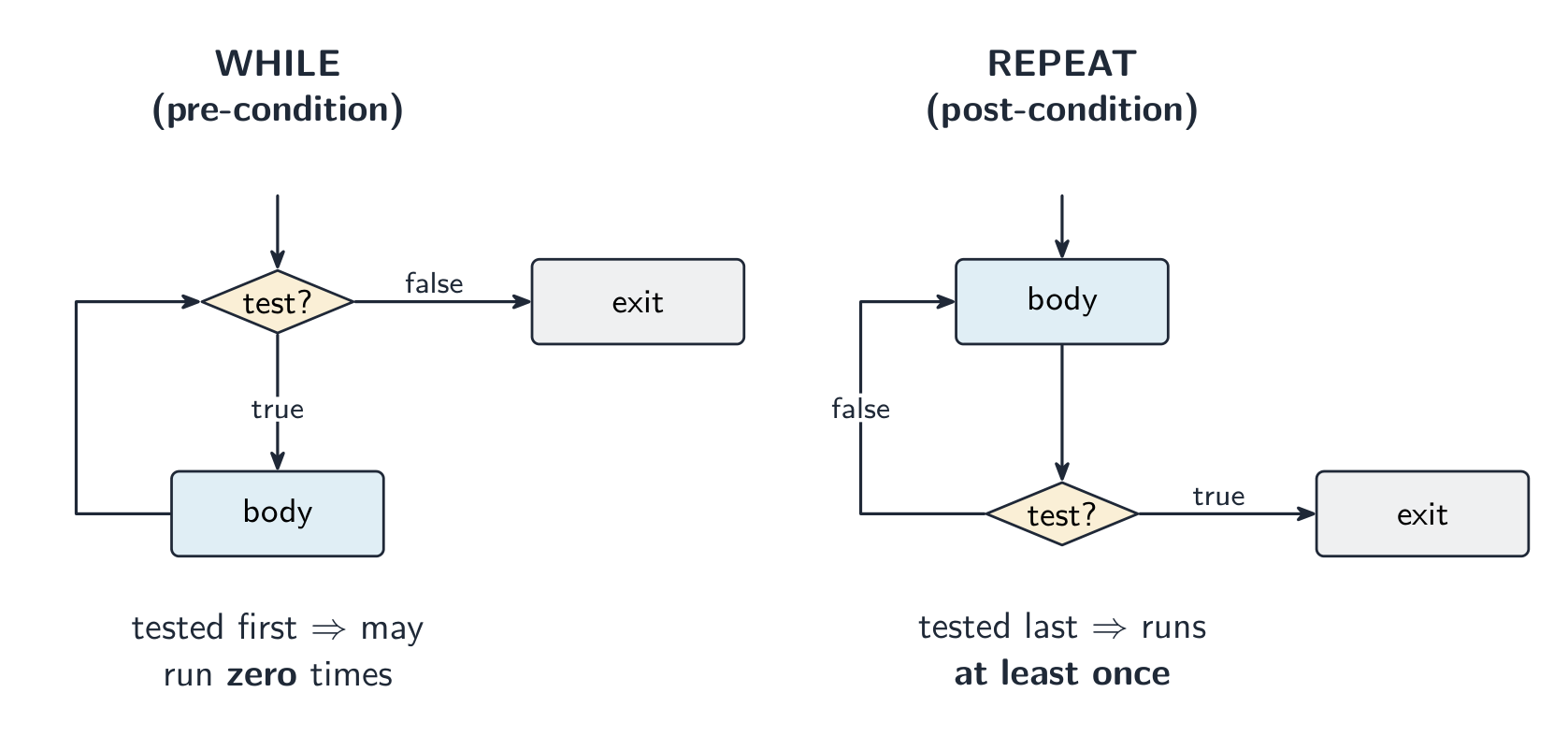
A pre-condition loop 前测循环 checks the condition before each repeat, so it may run zero times:
WHILE Answer <> "stop" DO
    INPUT Answer
ENDWHILE
A post-condition loop 后测循环 checks the condition after each repeat, so it always runs at least once:
REPEAT
    INPUT Password
UNTIL Password = "secret"
探索
一个 IF … ELSE IF 阶梯如何决定
条件从上到下被测试;第一个为真的运行,其余的被跳过。滑动分数,看哪个分支亮起。
探索
选择结构
改变值并观察哪个分支运行——选择结构的实际应用。
词汇
训练
| English | 中文 | 拼音 |
|---|---|---|
| sequence/ˈsiːkwəns/ | 顺序 | shùn xù |
| selection/sɪˈlekʃn/ | 选择 | xuǎn zé |
| iteration/ˌɪtəˈreɪʃn/ | 迭代 | dié dài |
| loop/luːp/ | 循环 | xún huán |
| count-controlled loop/kaʊnt kənˈtrəʊld luːp/ | 计数循环 | jì shù xún huán |
| pre-condition loop/priː kənˈdɪʃn luːp/ | 前测循环 | qián cè xún huán |
| post-condition loop/pəʊst kənˈdɪʃn luːp/ | 后测循环 | hòu cè xún huán |
8.1
求和与计数
English
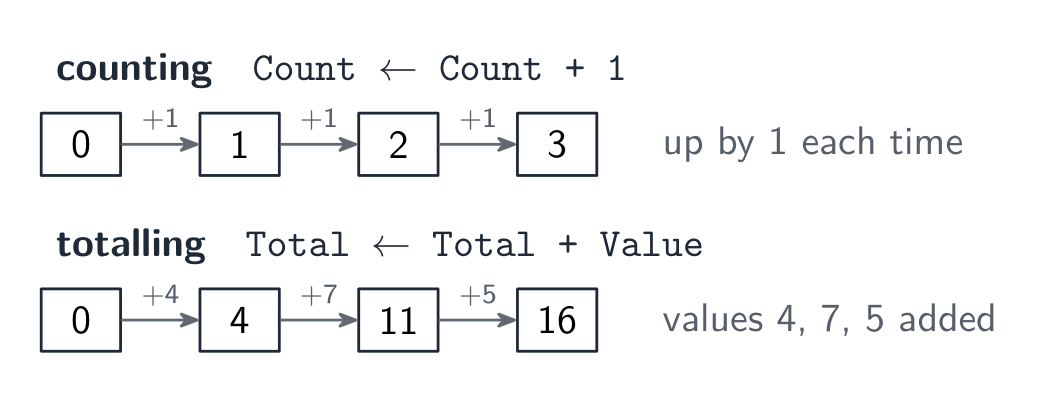
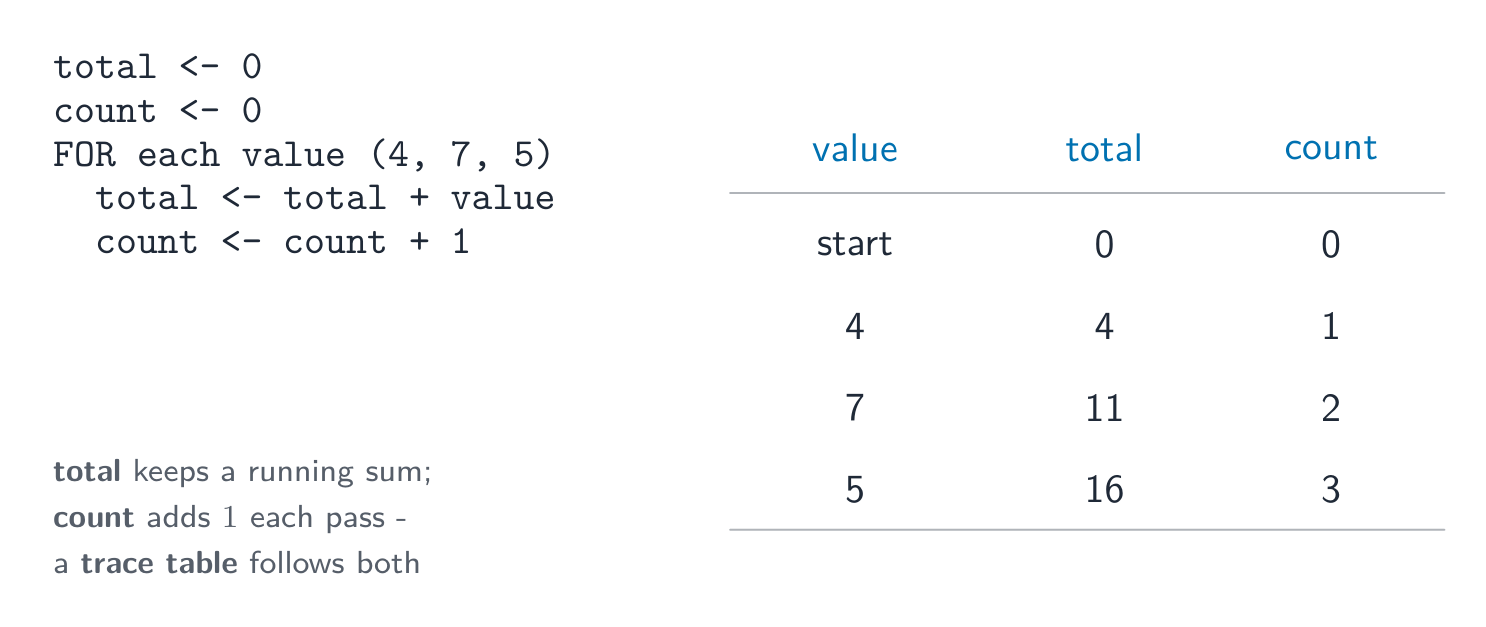
- totalling 求和 — keep adding values to a running total:
Total ← Total + Value. - counting 计数 — add 1 to a counter each time:
Count ← Count + 1.
Total ← 0
FOR I ← 1 TO 10
    INPUT Mark
    Total ← Total + Mark
NEXT I
OUTPUT Total
Worked example. A program must read 5 marks, then output the total and the average.
Total ← 0
FOR I ← 1 TO 5
    INPUT Mark
    Total ← Total + Mark
NEXT I
Average ← Total / 5
OUTPUT Total, Average
Two lines carry the marks. Total ← 0 must sit before the loop: put it inside and the total resets on every pass, so the program outputs only the last mark. And Average ← Total / 5 must sit after the loop, because the total is not complete until every mark has been added. Initialise before, calculate after - that ordering is what the question is really testing.
词汇
训练
| English | 中文 | 拼音 |
|---|---|---|
| totalling/ˈtəʊtəlɪŋ/ | 求和 | qiú hé |
| counting/ˈkaʊntɪŋ/ | 计数 | jì shù |
8.1
运算符
English
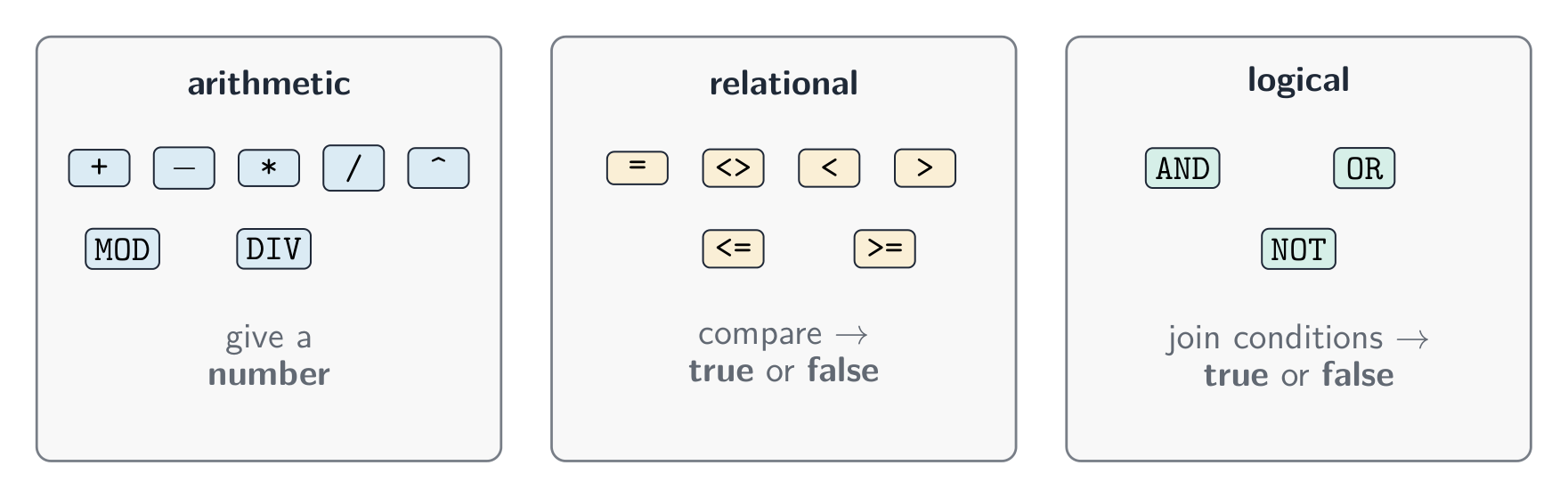
Arithmetic operators
| Operator | Meaning |
|---|---|
+ - * / |
add, subtract, multiply, divide |
^ |
raised to the power of |
MOD |
the remainder 余数 after division |
DIV |
the whole-number part of a division |
For example, 17 MOD 5 is 2, and 17 DIV 5 is 3.
Relational operators
These compare two values and give a Boolean result: =, <, <=, >, >=, and <> (not equal to).
Logical operators
These join conditions: AND (both must be true), OR (at least one must be true), NOT (reverses true/false).
IF Age >= 13 AND Age <= 19
  THEN
    OUTPUT "Teenager"
ENDIF
探索
SUBSTRING:取出字符串的一部分
第一个字符的位置是 1。SUBSTRING(Word, Start, Length) 从 开始 开始取 长度 个字符——拖动两个滑块,读出它组成的调用。
词汇
训练
| English | 中文 | 拼音 |
|---|---|---|
| remainder/rɪˈmeɪndə/ | 余数 | yú shù |
8.1
字符串处理
English
A string is made of characters. Useful operations:
- length 长度 — the number of characters in the string;
- substring 子串 — a smaller part taken from the string;
- upper case 大写 — change letters to capitals;
- lower case 小写 — change letters to small letters.
name ← "Computer"
OUTPUT LENGTH(name)          // 8
OUTPUT SUBSTRING(name, 1, 4) // "Comp"
OUTPUT UCASE(name)           // "COMPUTER"
OUTPUT LCASE(name)           // "computer"
(The first character may be counted as position 0 or position 1, depending on the language.)
In exam pseudocode the first character is at position 1, and SUBSTRING(name, start, length) takes length characters starting at start.
Worked example. Output the surname from a full name such as "Ada Lovelace".
FullName ← "Ada Lovelace"
Position ← 0
FOR I ← 1 TO LENGTH(FullName)
    IF SUBSTRING(FullName, I, 1) = " "
      THEN
        Position ← I
    ENDIF
NEXT I
OUTPUT SUBSTRING(FullName, Position + 1, LENGTH(FullName) - Position)
LENGTH(FullName)is 12 (the space counts as a character).- The loop checks one character at a time; the space is at position 4, so
Positionis 4. - The surname starts at position 5 and has $12 - 4 = 8$ characters:
SUBSTRING(FullName, 5, 8)is"Lovelace".
探索
SUBSTRING:取出字符串的一部分
第一个字符的位置是 1。SUBSTRING(Word, Start, Length) 从 开始 开始取 长度 个字符——拖动两个滑块,读出它组成的调用。
词汇
训练
| English | 中文 | 拼音 |
|---|---|---|
| substring/ˈsʌbstrɪŋ/ | 子串 | zǐ chuàn |
| upper case/ˈʌpə keɪs/ | 大写 | dà xiě |
| lower case/ˈləʊə keɪs/ | 小写 | xiǎo xiě |
| length/leŋθ/ | 长度 | cháng dù |
8.1
嵌套语句
English
A nested statement 嵌套语句 is one control structure placed inside another. You can nest selection and iteration.
FOR I ← 1 TO 3
    IF MOD(I, 2) = 0
      THEN
        OUTPUT I, " is even"
      ELSE
        OUTPUT I, " is odd"
    ENDIF
NEXT I
You will not have to write more than three levels of nesting.
词汇
训练
| English | 中文 | 拼音 |
|---|---|---|
| nested statement/ˈnestɪd ˈsteɪtmənt/ | 嵌套语句 | qiàn tào yǔ jù |
8.1
过程与函数
English
To avoid repeating code, you can break a program into named blocks.
- A procedure 过程 is a named block of code that does a task. You run it with
CALL. - A function 函数 is like a procedure, but it returns a value back to where it was called.
A parameter 参数 is a named input in a procedure or function; a call supplies its value. Exam questions use up to three parameters.
PROCEDURE Greet(PersonName : STRING)
    OUTPUT "Hello ", PersonName
ENDPROCEDURE

CALL Greet("Sam")
FUNCTION Square(N : INTEGER) RETURNS INTEGER
    RETURN N * N
ENDFUNCTION

Answer ← Square(5)   // answer is 25
Worked example. Write a function that returns the larger of two numbers, and use it.
FUNCTION Larger(A : INTEGER, B : INTEGER) RETURNS INTEGER
    DECLARE Result : INTEGER
    IF A > B
      THEN
        Result ← A
      ELSE
        Result ← B
    ENDIF
    RETURN Result
ENDFUNCTION

Biggest ← Larger(12, 30)
OUTPUT Larger(Biggest, 25)
Larger(12, 30) returns 30, which is stored in Biggest; Larger(30, 25) returns 30, which is output. A, B and Result are local: they exist only while the function runs. A function's result must be used, in an assignment or an output; a procedure is run on its own line with CALL and gives nothing back.
Local and global variables
- A local variable 局部变量 is declared inside a procedure or function. It can only be used there.
- A global variable 全局变量 is declared in the main program. It can be used anywhere.
Local variables are safer, because they cannot be changed by mistake from another part of the program.
词汇
训练
| English | 中文 | 拼音 |
|---|---|---|
| procedure/prəˈsiːdʒə/ | 过程 | guò chéng |
| function/ˈfʌŋkʃn/ | 函数 | hán shù |
| parameter/pəˈræmɪtə/ | 参数 | cān shù |
| local variable/ˈləʊkl ˈveərɪəbl/ | 局部变量 | jú bù biàn liàng |
| global variable/ˈɡləʊbl ˈveərɪəbl/ | 全局变量 | quán jú biàn liàng |
8.1
库函数
English
A library routine 库程序 is a ready-made piece of code you can use. You must know these:
| Routine | What it does |
|---|---|
MOD |
gives the remainder of a division |
DIV |
gives the whole-number part of a division |
ROUND |
rounds a real number to a number of decimal places |
RANDOM |
gives a random number |
| Call | Result |
|---|---|
MOD(17, 5) |
2 |
DIV(17, 5) |
3 |
ROUND(3.14159, 2) |
3.14 |
ROUND(7.46, 1) |
7.5 |
RANDOM() |
a random real number from 0 to 1 |
MOD(Number, 2) = 0 tests whether a number is even; DIV(Seconds, 60) and MOD(Seconds, 60) split 135 seconds into 2 minutes and 15 seconds.
词汇
训练
| English | 中文 | 拼音 |
|---|---|---|
| library routine/ˈlaɪbrəri ruːˈtiːn/ | 库程序 | kù chéng xù |
8.1
编写易于维护的程序
English
A maintainable 可维护的 program is easy for other people to read and change later. To make one:
- use meaningful identifiers 有意义的标识符 — clear names for variables, constants, arrays, procedures and functions (
totalScore, notx); - add comments 注释 to explain what parts of the code do;
- use procedures and functions to split the work into small blocks.
词汇
训练
| English | 中文 | 拼音 |
|---|---|---|
| maintainable/meɪnˈteɪnəbl/ | 可维护的 | kě wéi hù de |
| meaningful identifiers/ˈmiːnɪŋfl aɪˈdentɪfaɪəz/ | 有意义的标识符 | yǒu yì yì de biāo shí fú |
| comments/ˈkɒments/ | 注释 | zhù shì |
8.2
数组

教学大纲
| 考生应能: | 注释与指导 |
|---|---|
| 1 声明并使用一维(1D)和二维(2D)数组 | |
| 2 理解数组的用途 | • 包括在数组中使用变量作为索引 |
| 3 使用迭代向数组写入值以及从数组读取值 | • 第一个索引可以为零或一 • 包括嵌套迭代 |
来源:Cambridge International 教学大纲
English
An array 数组 is a single variable that holds many values of the same type, found by an index 索引 (a position number).
One-dimensional arrays
A one-dimensional (1D) array 一维数组 is like a single list.
DECLARE Scores : ARRAY[1:5] OF INTEGER
Scores[1] ← 90
Scores[2] ← 75
OUTPUT Scores[1]
You can use a loop to fill or read an array:
FOR I ← 1 TO 5
    INPUT Scores[I]
NEXT I
Worked example. Find the highest score in Scores and its position. Scores holds 90, 75, 98, 61, 98.
DECLARE Scores : ARRAY[1:5] OF INTEGER
Scores[1] ← 90
Scores[2] ← 75
Scores[3] ← 98
Scores[4] ← 61
Scores[5] ← 98

Highest ← Scores[1]
Place ← 1
FOR I ← 2 TO 5
    IF Scores[I] > Highest
      THEN
        Highest ← Scores[I]
        Place ← I
    ENDIF
NEXT I
OUTPUT "Highest ", Highest, " at position ", Place
I |
Scores[I] |
> Highest? |
Highest |
Place |
|---|---|---|---|---|
| start | 90 | 1 | ||
| 2 | 75 | no | 90 | 1 |
| 3 | 98 | yes | 98 | 3 |
| 4 | 61 | no | 98 | 3 |
| 5 | 98 | no | 98 | 3 |
The output is Highest 98 at position 3. Starting Highest at the first element, not at 0, makes it work for negative values too; with >= instead of >, the last 98 would be found (position 5).
Two-dimensional arrays
A two-dimensional (2D) array 二维数组 is like a table with rows and columns. It uses two indexes.
DECLARE Grid : ARRAY[1:3, 1:3] OF INTEGER
Grid[1, 1] ← 5
Grid[2, 3] ← 8

You read a 2D array with a loop inside a loop (nested iteration).
Worked example. Marks[1:3, 1:2] holds two test marks for each of three students (rows). Output each student's total.
| Column 1 | Column 2 | |
|---|---|---|
| Row 1 | 12 | 15 |
| Row 2 | 9 | 11 |
| Row 3 | 14 | 18 |
DECLARE Marks : ARRAY[1:3, 1:2] OF INTEGER
Marks[1, 1] ← 12
Marks[1, 2] ← 15
Marks[2, 1] ← 9
Marks[2, 2] ← 11
Marks[3, 1] ← 14
Marks[3, 2] ← 18

FOR Row ← 1 TO 3
    Total ← 0
    FOR Col ← 1 TO 2
        Total ← Total + Marks[Row, Col]
    NEXT Col
    OUTPUT "Student ", Row, ": ", Total
NEXT Row
The outer loop picks a student; the inner loop adds that student's two marks. The output is 27, 20 and 32. Total ← 0 must be inside the outer loop: placed before it, the totals would run on to 27, 47 and 79.
探索
数组
选择一行和一列以读取一个单元格。剑桥数组从 1开始计数,而一个 2-D 元素使用一对括号表示——Grid[2, 3].
词汇
训练
| English | 中文 | 拼音 |
|---|---|---|
| array/əˈreɪ/ | 数组 | shù zǔ |
| index/ˈɪndeks/ | 索引 | suǒ yǐn |
| one-dimensional (1D) array/wʌn daɪˈmenʃənl əˈreɪ/ | 一维数组 | yī wéi shù zǔ |
| two-dimensional (2D) array/tuː daɪˈmenʃənl əˈreɪ/ | 二维数组 | èr wéi shù zǔ |
8.3
文件处理
教学大纲
| 考生应能: | 备注与指导 |
|---|---|
| 1 理解将数据存储于文件中供程序使用的目的 | |
| 2 打开、关闭并用于读写操作的文件 | • 包括:– 读写单个数据项 – 读写一行文本 |
来源:Cambridge International 教学大纲
English
A program can store data in a file 文件 so it is kept after the program stops. You must open the file, use it, then close it.
OPENFILE "data.txt" FOR WRITE
WRITEFILE "data.txt", "Hello"
CLOSEFILE "data.txt"

OPENFILE "data.txt" FOR READ
READFILE "data.txt", Line
CLOSEFILE "data.txt"
You can read and write single items of data or a whole line of text. Always close a file when you have finished with it.
Worked example. Save the five values of Scores to a file, one per line, then read the first one back.
DECLARE Scores : ARRAY[1:5] OF INTEGER
Scores[1] ← 90
Scores[2] ← 75
Scores[3] ← 98
Scores[4] ← 61
Scores[5] ← 98

OPENFILE "scores.txt" FOR WRITE
FOR I ← 1 TO 5
    WRITEFILE "scores.txt", Scores[I]
NEXT I
CLOSEFILE "scores.txt"

OPENFILE "scores.txt" FOR READ
READFILE "scores.txt", FirstScore
CLOSEFILE "scores.txt"
OUTPUT FirstScore
Each WRITEFILE adds one line, so the file holds five lines; reading starts at the top, so FirstScore is the first score. Opening a file FOR WRITE starts it empty: anything already in it is lost.
词汇
训练
| English | 中文 | 拼音 |
|---|---|---|
| file/faɪl/ | 文件 | wén jiàn |
8.3
考试技巧
English
- A variable can change while the program runs; a constant is fixed. Learn the five data types: integer, real, char, string, Boolean.
- Every program is built from three structures: sequence, selection (IF / CASE), and iteration (loops).
- A WHILE loop tests before the body, so it may run zero times; a REPEAT … UNTIL loop tests after, so it always runs at least once.
MODgives the remainder andDIVthe whole-number part of a division:17 MOD 5is 2,17 DIV 5is 3.- A function returns a value; a procedure does not. A local variable works only inside its block; a global one works anywhere.
该知识点的互动课程
逐步完成,配合即时检查练习。