跳到主要内容

保护应用与数据

AP 网络安全 · 第 5 主题

训练
讲义 词汇表
5.1

应用与数据的漏洞与攻击

大纲
Learning ObjectiveEssential Knowledge

5.1.A
Explain how adversaries can exploit application and file vulnerabilities to cause loss, damage, disruption, or destruction.

  • 5.1.A.1 An adversary can read any unencrypted files if they have access to the device or drive storing the files.
  • 5.1.A.2 Computers have standard users and administrative users. Administrative users have access to control system settings and can typically access any files or applications on a system. If regular users are given administrative privileges on a computer, and an adversary can compromise a user’s account, then the adversary will have elevated privileges on the system.
  • 5.1.A.3 When access control settings are weakly configured, many users often have permission to view and sometimes even edit files on a system. Adversaries can take advantage of weak access control settings to steal or destroy files or disrupt an application.

5.1.B
Explain how application attacks exploit vulnerabilities.

  • 5.1.B.1 Applications are programs that run instructions on computers; they are executable data. Some applications run locally on a user’s computer, while other applications, like web applications, run on a server and are accessed by users through a network.
  • 5.1.B.2 Many applications take user input through open-ended input fields where users can type characters (e.g., letters, numbers, punctuation). Developers should include user input checks in their application, such as numeric input when asked for a number of items, to ensure that the user input matches what is expected; the application should reject input outside of the expected parameters. This process of verifying that user input meets expected criteria before processing it is called data validation. Applications that fail to validate user input are vulnerable to injection-type attacks, where adversaries insert unexpected character strings in input fields to alter the behavior of a program.
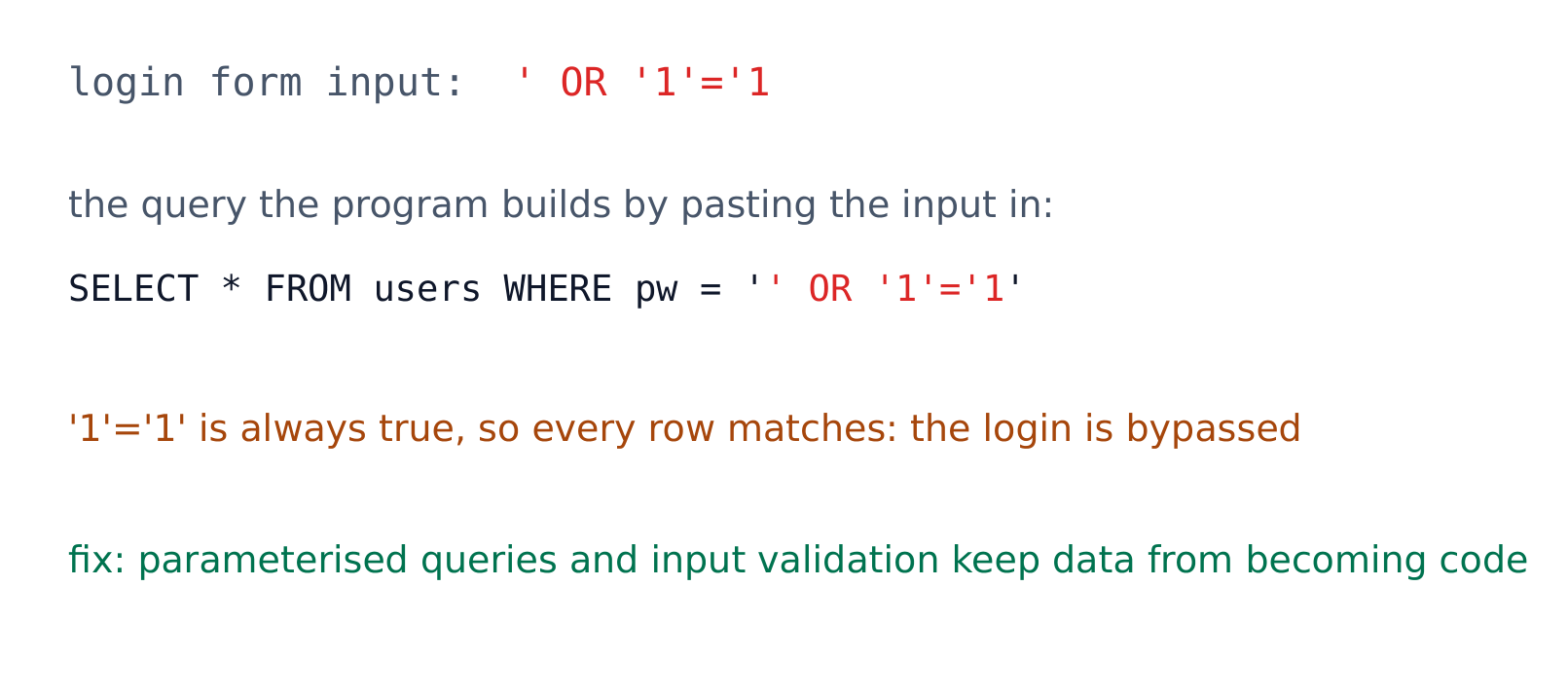
  • 5.1.B.3 Structured query language (SQL) is a computer language used to request information from databases and make changes to databases or entries in databases. Applications that query a database using unvalidated or unsanitized input from users are vulnerable.
  • 5.1.B.4 An SQL-injection attack places SQL commands and control characters into a user-input field in an application, which can lead to a breach of confidentiality by causing the application to return more information than it should, or a breach of integrity by modifying or deleting data in the database.
  • 5.1.B.5 Websites are written using hypertext markup language (HTML), and many websites use Javascript to create dynamic content on websites or web applications. Because Javascript commands run in the browser of the user visiting the website, those commands can access sensitive data stored in the browser like usernames, passwords, and cryptographic keys.
  • 5.1.B.6 A cross site scripting (XSS) attack injects malicious code into a website that a user’s browser then executes. The malicious code can be embedded in a link the user clicks (a Type I or Reflected XSS attack) or it can be inserted onto a website through a comment field, forum post, or visitor log, which would affect any user visiting that website (a Type II or Stored XSS attack).
  • 5.1.B.7 When applications take user input, that input is written to a buffer. A buffer is a designated section of computer memory with a fixed size. If the amount of data the user enters exceeds the size of the buffer, it can overflow into adjacent memory locations and overwrite other parts of the computer’s memory.
  • 5.1.B.8 A buffer overflow attack feeds more data into memory than was allotted, which can cause a system to crash or to execute code outside the scope of a program’s security policy, effectively allowing the adversary to perform unauthorized actions on a computer, such as accessing, modifying, or deleting files.
  • 5.1.B.9 The files that run web applications are stored in directories on servers. When users access web applications, their browsers send GET requests using hypertext transfer protocol (HTTP). A GET request accesses a file somewhere in the filesystem of the server.
  • 5.1.B.10 In a directory traversal attack, adversaries modify URLs and GET requests to attempt to access sensitive data (e.g., usernames and passwords) on a server’s file system.
    • Illustrative examples for 5.1.B.10:
      • A web server stores images for a website it hosts in the /var/www/images/ directory. An adversary modifies a URL requesting an image to ../../../etc/passwd. The .. moves one directory up in the file system; so the three consecutive .. returns the path to the root, and from there the adversary is attempting to access the passwd file that would return a list of all the authorized usernames on the device.

5.1.C
Assess and document risks from application and data vulnerabilities.

  • 5.1.C.1 Data security risks can involve a compromise of confidentiality when unauthorized persons can access sensitive data, integrity when data can be manipulated or altered from its intended state, and availability when data can be destroyed or encrypted to prevent others from accessing it.
  • 5.1.C.2 High risks from data vulnerabilities often involve highly sensitive data (e.g., data that is governed by laws or regulations) that could be compromised through a highly likely exploit.
    • Illustrative examples for 5.1.C.2:
      • The company developing the next jet engine that will be used by the Air Force in its planes is storing the technical specifications for the engine on an unencrypted drive.
  • 5.1.C.3 Moderate risks from data vulnerabilities often involve sensitive data not having strong enough encryption or strict enough access controls.
    • Illustrative examples for 5.1.C.3:
      • A company stores its customers’ PII in a spreadsheet, and the spreadsheet is encrypted using a small key.
  • 5.1.C.4 Low risks from data vulnerabilities often involve less sensitive information being encrypted with shorter keys or having access controls that are not strict enough.
    • Illustrative examples for 5.1.C.4:
      • An organization’s CEO stores his private memos to his executive staff on a company share drive that is unencrypted and has no access controls.

来源:美国大学理事会 AP 课程与考试说明

SQL 注入

应用程序(applications)是在计算机上运行的程序,而数据是它们处理的——两者都是首要目标。若文件被未加密地存储,任何有访问驱动器权限的人都能读它们。若一个普通用户被给予管理性(administrative)权限,一个窃取那个账户的对手获得广泛的权力。

最大的应用危险是坏的用户输入。当一个程序不检查一个用户打什么时,一个对手能溜入命令——一个注入攻击(injection attack)。数据验证(data validation)(检查输入符合预期的规则)是防御。关键的攻击:

  • SQL注入(SQL injection)——把 SQL 命令插入一个输入字段以读或改变一个数据库。
  • 跨站脚本(XSS)(cross-site scripting)——把恶意脚本注入一个网站,它在另一个用户的浏览器里运行。
  • 缓冲区溢出(buffer overflow)——发送比一个内存缓冲区(buffer)能容纳的更多数据,所以它溢出到附近的内存并可能运行对手的代码。
  • 目录遍历(directory traversal)——在一个 URL 里用 ../ 序列以到达打算的文件夹之外的文件,例如 /etc/passwd

我们按敏感性给数据风险评级:未加密的军事计划是风险;带一个弱密钥的客户数据是中等;带短密钥的低价值数据是

词汇表 训练
英文 中文 拼音
Applications 应用程序 yìng yòng chéng xù
administrative 管理性 guǎn lǐ xìng
injection attack 注入攻击 zhù rù gōng jī
Data validation 数据验证 shù jù yàn zhèng
SQL injection SQL注入 zhù rù
Cross-site scripting (XSS) 跨站脚本 kuà zhàn jiǎo běn
Buffer overflow 缓冲区溢出 huǎn chōng qū yì chū
buffer 缓冲区 huǎn chōng qū
Directory traversal 目录遍历 mù lù biàn lì
5.2

保护应用与数据:管理性控制与访问控制

大纲
Learning ObjectiveEssential Knowledge

5.2.A
Explain how the state or classification of data impacts the type and degree of security applied to that data.

  • 5.2.A.1 Organizations implement specific security controls to comply with legal requirements based on the types of data they collect, store, process, and transmit.
  • 5.2.A.2 Data can be classified by their state.
    • Data at rest are stored on a drive. It is important to protect the physical drive storing the data from destruction or theft. Data at rest can also be encrypted so that if an adversary steals it, they can’t immediately read the data.
    • Data in transit are being sent from one device to another. If the data are being transferred over physical media (e.g., cables) it is important to protect the media. Data in transit can also be encrypted so that if an adversary intercepts it, they can’t immediately read the data.
    • Data in use are being processed by software or a person. Access controls can be used to limit who or what has the ability to use data in different ways (e.g., view or edit). Data must be unencrypted to be used.
  • 5.2.A.3 Organizations often categorize data according to their sensitivity and prioritize a higher degree of security for more sensitive information.
  • 5.2.A.4 Laws and regulations can require certain types of data to be stored, transmitted, and handled according to specific rules.
    • Personally identifiable information (PII) is any data that allows someone to be identified and includes (but is not limited to): name, signature, phone number, address, biometric data (e.g., fingerprints), social security number, date of birth, and email address. The protection of this data is covered by many laws but most notably The Privacy Act of 1974 and for children under the age of 13 the Children’s Online Privacy Protection Act of 1998.
    • Protected health information (PHI) is any data related to an individual’s health, treatment, payment for healthcare at any time and includes (but is not limited to): test results, treatment records, hospital records, doctor visit notes, and health provider payment records. The protection of PHI is included in the Health Insurance Portability and Accountability Act of 1996.
    • Payment card information (PCI) is the data collected by organizations to process payments via cards (e.g., credit cards) and includes the following: name, account number, expiration date, address, and CVV code. The protection of this data is regulated by the Payment Card Industry Data Security Standard (PCI-DSS).
  • 5.2.A.5 Organizations that collect regulated data will label them and have policies that comply with the legal or regulatory requirements for the safe storage, transmission, and handling of these data.

5.2.B
Identify managerial controls related to application and data security.

  • 5.2.B.1 A cryptography policy will describe the acceptable encryption protocols and key parameters for an organization and may include:
    • A list of encryption algorithms approved for specific uses
    • Minimum or maximum key lengths
    • Cryptographic key-generation requirements and parameters
    • Cryptographic key-storage requirements
  • 5.2.B.2 A web application security policy will outline the requirements and parameters for testing and mitigating web application vulnerabilities in an organization, and it may include:
    • Parameters for when an application is subject to a security assessment
    • Timelines for remediating vulnerabilities based on level of risk
    • Parameters for how an application security assessment is to be carried out (e.g., using specific tools or according to specific frameworks)

5.2.C
Determine an appropriate access control model to protect applications and data.

  • 5.2.C.1 Access control enforces which users or applications (called subjects) can access, modify, add, or remove (called operations) which files or applications (called objects). Access control models describe how to determine which subjects have what type of access to which objects.
  • 5.2.C.2 Role-based access control (RBAC) assigns every subject to a role and defines which roles have which types of access to which objects.
    • Illustrative examples for 5.2.C.2:
      • An example of a role at a company might be “accountant,” and one type of object could be the payroll software. Role-based access could be used to ensure that only subjects who are assigned to the role of “accountant” have access to the payroll software object.
  • 5.2.C.3 Rule-based access control (RuBAC) checks a set of rules to determine what type of access a subject should have for a specific object and then allows or denies types of access based on the rules. This access control model is typically layered on top of another access control model.
    • Illustrative examples for 5.2.C.3:
      • There is a rule that prohibits subjects (even those who would normally have access) from accessing a certain database (the object) outside of local working hours. When a subject attempts to access the database, even if they are authorized to access it, they will be denied access if it is outside the time designated by the rule.
  • 5.2.C.4 Discretionary access control (DAC) gives individual subjects the ability to set the type of access that other subjects have on objects they own. In DAC models some subjects are designated as administrators or super users, and they have the ability to override the access controls established by other subjects.
    • Illustrative examples for 5.2.C.4:
      • Bob creates a file (an object) and decides to give Alice permission to edit the file, to give Frank permission to view the file only, and to deny everyone else access to the file altogether.
  • 5.2.C.5 Mandatory access control (MAC) follows strict rules for which types of access each subject level has for objects that are above their level, at their level, or below their level. Subject and object levels are assigned by an external administrator.
  • 5.2.C.6 The Bell-LaPadula model is a MAC model that is often used by governments and military organizations to control the security of information. This model has the following two important properties:
    • i. The Simple Security Property states that subjects may not read objects that are above their level.
    • ii. The * (Star) Security Property states that subjects may not write to objects below their level.
    • These rules taken together are often summarized as “write up, read down” (WURD).
  • 5.2.C.7 The principle of least privilege is the idea that entities should be given exactly as much access as they need to perform their function and no more.

5.2.D
Configure access control settings on a Linux-based system.

  • 5.2.D.1 Authorization is when an entity is granted permission to have a certain type of access to a resource. Access controls are put in place to control which users have what types of access to which data.
  • 5.2.D.2 There are three types of access to a file in Linux that can be set, and they always come in the following order:
    • i. Read access allows a user to view the contents of a file.
    • ii. Write access allows a user to make changes to a file.
    • iii. Execute access allows a user to run a binary file such as a program.
    • These are abbreviated rwx, respectively. If a user only has read and execute permissions (not write), then it would display as r-x. The - symbol indicates the absence of that permission.
  • 5.2.D.3 There are three default entities for which permissions are set and always in this order: (1) the file owner, (2) the file group, and (3) all other users. The three sets are displayed with no spaces (e.g., rwxrwxrwx).
  • 5.2.D.4 To view the current permission settings for a file, use the command ls -l, which will show the current settings for the default entities. If there is a + symbol at the end of the permissions, this means that other permissions have been set for that file and it can be viewed with the getfacl command.
  • 5.2.D.5 To modify the permission settings for a file, use the chmod command. This command can be used with the numeric method or the symbolic method.
  • 5.2.D.6 To use chmod in the numeric method the syntax is chmod ### filename. Each of the three ### represents one of the three entities mentioned above (the owner, the group, other nongroup users).
    • The first # = the owner
    • The second # = the group
    • The third # = other nongroup users
    • The permission for each entity is determined by adding up the values for the types of access to be granted:
    • 0 = no permissions
    • 1 = execute
    • 2 = write
    • 4 = read
    • Therefore 3 sets permission to write and execute, 5 sets permission to read and execute, 6 sets permission to read and write, and 7 sets permission to read, write, and execute.
    • Illustrative examples for 5.2.D.6:
      • The command chmod 750 test would set the permissions for the owner to read, write, and execute, for the group to read and execute, and for everyone else to no access at all.
      • The command chmod 543 test would set the permissions for the owner to read and execute, for the group to read only, and for everyone else to write and execute.
      • The command chmod 777 test would set the permissions for all three entities to read, write, and execute for the file test.
  • 5.2.D.7 To use chmod in the symbolic method the syntax is chmod entity +(or –) permission filename. The entities are the user owner, the group, and other nongroup users. Each entity is represented with a single letter.
    • u = user owner
    • g = group
    • o = others
    • a = all
    • Permission can be either added or removed to any combination of entities.
      • = add the permission
    • – = remove the permission
    • The permissions that can be set are read, write, and execute.
    • r = read
    • w = write
    • x = execute
    • Entities and permissions can be combined in a single command. To add the read and execute permissions for the group and user owner for a file called testfile, the command would be chmod ug+rx testfile.

来源:美国大学理事会 AP 课程与考试说明

数据按它的状态分类——静态数据(at rest)(存储在一个驱动器上)、传输中数据(in transit)(在设备之间移动),和使用中数据(in use)(正在被处理)。静态数据和传输中数据可以加密,这样窃取者也读不了;使用中数据必须解密,所以改由访问控制来守护它。

有些数据类型是受监管(regulated)的 —— 法律规定了它们必须如何存储、传输和处理 —— 所以组织必须让自己的控制措施匹配这些规则,以达到合规(compliance)。考试要你能把每种数据类型与管辖它的法律配对:

受监管数据 它是什么 管辖法律
个人身份信息(PII)(personally identifiable information) 任何能识别一个人的信息:姓名、地址、社保号、生物特征、出生日期 《隐私法》(1974);针对 13 岁以下儿童的 COPPA
受保护健康信息(PHI)(protected health information) 健康、治疗和医疗付款记录 HIPAA(1996)
支付卡信息(PCI)(payment card information) 卡号、有效期、CVV、持卡人姓名 PCI-DSS

收集受监管数据的组织必须给它贴标签,并制定政策,使其存储、传输和处理保持合规 —— 敏感度越高,所需的安全程度就越高。

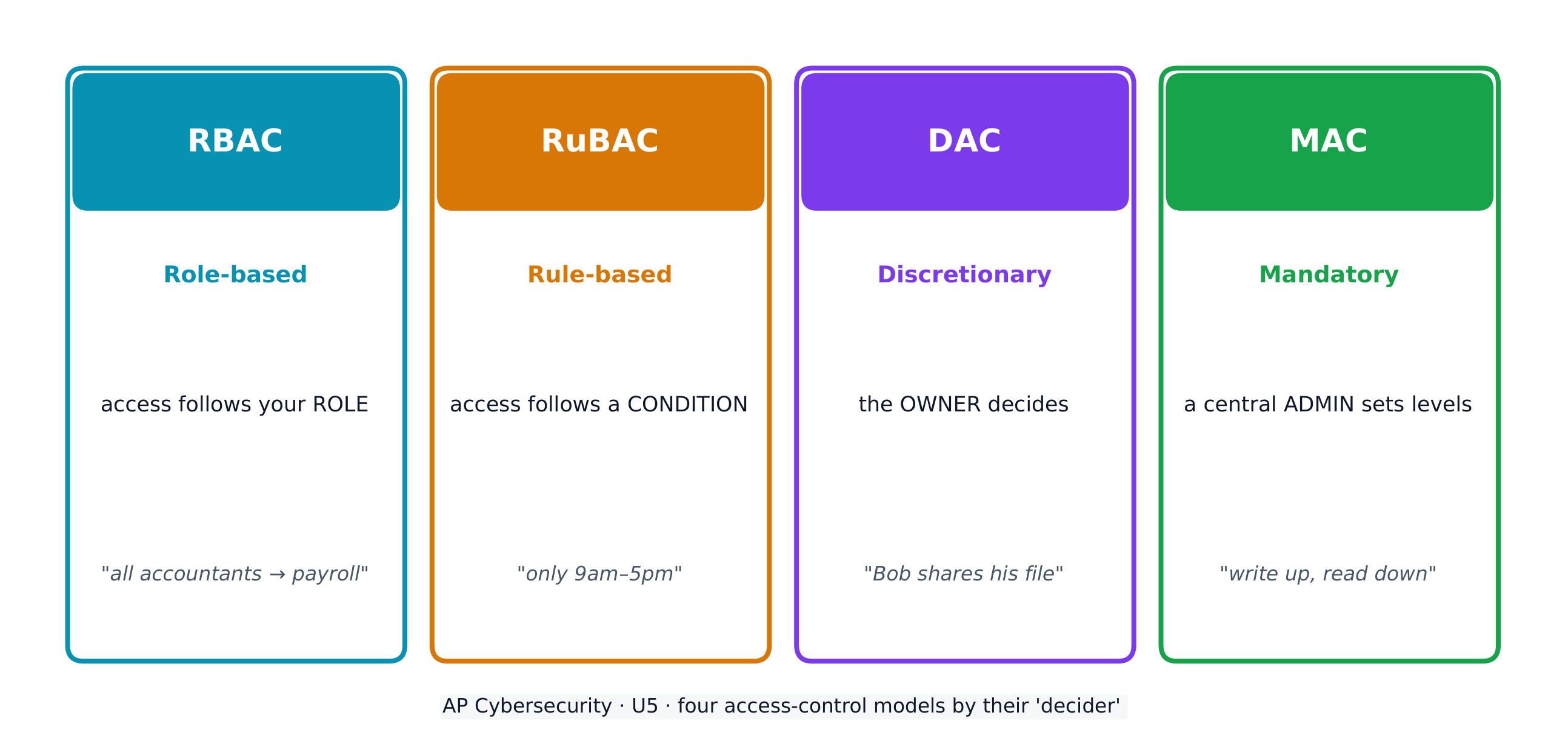
访问控制(access control)决定哪些主体(subjects)(用户)可以对哪些对象(objects)(文件)执行哪些操作(operations)。四个模型:

  • 基于角色的访问控制(RBAC)(role-based)——访问遵循你的角色(所有"会计"都能到达工资软件)。
  • 基于规则的访问控制(RuBAC)(rule-based)——访问遵循条件(只在营业时间),层叠在另一个模型上。
  • 自主访问控制(DAC)(discretionary)——一个文件的所有者(owner)决定谁还可以使用它。
  • 强制访问控制(MAC)(mandatory)——一个中央管理员设定严格的级别;Bell-LaPadula 模型把它总结为"向上写、向下读"。
四个访问控制模型决定谁到达哪个对象,以及如何到达

跨所有模型的一个指导思想是最小权限原则(principle of least privilege)——给每个实体恰好它需要的访问,不多。

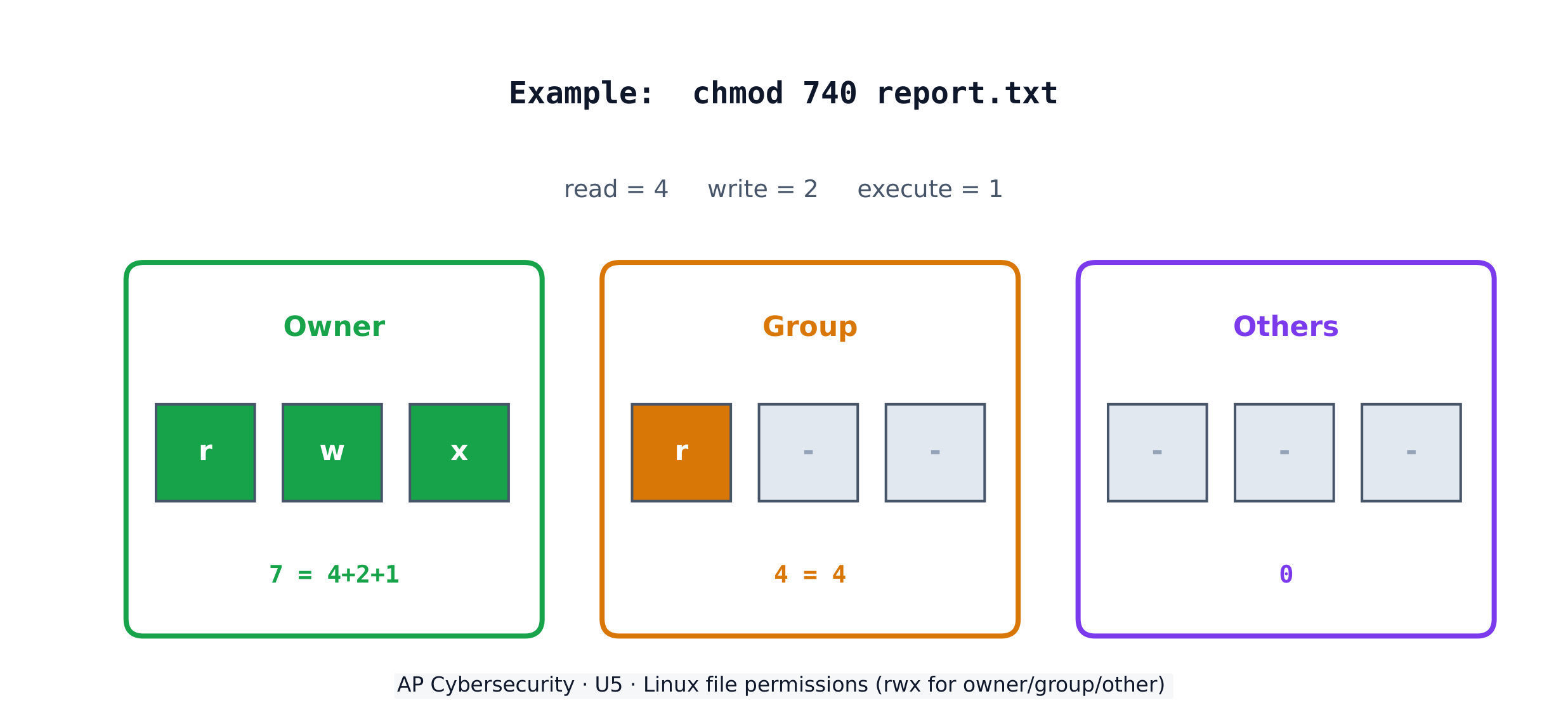
在一个 Linux 系统上,每个文件有三个权限——读(r)、写(w)、执行(x)——对三个组:所有者(owner)、(group),和其他人(others)。chmod 命令用数字设定它们,加 4(读)+ 2(写)+ 1(执行)。所以 chmod 640 意味着所有者读+写(6)、组读(4)、其他人什么都没有(0)。

Linux 文件权限:所有者、组和其他人的读/写/执行

Worked example. 一个主体想要只有她自己能读编辑一个文件、她的员工组能读它,而没有其他人能碰它。读+写 = 4+2 = 所有者的 6、读 = 组的 4、什么都没有 = 其他人的 0,给出 chmod 640 file。列表然后显示 -rw-r-----。要也让所有者能作为一个程序运行这个文件,你会加执行(7 = 4+2+1),给出 chmod 740

探索

Which access-control model fits the rule?

Each access-control model has a different decider: RBAC by your role, RuBAC by a condition, DAC by the file's owner, and MAC by a central administrator's levels.

词汇表 训练
英文 中文 拼音
at rest 静态数据 jìng tài shù jù
in transit 传输中数据 chuán shū zhōng shù jù
in use 使用中数据 shǐ yòng zhōng shù jù
regulated 受监管 shòu jiān guǎn
compliance 合规 hé guī
personally identifiable information (PII) 个人身份信息 gè rén shēn fèn xìn xī
protected health information (PHI) 受保护健康信息 shòu bǎo hù jiàn kāng xìn xī
payment card information (PCI) 支付卡信息 zhī fù kǎ xìn xī
Role-based (RBAC) 基于角色的访问控制 jī yú jué sè de fǎng wèn kòng zhì
Rule-based (RuBAC) 基于规则的访问控制 jī yú guī zé de fǎng wèn kòng zhì
Discretionary (DAC) 自主访问控制 zì zhǔ fǎng wèn kòng zhì
Mandatory (MAC) 强制访问控制 qiáng zhì fǎng wèn kòng zhì
principle of least privilege 最小权限原则 zuì xiǎo quán xiàn yuán zé
5.3

用密码学保护存储的数据

大纲
Learning ObjectiveEssential Knowledge

5.3.A
Explain how encryption can be used to protect files.

  • 5.3.A.1 The purpose of cryptography is to hide information. A cryptographic algorithm defines a process for encrypting and decrypting information. Encryption is the process of hiding the information, and decryption is the process of reversing the encryption to retrieve the original information.
  • 5.3.A.2 An encryption algorithm defines a process for combining the information to be encrypted with a predefined key. The information to be encrypted is called the plaintext. The output of the encryption algorithm is called the ciphertext.
  • 5.3.A.3 The number of possible keys that can be used in an encryption algorithm is called the keyspace. The larger the keyspace, the longer it will take an adversary to discover the correct key by random chance.
  • 5.3.A.4 Cryptographic algorithms are classified by whether they use one key or two keys.
    • Symmetric encryption algorithms use the same key to encrypt and decrypt information.
    • Asymmetric encryption algorithms use two different keys—one to encrypt information and the other to decrypt information.
  • 5.3.A.5 Cryptographic algorithms are also classified by whether they process information one bit at a time or in fixed-size chunks of bits.
    • Block encryption handles information in fixed-size chunks called blocks, producing an output block for each input block.
    • Stream encryption handles input information continuously, producing output one element at a time.

5.3.B
Apply symmetric encryption algorithms to encrypt and decrypt data.

  • 5.3.B.1 Computer-based encryption algorithms operate on binary data. The most common symmetric encryption algorithm is the Advanced Encryption Standard (AES). AES encryption is used to secure Wi-Fi transmissions, internet browsing, file encryption on disks, and hardware-level encryption on processors.
  • 5.3.B.2 AES is a symmetric key block cipher that encrypts data in 128-bit blocks (16 bytes). AES can operate with keys of varying lengths. Longer keys produce more secure encryption but require more time to encrypt and decrypt.
  • 5.3.B.3 Symmetric encryption and decryption can be performed using the command line, specialized software, or web-based tools.
    • On a command line interface, users can encrypt or decrypt with OpenSSL.
    • Specialized software like AES Crypt is an open source tool that can encrypt and decrypt files.
    • There are many web-based tools for encrypting and decrypting files.
  • 5.3.B.4 Using OpenSSL in a CLI, a user can encrypt and decrypt a file using the following commands (note that the encryption key is derived from the password provided):
    • To encrypt a file named test with AES using a 128-bit key, use the command: openssl enc -aes-128-cbc -e -in test -k password -out test.enc
    • To decrypt the encrypted file using the same key, use the command: openssl enc -aes-128-cbc -d -in test.enc -k password -out text

来源:美国大学理事会 AP 课程与考试说明

对称与非对称加密
哈希与雪崩效应

密码学(cryptography)隐藏信息。一个加密(encryption)算法把明文(plaintext)与一个密钥(key)结合以产生密文(ciphertext);解密(decryption)逆转它。密钥空间(keyspace)是可能的密钥的数量——它越大,一个对手需要越长时间猜测。一个 n 位密钥有一个 $2^n$ 的密钥空间。

对称加密(symmetric encryption)使用相同的密钥来加密和解密。标准是 AES(高级加密标准),一个在 128 位块上工作的分组密码(block cipher),保护 Wi-Fi、浏览和存储的文件。因为两侧都需要相同的秘密密钥,安全地共享那个密钥是挑战。

探索

Encrypt a message by shifting letters

Encryption combines plaintext with a key to make ciphertext. In this simple cipher the key is the shift amount; only someone who knows the shift can decrypt the message back.

词汇表 训练
英文 中文 拼音
Cryptography 密码学 mì mǎ xué
plaintext 明文 míng wén
key 密钥 mì yào
ciphertext 密文 mì wén
keyspace 密钥空间 mì yào kōng jiān
Symmetric encryption 对称加密 duì chèn jiā mì
AES 高级加密标准 gāo jí jiā mì biāo zhǔn
block cipher 分组密码 fēn zǔ mì mǎ
5.4

非对称密码学

大纲
Learning ObjectiveEssential Knowledge

5.4.A
Determine the appropriate asymmetric key to use when sending or receiving encrypted data.

  • 5.4.A.1 Asymmetric encryption allows users to communicate securely without prearranging a shared secret key.
  • 5.4.A.2 When using asymmetric encryption, each entity that will be receiving data must first generate a key pair. Key pairs are binary strings of equal length that are generated at the same time through a mathematical process. One key is designated as the public key and the other as the private key. The keys are mathematical inverses of each other— each key reverses its partner. Either key can be used to encrypt information, but only the other key in the key pair will then be able to decrypt it.
  • 5.4.A.3 Once the receiver generates the key pair, the private key must be stored securely. If the private key is exposed, shared, stolen, corrupted, or compromised the key pair must be deleted and a new key pair must be generated, because the security of the encryption algorithm rests on the security of the private key. The public key is published for anyone to view and use.
  • 5.4.A.4 To send information securely to someone, the sender will use the receiver’s public key to encrypt the data and send it. Only the receiver who has the private key will be able to decrypt and read the information.

5.4.B
Explain why the length of a key impacts the security of encrypted data.

  • 5.4.B.1 Longer keys result in larger keyspaces. For binary keys, an n-bit length key has a keyspace of $2^n$.
  • 5.4.B.2 Using an application to randomly guess an n-bit length encryption key means that on average an adversary will be able to guess the correct key in $2^n \div 2$ (or $2^{n-1}$) guesses.
  • 5.4.B.3 Although longer keys are more secure, they also require more time to encrypt and decrypt messages.
  • 5.4.B.4 Computational processing power and efficiency continue to improve, allowing software to guess keys faster. Key-length recommendations for both symmetric and asymmetric encryption algorithms are periodically increased to account for increased processing power.
  • 5.4.B.5 Key-length comparison is only valid when comparing keys for the same cryptographic algorithm.
    • Illustrative examples for 5.4.B.5:
      • An AES 256-bit key is more secure than an AES 128-bit key.
      • An RSA 4096-bit key is more secure than an RSA 2048-bit key.
      • RSA and AES keys cannot be directly compared to one another in determining the level of security.

5.4.C
Apply asymmetric encryption algorithms to encrypt and decrypt data.

  • 5.4.C.1 Common asymmetric encryption algorithms include RSA and elliptic curve cryptography (ECC). Asymmetric algorithms are used in many applications, including digital signatures and digital certificates.
  • 5.4.C.2 As with symmetric encryption, asymmetric encryption and decryption can be performed using the command line, specialized software, or web-based tools.
    • On a command line interface, users can encrypt or decrypt with OpenSSL.
    • Specialized software like RSA Encryption Tool is an open source tool that can encrypt and decrypt files.
    • There are many web-based tools for encrypting and decrypting files.
  • 5.4.C.3 In a CLI, a user can generate an asymmetric key pair and encrypt or decrypt files as necessary.
    • To generate a 2048-bit RSA key pair and save the key to a file named rsa.pem use the command: openssl genrsa -out rsa.pem 2048
    • To extract the public key from rsa.pem into a file named public.pem, use the command: openssl rsa -pubout -in rsa.pem -outform PEM -out public.pem
    • To encrypt the file test using RSA encryption and the key file public.pem, use the command: openssl pkeyutl -encrypt -pubin -inkey public.pem -in test -out test.enc
    • To decrypt the test.enc file using the rsa.pem file, run the command: openssl pkeyutl -decrypt -inkey rsa.pem -in test.enc -out test

来源:美国大学理事会 AP 课程与考试说明

非对称加密(asymmetric encryption)用一个密钥对(key pair)解决密钥共享问题——一个任何人都可以看的公钥(public key)和一个保持秘密的私钥(private key)。这些密钥是数学的逆:无论一个锁上什么,只有另一个解锁。要给你发一个秘密,我用你的公钥加密,而只有你的私钥能解密它——所以我们从不必提前共享一个秘密。

非对称加密:用公钥加密,用私钥解密
非对称加密:用公钥加密,用私钥解密

更长的密钥意味着更大的密钥空间和更多的安全,但更慢的加密。常见的非对称算法是 RSA椭圆曲线密码学(ECC)(elliptic curve cryptography),用于数字签名和证书。记住:你只能在同一算法内比较密钥长度——一个 RSA 4096 位密钥不直接与一个 AES 256 位密钥可比。

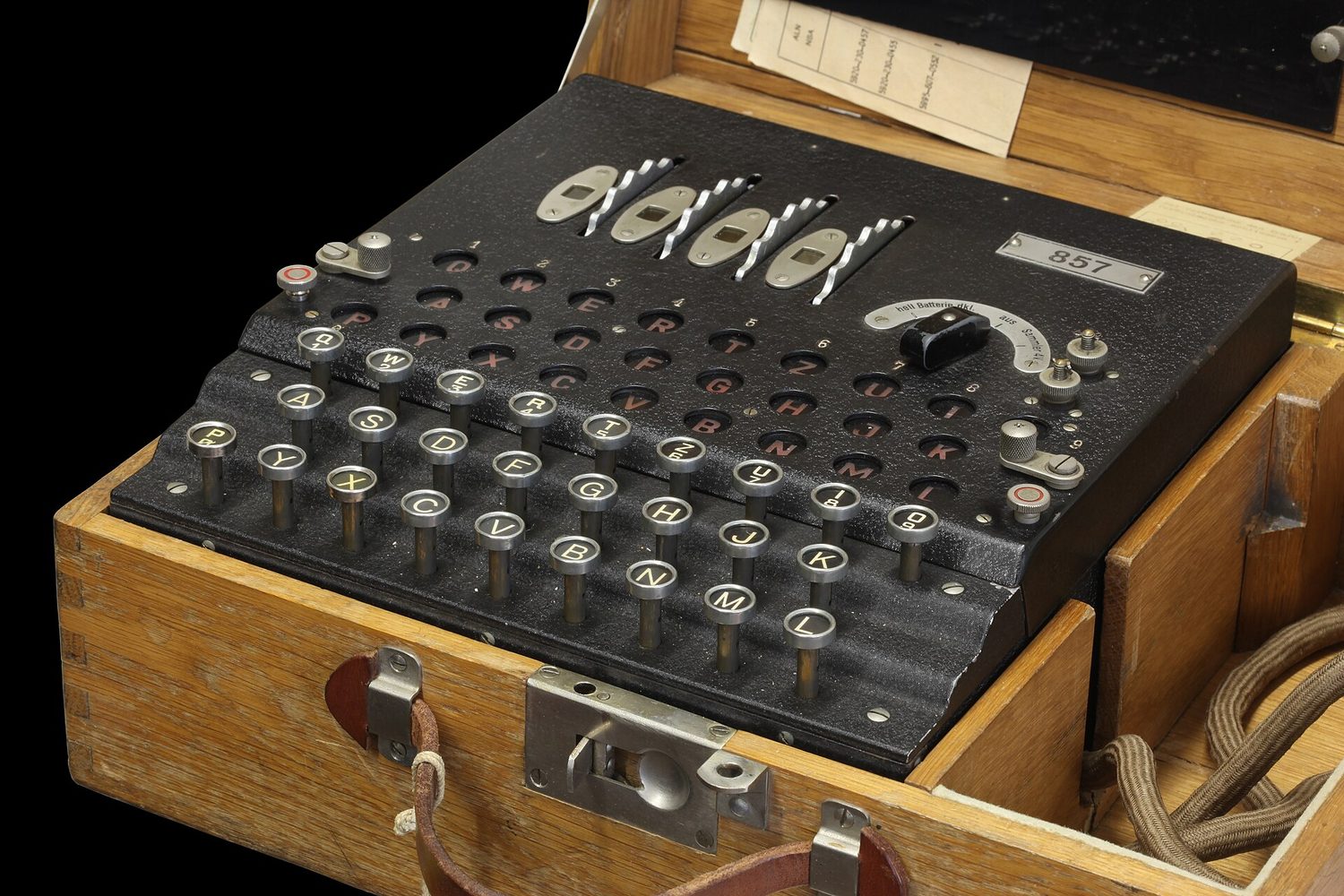
A padlock: cryptography locks data so only someone with the matching key can open it
词汇表 训练
英文 中文 拼音
Asymmetric encryption 非对称加密 fēi duì chèn jiā mì
key pair 密钥对 mì yào duì
public key 公钥 gōng yào
private key 私钥 sī yào
elliptic curve cryptography (ECC) 椭圆曲线密码学 tuǒ yuán qū xiàn mì mǎ xué
5.5

保护应用

大纲
Learning ObjectiveEssential Knowledge

5.5.A
Identify the application security principles of secure by design and security by default.

  • 5.5.A.1 Secure by design is an initiative that encourages companies to include security in all phases of product development including design. When organizations implement secure by design, security is a design principle not just a technical feature.
  • 5.5.A.2 Secure by design includes three design principles:
    • i. Companies should take ownership of customer security outcomes. Companies should build products that meet the security needs of their customers.
    • ii. Companies should embrace radical transparency and accountability. Sharing relevant security-related product news and updates quickly increases security for everyone.
    • iii. Companies should build organizational structure and leadership to implement secure by design. Companies need leaders who are focused on security and have a security-first posture.
  • 5.5.A.3 Secure by design includes the concept of secure by default, which is the idea that security features for software and devices should be enabled by default. Devices and software should be secure to use out of the box, with security features already enabled.

5.5.B
Explain how user input sanitization protects applications.

  • 5.5.B.1 When users enter input into an application, the application typically encases that input in special characters to process it. The characters that encase the user input are called control characters and include the single quote, the double quote, and the semicolon.
  • 5.5.B.2 When creating a program that takes user input, programmers should use a function to verify that user input meets their expected criteria and does not include any control characters that could be used to manipulate the system. This verification function can sanitize user input by removing potentially malicious characters, or it can give the user an error and force the user to provide different input. This can protect against many application attacks, including:
    • SQL injection attacks
    • XSS attacks
    • Directory traversal attacks

来源:美国大学理事会 AP 课程与考试说明

两个设计原则从一开始就保持应用安全。安全设计(secure by design)把安全建入开发的每个阶段,而不是作为一个事后的想法。默认安全(secure by default)意味着产品出厂时它的安全功能已经启用——开箱即安全。

安全设计建立在一家公司必须采纳的三个原则上:(1)为它的客户的安全结果负责,而不是把责任推给用户,(2)拥抱彻底的透明和问责——快速分享与安全相关的消息和更新,让每个人都更安全,以及(3)建立把安全作为头等目标的组织结构和领导力

对抗注入攻击的关键防御是输入清理(input sanitization)。某些特殊字符(special characters)——单引号、双引号和分号——能被用来操纵一个系统,所以一个好的程序在处理之前移除或拒绝它们。清理同样地防御 SQL 注入、XSS 和目录遍历攻击。

词汇表 训练
英文 中文 拼音
Secure by design 安全设计 ān quán shè jì
Secure by default 默认安全 mò rèn ān quán
input sanitization 输入清理 shū rù qīng lǐ
special characters 特殊字符 tè shū zì fú
5.6

检测应用与数据攻击

大纲
Learning ObjectiveEssential Knowledge

5.6.A
Explain how to detect attacks on data.

  • 5.6.A.1 Devices track and log when data are accessed and by whom. The process of recording and monitoring user activities is called accounting. Analysis of these logs can reveal malicious activity when an adversary attempts to access, copy, move, or delete data. Suspicious activity can include:
    • Accessing files that aren’t typically accessed
    • Accessing files or applications outside of a user’s normal patterns (including time of day, location, and device type)
    • Attempts to delete or copy sensitive files
  • 5.6.A.2 A honeypot is a file that appears as if it contains valuable data (e.g., credit card information, PII, passwords), but the data in the file are fake. A system can alert defenders if someone attempts to access the honeypot. Since the honeypot is a fake file, there is no legitimate reason to be accessing it, and any attempted access would be an indicator of malicious activity.
  • 5.6.A.3 Cryptographic hash functions can generate a digest for data and can reveal if data have been altered. If a file has changed unexpectedly, this can be a sign of malicious activity.

5.6.B
Determine controls for detecting attacks against applications or data.

  • 5.6.B.1 Cost is a criterion in determining detective controls. Detective controls like honeypots and using hash values to check data integrity are inexpensive. Some organizations invest in third-party data loss prevention (DLP) services, which monitor data access, usage, and transmission by users throughout the organization to detect suspicious activity; DLP services provide strong detection capabilities at a higher cost.
  • 5.6.B.2 Sensitivity or criticality of data or applications is a criterion in determining detective controls. More sensitive or critical data or applications are more likely targets of an adversary and should be monitored more closely.
  • 5.6.B.3 Classification of data is a criterion in determining detective controls. Data that have been classified as private, educational, healthcare, or financial often have legal or regulatory detection and monitoring requirements.

5.6.C
Evaluate the impact of a method for detecting attacks against an application or data.

  • 5.6.C.1 To operate at an effective speed, log analysis needs to be augmented with some automation. Honeypots offer near instantaneous detection capabilities.
  • 5.6.C.2 Some DLP tools, honeypots, and realtime automated log analysis provide alerts as an attack is happening. These tools allow for a prompt response that can stop an attack before it does more harm. Retrospective log analysis and the use of cryptographic hashes to verify data integrity identify attacks after they have occurred.
  • 5.6.C.3 False negatives can occur in applications and data attack detection. Cryptographic hash functions only detect if data have been altered. An adversary could view and steal data without altering it, and a cryptographic hash function would not detect this. Honeypots cannot detect adversaries that do not attempt to access them.

5.6.D
Identify whether a file has been altered by verifying its hash.

  • 5.6.D.1 Cryptographic hash functions can help identify changes in a file because they are repeatable: the same input always produces the same output for a given hash function.
  • 5.6.D.2 Hashes can be calculated using the command line on a computer, a website, or specialized software.
    • In Windows Powershell, if a user wanted to generate the SHA256 hash for a file named testfile, they would use the command: Get-FileHash testfile -Algorithm SHA256
    • In BASH the same could be accomplished with the command: sha256sum testfile
    • In zsh, the common command line terminal on Apple computers, this could be accomplished with the command: shasum -a 256 testfile
  • 5.6.D.3 A file can be hashed and its hash output recorded. Then it can be hashed again later, and the second hash output can be compared to the previous hash output for the same file. If a file’s hash changes, then the file was altered between when the first and second hashes were generated.

5.6.E
Apply detection techniques to identify and report indicators of application attacks by analyzing log files.

  • 5.6.E.1 SQL injection attacks can be detected by reviewing application and server logs of user input for SQL control words and symbols such as:
    • A single (') or double (") quote character
    • Boolean conditions like OR 1=1
    • A double dash (which indicates a comment in SQL): --
    • SQL control words (always in capital letters) like WHERE, IN, FROM
  • 5.6.E.2 XSS attacks can be detected by reviewing user input for suspicious tags, particularly the tag.
  • 5.6.E.3 For web applications, buffer overflows can be detected by checking the amount of data the user is sending to the web application in their request. The fields commonly checked are the URL length, cookie length, query string length, and total request length. Long strings in any of these fields can be an indicator of an attempted buffer overflow attack.
  • 5.6.E.4 Directory traversal attacks can be detected by reviewing application and server logs. HTTP GET requests that include paths with sequences of ../ are indicators of an adversary attempting a directory traversal.

来源:美国大学理事会 AP 课程与考试说明

要检测数据攻击,系统执行审计记录(accounting)——记录谁在何时访问了什么。但日志非常庞大,所以日志分析必须自动化才能以有用的速度运行;靠人读原始日志太慢了。一个巧妙的补充是一个蜜罐(honeypot)——一个看起来有价值的假文件;因为没有人有真正的理由打开它,任何访问都是一个近乎即时的、清晰的攻击迹象。尤其要留意删除或复制敏感文件的企图。密码散列也帮助:重新散列一个文件并比较——若摘要改变了,文件被更改了。

选择检测控制意味着权衡成本(蜜罐便宜;一个数据泄露防护(DLP)(data loss prevention)服务强大但昂贵)与数据的敏感性。要从日志读一个具体的攻击,寻找它的特征:SQL 注入显示 OR 1=1--;XSS 显示 <script> 标签;目录遍历显示 ../ 序列;一个缓冲区溢出显示异常长的输入字符串。

词汇表 训练
英文 中文 拼音
accounting 审计记录 shěn jì jì lù
honeypot 蜜罐 mì guàn
data loss prevention (DLP) 数据泄露防护 shù jù xiè lòu fáng hù
5.6

考试技巧

  • 把每个应用攻击匹配到它在一个日志里的证据:OR 1=1 / -- = SQL 注入;<script> = XSS;../ = 目录遍历;非常长的输入 = 缓冲区溢出
  • 按它们的决定者学四个访问控制模型:RBAC = 你的角色、RuBAC = 一个条件、DAC = 文件的所有者、MAC = 一个中央管理员。最小权限是它们全部的基础。
  • 通过每组加 4+2+1 读 Linux 权限——chmod 750 = 所有者 rwx(7)、组 r-x(5)、其他人 none(0)。练习双向转换。
  • 对称 = 一个共享密钥(快,AES);非对称 = 一个公钥/私钥对(解决密钥共享,RSA/ECC)。用接收者的公钥加密。
  • 输入清理是防止注入攻击的单个最佳答案;一个蜜罐是经典的便宜的检测控制。

本主题的互动课程

逐步学习,并即时检测练习。

AP 网络安全的更多主题

登录或创建账号

IGCSE, A-Level & AP