Skip to content · ⁨ข้ามไปยังเนื้อหา⁩

Securing Devices · ⁨การป้องกันอุปกรณ์⁩

AP Cybersecurity · ⁨AP ความปลอดภัยทางไซเบอร์⁩ · Topic 4 · ⁨หัวข้อ 4⁩

Video lesson for this topic · ⁨บทเรียนวิดีโอสำหรับหัวข้อนี้⁩ Open the video page · ⁨เปิดหน้าวิดีโอ⁩
9:32

การป้องกันอุปกรณ์

เป็นเช้าวันจันทร์ในโรงพยาบาลที่คึกคัก ภายในหนึ่งนาที หน้าจอในหอผู้ป่วย ห้องยา และสำนักงานบันทึกทั้งหมดจะเปลี่ยนไป ไฟล์ทุกอย่างบนนั้นคือ...

English narration · English + 中文 subtitles burned in · ⁨การบรรยายภาษาอังกฤษ · คำบรรยายภาษาอังกฤษ + 中文 ลอยตัวบนภาพ⁩

4.1

Device Vulnerabilities and Attacks · ⁨ความเสี่ยงและความเสี่ยงของอุปกรณ์⁩

Syllabus · ⁨หลักสูตร⁩
English

Learning Objective 4.1.A: Identify types of computing devices.

  • 4.1.A.1 Server computers are devices that provide one or more services to other computers (e.g., DNS, DHCP, FTP). Any computer can be a server, and in an enterprise environment servers typically have more processing power and storage than a personal computer.
  • 4.1.A.2 Personal computers are devices that are designed to be used by one person for work or recreational purposes (e.g., word processing, graphic design, web browsing, and media production or viewing). These include desktop, laptop, and notebook computers.
  • 4.1.A.3 Handheld computers (also called mobile computers or information appliances) are smaller than personal computers and run on battery power. These include tablets, smartphones, and wearable technology like smart watches.
  • 4.1.A.4 Embedded computers are devices that are part of a machine. Embedded devices have specific instruction sets for interfacing with the specialized components of the machine they’re embedded in. Embedded computers tend to be slower and cheaper than other computers and have minimal storage.
  • 4.1.A.5 Everyday devices with embedded computers are often called Internet of Things (IoT) devices. Embedded computers are found in transportation (e.g., cars, trains, and airplanes), devices that operate critical infrastructure (e.g., operating circuit breakers at electrical substations and pumps at water treatment plants), medical equipment (e.g., IV pumps, MRI scanners, pacemakers, and insulin pumps), and everyday devices like washing machines, coffee makers, and thermostats.

Learning Objective 4.1.B: Identify the type of malware used in a cyberattack.

  • 4.1.B.1 Malware is malicious software that can damage or destroy a device or network, or allow an adversary access to a device and the data on the device.
  • 4.1.B.2 Malware is often used as a tool to accomplish part of an adversary’s plan to achieve their ultimate goal(s). There are many types of malware, such as:
    • Viruses are malware that must be activated by a user executing or opening a file.
    • Worms spread from one computer to another without human interaction.
    • Trojans are malware embedded in other software that seems harmless. Remote access trojans (RATs) provide an adversary with remote access to the target system.
    • Ransomware encrypts a device’s files, preventing the user from accessing files on the device. The ransomware typically presents the user with a screen demanding payment and promising to give the user a decryption key for their files if the user pays within a fixed amount of time.
    • Spyware tracks a user’s actions on a computer and sends information back to an adversary.
    • A keylogger is software or hardware that logs the users keystrokes and sends the information back to the adversary. Adversaries can often extract usernames and passwords from keylogger data.
    • Logic bombs are set to trigger their effect only when a specific set of conditions are met; the conditions can include time and date, specific type or version of the operating system, character set the computer is using, etc.
    • A rootkit is sophisticated malware that gets into the target computer’s operating system and can control nearly every aspect of the system, including making the rootkit itself invisible to detection.
  • 4.1.B.3 While most malware is a file or a collection of files, fileless malware is malicious code that lives in RAM and uses legitimate programs already installed on a device to compromise it.

Learning Objective 4.1.C: Explain how adversaries can exploit common device vulnerabilities to cause loss, damage, disruption, or destruction.

  • 4.1.C.1 Adversaries can develop exploits for known vulnerabilities in software (including operating systems). Devices with unpatched software are vulnerable to these exploits, which could allow an adversary to crash a system, view user actions, enable or disable various services or components on the device (e.g., turning on a webcam or microphone), or even take control of the device to issue their own commands including commands to steal or destroy information on the device.
  • 4.1.C.2 Adversaries can take advantage of weak authentication requirements by guessing a user’s password or using social engineering to get a user to divulge their password.
  • 4.1.C.3 When systems don’t have a password on the basic input output system (BIOS) or unified extensible firmware interface (UEFI), an adversary can boot a computer into a special mode (e.g., “recovery mode”) that gives them higher-level privileges. Without BIOS or UEFI protection, adversaries can load their own operating system onto a device from an external drive and use specialized tools to alter or create user profiles, including changing user passwords.
  • 4.1.C.4 Adversaries can load malware onto an external drive, and if autorun is enabled, then a device will run the malware when the external drive is inserted.
  • 4.1.C.5 Adversaries can leverage open ports to connect to a device.
  • 4.1.C.6 Adversaries can send malicious data to devices to disrupt them or attempt to take control of them. Devices that have no firewall (or a misconfigured firewall) cannot filter out this malicious data.
  • 4.1.C.7 Adversaries often attempt to install malware on a device to disrupt or control it. Devices lacking anti-malware software are more vulnerable to this type of attack.

Learning Objective 4.1.D: Assess and document risks from device vulnerabilities.

  • 4.1.D.1 Risk from device vulnerabilities can come from unauthorized access or malware that allow an adversary to impersonate an authorized user, remotely control a device, encrypt a device’s drive to ransom the data, or wipe a device’s memory, destroying data or rendering the device inoperable. The level of risk varies depending on the criticality of the device or the services the device provides or data it stores.
  • 4.1.D.2 High risks from device vulnerabilities involve potentially compromising sensitive data or critical operations.
    • Illustrative examples for 4.1.D.2:
      • An organization has not installed the most recent update for their email server which included a patch for a known critical vulnerability.
  • 4.1.D.3 Moderate risks from device vulnerabilities can arise from weak authentication requirements or from vulnerabilities that would be less likely to be exploited.
    • Illustrative examples for 4.1.D.3:
      • A water treatment plant has embedded systems controlling pumps. The pumps can be remotely accessed via username and password for remote management for the plant, but the devices do not require multi-factor authentication (MFA).
  • 4.1.D.4 Low risks from device vulnerabilities are typically related to vulnerabilities that, if exploited, would have little impact.
    • Illustrative examples for 4.1.D.4:
      • An employee’s laptop has telnet port 23 open.
ไทย

วัตถุประสงค์การเรียนรู้ 4.1.A: ระบุประเภทของอุปกรณ์คอมพิวเตอร์

  • 4.1.A.1 คอมพิวเตอร์เซิร์ฟเวอร์คืออุปกรณ์ที่ให้บริการหนึ่งหรือหลายอย่างแก่คอมพิวเตอร์อื่น ๆ (เช่น DNS, DHCP, FTP) คอมพิวเตอร์เครื่องใดก็สามารถเป็นเซิร์ฟเวอร์ได้ และในสภาพแวดล้อมระดับองค์กร เซิร์ฟเวอร์มักจะมีความสามารถในการประมวลผลและความจุในการจัดเก็บข้อมูลมากกว่าคอมพิวเตอร์ส่วนบุคคล
  • 4.1.A.2 คอมพิวเตอร์ส่วนบุคคลคืออุปกรณ์ที่ออกแบบมาเพื่อใช้โดยบุคคลเดียวเพื่อการทำงานหรือความบันเทิง (เช่น การพิมพ์เอกสาร, การออกแบบกราฟิก, การท่องเว็บ, และการผลิตหรือรับชมสื่อ) รวมถึงคอมพิวเตอร์เดสก์ท็อป แล็ปท็อป และโน้ตบุ๊ค
  • 4.1.A.3 คอมพิวเตอร์พกพา (หรือเรียกว่าคอมพิวเตอร์มือถือ หรืออุปกรณ์สารสนเทศ) มีขนาดเล็กกว่าคอมพิวเตอร์ส่วนบุคคลและใช้พลังงานจากแบตเตอรี่ รวมถึงแท็บเล็ต สมาร์ทโฟน และเทคโนโลยีสวมใส่ เช่น นาฬิกาอัจฉริยะ
  • 4.1.A.4 คอมพิวเตอร์ฝังตัวคืออุปกรณ์ที่เป็นส่วนหนึ่งของเครื่องจักร อุปกรณ์ฝังตัวจะมีชุดคำสั่งเฉพาะสำหรับการเชื่อมต่อเข้ากับส่วนประกอบพิเศษของเครื่องจักรที่ฝังอยู่ คอมพิวเตอร์ฝังตัวมักจะมีความเร็วต่ำกว่าและมีราคาถูกกว่าคอมพิวเตอร์ทั่วไป และมีพื้นที่จัดเก็บข้อมูลน้อยมาก
  • 4.1.A.5 อุปกรณ์ในชีวิตประจำวันที่มีคอมพิวเตอร์ฝังตัวมัก被称为 Internet of Things (IoT) devices คอมพิวเตอร์ฝังตัวพบได้ในยานพาหนะ (เช่น รถยนต์, เรือ, เครื่องบิน), อุปกรณ์ที่ดำเนินการโครงสร้างพื้นฐานสำคัญ (เช่น การเปิด-ปิดเบรกเกอร์ในสถานีไฟฟ้าแรงสูง และปั๊มในระบบบำบัดน้ำ), อุปกรณ์ทางการแพทย์ (เช่น ปั๊มหยดน้ำ, เครื่อง MRI, จังหวะหัวใจเทียม, และปั๊มอินซูลิน), และอุปกรณ์ในชีวิตประจำวัน เช่น เครื่องซักผ้า, เครื่องชงกาแฟ, และเทอร์โมสตัท

วัตถุประสงค์การเรียนรู้ 4.1.B: ระบุประเภทของมัลแวร์ที่ใช้ในการโจมตีทางไซเบอร์

  • 4.1.B.1 มัลแวร์คือซอฟต์แวร์ที่เป็นอันตรายที่สามารถทำลายหรือทำให้เสียหายต่ออุปกรณ์หรือเครือข่าย หรือเปิดโอกาสให้ผู้โจมตีเข้าถึงอุปกรณ์และข้อมูลบนอุปกรณ์นั้นได้
  • 4.1.B.2 มัลแวร์มักใช้เป็นเครื่องมือเพื่อให้ผู้โจมตีบรรลุเป้าหมายหลักของตน มีมัลแวร์หลายประเภท เช่น:
    • ไวรัสคือมัลแวร์ที่ต้องถูกเปิดใช้งานโดยผู้ใช้通过开展หรือเปิดไฟล์
    • เวิร์มกระจายจากคอมพิวเตอร์หนึ่งไปยังอีกเครื่องหนึ่งโดยไม่ต้องมีการกระทำจากมนุษย์
    • Trojan คือมัลแวร์ที่ถูกฝังอยู่ในซอฟต์แวร์อื่น ๆ ที่ดู无害 Remote access trojans (RATs) เปิดโอกาสให้ผู้โจมตีเข้าถึงระบบเป้าหมายจากระยะไกล
    • Ransomware จะเข้ารหัสไฟล์ของอุปกรณ์ ทำให้ผู้ใช้ไม่สามารถเข้าถึงไฟล์บนอุปกรณ์ได้ โดยปกติแล้ว Ransomware จะแสดงหน้าจอให้ผู้ใช้กรอกค่าไถ่และสัญญาว่าจะมอบกุญแจถอดรหัสให้กับผู้ใช้หากชำระภายในกำหนดเวลา
    • Spyware จะติดตามการกระทำของผู้ใช้บนคอมพิวเตอร์และส่งข้อมูลกลับไปยังผู้โจมตี
    • Keylogger คือซอฟต์แวร์หรือฮาร์ดแวร์ที่บันทึกการกดแป้นพิมพ์ของผู้ใช้และส่งข้อมูลกลับไปยังผู้โจมตี ผู้โจมตีมักจะดึงชื่อผู้ใช้และรหัสผ่านออกจากข้อมูลของ keylogger ได้
    • Logic bombs ถูกตั้งไว้เพื่อกระตุ้นผลลัพธ์เฉพาะเมื่อเงื่อนไขที่กำหนดเป็นจริง; เงื่อนไขอาจรวมถึงเวลาและวันที่, ประเภทหรือเวอร์ชันของระบบปฏิบัติการ, ชุดอักขระที่คอมพิวเตอร์กำลังใช้ ฯลฯ
    • Rootkit คือมัลแวร์ที่มีความซับซ้อนซึ่งแทรกเข้าสู่ระบบปฏิบัติการของคอมพิวเตอร์เป้าหมายและสามารถควบคุมเกือบทุกด้านของระบบ รวมถึงการทำให้อัตโนมัติตัวเองไม่ปรากฏต่อการตรวจจับ
  • 4.1.B.3 แม้มัลแวร์ส่วนใหญ่จะเป็นไฟล์หรือกลุ่มไฟล์ แต่ Fileless malware คือโค้ดที่เป็นอันตรายที่อาศัยอยู่ใน RAM และใช้โปรแกรมที่ถูกติดตั้งอยู่แล้วบนอุปกรณ์เพื่อทำลายมัน

วัตถุประสงค์การเรียนรู้ 4.1.C: อธิบายวิธีการที่ผู้โจมตี可以利用ความเปราะบางทั่วไปของอุปกรณ์เพื่อก่อให้เกิดความสูญเสีย ความเสียหาย การหยุดชะงัก หรือการทำลาย

  • 4.1.C.1 ผู้โจมตีสามารถสร้างช่องโหว่ exploitation สำหรับจุดอ่อนที่ทราบแล้วในซอฟต์แวร์ (รวมถึงระบบปฏิบัติการ) อุปกรณ์ที่มีซอฟต์แวร์ไม่ได้รับการอัปเดตเพื่อปิดช่องโหว่จะเสี่ยงต่อ exploitation เหล่านี้ ซึ่งอาจทำให้ผู้โจมตีสามารถทำให้ระบบล่ม ดูการกระทำของผู้ใช้ เปิดหรือปิดบริการหรือส่วนประกอบต่างๆ บนอุปกรณ์ (เช่น การเปิดกล้องเว็บแคมหรือไมโครโฟน) หรือแม้แต่ยึดควบคุมอุปกรณ์เพื่อออกคำสั่งของตนเอง รวมถึงคำสั่งเพื่อขโมยหรือทำลายข้อมูลบนอุปกรณ์
  • 4.1.C.2 ผู้โจมตีสามารถใช้ประโยชน์จากข้อกำหนดการยืนยันตัวตนที่อ่อนแอโดยการเดารหัสผ่านของผู้ใช้หรือใช้เทคนิคทางสังคมวิทยา (social engineering) เพื่อให้ผู้ใช้เปิดเผยรหัสผ่านของตน
  • 4.1.C.3 เมื่อระบบไม่มีรหัสผ่านสำหรับ basic input output system (BIOS) หรือ unified extensible firmware interface (UEFI) ผู้โจมตีสามารถบูตคอมพิวเตอร์เข้าสู่โหมดพิเศษ (เช่น “recovery mode”) ที่ให้สิทธิ์ระดับสูงแก่พวกเขา โดยไม่มีการป้องกัน BIOS หรือ UEFI ผู้โจมตีสามารถโหลดระบบปฏิบัติการของตนเองลงบนอุปกรณ์จากไดรฟ์ภายนอกและใช้เครื่องมือเฉพาะเจาะจงในการแก้ไขหรือสร้างโปรไฟล์ผู้ใช้ใหม่ รวมถึงการเปลี่ยนรหัสผ่านของผู้ใช้
  • 4.1.C.4 ผู้โจมตีสามารถโหลดมัลแวร์ลงบนไดรฟ์ภายนอก และหากเปิดใช้งาน autorun แล้ว อุปกรณ์จะรันมัลแวร์เมื่อเสียบไดรฟ์ภายนอกเข้าไป
  • 4.1.C.5 ผู้โจมตีสามารถใช้พอร์ตที่เปิดอยู่เพื่อเชื่อมต่อกับอุปกรณ์
  • 4.1.C.6 ผู้โจมตีสามารถส่งข้อมูลที่เป็นอันตรายไปยังอุปกรณ์เพื่อยึดครองหรือขัดขวางการทำงาน และอุปกรณ์ที่ไม่มีไฟวอลล์ (หรือมีไฟวอลล์ที่ตั้งค่าผิดพลาด) จะไม่สามารถกรองข้อมูลที่เป็นอันตรายเหล่านี้ได้
  • 4.1.C.7 ผู้โจมตีมักพยายามติดตั้งมัลแวร์บนอุปกรณ์เพื่อยึดครองหรือขัดขวางการทำงาน อุปกรณ์ที่ขาดซอฟต์แวร์ป้องกันมัลแวร์จะมีความเสี่ยงต่อการโจมตีประเภทนี้มากกว่า

วัตถุประสงค์การเรียนรู้ 4.1.D: ประเมินและบันทึกความเสี่ยงจากช่องโหว่ของอุปกรณ์

  • 4.1.D.1 ความเสี่ยงจากช่องโหว่ของอุปกรณ์อาจมาจากการเข้าถึงโดยไม่ได้รับอนุญาตหรือมัลแวร์ที่อนุญาตให้ผู้โจมตีปลอมตัวเป็นผู้ใช้ที่ได้รับอนุญาต ควบคุมอุปกรณ์จากระยะไกล เข้ารหัสไดรฟ์ของอุปกรณ์เพื่อเรียกค่าไถ่ข้อมูล หรือลบความจำของอุปกรณ์ ทำให้ข้อมูลหายหรือทำให้อุปกรณ์ใช้งานไม่ได้ ระดับความเสี่ยงจะแตกต่างกันไปตามความสำคัญของอุปกรณ์ บริการที่อุปกรณ์ให้บริการ หรือข้อมูลที่เก็บรักษาไว้
  • 4.1.D.2 ความเสี่ยงสูงจากช่องโหว่ของอุปกรณ์เกี่ยวข้องกับการถูกทำลายข้อมูลสำคัญหรือกระบวนการสำคัญอย่างมีนัยสำคัญ
    • ตัวอย่างประกอบสำหรับ 4.1.D.2:
      • องค์กรไม่ได้ติดตั้งการอัปเดตล่าสุดสำหรับเซิร์ฟเวอร์อีเมลซึ่งรวมถึงการปิดช่องโหว่สำหรับจุดอ่อนที่ทราบแล้วที่มีระดับวิกฤต
  • 4.1.D.3 ความเสี่ยงปานกลางจากช่องโหว่ของอุปกรณ์อาจเกิดขึ้นจากข้อกำหนดการยืนยันตัวตนที่อ่อนแอหรือจากช่องโหว่ที่จะถูกนำไปใช้ประโยชน์น้อยกว่า
    • ตัวอย่างประกอบสำหรับ 4.1.D.3:
      • โรงงานบำบัดน้ำมีระบบฝังตัวควบคุมปั๊มน้ำ ปั๊มสามารถเข้าถึงจากระยะไกลผ่านชื่อผู้ใช้และรหัสผ่านสำหรับการจัดการระยะไกลสำหรับโรงงาน แต่อุปกรณ์ไม่ต้องการการยืนยันตัวตนหลายขั้นตอน (MFA)
  • 4.1.D.4 ความเสี่ยงต่ำจากช่องโหว่ของอุปกรณ์มักเกี่ยวข้องกับช่องโหว่ที่จะมีผลกระทบเล็กน้อยหากถูกนำไปใช้ประโยชน์
    • ตัวอย่างประกอบสำหรับ 4.1.D.4:
      • แล็ปท็อปของพนักงานมีพอร์ต telnet 23 เปิดอยู่

Source: College Board AP Course and Exam Description · ⁨แหล่งที่มา: คำอธิบายหลักสูตรและข้อสอบ College Board AP⁩

English

A device is any computer - a server, a personal laptop, a smartphone, or an embedded computer 嵌入式计算机 built into a machine. Everyday devices with embedded computers are called Internet of Things (IoT) 物联网 devices, and they run everything from water pumps to washing machines.

The four classes of device, and why the class matters

Class What it is Security consequence
servers shared machines running services for many users the highest-value target; one compromise reaches everyone
personal computers desktops and laptops general purpose, so they run anything the user installs
handheld computers 手持计算机 (also called mobile computers or information appliances) smaller than a PC and running on battery power — smartphones, tablets, smart watches and other wearable technology easily lost or stolen, and often carried across untrusted networks
embedded computers a computer that is part of a machine — a car's engine controller, a thermostat, a medical pump has a specialised instruction set for interfacing with its components, and tends to be slower, cheaper and to have minimal storage, so security features are often left out and updates are rare

That last row is the reason embedded and IoT devices appear so often in attack scenarios: the constraints that make them cheap are the same constraints that make them hard to defend.

The main threat to a device is malware 恶意软件 - malicious software. Learn the types:

  • Virus 病毒 - must be activated by a user opening a file.
  • Worm 蠕虫 - spreads by itself, with no human action.
  • Trojan 木马 - hides inside software that looks safe; a remote access trojan (RAT) 远程访问木马 gives the adversary remote control.
  • Ransomware 勒索软件 - encrypts your files and demands payment for the key.
  • Spyware 间谍软件 - secretly tracks what you do.
  • Keylogger 键盘记录器 - records every keystroke to steal passwords.
  • Logic bomb 逻辑炸弹 - triggers only when a condition is met (a date, a version).
  • Rootkit - deeply hides in the operating system and can even make itself invisible.

Most malware is a file, but fileless malware 无文件恶意软件 is different: it lives only in RAM 内存 and abuses legitimate programs already on the device, leaving no file for a scanner to find.

Adversaries exploit unpatched software 未打补丁的软件, weak passwords, unprotected BIOS/UEFI startup settings, and open ports. We rate device risk by the value and criticality of the device - a hospital's unpatched email server is high risk, while an employee's laptop with one unused open port is low.

ไทย

อุปกรณ์ (device) คือคอมพิวเตอร์ทุกประเภท - เซิร์ฟเวอร์, แล็ปท็อปส่วนบุคคล,สมาร์ทโฟน หรือ คอมพิวเตอร์ฝังตัว (embedded computer) ที่สร้างอยู่ในเครื่อง อุปกรณ์ทั่วไปที่มีคอมพิวเตอร์ฝังตัวเรียกว่า อุปกรณ์ Internet of Things (IoT) และ它们在运行 everything from water pumps to washing machines. (Note: The source text had a mix of English and Chinese here. Translating the meaning):它们运行从水泵到洗衣机等各种设备。

สี่ประเภทของอุปกรณ์ และทำไมประเภทจึงสำคัญ

ประเภท สิ่งที่มันคือ ผลกระทบด้านความปลอดภัย
เซิร์ฟเวอร์ (servers) เครื่อง.shared的运行服务给许多用户 เป้าหมายที่มีค่าสูงสุด; การถูกบุกรุกเพียงครั้งเดียวเข้าถึงทุกคน
คอมพิวเตอร์ส่วนบุคคล (personal computers) คอมพิวเตอร์ตั้งโต๊ะและแล็ปท็อป อเนกประสงค์, ดังนั้นจึงรันทุกอย่างที่ผู้ใช้งานติดตั้ง
คอมพิวเตอร์มือถือ (handheld computers) (หรือเรียกว่าคอมพิวเตอร์เคลื่อนที่หรืออุปกรณ์สารสนเทศ) เล็กกว่า PC และทำงานด้วย พลังงานแบตเตอรี่ — สมาร์ทโฟน, แท็บเล็ต, นาฬิกาอัจฉริยะและ เทคโนโลยีสวมใส่ (wearable technology) อื่นๆ หายง่ายหรือถูกขโมย และมักพกพาไปตามeriorที่เชื่อถือไม่ได้
คอมพิวเตอร์ฝังตัว (embedded computers) คอมพิวเตอร์ที่เป็น ส่วนหนึ่งของเครื่อง — ตัวควบคุมเครื่องยนต์รถยนต์, เทอร์โมสตัท, ปั๊มทางการแพทย์ มี ชุดคำสั่งเฉพาะ (specialised instruction set) สำหรับเชื่อมต่อกับส่วนประกอบของตนเอง, และ มักจะมีความเร็วช้ากว่า, ราคาถูกกว่า และมีพื้นที่จัดเก็บน้อย, ดังนั้นคุณสมบัติด้านความปลอดภัยจึงมักถูกละเลยและการอัปเดตก็หายาก

บรรทัดสุดท้ายนี้คือเหตุผลที่อุปกรณ์ฝังตัวและ IoT ปรากฏในสถานการณ์การโจมตีบ่อยครั้ง: ข้อจำกัดที่ทำให้ราคาถูกคือข้อจำกัดเดียวกันที่ทำให้ยากต่อการป้องกัน

ภัยคุกคามหลักต่ออุปกรณ์คือ มัลแวร์ (malware) - ซอฟต์แวร์ที่เป็นอันตราย เรียนรู้ประเภทต่างๆ:

  • ไวรัส (Virus) - ต้องเปิดไฟล์โดยผู้ใช้เพื่อกระตุ้นให้ทำงาน
  • เวิร์ม (Worm) - กระจายตัวเองโดยไม่ต้องมีการกระทำจากมนุษย์
  • โทรจัน (Trojan) - ซ่อนอยู่ในซอฟต์แวร์ที่ดูปลอดภัย; โทรจันสำหรับการเข้าถึงระยะไกล (RAT) ให้ผู้โจมตีการควบคุมจากระยะไกล
  • ** ransomware** - เข้ารหัสไฟล์ของคุณและขอเงินค่าไถ่เพื่อรับกุญแจ
  • spyware - ติดตามสิ่งที่คุณทำอย่างลับๆ
  • keylogger - บันทึกทุกครั้งที่กดปุ่มเพื่อขโมยรหัสผ่าน
  • logic bomb - ถูกกระตุ้นเมื่อมีเงื่อนไข特定的 (วันที่, เวอร์ชัน)
  • rootkit - ซ่อนลึกในระบบปฏิบัติการและ thậm chíทำให้ตัวเองไม่เห็นได้

มัลแวร์ส่วนใหญ่เป็นไฟล์ แต่ fileless malware แตกต่าง: มันอาศัยอยู่ใน RAM เท่านั้นและใช้โปรแกรมที่ถูกกฎหมายที่มีอยู่แล้วในอุปกรณ์ โดยไม่ทิ้งไฟล์ให้เครื่องสแกนหาได้

ผู้โจมตีใช้ประโยชน์จาก ซอฟต์แวร์没有被补丁, รหัสผ่านที่อ่อนแอ, การตั้งค่าการเริ่มต้น BIOS/UEFI ที่ไม่ปลอดภัย, และพอร์ตที่เปิดอยู่ เราประเมินความเสี่ยงของอุปกรณ์ตามคุณค่าและความสำคัญของอุปกรณ์ - เซิร์ฟเวอร์อีเมล没有被补丁 ของโรงพยาบาลมีความเสี่ยง สูง ในขณะที่แล็ปท็อปของพนักงานที่มีพอร์ตเปิดที่ยังไม่ใช้งานหนึ่งพอร์ตมีความเสี่ยง ต่ำ

Explore · ⁨สำรวจ⁩

Name the malware from its behaviour · ⁨ตั้งชื่อนม้ลแวร์ตามพฤติกรรม⁩

Each kind of malware has one defining trait: a worm self-spreads, a virus needs a user to run it, ransomware encrypts for money, and a rootkit hides deep in the OS. · ⁨มัลแวร์แต่ละชนิดมีลักษณะเด่นหนึ่งอย่าง: worm แพร่ขยายเอง, virus ต้องให้ผู้ใช้รัน, ransomware เข้ารหัสเพื่อเรียกค่าไถ่, และ rootkit ซ่อนลึกในระบบปฏิบัติการ⁩

Vocabulary · ⁨คำศัพท์⁩ Train · ⁨ฝึกฝน⁩
English ไทย
embedded computer/emˈbedɪd kəmˈpjuːtə/ คอมพิวเตอร์ฝังตัว
Internet of Things (IoT)/ˈɪntənet ɒv θɪŋz/ อินเทอร์เน็ตของสิ่งของ (IoT)
handheld computers/ˈhændheld kəmˈpjuːtəz/ คอมพิวเตอร์แบบพกพา
malware/ˈmælweə/ มัลแวร์
Virus/ˈvaɪrəs/ ไวรัส
Worm/wɜːm/ เวิร์ม (Worm)
Trojan/ˈtrəʊdʒn/ โทรจัน (Trojan)
remote access trojan (RAT)/rɪˈməʊt ˈækses ˈtrəʊdʒn/ Trojan การเข้าถึงระยะไกล (RAT)
Ransomware/ˈrænsəmweə/ แรนซัมแวร์
Spyware/ˈspaɪweə/ สไปว์แวร์ (Spyware)
Keylogger/ˈkiːlɒɡə/ Keylogger
Logic bomb/ˈlɒdʒɪk bɒm/ ระเบิดตรรกะ (Logic bomb)
fileless malware/ˈfaɪlləs ˈmælweə/ มัลแวร์ไร้ไฟล์ (fileless malware)
RAM/ræm/ RAM
unpatched software/ʌnˈpætʃt ˈsɒftweə/ ซอฟต์แวร์没有被修补丁
4.2

Authentication · ⁨การยืนยันตัวตน (Authentication)⁩

Syllabus · ⁨หลักสูตร⁩
Learning ObjectiveEssential Knowledge

4.2.A
Explain why hashes (also called hash outputs, checksums, message digests, or digests) are used to store passwords.

  • 4.2.A.1 A cryptographic hash function (also called a message digest function) is a mathematical algorithm that takes binary data of an arbitrary length, processes it according to a set of instructions, and outputs a fixed-length binary string called the hash (or checksum or message digest). Well known cryptographic hashes include:
    • MD5
    • SHA-1, SHA-256, SHA-512 (SHA stands for Secure Hash Algorithm)
    • NTHash
    • RIPEMD-160
  • 4.2.A.2 An n-bit hash has $2^n$ possible outputs. The number of inputs is infinite, and so inevitably two different inputs will produce the same hash. This is called a collision.
  • 4.2.A.3 Cryptographic hash functions have the following properties:
    • Hashes are collision resistant; it is difficult to find two different inputs to the same hash function that produce the same output.
    • Hashes have pre-image resistance; given a hash, it is infeasible to figure out the input that generated the hash.
    • Hashes are repeatable; the same input will always produce the same hash.
    • Hashes have a fixed length; the length in bits of the hash for a specific hash function is constant regardless of the size of the input.
  • 4.2.A.4 Adversaries try to compromise hashing functions by forcing collisions in their output. If an efficient algorithm exists to force a collision for a specific hash function, then that hash function will be deprecated (no longer used in secure settings). MD5 and SHA1 are examples of deprecated hash functions.
  • 4.2.A.5 Password-based authentication services shouldn’t store passwords in plaintext, so that if an adversary gains access to the user:password directory they won’t immediately know the passwords for all users. Instead, user passwords should be hashed and the hash stored in a database. When a user enters their password, it is hashed, and the hash is compared to the hash stored on file. If the hashes match, then the user is authenticated.
  • 4.2.A.6 If two users had the same password, then their passwords would have identical hashes in the user:password directory. To prevent this, a few random bits (called salt) are hashed with a user’s password to generate the hash. Each user’s salt is unique, so even if two users have the same password they will have a different password hash because they have different salt.

4.2.B
Explain how password attacks exploit vulnerabilities.

  • 4.2.B.1 If an adversary can compromise the password of a legitimate user, and that user’s organization has not enabled MFA or other authentication protections, then the adversary can act within that organization with all the access and rights available to the user.
  • 4.2.B.2 Password attacks can be classified as online or offline.
    • Online password attacks attempt user:password combinations in an active authentication portal.
    • Offline password attacks have captured a user:password database and can run password attacks against the database on their own computer. This method bypasses any account lock out protections that may be in place.
  • 4.2.B.3 Many users reuse the same passwords (or variations of the same password) for all the services and accounts they have, despite warnings not to. When an organization’s user database is stolen, the usernames, emails, and passwords are sold to adversaries or posted online. Adversaries often begin an attempt to compromise an account by trying stolen or leaked credentials for a target individual.
  • 4.2.B.4 Many users set passwords that are easy to guess, and adversaries will attempt to guess common passwords for a user’s account. Password spraying is an attack where an adversary attempts a common password against many different user accounts.
  • 4.2.B.5 Some services and devices (e.g., switches, routers, and IoT devices) are preconfigured with a default administrative user and password. Credential stuffing is an attack where an adversary attempts to gain access to these services or devices using common default credentials or account credentials that have been stolen.
  • 4.2.B.6 Offline password attacks use automated hash-cracking tools to hash possible passwords and compare them against a captured hash. Although hashes can’t be reversed, an adversary can use these tools to hash many potential passwords and compare them to the target hash. If an adversary finds a hash that matches, they can use the password that generated the hash to login to the user’s account. Offline attacks include:
    • Brute force attacks, where an adversary uses an automated tool to test all the potential passwords that a user could have
    • Dictionary attacks, where an adversary uses an automated tool to test a list of common passwords
  • 4.2.B.7 A rainbow table attack uses a list of common passwords to generate a rainbow table. A rainbow table is a table that contains each potential password and its hash. The table is then sorted by the hashes, and the adversary uses an automated tool to search the list of hashes for the captured hash. If the hashes match, then the adversary has found a password that generates the same hash, and the password will allow the adversary to login to the user’s account.

4.2.C
Determine the type of authentication used to verify the identity of a user.

  • 4.2.C.1 Authentication mechanisms are technical controls that verify the identity of a user to ensure that only authorized users access a system. The proof the user provides to identify themselves is called a factor. Common authentication factors include:
    • Something the user knows (knowledge factor)
    • Something the user has (possession factor)
    • Something the user is (biometric factor)
    • Somewhere the user is (location factor)
  • 4.2.C.2 Knowledge factors can be passwords, PINs, or answers to preselected challenge questions. For a knowledge factor to be effective it needs to be something an adversary can’t easily guess; however, knowledge factors that are difficult for an adversary to figure out can also be harder for a user to remember.
  • 4.2.C.3 A possession factor is an object a user has that is unique to them, such as an access card, a bank card, a cell phone, or an authentication token. The more difficult it is for an adversary to obtain the object (or a copy of it), the more secure the possession factor is.
  • 4.2.C.4 Biometric factors measure features of the human body and can include fingerprints, palm prints, facial recognition, iris or retina scans, or voice identification. Biometric factors are difficult for an adversary to duplicate because they are unique to an individual.
  • 4.2.C.5 Location factors use information about Wi-Fi signals, GPS data, time zone settings, and even IP address information to make determinations about location. Rules can be established for allowing or denying access based on a location factor.
  • 4.2.C.6 Multifactor authentication (MFA) is when a system uses more than one factor to authenticate a user. MFA is more secure than single-factor authentication because it requires the user to provide at least two separate factors of authentication.

4.2.D
Configure login settings to make a device more secure.

  • 4.2.D.1 Requiring complexity in passwords is a login setting that can be configured. When enabled, users setting a new password must include at least one character from each character set. Passwords with characters from each character set are significantly harder for an adversary to crack than passwords that use characters from only one or two character sets. The main character sets often required are:
    • Uppercase letters (A–Z)
    • Lowercase letters (a–z)
    • Numeric digits (0–9)
    • Special characters (!”#$%&’()*+,-./:;<=>?@ [ \ ] ^_`{|}~)
  • 4.2.D.2 Requiring a minimum password length is a login setting that can be configured. This means that users must have at least a certain number of characters in their password. The longer and more complex a password is, the longer it will take a digital tool to crack the password.
  • 4.2.D.3 Requiring a maximum password age is a login setting that can be configured. When configured, users will receive a prompt to change their password a certain number of days after their last password change, usually every 90 or 120 days. If a user’s password has been compromised, changing it could prevent an adversary from gaining access to the user’s account. However, some national standards recommend that organizations not require users to change their passwords on predefined intervals to discourage users from developing password patterns (e.g., PasswordFall2028).
  • 4.2.D.4 Requiring the system to store a certain number of previous user passwords is a login setting that can be configured. This prevents a user from reusing a password. Many organizations store users’ previous 5–10 password hashes to prevent reuse.
  • 4.2.D.5 Requiring a lockout period after a certain number of invalid login attempts is a login setting that can be configured. This prevents an adversary from continuously randomly attempting wrong passwords. Many organizations lock a user’s account after 3–5 invalid login attempts. The period of the lockout varies.

Source: College Board AP Course and Exam Description · ⁨แหล่งที่มา: คำอธิบายหลักสูตรและข้อสอบ College Board AP⁩

English
Multi-factor authentication

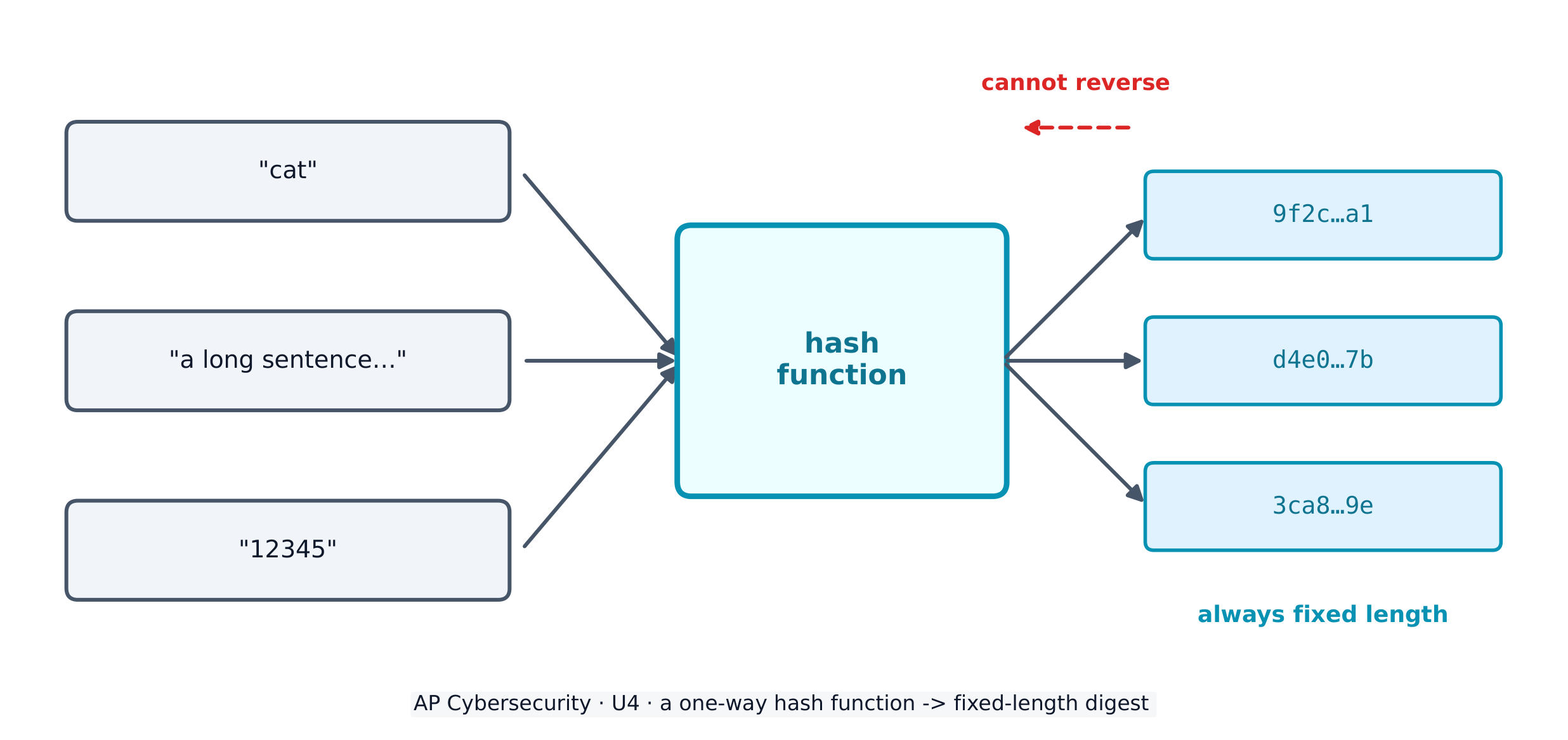
To store passwords safely, systems use a cryptographic hash function 密码散列函数 - a one-way maths algorithm that turns any input into a fixed-length string called a hash 散列值 (or digest). Hashes have three vital properties: they are collision resistant 抗碰撞 (hard to find two inputs with the same output), have pre-image resistance 抗原像 (you cannot work backwards to the input), and are repeatable (the same input always gives the same hash).

Real hash functions have names. The Secure Hash Algorithm (SHA) family – SHA-256 and SHA-512 – is today's standard. Adversaries attack a hash function by trying to force a collision (two different inputs with the same hash); once an efficient collision attack exists, that function is deprecated 弃用 (retired from secure use). MD5 and SHA-1 are the classic deprecated examples – never rely on them to protect data today.

A service never stores your plaintext password. It stores the hash; when you log in, it hashes what you typed and compares. To stop two identical passwords producing identical hashes, a few random bits called salt 盐值 are added before hashing, so every stored hash is unique.

Worked example. Two users both choose the password sunshine. Without salt, both stored hashes would be identical, so cracking one instantly cracks the other. Give each user a unique salt - say x7 and q2 - and the service hashes sunshinex7 and sunshineq2 instead. The two stored hashes now look completely different, so the adversary must attack each account separately. This is why a stolen hash database is far less dangerous when the hashes are salted.

Adversaries fight back with password attacks. Online attacks guess against a live login; offline attacks steal the hash database and crack it on their own machine (which bypasses any account-lockout protection). Techniques include:

  • brute force 暴力破解 - an automated tool tries every possible password in turn; guaranteed to work eventually, but slow, and it grows explosively with password length.
  • a dictionary attack 字典攻击 - the tool tries a list of common words and known passwords first, because most people pick guessable ones.
  • password spraying 密码喷洒 - one common password against many accounts (this dodges lockout, which counts failures per account).
  • credential stuffing 撞库 - reusing stolen or default credentials, exploiting that people reuse passwords across sites.
  • a rainbow table 彩虹表 - a precomputed table of passwords and their hashes, sorted by hash, so a captured hash can be looked up instead of recomputed.

Password policy settings

An administrator hardens accounts by configuring login settings - and the exam expects you to name them and say what each defends against:

Setting What it does The attack it slows
complexity 复杂度 require a character from each set (upper, lower, digit, special) brute force / dictionary
minimum length 最小长度 require N characters - length matters more than anything brute force (grows exponentially)
maximum age 最长有效期 force a change every ~90-120 days limits how long a stolen password is useful
password history 密码历史 store the last 5-10 hashes, block reuse stops recycling an old (possibly leaked) password
lockout 锁定 lock the account after 3-5 wrong tries brute force / online guessing

One subtlety worth a mark: some national standards now advise against forced expiry, because regular changes push users into predictable patterns like PasswordFall2028. A password manager 密码管理器 solves the real problem - it generates and stores a long, unique password per site, so none is ever reused or guessable.

Authentication factors prove who you are, and fall into categories: something you know (a password), something you have (a token or phone), something you are (a biometric 生物特征 like a fingerprint or retina scan), and somewhere you are (a location factor). Using two or more is multifactor authentication (MFA) 多因素身份验证 - far stronger than a password alone.

Removable media, and the autorun problem

An adversary can load malware onto an external drive — a USB stick, a portable disc — and leave it where someone will pick it up. If autorun 自动运行 is enabled, the device runs a program from that drive the moment it is inserted, with no click required, so the malware executes before the user has decided to trust anything.

Two controls answer this, and the exam wants both named:

  • Disable autorun, so inserting a drive never runs anything by itself.
  • Prohibit users from connecting external drives or media at all — enforced by policy and by a technical control that blocks the USB ports — which is why so many secure environments physically or logically disable them.
ไทย
การยืนยันตัวตนหลายปัจจัย (Multi-factor authentication)
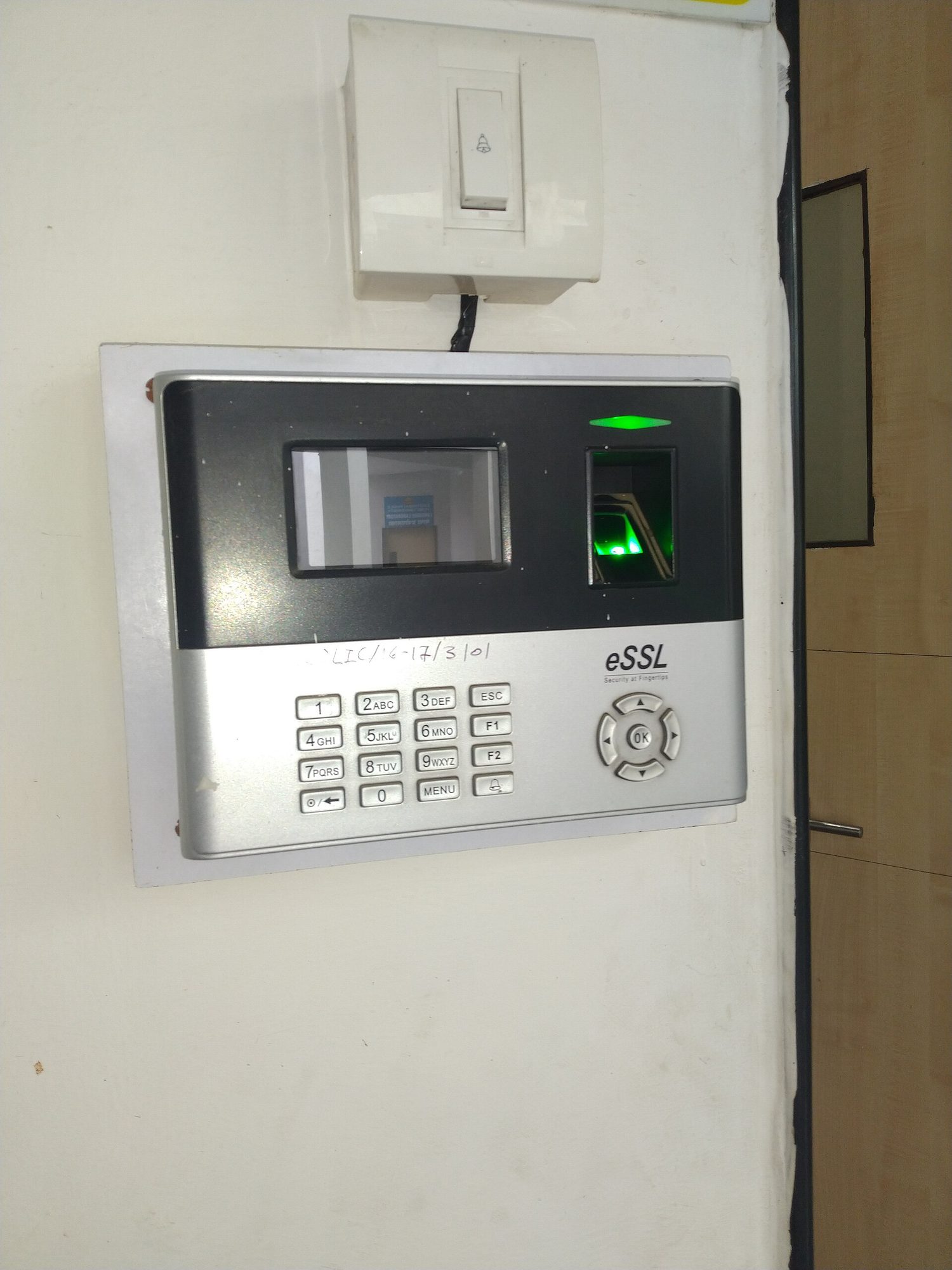
A person pressing a fingertip onto a small optical fingerprint scanner
เครื่องสแกนลายนิ้วมือ: การยืนยันตัวตนทางชีวภาพตรวจสอบสิ่งที่คุณเป็น (something you ARE), ซึ่งยากต่อการโจรกรรมหรือเดาของนักโจมตีมากกว่ารหัสผ่าน

เพื่อจัดเก็บรหัสผ่านอย่างปลอดภัย ระบบใช้ ฟังก์ชันแฮชทางคณิตศาสตร์ (cryptographic hash function) - อัลกอริทึมคณิตศาสตร์แบบทางเดียวที่แปลงอินพุตใดๆ เป็นสตริงที่มีความยาวคงที่ที่เรียกว่า แฮช (hash) (หรือ digest). แฮชมีสามคุณสมบัติที่สำคัญ:它们是 ** resistant ต่อการชน (collision resistant)** (ยากที่จะหาค่าอินพุตสองค่าที่มีเอาต์พุตเหมือนกัน), มี pre-image resistance (ไม่สามารถย้อนกลับไปยังอินพุตได้), และเป็น repeatable (อินพุตเดียวกันให้แฮชเสมอ)

A hash function turns any input into a fixed-length digest, and cannot be reversed
ฟังก์ชันแฮชแปลงอินพุตใดๆ เป็น digest ที่มีความยาวคงที่ และไม่สามารถย้อนกลับได้

ฟังก์ชันแฮชจริงมีชื่อ ฟังก์ชัน Secure Hash Algorithm (SHA) – SHA-256 และ SHA-512 – เป็นมาตรฐานในปัจจุบัน ผู้โจมตีจะโจมตีฟังก์ชันแฮชโดยพยายาม สร้างการชน (collision) (อินพุตที่แตกต่างกันสองชนิดแต่ให้ค่าแฮชเหมือนกัน) เมื่อมีการโจมตีแบบชนที่มีประสิทธิภาพเกิดขึ้นแล้ว ฟังก์ชันนั้นจะถูก ยกเลิกการใช้งาน (deprecated) (ถอนออกจากการใช้งานด้านความปลอดภัย) MD5 และ SHA-1 เป็นตัวอย่างคลาสสิกของการถูกยกเลิกการใช้งาน – ห้ามพึ่งพาฟังก์ชันเหล่านี้เพื่อปกป้องข้อมูลในปัจจุบัน

บริการไม่เก็บรหัสผ่านแบบข้อความธรรมดาของคุณไว้ บริการจะเก็บ ค่าแฮช; เมื่อคุณเข้าสู่ระบบ它将จะแฮชสิ่งที่พิมพ์ลงและเปรียบเทียบ เพื่อป้องกันไม่ให้รหัสผ่านที่เหมือนกันสองตัวสร้างค่าแฮชที่เหมือนกัน จะเพิ่มบิตสุ่มจำนวนเล็กน้อยที่เรียกว่า เกลือ (salt) ก่อนทำการแฮช ทำให้ค่าแฮชที่เก็บไว้ทั้งหมดแตกต่างกัน

ตัวอย่างคำอธิบาย ผู้ใช้สองคนเลือกรหัสผ่าน sunshine เช่นกัน หากไม่มีเกลือ ค่าแฮชที่เก็บไว้ทั้งสองจะเหมือนกัน ทำให้_temperature__account一个 instantly_temperature另一个。มอบเกลือเฉพาะสำหรับผู้ใช้แต่ละคน – เช่น x7 และ q2 – แล้วบริการจะแฮช sunshinex7 และ sunshineq2 แทน ค่าแฮชที่เก็บไว้ทั้งสองตอนนี้ดูแตกต่างกันอย่างสิ้นเชิง ทำให้ผู้ต้องร้ายต้องโจมตีบัญชีแยกต่างหาก นี่คือเหตุผลว่าทำไมฐานข้อมูลแฮชที่ถูกขโมยจึงอันตรายน้อยกว่ามากเมื่อแฮชมีเกลือ

ผู้ต้องร้ายตอบโต้ด้วยการ โจมตีรหัสผ่าน การโจมตี ออนไลน์ จะลองเดารหัสผ่านกับหน้าเข้าสู่ระบบจริง; การโจมตี ออฟไลน์ จะขโมยฐานข้อมูลแฮชและ_temperature它ในเครื่องของตนเอง (ซึ่งข้ามการป้องกันล็อคบัญชี) เทคนิครวมถึง:

  • brute force - เครื่องมืออัตโนมัติจะลอง ทุก รหัสผ่านที่เป็นไปได้ทีละตัว; รับประกันว่าจะทำงานได้ในที่สุด แต่ช้าลง, และมันเพิ่มขึ้นอย่างรวดเร็วตามความยาวของรหัสผ่าน.
  • dictionary attack - เครื่องมือจะลองรายการคำทั่วไปและรหัสผ่านที่รู้จักเป็นอันดับแรก เนื่องจาก大多数人เลือกสิ่งที่เดาได้ง่าย
  • password spraying - ใช้รหัสผ่านหนึ่งตัวต่อหลายบัญชี (วิธีนี้หลีกเลี่ยงการล็อค ซึ่งนับความผิดพลาดต่อบัญชี)
  • credential stuffing - ใช้ข้อมูลยืนยันตัวตนที่ถูกขโมยหรือค่าเริ่มต้นซ้ำ Embassy ที่ผู้ใช้ใช้รหัสผ่านซ้ำข้ามเว็บไซต์
  • rainbow table - ตารางที่คำนวณล่วงหน้าของรหัสผ่านและค่าแฮช их它们, เรียงตามค่าแฮช เพื่อให้สามารถค้นหาค่าแฮชที่ถูกจับได้โดยไม่ต้องคำนวณใหม่

การตั้งค่านโยบายรหัสผ่าน

ผู้ดูแลระบบเสริมความปลอดภัยให้กับบัญชีโดยการ กำหนดการตั้งค่าการเข้าสู่ระบบ – และการสอบคาดหวังให้คุณระบุชื่อบนและบอกว่าการป้องกันอะไรแต่ละอย่าง:

การตั้งค่า สิ่งที่ทำ การโจมตีที่ชะลอไว้
complexity กำหนดต้องมีอักขระจากแต่ละชุด (ตัวพิมพ์ใหญ่, ตัวพิมพ์เล็ก,的数字, พิเศษ) brute force / dictionary
minimum length กำหนดให้ใช้ N อักขระ – ความยาวสำคัญกว่าสิ่งอื่นใด brute force (เพิ่มขึ้นแบบเอ็กซ์โพเนนเชียล)
maximum age บังคับให้เปลี่ยนทุก ~90-120 วัน จำกัดระยะเวลาที่รหัสผ่านที่ถูกขโมยจะมีประโยชน์
password history เก็บค่าแฮชล่าสุด 5-10 ตัว, ป้องกันการใช้ซ้ำ หยุดการใช้รหัสผ่านเก่าที่อาจรั่วไหลซ้ำ
lockout ล็อคบัญชีหลังจากลองผิด 3-5 ครั้ง brute force / online guessing

รายละเอียดเล็กๆ น้อยๆ ที่ควรทราบ: มาตรฐานแห่งชาติบางแห่งตอนนี้แนะนำ ไม่ให้ บังคับให้หมดอายุ เพราะการเปลี่ยนประจำ促使 users into predictable patterns like PasswordFall2028. Password manager แก้ไขปัญหาที่แท้จริง – มันสร้างและเก็บรหัสผ่านที่ยาวและเฉพาะสำหรับแต่ละเว็บไซต์ ทำให้ไม่มีรหัสผ่านใดถูกใช้ซ้ำหรือเดาได้ง่าย

ปัจจัยการยืนยันตัวตน (Authentication factors) ยืนยันว่าคุณคือใคร และมีประเภทต่างๆ: สิ่งที่ คุณ รู้ (รหัสผ่าน), สิ่งที่ คุณ มี (token หรือโทรศัพท์), สิ่งที่ คุณ เป็น (biometric เช่นลายนิ้วมือหรือสแกนเรติน่า), และสถานที่ที่คุณ อยู่ (ปัจจัยตำแหน่ง) การใช้สองอย่างขึ้นไปคือ การยืนยันตัวตนหลายขั้นตอน (MFA) – แข็งแกร่งกว่ารหัสผ่านเพียงอย่างเดียวมาก

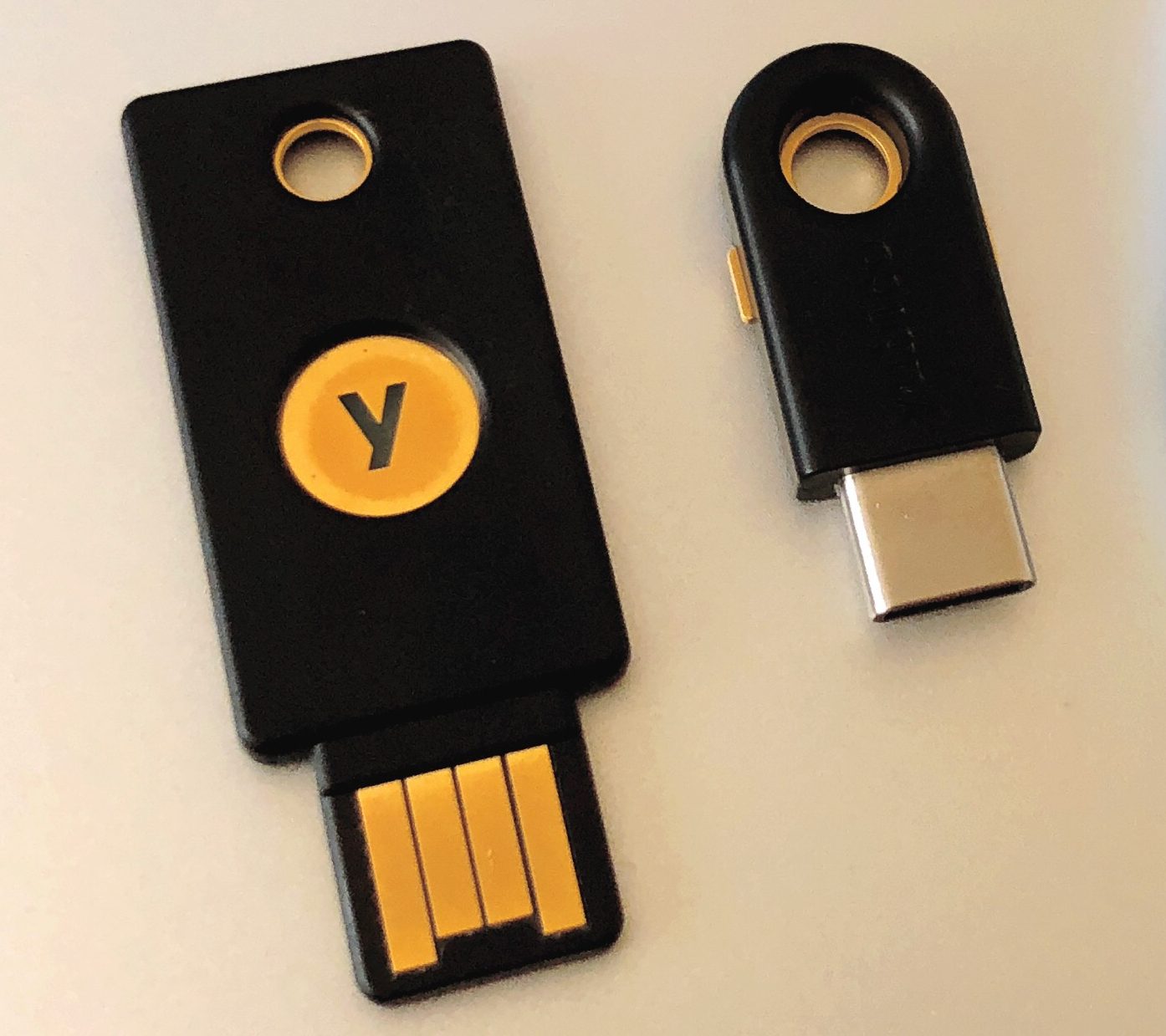
กุญแจความปลอดภัยฮาร์ดแวร์ USB ขนาดเล็กสองอัน
กุญแจความปลอดภัยฮาร์ดแวร์ยืนยันตัวตนด้วยสิ่งที่ถืออยู่ในมือ – ปัจจัยรองที่แข็งแกร่ง

สื่อถอดได้ และปัญหา autorun

ผู้ต้องร้ายสามารถโหลดมัลแวร์ลงใน ไดรฟ์ภายนอก – Stick USB, Disc แบบพกพา – และทิ้งไว้ให้คนอื่นหยิบขึ้นมา หาก autorun เปิดอยู่ Device จะรันโปรแกรมจากไดรฟ์นั้น ทันทีที่เสียบเข้า โดยไม่ต้องคลิกใดๆ ทำให้มัลแวร์被执行ก่อนที่ผู้ใช้จะตัดสินใจเชื่อถืออะไรเลย

การควบคุมสองอย่างตอบคำถามนี้ และการสอบต้องการให้ระบุชื่อทั้งสอง:

  • ปิด autorun, เพื่อให้การเสียบไดรฟ์ไม่รันอะไรเอง
  • ห้ามผู้ใช้เชื่อมต่อดูรฟ์ภายนอกหรือสื่อ เลย – enforced by policy และโดย technical control ที่บล็อกพอร์ต USB – ซึ่งเป็นเหตุผลว่าทำไมสภาพแวดล้อมที่ปลอดภัยจำนวนมากถึงปิดใช้งานทางกายภาพหรือทาง.logically them
Explore · ⁨สำรวจ⁩

How a hash maps any input to a fixed slot · ⁨วิธีที่ hash映射ทุกอินพุตไปยังช่องความยาวคงที่⁩

A hash function sends every input to a fixed-length output. The same input always lands in the same place (repeatable), and you cannot work backwards from the slot to the input. · ⁨ฟังก์ชัน hash ส่งอินพุตทุกอย่างไปยังเอาต์พุตความยาวคงที่ อินพุตเดียวกันจะตกอยู่ในตำแหน่งเดิมเสมอ (ทำซ้ำได้) และไม่สามารถย้อนกลับจากช่องนั้นไปหาอินพุตได้⁩

Vocabulary · ⁨คำศัพท์⁩ Train · ⁨ฝึกฝน⁩
English ไทย
cryptographic hash function/ˌkrɪptəˈɡræfɪk hæʃ ˈfʌŋkʃn/ ฟังก์ชันแฮชเข้ารหัส
hash/hæʃ/ แฮช (hash)
collision resistant/kəˈlɪʒn rɪˈzɪstənt/ ต้านทานการชน (collision resistant)
pre-image resistance/priː ˈɪmɪdʒ rɪˈzɪstəns/ pre-image resistance
deprecated/ˈdeprɪkeɪtɪd/ เลิกใช้แล้ว (deprecated)
salt/sɒlt/ เกลือ
brute force/bruːt fɔːs/ brute force
dictionary attack/ˈdɪkʃənəri əˈtæk/ การโจมตีแบบพจนานุกรม
password spraying/ˈpæswɜːd ˈspreɪɪŋ/ Password spraying
credential stuffing/krɪˈdenʃl ˈstʌfɪŋ/ Credential stuffing
rainbow table/ˈreɪnbəʊ ˈteɪbl/ ตารางสายรุ้ง (rainbow table)
complexity/kəmˈpleksɪti/ ความซับซ้อน
minimum length/ˈmɪnɪməm leŋθ/ ความยาวขั้นต่ำ
maximum age/ˈmæksɪməm eɪdʒ/ อายุสูงสุด
password history/ˈpæswɜːd ˈhɪstəri/ ประวัติรหัสผ่าน
lockout/ˈlɒkaʊt/ การล็อกเอาท์
password manager/ˈpæswɜːd ˈmænɪdʒə/ ผู้จัดการรหัสผ่าน
biometric/ˌbaɪəʊˈmetrɪk/ ชีวมิติ
multifactor authentication (MFA)/ˌmʌltɪˈfæktə ɔːˌθentɪˈkeɪʃn/ การยืนยันตัวตนหลายปัจจัย (MFA)
autorun/ˌɔːtəʊˈrʌn/ autorun
Watch lesson · ⁨ดูบทเรียน⁩
4.3

Protecting Devices · ⁨การปกป้องอุปกรณ์⁩

Syllabus · ⁨หลักสูตร⁩
English

Learning Objective 4.3.A: Identify managerial controls related to device security.

  • 4.3.A.1 An acceptable use policy will describe the range of activities that are permissible, prohibited, or required by users on devices owned by an organization and may include:
    • Prohibiting users from accessing specific websites or types of websites (e.g., social media or gaming)
    • Requiring users to keep software updated
    • Allowing users to connect peripheral devices
    • Prohibiting users from connecting external drives or media
  • 4.3.A.2 A password policy will detail the requirements for user passwords within an organization and may include:
    • A minimum or maximum password length
    • A minimum or maximum amount of time a user may keep the same password
    • A prohibition of password reuse
    • Rules for password construction (e.g., no dictionary words and character set requirements)
    • A suggestion to use secure password management tools instead of writing passwords down
  • 4.3.A.3 A software installation policy will describe what (if any) software users are allowed to install on their devices and usually also a process for users to request specialized software they may need to perform their role, and it may include:
    • A prohibition against users installing software on their devices
    • A process for users to request new software needed for their role
    • A list of approved software for users

Learning Objective 4.3.B: Explain how anti-malware software can make a device more secure.

  • 4.3.B.1 Anti-malware software (sometimes called antivirus software) has tools to quarantine and remove malware that can corrupt, spy on, or destroy a system. Malware contains indicators that make it detectable; these indicators are called signatures.
  • 4.3.B.2 Anti-malware software has a database of malware signatures. It periodically scans the files on a device and checks to see if any of the files match any of the signatures in its database. If there is a match, the software quarantines and removes the malicious files.

Learning Objective 4.3.C: Explain why keeping a device’s operating system and software updated makes it more secure.

  • 4.3.C.1 When vulnerabilities in operating systems and software are found, the vendor or organization that maintains the operating system software will fix it and send an update. A small update is called a patch.
  • 4.3.C.2 Ensuring that a computer’s operating system and software applications are updated to the most recent version prevents adversaries from taking advantage of a known vulnerability.

Learning Objective 4.3.D: Configure a host-based firewall.

  • 4.3.D.1 Host-based firewalls allow or deny traffic into or out of a single device. This provides an extra layer of security in case a host is connected to a compromised network.
  • 4.3.D.2 A host-based firewall is software that runs on a device and follows a set of rules (an ACL) like a network-based firewall. Firewall rules are implemented in order, applying the first rule that matches.
  • 4.3.D.3 A host-based firewall can also block specified types of outbound traffic. Host-based firewalls should always block ports or services not needed for a given device.
    • Illustrative examples for 4.3.D.3:
      • A host-based firewall is configured to block outbound FTP traffic. This prevents an adversary with remote access to the host from using FTP to exfiltrate a file to the adversary’s server.
  • 4.3.D.4 The rules for a host-based firewall can allow or deny traffic based on source or destination port or IP address, service, protocol, or application.
ไทย

วัตถุประสงค์การเรียนรู้ 4.3.A: ระบุการควบคุมด้านการจัดการที่เกี่ยวข้องกับความปลอดภัยของอุปกรณ์

  • 4.3.A.1 นโยบายการใช้ที่ยอมรับได้จะอธิบายขอบเขตของกิจกรรมที่อนุญาต ห้าม หรือต้องทำโดยผู้ใช้บนอุปกรณ์ที่เป็นเจ้าของขององค์กร และอาจรวมถึง:
    • การห้ามผู้ใช้เข้าถึงเว็บไซต์เฉพาะหรือประเภทของเว็บไซต์ (เช่น สื่อสังคมออนไลน์หรือเกม)
    • การบังคับให้ผู้ใช้รักษาซอฟต์แวร์ให้ทันสมัย
    • การอนุญาตให้ผู้เชื่อมต่อกับอุปกรณ์ต่อพ่วง
    • การห้ามผู้ใช้เชื่อมต่อกับไดรฟ์ภายนอกหรือสื่อจัดเก็บข้อมูล
  • 4.3.A.2 นโยบายรหัสผ่านจะรายละเอียดข้อกำหนดสำหรับรหัสผ่านของผู้ใช้ภายในองค์กร และอาจรวมถึง:
    • ความยาวรหัสผ่านขั้นต่ำหรือสูงสุด
    • ระยะเวลาขั้นต่ำหรือสูงสุดที่ผู้ใช้สามารถรักษารหัสผ่านเดิมได้
    • การห้ามใช้รหัสผ่านซ้ำ
    • กฎเกณฑ์สำหรับการสร้างรหัสผ่าน (เช่น ห้ามใช้คำในพจนานุกรมและข้อกำหนดชุดตัวอักษร)
    • คำแนะนำให้ใช้เครื่องมือจัดการรหัสผ่านที่ปลอดภัยแทนการจดรหัสผ่านลงกระดาษ
  • 4.3.A.3 นโยบายการติดตั้งซอฟต์แวร์จะอธิบายว่าผู้ใช้สามารถติดตั้งซอฟต์แวร์ใด (ถ้ามี) บนอุปกรณ์ของตน และมักจะมีกระบวนการที่ผู้ใช้สามารถขอซอฟต์แวร์เฉพาะทางที่ต้องการสำหรับบทบาทการทำงาน และอาจรวมถึง:
    • การห้ามผู้ใช้ติดตั้งซอฟต์แวร์บนอุปกรณ์
    • กระบวนการที่ผู้ใช้สามารถขอซอฟต์แวร์ใหม่ที่จำเป็นสำหรับบทบาทการทำงาน
    • รายการซอฟต์แวร์ที่ได้รับการอนุมัติสำหรับผู้ใช้งาน

วัตถุประสงค์การเรียนรู้ 4.3.B: อธิบายว่าซอฟต์แวร์ป้องกันมัลแวร์สามารถทำให้ปลอดภัยของอุปกรณ์ดีขึ้นได้อย่างไร

  • 4.3.B.1 ซอฟต์แวร์ป้องกันมัลแวร์ (บางครั้งเรียกว่าซอฟต์แวร์แอนตี้ไวรัส) มีเครื่องมือในการกักกันและลบมัลแวร์ที่สามารถทำลาย spy หรือทำลายระบบ มัลแวร์มีตัวบ่งชี้ที่ทำให้ตรวจจับได้ ซึ่งตัวบ่งชี้นี้เรียกว่าลายเซ็น
  • 4.3.B.2 ซอฟต์แวร์ป้องกันมัลแวร์มีฐานข้อมูลลายเซ็นมัลแวร์它将定期扫描设备上的文件并检查是否有任何文件与数据库中的任何签名匹配。如果有匹配,软件将隔离并删除恶意文件。

วัตถุประสงค์การเรียนรู้ 4.3.C: อธิบายว่าทำไมการรักษาการอัปเดตระบบปฏิบัติการและซอฟต์แวร์ของอุปกรณ์จึงทำให้ปลอดภัยขึ้น

  • 4.3.C.1 เมื่อพบช่องโหว่ในระบบปฏิบัติการและซอฟต์แวร์ ผู้ผลิตหรือองค์กรที่ดูแลระบบปฏิบัติการจะแก้ไขและส่งการอัปเดต การอัปเดตขนาดเล็กเรียกว่าแพตช์
  • 4.3.C.2 การมั่นใจว่าระบบปฏิบัติการและแอปพลิเคชันซอฟต์แวร์ของคอมพิวเตอร์ได้รับการอัปเดตเป็นเวอร์ชันล่าสุดจะช่วยป้องกันผู้ไม่หวังดีจากการใช้ประโยชน์จากช่องโหว่ที่ถูกทราบแล้ว

วัตถุประสงค์การเรียนรู้ 4.3.D: ตั้งค่าไฟร์วอลล์แบบโฮสต์

  • 4.3.D.1 ไฟร์วอลล์แบบโฮสต์อนุญาตหรือปฏิเสธการรับส่งข้อมูลเข้าหรือออกจากอุปกรณ์เดียว ซึ่งให้การป้องกันชั้นเพิ่มเติมในกรณีที่โฮสต์เชื่อมต่อกับเครือข่ายที่ถูก攻破แล้ว
  • 4.3.D.2 ไฟร์วอลล์แบบโฮสต์เป็นซอฟต์แวร์ที่ทำงานบนอุปกรณ์และปฏิบัติตามชุดกฎ (ACL) เหมือนกับไฟร์วอลล์แบบเครือข่าย กฎหมายไฟร์วอลล์จะถูกนำไปใช้ตามลำดับ โดยใช้กฎแรกที่ตรงกัน
  • 4.3.D.3 ไฟร์วอลล์แบบโฮสต์ยังสามารถปิดกั้นประเภทการรับส่งข้อมูลออกที่ระบุไว้ ไฟร์วอลล์แบบโฮสต์ควรปิดกั้นพอร์ตหรือบริการที่ไม่จำเป็นสำหรับอุปกรณ์ที่กำหนดเสมอ
    • ตัวอย่างประกอบสำหรับ 4.3.D.3:
      • ไฟร์วอลล์แบบโฮสต์ถูกตั้งค่าให้ปิดกั้นการรับส่งข้อมูล FTP แบบออก ซึ่งช่วยป้องกันผู้ไม่หวังดีที่มีสิทธิ์เข้าถึงระยะไกลจากโฮสต์จากการใช้ FTP เพื่อดึงไฟล์ออกไปยังเซิร์ฟเวอร์ของผู้ไม่หวังดี
  • 4.3.D.4 กฎสำหรับไฟร์วอลล์แบบโฮสต์สามารถอนุญาตหรือปฏิเสธการรับส่งข้อมูลبناءตามพอร์ตต้นทางหรือปลายทาง หรือที่อยู่ IP บริการ โปรโตคอล หรือแอปพลิเคชัน

Source: College Board AP Course and Exam Description · ⁨แหล่งที่มา: คำอธิบายหลักสูตรและข้อสอบ College Board AP⁩

English

Managerial controls set the rules: an acceptable use policy 可接受使用政策 lists what users may and may not do, a password policy sets length and reuse rules, and a software installation policy controls what can be installed.

Technical controls do the work. Anti-malware software 反恶意软件 keeps a database of malware signatures and quarantines any file that matches. Keeping the operating system and applications updated - installing each patch 补丁 - closes known holes before adversaries can use them. A host-based firewall 主机防火墙 controls traffic in and out of one single device, blocking ports and services it does not need.

ไทย

การควบคุมด้านการบริหารกำหนดกฎ: นโยบายการใช้ที่ยอมรับได้ (acceptable use policy) ระบุสิ่งที่ผู้ใช้ทำได้และไม่ได้ทำ, นโยบายรหัสผ่าน กำหนดความยาวและกฎการใช้ซ้ำ, และ นโยบายการติดตั้งซอฟต์แวร์ ควบคุมสิ่งที่สามารถติดตั้งได้

การควบคุมทางเทคนิคทำหน้าที่ Anti-malware software รักษาคำนำหน้าของมัลแวร์ signatures และ quarantine ไฟล์ที่ตรงกับมัน การรักษา Operating system และ applications updated - ติดตั้งแต่ละ patch - ปิดช่องโหว่ที่รู้จักก่อนผู้ต้องร้ายจะใช้它们在

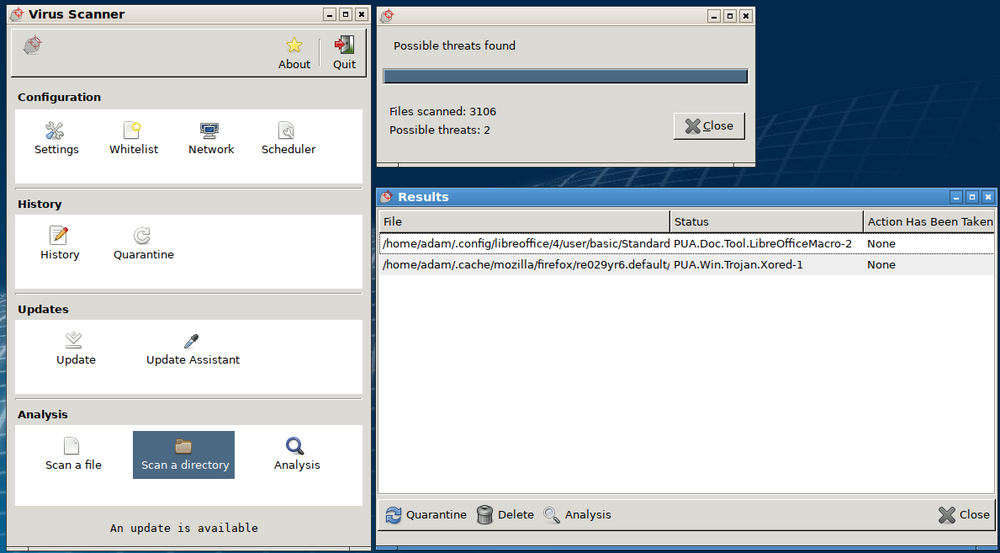
หน้าต่าง Anti-malware scanner: สแกนไฟล์ 3106 ไฟล์, พบภัยคุกคามสองชนิด, พร้อมการควบคุม quarantine และ update
Anti-malware software สแกนไฟล์เทียบกับฐานข้อมูล signatures และ quarantine任何matches – การสแกนนี้มี标记 two threats
Vocabulary · ⁨คำศัพท์⁩ Train · ⁨ฝึกฝน⁩
English ไทย
acceptable use policy/əkˈseptəbl juːs ˈpɒlɪsi/ นโยบายการใช้งานที่ยอมรับได้
Anti-malware software/ˈænti ˈmælweə ˈsɒftweə/ ซอฟต์แวร์ Anti-malware
patch/pætʃ/ patch
host-based firewall/həʊst beɪst ˈfaɪəwɔːl/ host-based firewall
indicator of compromise (IoC)/ˈɪndɪkeɪtə ɒv ˈkɒmprəmaɪz/ ตัวบ่งชี้การถูกบุกรุก (IoC)
endpoint detection and response (EDR)/endˈpɔɪnt dɪˈtekʃn ænd rɪˈspɒns/ การตรวจจับและตอบสนองที่จุดปลาย (EDR)
4.4

Detecting Attacks on Devices · ⁨การตรวจจับการโจมตีบนอุปกรณ์⁩

Syllabus · ⁨หลักสูตร⁩
English

Learning Objective 4.4.A: Explain how to detect attacks against devices.

  • 4.4.A.1 System processes and settings, login attempts, file download attempts, and user actions are logged by computing systems. These logs can be used to reconstruct circumstances leading up to and during a cyber incident.
  • 4.4.A.2 An indicator of compromise (IoC) is evidence that an adversary has compromised a device or network.
  • 4.4.A.3 Authentication logs (or auth logs) record every attempted login on a system. Analysis of authentication logs can reveal attempted attacks.
  • 4.4.A.4 Host-based IoCs are discovered when analyzing logs and configuration settings. Indicators, such as the following, can be found in authentication logs, user activity logs, and system configuration files:
    • Unusual files being created or modified
    • Unexpected processes or services
    • Unauthorized changes to system configuration settings
    • Unauthorized software installation or update
  • 4.4.A.5 File-based IoCs are discovered when analyzing files on a device. Indicators are usually found in executable files and can include:
    • Files whose hash matches known malware
    • File names that are known to be created by a certain piece of malware
    • File paths that are associated with malicious activity
  • 4.4.A.6 Behavior-based IoCs are discovered when analyzing logs. Indicators can be found in authentication logs and access logs and can include:
    • Multiple failed login attempts
    • Unusual login times or locations
    • Unauthorized attempts to access sensitive data
    • Attempts to elevate user privileges on a system

Learning Objective 4.4.B: Determine controls for detecting attacks against a device.

  • 4.4.B.1 Performance is a criterion for determining a detection method. Detection tools use system memory and processing power and can impact the performance of a device. Anomaly-based detection tools use more system resources than signature-based tools. Signature-based detection is a better option for devices with less powerful system resources. Many embedded devices do not have enough system resources to run any detection tools on the device.
  • 4.4.B.2 Cost is a criterion for determining a detection method. Organizations that purchase detection software need to consider the cost of purchasing enough software licenses for the number of devices they need to monitor. Some organizations purchase an endpoint detection and response (EDR) service from a third-party vendor. Although these services are expensive, they provide a holistic, unified approach to threat detection for an organization’s devices; they typically include a centralized alert platform for monitoring possible attacks on devices.
  • 4.4.B.3 Sensitivity or criticality of the device is a criterion for determining a detection method. Devices that store or process sensitive information or provide critical services are more likely to be targeted by adversaries and benefit from a hybrid-detection model to offer maximum protection, when possible.

Learning Objective 4.4.C: Evaluate the impact of a device detection method.

  • 4.4.C.1 Speed and performance are factors in evaluating the impact of a detection method. Signature-based detection is faster than anomaly-based detection in general, and that effect is compounded on devices, which often lack the processing power to effectively run anomaly-based detection tools. Implementing resource-intensive detection tools on devices can degrade device performance.
  • 4.4.C.2 Phase of the attack is a factor in evaluating the impact of a detection method. To carry out actions on a device, adversaries must first bypass a combination of physical- or network-layer protective, deterrent, and detective security controls. Detecting and stopping an attack at the device level can prevent adversaries from accessing sensitive data or disrupting critical services.
  • 4.4.C.3 False positives versus ease of bypassing detection is a factor in evaluating the impact of a detection method. Most device-level detection tools are signature-based, and signature-based detection has a low rate of false positives. However, signature-based detection is easier for adversaries to bypass.

Learning Objective 4.4.D: Apply detection techniques to identify indicators of password attacks by analyzing log files.

  • 4.4.D.1 Online password attacks can be detected in authentication logs. A single user attempting many wrong passwords is an indicator of an online password attack. If a user:password hash database has been compromised, all the user passwords in the database should be considered insecure and all users should be forced to reset their passwords.
  • 4.4.D.2 If an authorized user is logging in from a different location or IP address than expected, or at a different time than normal, this can be an indicator that the user’s password has been compromised.
  • 4.4.D.3 An indicator of password spraying is many users trying to log in within seconds of each other from one IP address or from unusual IP addresses.
  • 4.4.D.4 An indicator of credential stuffing is a series of default user:password combinations being attempted on a device in quick succession, often from the same IP address.
  • 4.4.D.5 Offline password attacks can’t be detected, because the attack takes place on the adversary’s computer.
ไทย

วัตถุประสงค์การเรียนรู้ 4.4.A: อธิบายวิธีการตรวจจับการโจมตีต่ออุปกรณ์

  • 4.4.A.1 กระบวนการและค่าการตั้งค่าของระบบ การพยายามเข้าสู่ระบบ การพยายามดาวน์โหลดไฟล์ และการกระทำของผู้ใช้จะถูกบันทึกโดยระบบคอมพิวเตอร์ บันทึกเหล่านี้สามารถใช้เพื่อสร้างสถานการณ์ที่นำไปสู่และระหว่างเหตุการณ์ไซเบอร์
  • 4.4.A.2 สัญญาณการถูกบุกรุก (IoC) คือหลักฐานที่บ่งชี้ว่าผู้โจมตีได้เข้าควบคุมอุปกรณ์หรือเครือข่ายแล้ว
  • 4.4.A.3 บันทึกการยืนยันตัวตน (หรือ auth logs) บันทึกทุกครั้งที่พยายามเข้าสู่ระบบบนระบบคอมพิวเตอร์ การวิเคราะห์บันทึกการยืนยันตัวตนสามารถเปิดเผยการโจมตีที่พยายามเกิดขึ้นได้
  • 4.4.A.4 สัญญาณการถูกบุกรุกแบบ Host-based จะถูกค้นพบเมื่อวิเคราะห์บันทึกและตั้งค่าการกำหนดค่า สัญญาณต่างๆ เช่น ตัวอย่างต่อไปนี้ สามารถพบได้ในบันทึกการยืนยันตัวตน บันทึกกิจกรรมของผู้ใช้ และไฟล์การกำหนดค่าระบบ:
    • ไฟล์ที่ไม่ปกติถูกสร้างหรือแก้ไข
    • กระบวนการหรือบริการที่ไม่คาดคิด
    • การเปลี่ยนแปลงการตั้งค่าระบบโดยไม่ได้รับอนุญาต
    • การติดตั้งหรืออัปเดตซอฟต์แวร์โดยไม่ได้รับอนุญาต
  • 4.4.A.5 สัญญาณการถูกบุกรุกแบบ File-based จะถูกค้นพบเมื่อวิเคราะห์ไฟล์บนอุปกรณ์ สัญญาณมักพบในไฟล์ที่รันได้และอาจประกอบด้วย:
    • ไฟล์ที่มีค่าแฮชตรงกับมัลแวร์ที่รู้จัก
    • ชื่อไฟล์ที่ทราบกันดีว่าเป็นการสร้างโดยมัลแวร์บางชนิด
    • เส้นทางไฟล์ที่เกี่ยวข้องกับกิจกรรมที่เป็นอันตราย
  • 4.4.A.6 สัญญาณการถูกบุกรุกแบบ Behavior-based จะถูกค้นพบเมื่อวิเคราะห์บันทึก สัญญาณสามารถพบได้ในบันทึกการยืนยันตัวตนและบันทึกการเข้าถึงและอาจประกอบด้วย:
    • ความพยายามเข้าสู่ระบบล้มเหลวหลายครั้ง
    • เวลาหรือสถานที่เข้าสู่ระบบที่ไม่ปกติ
    • ความพยายามเข้าถึงข้อมูลสำคัญโดยไม่ได้รับอนุญาต
    • ความพยายามยกระดับสิทธิ์ผู้ใช้ในระบบ

วัตถุประสงค์การเรียนรู้ 4.4.B: กำหนดมาตรการสำหรับการตรวจจับการโจมตีต่ออุปกรณ์

  • 4.4.B.1 ประสิทธิภาพเป็นเกณฑ์ในการกำหนดวิธีการตรวจจับ เครื่องมือตรวจจับใช้หน่วยความจำและกำลังประมวลผลของระบบและอาจส่งผลต่อประสิทธิภาพของอุปกรณ์ เครื่องมือตรวจจับแบบ Anomaly ใช้ทรัพยากรระบบมากกว่าเครื่องมือแบบ Signature การตรวจจับแบบ Signature เป็นทางเลือกที่ดีกว่าสำหรับอุปกรณ์ที่มีทรัพยากรระบบไม่สูงมากนัก อุปกรณ์ฝังตัวจำนวนมากไม่มีทรัพยากรระบบเพียงพอที่จะรันเครื่องมือตรวจจับใดๆ บนอุปกรณ์ได้
  • 4.4.B.2 ต้นทุนเป็นเกณฑ์ในการกำหนดวิธีการองค์กรที่ซื้อซอฟต์แวร์ตรวจจับต้องพิจารณาต้นทุนในการซื้อใบอนุญาตซอฟต์แวร์ให้เพียงพอต่อจำนวนอุปกรณ์ที่ต้องการตรวจสอบ บางองค์กรซื้อบริการตรวจจับและตอบสนองจุดปลาย (EDR) จากผู้ขายภายนอก แม้ว่าจะมีราคาแพง แต่บริการเหล่านี้ให้แนวทางที่ครอบคลุมและเป็นเอกภาพในการตรวจจับภัยคุกคามสำหรับอุปกรณ์ขององค์กร โดยทั่วไปจะรวมแพลตฟอร์มแจ้งเตือนแบบรวมศูนย์สำหรับการตรวจสอบการโจมตีที่อาจเกิดขึ้นต่ออุปกรณ์
  • 4.4.B.3 ระดับความไวต่อความเสี่ยงหรือความสำคัญของอุปกรณ์เป็นเกณฑ์ในการกำหนดวิธีการอุปกรณ์ที่จัดเก็บหรือประมวลผลข้อมูลสำคัญหรือให้บริการที่สำคัญมีแนวโน้มจะถูกโจมตีมากกว่าและจะได้รับประโยชน์จากโมเดลตรวจจับแบบผสมผสานเพื่อให้ความป้องกันสูงสุดเท่าที่จะเป็นไปได้

วัตถุประสงค์การเรียนรู้ 4.4.C: ประเมินผลกระทบของวิธีการตรวจจับอุปกรณ์

  • 4.4.C.1 ความเร็วและประสิทธิภาพเป็นปัจจัยในการประเมินผลกระทบของวิธีการตรวจจับ โดยทั่วไปการตรวจจับแบบ Signature จะเร็วกว่าการตรวจจับแบบ Anomaly และผลนี้ยิ่งชัดเจนขึ้นเมื่ออยู่ในอุปกรณ์ซึ่งมักขาดกำลังประมวลผลที่จะรันเครื่องมือตรวจจับแบบ Anomaly ได้อย่างมีประสิทธิภาพ การนำเครื่องมือตรวจจับที่ใช้ทรัพยากรสูงมาติดตั้งบนอุปกรณ์อาจทำให้ประสิทธิภาพของอุปกรณ์ลดลง
  • 4.4.C.2 ระยะของการโจมตีเป็นปัจจัยในการประเมินผลกระทบของวิธีการตรวจจับ เพื่อดำเนินการบนอุปกรณ์ ผู้โจมตีต้องผ่านด่านการป้องกัน การยับยั้ง และการตรวจจับที่ประกอบด้วยความปลอดภัยชั้นฟิสิกส์หรือเครือข่ายก่อน การตรวจจับและหยุดยั้งการโจมตีในระดับอุปกรณ์สามารถป้องกันไม่ให้ผู้โจมตีเข้าถึงข้อมูลสำคัญหรือรบกวนบริการสำคัญได้
  • 4.4.C.3 ผลบวกเท็จเปรียบเทียบกับความสะดวกในการหลบเลี่ยงการตรวจจับเป็นปัจจัยในการประเมินผลกระทบของวิธีการตรวจจับ เครื่องมือตรวจจับระดับอุปกรณ์ส่วนใหญ่เป็นแบบ Signature และการตรวจจับแบบ Signature มีอัตราผลบวกต่ำ อย่างไรก็ตาม การตรวจจับแบบ Signature ถูกผู้โจมตีหลบเลี่ยงได้ง่ายกว่า

วัตถุประสงค์การเรียนรู้ 4.4.D: ใช้เทคนิคการตรวจจับเพื่อระบุสัญญาณของการโจมตีรหัสผ่านโดยการวิเคราะห์ไฟล์บันทึก

  • 4.4.D.1 การโจมตีรหัสผ่านออนไลน์สามารถตรวจจับได้ในบันทึกการยืนยันตัวตน ผู้ใช้รายหนึ่งพยายามใส่รหัสผ่านผิดหลายครั้งคือสัญญาณของการโจมตีรหัสผ่านออนไลน์ หากฐานข้อมูลแฮชรหัสผ่านผู้ใช้ถูกบุกรุก รหัสผ่านผู้ใช้ทั้งหมดในฐานข้อมูลควร被视为ไม่ปลอดภัยและควรบังคับให้ผู้ใช้อุทิศเปลี่ยนรหัสผ่านทั้งหมด
  • 4.4.D.2 หากผู้ใช้ที่มีสิทธิ์เข้าสู่ระบบจากสถานที่หรือที่อยู่ IP ที่ต่างจากความคาดหวัง หรือในช่วงเวลาที่ต่างจากปกติ อาจเป็นสัญญาณว่ารหัสผ่านของผู้使用该被 compromised
  • 4.4.D.3 สัญญาณของการพ่นรหัสผ่าน (Password Spraying) คือผู้ใช้หลายคนพยายามเข้าสู่ระบบภายในเวลาไม่กี่วินาทีจากที่อยู่ IP เดียวกันหรือจากที่อยู่ IP ที่ผิดปกติ
  • 4.4.D.4 สัญญาณของการเติมข้อมูลประจำตัว (Credential Stuffing) คือการลองใช้ชุดข้อมูลประจำตัวผู้ใช้:รหัสผ่านเริ่มต้นหลายชุดบนอุปกรณ์ในลำดับรวดเร็ว มักมาจากที่อยู่ IP เดียวกัน
  • 4.4.D.5 การโจมตีรหัสผ่านออฟไลน์ไม่สามารถตรวจจับได้ เพราะการโจมตีเกิดขึ้นบนคอมพิวเตอร์ของผู้โจมตี

Source: College Board AP Course and Exam Description · ⁨แหล่งที่มา: คำอธิบายหลักสูตรและข้อสอบ College Board AP⁩

English

Devices log logins, file changes, and processes, and these logs reveal an indicator of compromise (IoC) 入侵指标 - evidence that an adversary got in. Host-based IoCs show up as unexpected processes or changed settings; file-based IoCs are files whose hash matches known malware; behaviour-based IoCs are things like many failed logins or unusual login times.

Choosing a detection method means weighing performance (signature-based is lighter, better for weak devices), cost (an endpoint detection and response (EDR) 端点检测与响应 service is powerful but expensive), and how sensitive the device is. Reading authentication logs exposes password attacks: many wrong passwords for one user signals a guessing attack; many users failing from one IP signals password spraying; a burst of default credentials signals credential stuffing. Offline attacks, though, cannot be detected - they happen on the adversary's own computer.

Speed is itself a security factor. Signature-based detection compares what it sees against a list of known-bad patterns, so it is faster than anomaly-based detection, which must first learn what normal looks like and then measure every event against that model. Anomaly-based detection catches attacks that have no signature yet, but it costs far more processing power — and on a device that lacks it, the effect compounds: the detection runs slowly, the device degrades, and the method ends up not being implemented effectively at all.

ไทย

อุปกรณ์บันทึกการเข้าสู่ระบบ การเปลี่ยนแปลงไฟล์ และกระบวนการ โดยข้อมูลเหล่านี้สามารถบ่งบอกถึง ตัวชี้วัดการถูกโจมตี (IoC) - ซึ่งคือหลักฐานที่แสดงว่าผู้ไม่ประสงค์ดีได้เข้าถึงระบบแล้ว IoC แบบโฮสต์ จะปรากฏเป็นกระบวนการที่ไม่คาดคิดหรือการตั้งค่าที่เปลี่ยนไป; IoC แบบไฟล์ คือไฟล์ที่มีค่าแฮชตรงกับมัลแวร์ที่รู้จัก; ส่วน IoC แบบพฤติกรรม เช่น การล็อกอินล้มเหลวหลายครั้ง หรือเวลาเข้าใช้ที่ไม่ปกติ

การเลือกวิธีการตรวจจับต้องพิจารณาถึง ประสิทธิภาพ (วิธีตามลายนิ้วมือมีน้ำหนักเบา เหมาะกับอุปกรณ์อ่อนแอ), ค่าใช้จ่าย (บริการ การตรวจจับและตอบสนองระดับเอนด์พอยต์ (EDR) มีประสิทธิภาพสูงแต่แพง), และความไวต่อความเสี่ยงของอุปกรณ์ การอ่าน ลอกรายละเอียดการยืนยันตัวตน ช่วยเปิดเผยการโจมตีรหัสผ่าน: รหัสผ่านผิดจำนวนมากสำหรับผู้ใช้คนเดียวบ่งบอกถึงการเดารหัส; ผู้ใช้หลายคนล้มเหลวจาก IP เดียวบ่งบอกถึง การสเปรย์รหัสผ่าน; การส่งชุดข้อมูลรหัสผ่านเริ่มต้นพร้อมกันบ่งบอกถึง การเติมข้อมูลรหัสผ่าน อย่างไรก็ตาม การโจมตีแบบออฟไลน์ไม่สามารถตรวจจับได้ เนื่องจากเกิดขึ้นบนคอมพิวเตอร์ของผู้ไม่ประสงค์ดีเอง

ความเร็วก็เป็นปัจจัยด้านความปลอดภัยอย่างหนึ่ง การตรวจจับแบบตามลายนิ้วมือจะเปรียบเทียบสิ่งที่เห็นได้กับรายการรูปแบบที่เป็นอันตราย Known-bad ทำให้มีความ เร็ว กว่าการตรวจจับแบบความผิดปกติ (anomaly-based) ซึ่งต้องเรียนรู้ก่อนว่าสิ่งใดเป็นปกติ แล้วจึงวัดทุกเหตุการณ์เทียบกับโมเดลนั้น การตรวจจับแบบความผิดปกติสามารถจับการโจมตีที่ยังไม่มีลายนิ้วมือได้ แต่ต้องใช้กำลังประมวลผลมากกว่ามาก — และในอุปกรณ์ที่ขาดแคลนทรัพยากร ผลกระทบจะทวีคูณ: การตรวจจับทำงานช้าลง อุปกรณ์เสื่อมสภาพ และวิธีนี้อาจไม่ได้ถูกนำไปใช้ได้อย่างมีประสิทธิภาพเลย

4.4

Exam tips · ⁨ข้อแนะนำสำหรับการสอบ⁩

English
  • Know each malware type by its defining trait: a worm self-spreads, a virus needs a user, ransomware encrypts for money, a RAT gives remote control, a rootkit hides.
  • A hash is one-way and fixed-length; salt makes identical passwords hash differently. Never say a service "stores the password" - it stores the salted hash.
  • Name real algorithms: SHA-256/SHA-512 are current; MD5 and SHA-1 are deprecated because efficient collision attacks exist.
  • Match the password attack to its log signature: one user + many wrong passwords = guessing; many users + one IP = spraying; default credentials = stuffing.
  • Sort authentication factors into know / have / are / where, and remember MFA combines two or more - a fingerprint plus a password, not two passwords.
  • Offline password attacks cannot be detected because the cracking happens on the adversary's machine - a favourite exam "gotcha".
ไทย
  • รู้จักแต่ละ ประเภทของมัลแวร์ตามลักษณะเด่น: เวิร์มกระจายตัวเอง, ไวรัสต้องการการใช้งานจากผู้ใช้, แรนซัมแวร์เข้ารหัสเพื่อเรียกค่าไถ่, RAT ให้การควบคุมระยะไกล, รูทคิตซ่อนตัว
  • แฮชเป็น ทางเดียวและมีขนาดคงที่; เกลือ (salt) ทำให้รหัสผ่านเหมือนกันเกิดค่าแฮชต่างกัน ห้ามบอกว่าบริการ "เก็บรหัสผ่านไว้" เพราะมันเก็บ ค่าแฮชที่มีเกลือผสม แทน
  • ใช้ชื่ออัลกอริทึมที่ถูกต้อง: SHA-256/SHA-512 เป็นมาตรฐานปัจจุบัน; ส่วน MD5 และ SHA-1 ถูก ยกเลิกการใช้งาน เนื่องจากมีเทคนิคการโจมตีการชน (collision attacks) ที่มีประสิทธิภาพแล้ว
  • จับคู่การโจมตีรหัสผ่านกับลายเซ็นในลอกระหว่าง: ผู้ใช้ 1 คน + รหัสผ่านผิดหลายครั้ง = การเดา; ผู้ใช้หลาย คน + IP เดียว = การสเปรย์; รหัสผ่านเริ่มต้น = การเติมข้อมูล
  • จัดกลุ่มปัจจัยการยืนยันตัวตนออกเป็น สิ่งที่รู้ / สิ่งที่ถือ / สิ่งที่เป็น / สถานที่, และจำไว้ว่า MFA ต้องรวมสองอย่างขึ้นไปเข้าด้วยกัน เช่น ลายนิ้วมือบวกกับรหัสผ่าน ไม่ใช่รหัสผ่านสองตัว
  • การโจมตีรหัสผ่านแบบออฟไลน์ไม่สามารถตรวจจับได้ เพราะการ cracking เกิดขึ้นบนเครื่องของผู้ไม่ประสงค์ดี — ซึ่งเป็นข้อสอบที่มักออกให้ระวัง

Interactive lessons on this topic · ⁨บทเรียนเชิงโต้ตอบสำหรับหัวข้อนี้⁩

Work through it step by step, with instant-check exercises. · ⁨ทำทีละขั้นตอน พร้อมแบบฝึกหัดตรวจสอบผลทันที⁩

Past Papers · ⁨ข้อสอบย้อนหลัง⁩

More topics in AP Cybersecurity · ⁨AP ความปลอดภัยทางไซเบอร์⁩ · ⁨หัวข้อเพิ่มเติมใน AP Cybersecurity · ⁨AP ความปลอดภัยทางไซเบอร์⁩⁩

Log in or create account · ⁨เข้าสู่ระบบหรือสร้างบัญชี⁩

IGCSE, A-Level & AP