Mini-project: a profile card · โปรเจกต์ย่อย: บัตรโปรไฟล์
This page needs a recent browser (with SharedArrayBuffer support). Please update Chrome, Edge, Firefox or Safari to the latest version. · หน้านี้ต้องใช้เบราว์เซอร์ล่าสุด (รองรับ SharedArrayBuffer) กรุณาอัปเดต Chrome, Edge, Firefox หรือ Safari เป็นเวอร์ชันล่าสุด
English
Your mini-project
- Time to put it all together and build a profile card.
- Here is what you are aiming for:
ไทย
โปรเจค mini ของคุณ
- ถึงเวลาที่จะนำeverything together来构建一个 profile card
- นี่คือสิ่งที่คุณกำลังมุ่งหมาย:
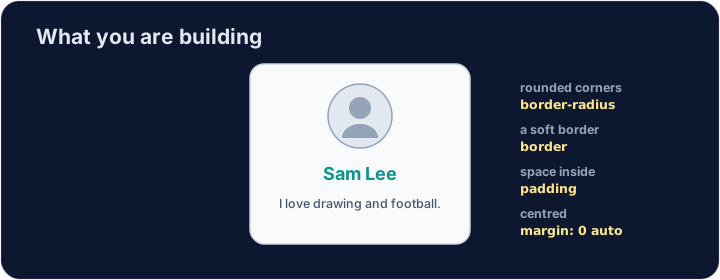
<style>
  .card { width: 280px; margin: 0 auto; padding: 20px; text-align: center;
          background-color: #f8fafc; border: 1px solid #cbd5e1; border-radius: 12px; }
  h2 { color: teal; margin: 8px 0; }
</style>
<div class="card">
  <img src="/static/code/web-basics/cat.svg" alt="My avatar" width="120">
  <h2>Sam Lee</h2>
  <p>I love drawing and football.</p>
</div>
English
What you've learned
- HTML: headings, paragraphs, lists, links, images, tables, forms, page structure.
- CSS: colours, text, the box model, spacing, sizing, and rows with Flexbox.
- That is the real foundation of every web page. You can build things now. 🎉
ไทย
สิ่งที่เรียนรู้มา
- HTML: หัวข้อ,ย่อหน้า,รายการ,ลิงก์,ภาพ,ตาราง,ฟอร์ม,โครงสร้างหน้าเว็บ
- CSS: สี,ข้อความ,โครงสร้างกล่อง,ระยะห่าง,ขนาด,และแถวด้วย Flexbox
- นั่นคือรากฐานจริงของ every web page. You can build things now. 🎉
English
Common mistakes
- Build and check one piece at a time.
- Keep the HTML structure and the CSS styling separate.
ไทย
ข้อผิดพลาดที่พบบ่อย
- สร้างและตรวจสอบ piece at a time
- รักษา HTML structure และ CSS styling แยกออกจากกัน
English
Build your card
- The card's layout is already styled, so you can focus on filling it in.
- Each task adds one piece — content, a picture, then colour. Press ▶ often!
ไทย
สร้างการ์ดของคุณ
- Layout ของการ์ดถูก styled ไว้แล้ว, so you can focus on filling it in
- แต่ละ task เพิ่ม one piece — content, a picture, แล้วตามด้วยสี. Press ▶ บ่อยๆ!
Start your card. Inside the .card, add an <h2> with a name and a <p> with one line about you. · เริ่มการ์ดของคุณ ภายใน ⟨.card⟩ เพิ่ม ⟨<h2>⟩ ที่มีชื่อและ ⟨<p>⟩ ที่มีข้อความหนึ่งบรรทัดเกี่ยวกับคุณ
Add a picture above the name. Add an <img src="/static/code/web-basics/cat.svg"> with alt text, just inside the card. · เพิ่มรูปภาพเหนือชื่อ เพิ่ม ⟨<img src="/static/code/web-basics/cat.svg">⟩ ที่มีข้อความ alt วางอยู่ภายในการ์ดพอดี
Finish it with a splash of colour. Give the h2 a colour you like, e.g. h2 { color: teal; }. · จบด้วยการเติมสีสัน ให้ ⟨h2⟩ มีสีที่คุณชอบ เช่น h2 { color: teal; }