Cyber security
Introduced| English | Meaning |
|---|---|
| cyber security/ˈsaɪbə sɪˈkjʊərɪti/ | Protecting digital systems, networks and information against threats to their confidentiality, integrity and availability. |
| malware/ˈmælweə/ | Software designed to damage, disrupt, exploit or gain unauthorised access to computer systems. |
| brute force/bruːt fɔːs/ | brute force |
| DDoS/diː duː es/ | Flooding a server with requests so it can't respond (the site goes down). |
| phishing/ˈfɪʃɪŋ/ | An attempt to trick someone into revealing information or taking an unsafe action by pretending to be a trusted source. |
| pharming/ˈfɑːmɪŋ/ | Redirecting a user to a fraudulent website by corrupting name resolution or related local settings, even when the intended address is entered. |
| social engineering/ˈsəʊʃl ˌendʒɪˈnɪərɪŋ/ | Manipulating people into revealing information or taking actions that compromise security. |
| virus/ˈvaɪrəs/ | Malicious software that replicates by attaching to or modifying other files or programs. |
| worm/wɜːm/ | Malicious software that copies itself between systems without needing to attach to another program. |
| Trojan horse/ˈtrəʊdʒn hɔːs/ | Pretends to be useful, but harms once installed. |
| spyware/ˈspaɪweə/ | spyware |
| ransomware/ˈrænsəmweə/ | Malicious software that blocks access to data or systems and demands payment, often by encrypting files. |
| firewall/ˈfaɪəwɔːl/ | A security system that filters network traffic according to rules. |
| authentication/ɔːˌθentɪˈkeɪʃn/ | Checking that a claimed identity is valid. |
Defending against attack
- Cyber security 网络安全 keeps computers, networks and data safe from attack.
- You must know the main threats, the types of malware 恶意软件, and how to protect data.
- Many attacks trick people, not just computers.
Threats
- Brute force 暴力破解 — trying many passwords quickly until one works.
- Data interception — "listening in" to steal data as it travels.
- DDoS 分布式拒绝服务 — flooding a server with requests so it can't respond (the site goes down).
- Hacking — gaining access without permission.
- Phishing 网络钓鱼 — fake messages that trick you into giving details; pharming 域名欺骗 — secret code sends you to a fake site even when you type the right address.
- Social engineering 社会工程 — tricking a person (e.g. pretending to be the boss).
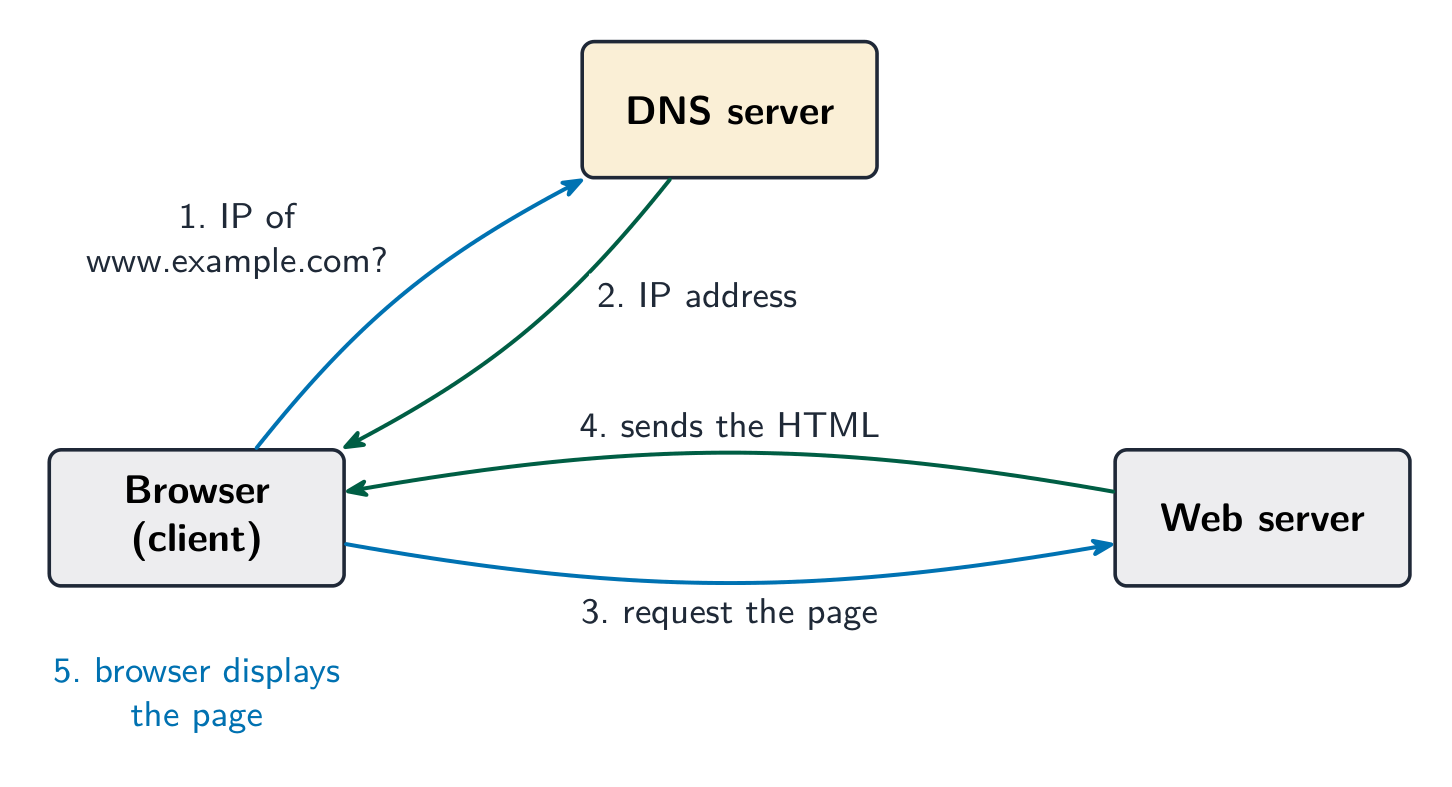
The browser asks a DNS for the site's IP address, then requests the page from the web server, which returns the HTML.
Encryption with a key
Change the shift — that is the key. Each letter slides that many places to make ciphertext, and the same key slides it back. That is symmetric encryption.
A brute force attack works by:
Difficulty 1/5 · 100 coins + a small bonus on first completion today
Brute force tries password after password until it gets in.
A DDoS attack:
Difficulty 1/5 · 100 coins + a small bonus on first completion today
A distributed denial-of-service overwhelms a server so genuine users can't reach the site.
Phishing tricks you with fake messages into giving away details, while pharming silently redirects you to a fake site even when you type the correct address.
Difficulty 1/5 · 100 coins + a small bonus on first completion today
Both aim to steal credentials, but phishing needs you to click; pharming poisons the address lookup itself.
Malware
- Virus 病毒 — attaches to a file and copies itself when the file is opened.
- Worm 蠕虫 — copies itself across a network on its own, with no file needed.
- Trojan horse 特洛伊木马 — pretends to be useful, but harms once installed.
- Spyware 间谍软件 — secretly records what you do (e.g. keystrokes); adware — floods you with adverts; ransomware 勒索软件 — locks your files and demands payment.

A URL has three parts: the protocol, the domain name, and the path to the page on the server.
How does a worm differ from a virus?
Difficulty 1/5 · 100 coins + a small bonus on first completion today
A worm self-spreads over networks; a virus needs an infected file to be opened.
Match each item to what it is.
Difficulty 2/5 · 140 coins + a small bonus on first completion today
Ransomware extorts; spyware spies; DDoS overwhelms a server.
Keeping data safe
- Access levels (each user sees only what they need), anti-malware, and a firewall 防火墙 (checks and blocks network traffic).
- Authentication 身份验证 — proving who you are: a password, biometrics, or two-step verification.
- Automatic software updates (fix weak points), checking a message's spelling/tone and a link's URL, privacy settings, and a proxy server (hides your IP, filters content).

A firewall sits between the outside internet and your network, checking each connection and blocking any traffic that is not allowed
Two-step verification improves security by:
Difficulty 1/5 · 100 coins + a small bonus on first completion today
Adding a second factor (a phone code or biometric) means a stolen password alone is not enough.
You've got it
- threats: brute force, interception, DDoS, hacking, phishing/pharming, social engineering
- malware: virus (file), worm (network), Trojan, spyware, adware, ransomware
- protect with access levels, anti-malware, firewall, authentication/2FA, updates, proxy server
- many attacks target people — check spelling, tone and the URL