Representing text, sound and images
Introduced| English | Meaning |
|---|---|
| character set/ˈkærɪktə set/ | A collection of characters with assigned codes for representing text. |
| ASCII/ˈæski/ | A seven-bit character code defining 128 values for letters, digits, punctuation and control functions. |
| Unicode/ˈjuːnɪkəʊd/ | Unicode |
| sampling/ˈsæmplɪŋ/ | Measuring a signal at selected instants to produce discrete values for digital representation. |
| sample rate/ˈsæmpl reɪt/ | sample rate |
| sample resolution/ˈsæmpl ˌrezəˈluːʃn/ | sample resolution |
| resolution/ˌrezəˈluːʃn/ | The ability to distinguish fine detail or closely separated features. |
| pixels/ˈpɪkslz/ | An individual picture element in a digital image or display. |
| colour depth/ˈkʌlə depθ/ | The number of bits used to represent a pixel's colour, determining how many encoded colour values are available. |
Text, sound and images in binary
- Numbers aren't the only data — text, sound and images all become binary too.
- Each has its own method.
- The trade-off everywhere: better quality means a bigger file.
Representing text
- Each character is given a number, stored in binary. The set of characters + their numbers is a character set 字符集.
- ASCII ASCII码 uses 7 bits → 128 characters (enough for English letters, digits, symbols).
- Unicode 统一码 uses more bits → far more characters (many languages, symbols, emoji) — but the same text takes more storage.

A left shift of 2 places: every bit moves 2 columns left, the left-most bits are lost and zeros enter on the right.
Representing sound
y = a sin(bt + c)
Sound is a wave; sampling records its height many times a second.
How many different characters can 7-bit ASCII represent?
Difficulty 2/5 · 140 coins + a small bonus on first completion today
7 bits give 2^7 = 128 characters.
Compared with ASCII, Unicode:
Difficulty 1/5 · 100 coins + a small bonus on first completion today
Unicode covers many languages and emoji, needing more bits — so the same text is larger than in ASCII.
Match each idea to what it means.
Difficulty 2/5 · 140 coins + a small bonus on first completion today
More bits means more characters, more samples per second, or more colours.
Representing sound
- A sound wave is smooth; to store it the computer measures its height at regular moments — sampling 采样.
- Sample rate 采样率 = samples per second (Hz); sample resolution 采样分辨率 = bits per sample.
- Higher rate and resolution 分辨率 → a more accurate recording, but a larger file.

The sample rate of a sound recording is:
Difficulty 1/5 · 100 coins + a small bonus on first completion today
Sample rate = samples per second (Hz); sample resolution = bits per sample.
Representing images
- A bitmap image is a grid of dots — pixels 像素.
- Resolution = the number of pixels (e.g. $1920 \times 1080$).
- Colour depth 颜色深度 = the number of bits per pixel.
- Higher resolution and colour depth → better quality, but a larger file.
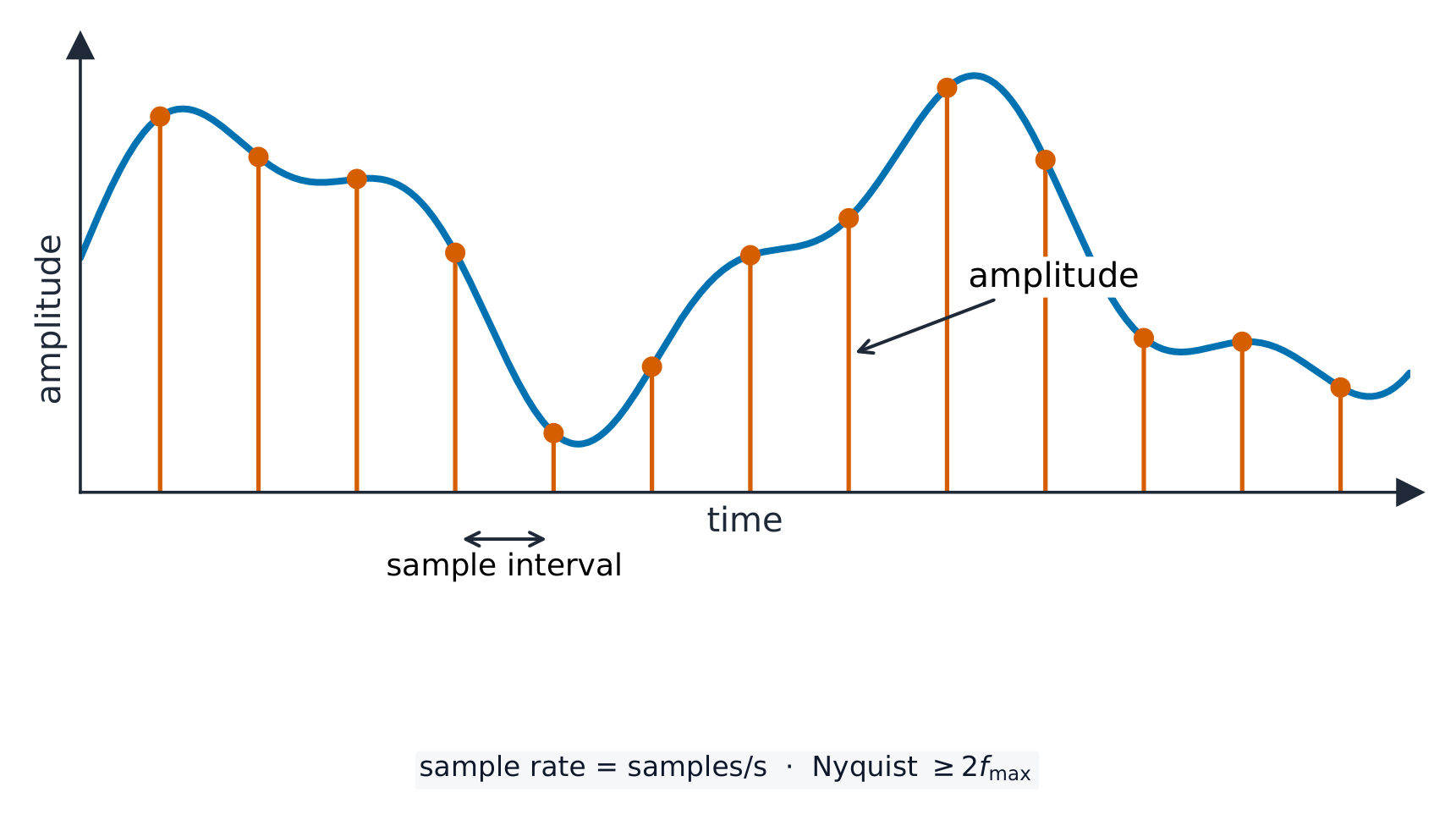
Sampling measures the wave's height (amplitude) at regular moments; more samples per second follow the wave more closely.
The colour depth of an image is:
Difficulty 1/5 · 100 coins + a small bonus on first completion today
Colour depth is bits per pixel — more bits means more possible colours.
Increasing an image's resolution and colour depth will:
Difficulty 1/5 · 100 coins + a small bonus on first completion today
More pixels and more bits per pixel mean better quality but a larger file.
You've got it
- text: a character set maps characters to numbers; ASCII = 7 bits (128), Unicode = more (emoji), bigger files
- sound: sampling records the wave; sample rate (Hz) + sample resolution (bits)
- images: pixels; resolution (pixel count) + colour depth (bits/pixel)
- in all three: higher quality → bigger file