Skip to content · ⁨본문 바로가기⁩

Creative Development · ⁨창작적 개발⁩

AP Computer Science Principles · ⁨AP 컴퓨터 과학 원리⁩ · Topic 1 · ⁨주제 1⁩

Video lesson for this topic · ⁨이 주제용 영상 수업⁩ Open the video page · ⁨영상 페이지 열기⁩
6:15

창작적 개발

두 수의 평균을 출력해야 하는 프로그램이 있습니다. 실행됩니다. 충돌하지 않습니다. 답을 출력하지만 답은 틀립니다.给它四和六(Give it four and six—주어진 텍스트는 영어로 되어 있으므로 번역: 네와 여섯을 주면)…

English narration · English + 中文 subtitles burned in · ⁨영어 내레이션 · 영어 + 중국어 자막 burned-in⁩

1.1

Collaboration · ⁨협업⁩

Syllabus
English

Enduring Understanding (CRD-1): Incorporating multiple perspectives through collaboration improves computing innovations as they are developed.

Learning Objective CRD-1.A: Explain how computing innovations are improved through collaboration. [Skill 1.C]

  • CRD-1.A.1 A computing innovation includes a program as an integral part of its function.
  • CRD-1.A.2 A computing innovation can be physical (e.g., self-driving car), nonphysical computing software (e.g., picture editing software), or a nonphysical computing concept (e.g., e-commerce).
  • CRD-1.A.3 Effective collaboration produces a computing innovation that reflects the diversity of talents and perspectives of those who designed it.
  • CRD-1.A.4 Collaboration that includes diverse perspectives helps avoid bias in the development of computing innovations.
  • CRD-1.A.5 Consultation and communication with users are important aspects of the development of computing innovations.
  • CRD-1.A.6 Information gathered from potential users can be used to understand the purpose of a program from diverse perspectives and to develop a program that fully incorporates these perspectives.

Learning Objective CRD-1.B: Explain how computing innovations are developed by groups of people. [Skill 1.C]

  • CRD-1.B.1 Online tools support collaboration by allowing programmers to share and provide feedback on ideas and documents.
  • CRD-1.B.2 Common models such as pair programming exist to facilitate collaboration.

Learning Objective CRD-1.C: Demonstrate effective interpersonal skills during collaboration. [Skill 1.C]

  • CRD-1.C.1 Effective collaborative teams practice interpersonal skills, including but not limited to:
    • communication
    • consensus building
    • conflict resolution
    • negotiation
한국어

지속적 이해(CRD-1): 협업을 통해 다각적인 관점을 통합하면 컴퓨팅 혁신이 개발됨에 따라 개선됩니다.

학습 목표 CRD-1.A: 협업을 통해 컴퓨팅 혁신이 어떻게 개선되는지 설명합니다. [기술 1.C]

  • CRD-1.A.1 컴퓨팅 혁신에는 기능의 핵심 일부로서 프로그램이 포함됩니다.
  • CRD-1.A.2 컴퓨팅 혁신은 물리적(예: 자율주행 자동차), 비물리적 컴퓨팅 소프트웨어(예: 이미지 편집 소프트웨어), 또는 비물리적 컴퓨팅 개념(예: 전자상거래)일 수 있습니다.
  • CRD-1.A.3 효과적인 협업은 설계자의 다양한 재능과 관점을 반영하는 컴퓨팅 혁신을 산출합니다.
  • CRD-1.A.4 다각적인 관점이 포함된 협업은 컴퓨팅 혁신 개발에서 편향을 피하는 데 도움이 됩니다.
  • CRD-1.A.5 사용자와의 상담 및 소통은 컴퓨팅 혁신 개발의 중요한 aspects입니다.
  • CRD-1.A.6 잠재적 사용자로부터 수집된 정보는 다양한 관점에서 프로그램의 목적을 이해하고, 이러한 관점을 완전히 반영하는 프로그램을 개발하는 데 사용할 수 있습니다.

학습 목표 CRD-1.B: 사람들이 모인 그룹이 어떻게 컴퓨팅 혁신을 개발하는지 설명합니다. [기술 1.C]

  • CRD-1.B.1 온라인 도구는 프로그래머가 아이디어와 문서를 공유하고 피드백을 제공할 수 있도록 함으로써 협업을 지원합니다.
  • CRD-1.B.2 페어 프로그래밍과 같은 일반적인 모델은 협업을 촉진하기 위해 존재합니다.

학습 목표 CRD-1.C: 협업 중 효과적인 대인 관계를 보여줍니다. [기술 1.C]

  • CRD-1.C.1 효과적인 협업 팀은 다음을 포함한 대인 관계 기술을 실천합니다:
    • 의사소통
    • 합의 형성
    • 갈등 해결
    • 협상

Source: College Board AP Course and Exam Description · ⁨출처: College Board AP Course and Exam Description⁩

English

Computing is a collaborative 协作 activity. Working in a team brings more perspectives, catches more errors, and produces better programs than working alone. Good collaboration uses consensus building, clear communication, and each member's strengths. Pair programming 结对编程 – two people at one computer, one typing and one reviewing – is a common practice. On the exam, you should be able to explain how collaboration improved a program (more ideas, fewer bugs, wider testing).

한국어
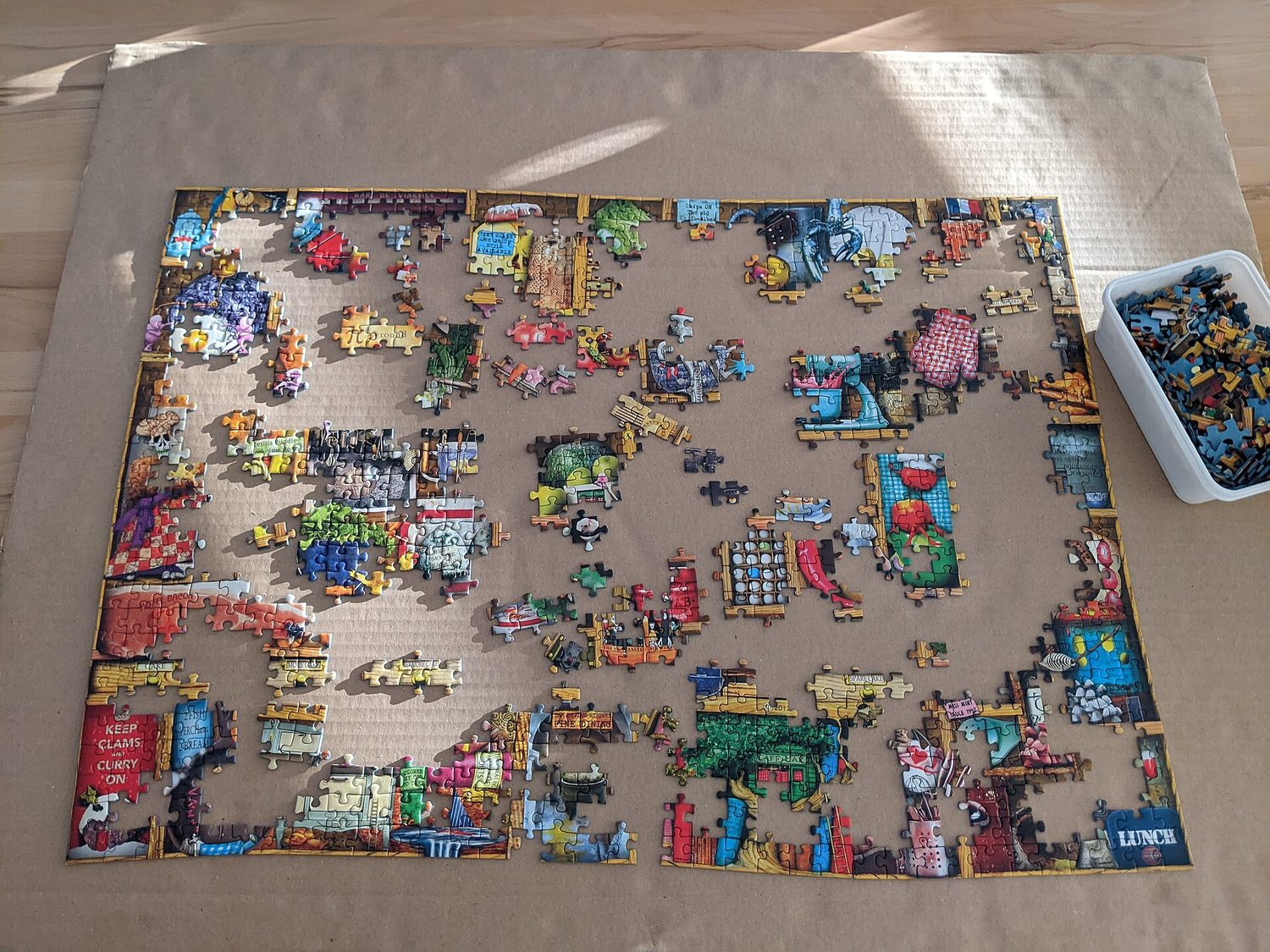
진행 중인 조립 퍼즐: 협업 및 모듈 설계가 해결책을 완성합니다

컴퓨팅은 협업적인 활동입니다. 팀으로 작업하면 더 많은 관점을 제공하고, 더 많은 오류를 발견하며, 혼자 일할 때보다 더 나은 프로그램을 생성합니다. 좋은 협업은 합의 형성, 명확한 의사소통, 각 구성원의 강점을 활용합니다. 페어 프로그래밍 – 두 사람이 하나의 컴퓨터 앞에서, 한 사람은 타이핑하고 한 사람은 검토함 – 은 일반적인 관행입니다. 시험에서는 협업이 프로그램을 어떻게 개선했는지(더 많은 아이디어, 더 적은 버그, 더 넓은 테스트) 설명할 수 있어야 합니다.

1.2

Program Function and Purpose · ⁨프로그램 기능 및 목적⁩

Syllabus
English

Enduring Understanding (CRD-2): Developers create and innovate using an iterative design process that is user-focused, that incorporates implementation/feedback cycles, and that leaves ample room for experimentation and risk-taking.

Learning Objective CRD-2.A: Describe the purpose of a computing innovation. [Skill 1.A]

  • CRD-2.A.1 The purpose of computing innovations is to solve problems or to pursue interests through creative expression.
  • CRD-2.A.2 An understanding of the purpose of a computing innovation provides developers with an improved ability to develop that computing innovation.

Learning Objective CRD-2.B: Explain how a program or code segment functions. [Skill 4.A]

  • CRD-2.B.1 A program is a collection of program statements that performs a specific task when run by a computer. A program is often referred to as software.
  • CRD-2.B.2 A code segment is a collection of program statements that is part of a program.
  • CRD-2.B.3 A program needs to work for a variety of inputs and situations.
  • CRD-2.B.4 The behavior of a program is how a program functions during execution and is often described by how a user interacts with it.
  • CRD-2.B.5 A program can be described broadly by what it does, or in more detail by both what the program does and how the program statements accomplish this function.

Learning Objective CRD-2.C: Identify input(s) to a program. [Skill 3.A]

  • CRD-2.C.1 Program inputs are data sent to a computer for processing by a program. Input can come in a variety of forms, such as tactile, audio, visual, or text.
  • CRD-2.C.2 An event is associated with an action and supplies input data to a program.
  • CRD-2.C.3 Events can be generated when a key is pressed, a mouse is clicked, a program is started, or any other defined action occurs that affects the flow of execution.
  • CRD-2.C.4 Inputs usually affect the output produced by a program.
  • CRD-2.C.5 In event-driven programming, program statements are executed when triggered rather than through the sequential flow of control.
  • CRD-2.C.6 Input can come from a user or other programs.

Learning Objective CRD-2.D: Identify output(s) produced by a program. [Skill 3.A]

  • CRD-2.D.1 Program outputs are any data sent from a program to a device. Program output can come in a variety of forms, such as tactile, audio, visual, or text.
  • CRD-2.D.2 Program output is usually based on a program's input or prior state (e.g., internal values).
한국어

지속적 이해(CRD-2): 개발자는 사용자 중심이며, 구현/피드백 사이클을 포함하고, 실험 및 위험 감수에 충분한 여지를 남겨두는 반복적 설계 프로세스를 사용하여 컴퓨팅 혁신을 만들고 혁신합니다.

학습 목표 CRD-2.A: 컴퓨팅 혁신의 목적을 설명합니다. [기술 1.A]

  • CRD-2.A.1 컴퓨팅 혁신의 목적은 창의적 표현을 통해 문제를 해결하거나 관심을 추구하는 것입니다.
  • CRD-2.A.2 컴퓨팅 혁신의 목적에 대한 이해는 개발자가 해당 컴퓨팅 혁신을 개발하는 능력을 향상시킵니다.

학습 목표 CRD-2.B: 프로그램 또는 코드 세그먼트가 어떻게 작동하는지 설명합니다. [기술 4.A]

  • CRD-2.B.1 프로그램은 컴퓨터에서 실행될 때 특정 작업을 수행하는 프로그램 문장의 모음입니다. 프로그램은 보통 소프트웨어라고 불립니다.
  • CRD-2.B.2 코드 세그먼트는 프로그램의 일부인 프로그램 문장의 집합입니다.
  • CRD-2.B.3 프로그램은 다양한 입력과 상황에 대해 올바르게 작동해야 합니다.
  • CRD-2.B.4 프로그램의 동작은 실행 중 프로그램이 어떻게 기능하는지를 의미하며, 일반적으로 사용자가它与 interacts하는 방식에 의해 설명됩니다.
  • CRD-2.B.5 프로그램은 수행하는 기능에 대해 포괄적으로 설명하거나, 프로그램이 무엇을 수행하는지 및 프로그램 문장이 이 기능을 어떻게 달성하는지에 대해 구체적으로 설명할 수 있습니다.

학습 목표 CRD-2.C: 프로그램의 입력을 식별함. [기술 3.A]

  • CRD-2.C.1 프로그램 입력은 프로그램에 의해 처리되도록 컴퓨터로 전송되는 데이터입니다. 입력은 촉각, 오디오, 시각 또는 텍스트 등 다양한 형태로 제공될 수 있습니다.
  • CRD-2.C.2 *이벤트(event)*는 동작과 관련되어 있으며 프로그램에 입력 데이터를 제공합니다.
  • CRD-2.C.3 키를 누르거나 마우스를 클릭하거나, 프로그램을 시작하거나, 실행 흐름에 영향을 미치는 기타 정의된 동작이 발생했을 때 이벤트가 생성될 수 있습니다.
  • CRD-2.C.4 입력은 일반적으로 프로그램이 생성하는 출력에 영향을 미칩니다.
  • CRD-2.C.5 이벤트 기반 프로그래밍에서는 제어의 순차적 흐름 대신 트리거가 발생했을 때 프로그램 문장이 실행됩니다.
  • CRD-2.C.6 입력은 사용자나 다른 프로그램으로부터 올 수 있습니다.

학습 목표 CRD-2.D: 프로그램이 생성하는 출력을 식별함. [기술 3.A]

  • CRD-2.D.1 프로그램 출력은 프로그램으로부터 장치로 전송되는 모든 데이터입니다. 프로그램 출력은 촉각, 오디오, 시각 또는 텍스트 등 다양한 형태로 제공될 수 있습니다.
  • CRD-2.D.2 프로그램 출력은 일반적으로 프로그램의 입력이나 이전 상태(예: 내부 값)에 기반합니다.

Source: College Board AP Course and Exam Description · ⁨출처: College Board AP Course and Exam Description⁩

English

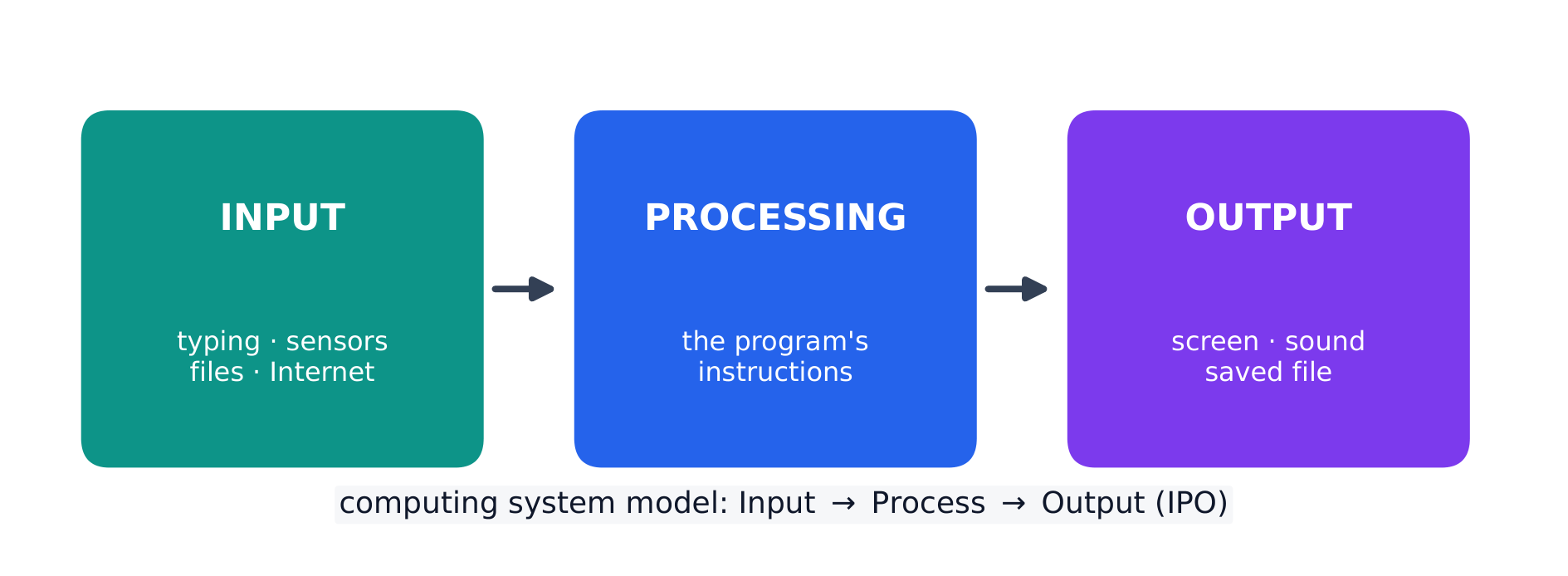
Every program is written for a purpose – it solves a problem or pursues an interest. A program takes input 输入, processes it, and produces output 输出. Inputs can come from a user, a device, a file, or another program; outputs can be visual, audible, textual, or a signal to a device. Being able to state a program's purpose, and describe its inputs and outputs clearly, is a core skill (and part of the Create performance task).

한국어

모든 프로그램은 특정 목적을 위해 작성됩니다. 문제를 해결하거나 관심을 추구합니다. 프로그램은 입력을 받아 처리하고 출력을 생성합니다. 입력은 사용자, 장치, 파일 또는 다른 프로그램에서 올 수 있으며, 출력은 시각적, 청각적, 텍스트 형식이거나 장치로의 신호일 수 있습니다. 프로그램의 목적을 명시하고 입력 및 출력을 명확하게 기술할 수 있는 것은 핵심 스이며(CREATE 수행 평가의 일부입니다).

모든 프로그램은 입력, 처리, 출력으로 분해됩니다
모든 프로그램은 입력-처리-출력 모델을 따릅니다
Explore · ⁨탐색하기⁩

Explore the input → processing → output model · ⁨입력 → 처리 → 출력 모델을 탐색해 보십시오⁩

Step through the IPO model. Every program takes some input, performs processing on it by following its instructions, then produces output — trace one weather-app example along the pipeline. · ⁨IPO 모델을 단계별로 따라가십시오. 모든 프로그램은 어떤 입력을 받아 지시에 따라 처리를 수행한 후 출력을 생성합니다 — 날씨 앱 예제를 파이프라인을 따라 추적해 보십시오.⁩

1.3

Program Design and Development · ⁨프로그램 설계 및 개발⁩

Syllabus
English

Enduring Understanding (CRD-2): Developers create and innovate using an iterative design process that is user-focused, that incorporates implementation/feedback cycles, and that leaves ample room for experimentation and risk-taking.

Learning Objective CRD-2.E: Develop a program using a development process. [Skill 1.B]

  • CRD-2.E.1 A development process can be ordered and intentional, or exploratory in nature.
  • CRD-2.E.2 There are multiple development processes. The following phases are commonly used when developing a program:
    • investigating and reflecting
    • designing
    • prototyping
    • testing
  • CRD-2.E.3 A development process that is iterative requires refinement and revision based on feedback, testing, or reflection throughout the process. This may require revisiting earlier phases of the process.
  • CRD-2.E.4 A development process that is incremental is one that breaks the problem into smaller pieces and makes sure each piece works before adding it to the whole.

Learning Objective CRD-2.F: Design a program and its user interface. [Skill 1.B]

  • CRD-2.F.1 The design of a program incorporates investigation to determine its requirements.
  • CRD-2.F.2 Investigation in a development process is useful for understanding and identifying the program constraints, as well as the concerns and interests of the people who will use the program.
  • CRD-2.F.3 Some ways investigation can be performed are as follows:
    • collecting data through surveys
    • user testing
    • interviews
    • direct observations
  • CRD-2.F.4 Program requirements describe how a program functions and may include a description of user interactions that a program must provide.
  • CRD-2.F.5 A program's specification defines the requirements for the program.
  • CRD-2.F.6 In a development process, the design phase outlines how to accomplish a given program specification.
  • CRD-2.F.7 The design phase of a program may include:
    • brainstorming
    • planning and storyboarding
    • organizing the program into modules and functional components
    • creation of diagrams that represent the layouts of the user interface
    • development of a testing strategy for the program

Learning Objective CRD-2.G: Describe the purpose of a code segment or program by writing documentation. [Skill 4.A]

  • CRD-2.G.1 Program documentation is a written description of the function of a code segment, event, procedure, or program and how it was developed.
  • CRD-2.G.2 Comments are a form of program documentation written into the program to be read by people and do not affect how a program runs.
  • CRD-2.G.3 Programmers should document a program throughout its development.
  • CRD-2.G.4 Program documentation helps in developing and maintaining correct programs when working individually or in collaborative programming environments.
  • CRD-2.G.5 Not all programming environments support comments, so other methods of documentation may be required.

Learning Objective CRD-2.H: Acknowledge code segments used from other sources. [Skill 1.C]

  • CRD-2.H.1 It is important to acknowledge any code segments that were developed collaboratively or by another source.
  • CRD-2.H.2 Acknowledgement of a code segment(s) written by someone else and used in a program can be in the program documentation. The acknowledgement should include the origin or original author's name.
한국어

지속적 이해(CRD-2): 개발자는 사용자 중심이며, 구현/피드백 사이클을 포함하고, 실험 및 위험 감수에 충분한 여지를 남겨두는 반복적 설계 프로세스를 사용하여 컴퓨팅 혁신을 만들고 혁신합니다.

학습 목표 CRD-2.E: 개발 과정을 사용하여 프로그램을 생성하기. [기술 1.B]

  • CRD-2.E.1 개발 과정은 순차적이고 의도적일 수 있으며, 탐구적인 성격을 가질 수도 있다.
  • CRD-2.E.2 여러 가지 개발 과정이 존재한다. 프로그램을 개발할 때 일반적으로 사용되는 단계는 다음과 같다:
    • 조사 및 성찰
    • 설계
    • 프로토타입 제작
    • 테스트
  • CRD-2.E.3 반복형 개발 과정은 피드백, 테스트 또는 성찰을整个过程에 걸쳐 개선하고 수정하는 것을 요구한다. 이는 이전 단계를 다시 방문해야 할 수 있다.
  • CRD-2.E.4 증분형 개발 과정은 문제를 작은 부분으로 나누어 전체에 통합하기 전에 각 부분이 올바르게 작동함을 확인하는 과정이다.

학습 목표 CRD-2.F: 프로그램과 사용자 인터페이스를 설계하기. [기술 1.B]

  • CRD-2.F.1 프로그램의 설계는 필요 사항을 파악하기 위한 조사를 포함한다.
  • CRD-2.F.2 개발 과정에서의 조사는 프로그램의 제약 조건을 이해하고 식별하는 데 유용하며, 또한 프로그램 사용자의 concern(관심사)과関心(관심)을 파악하는 데 도움이 된다.
  • CRD-2.F.3 조사를 수행하는 방법에는 다음이 포함된다:
    • 설문조사를 통한 데이터 수집
    • 사용자 테스트
    • 인터뷰
    • 직접 관찰
  • CRD-2.F.4 프로그램의 요구 사항은 프로그램의 기능 방식에 대해 설명하며, 프로그램이 제공해야 하는 사용자 상호작용에 대한 설명을 포함할 수 있다.
  • CRD-2.F.5 프로그램의 명세서는 프로그램에 대한 요구 사항을 정의한다.
  • CRD-2.F.6 개발 과정에서 설계 단계는 주어진 프로그램 사양을 어떻게 달성할지를 설명합니다.
  • CRD-2.F.7 프로그램의 설계 단계에는 다음이 포함될 수 있습니다:
    • 브레인스토밍
    • 계획 수립 및 스토리보딩
    • 프로그램을 모듈과 기능적 구성 요소로 조직화
    • 사용자 인터페이스 레이아웃을 나타내는 도표 생성
    • 프로그램에 대한 테스트 전략 개발

학습 목표 CRD-2.G: 문서화를 통해 코드 섹션이나 프로그램의 목적을 설명함. [기술 4.A]

  • CRD-2.G.1 프로그램 문서化은 코드 섹션, 이벤트, 절차 또는 프로그램의 기능과 그것이 어떻게 개발되었는지에 대한 서면 설명입니다.
  • CRD-2.G.2 주석은 사람에 의해 읽히도록 프로그램에 작성된形式的인 문서화 형태이며, 프로그램 실행 방식에는 영향을 주지 않습니다.
  • CRD-2.G.3 프로그래머는 프로그램 전체 개발 기간 동안 문서화를 해야 합니다.
  • CRD-2.G.4 프로그래밍 문서화는 개인 작업 시나 협력적 프로그래밍 환경에서 올바른 프로그램을 개발하고 유지하는 데 도움이 됩니다.
  • CRD-2.G.5 모든 프로그래밍 환경이 주석을 지원하지 않으므로, 다른 문서화 방법이 필요할 수 있습니다.

학습 목표 CRD-2.H: 다른 출처에서 사용된 코드 섹션을 인정함. [기술 1.C]

  • CRD-2.H.1 협업으로 개발되었거나 다른 출처에서 제공된 코드 섹션에 대해 인정하는 것이 중요합니다.
  • CRD-2.H.2 다른 사람이 작성하여 프로그램에 사용된 코드 섹션에 대한 인정은 프로그램 문서화에 포함될 수 있습니다. 인정 내용에는 원천이나 초기 저자의 이름이 포함되어야 합니다.

Source: College Board AP Course and Exam Description · ⁨출처: College Board AP Course and Exam Description⁩

English

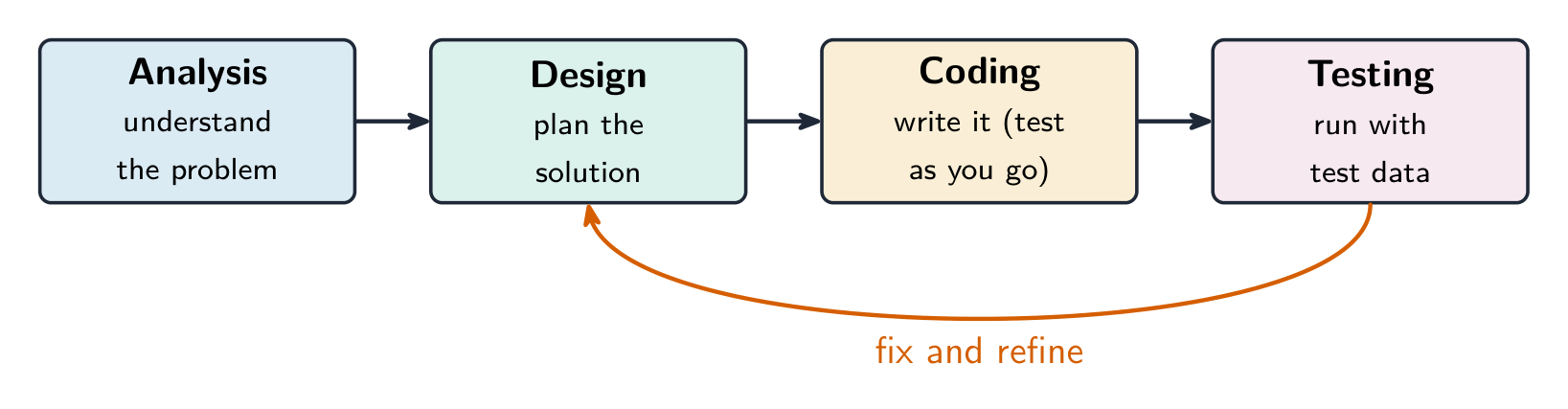
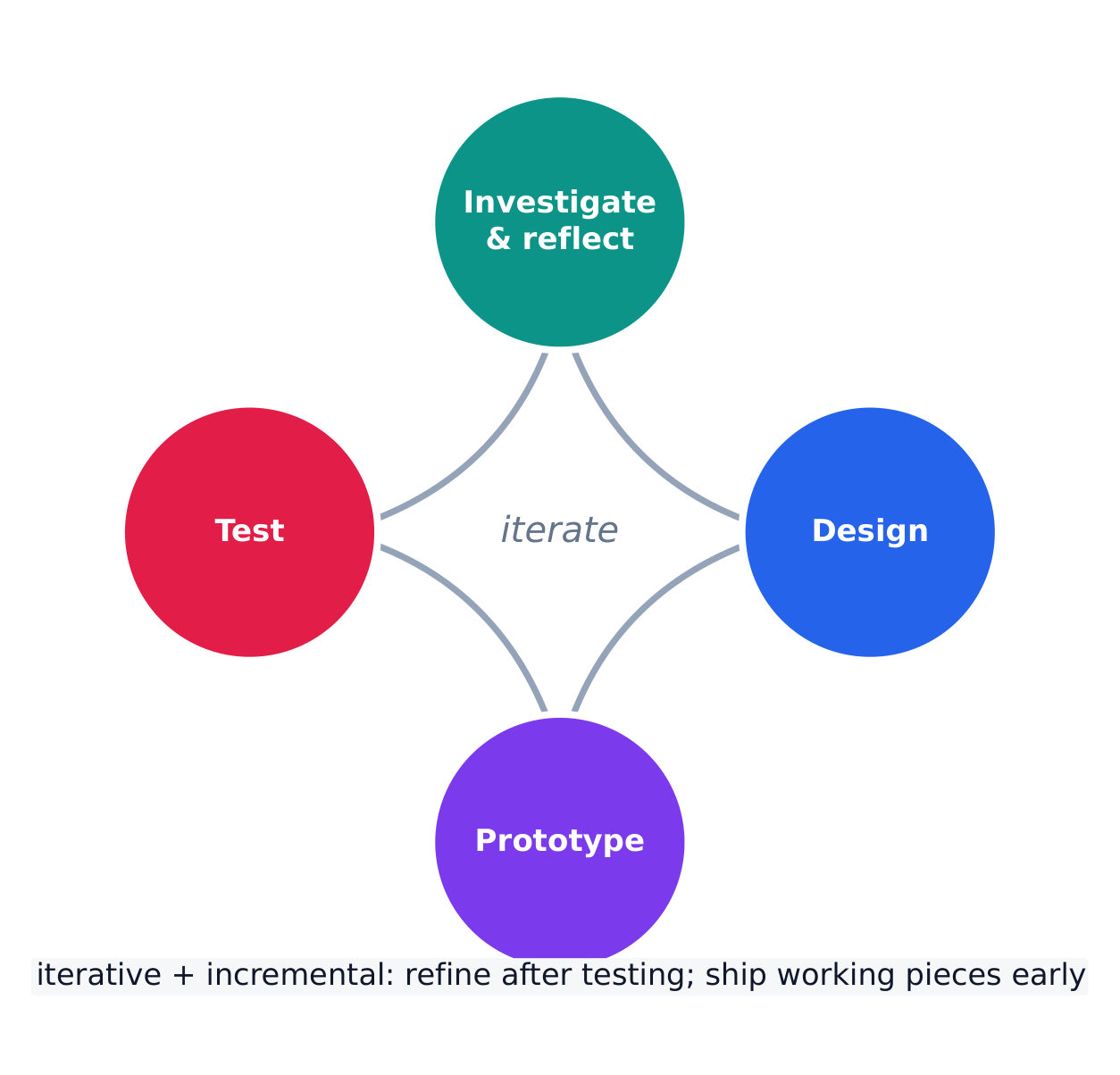
Programs are built through an iterative 迭代 process, not in one straight line: investigate the problem and users, design (often with a diagram or written plan), implement in code, and test – then repeat. A large problem is broken into smaller pieces (decomposition 分解). Comments 注释 and clear naming document the design so others (and your future self) can understand it. Development is incremental – build and test a small piece, then add the next.

Investigating what users actually need

Before any code is written, the developer investigates the problem and the people who will use the program. Three ways to do that:

  • surveys 调查问卷 sent to potential users, which collect data from many people quickly;
  • interviews and direct observation of users doing the task by hand;
  • studying existing solutions to see what already works and what frustrates people.

The findings are turned into a design. Two artefacts do that: a program requirements list saying exactly what the program must do, and diagrams representing the layout of the user interface 用户界面 — sketches showing which controls appear where, and what each one does when used. Designing the interface on paper first is cheaper than discovering after coding that the buttons are in the wrong place.

Events, and programs that wait

Not every program runs straight through from top to bottom. An event 事件 is generated when a key is pressed, a mouse is clicked, a program is started, or any other defined action occurs — and an event changes the flow of execution: the program pauses what it was doing and runs the code attached to that event, called an event handler 事件处理程序.

This is why a program with a graphical interface can appear to be doing nothing: it is waiting for the next event. The order in which those events arrive is decided by the user, not by the programmer, so the same program can run its blocks in a different order each time it is used.

한국어
프로그래머가 멀티 모니터 워크스테이션에서 디버깅 중 – 반복적 설계 및 테스트

프로그램은 한 줄의 직선적인 과정이 아닌 반복적으로 구축됩니다: 문제와 사용자를 조사하고, 설계(보통 도표 또는 서면 계획으로)하며, 코드로 구현하고, 테스트한 뒤 이를 반복합니다. 큰 문제는 작은 부분으로 나뉩니다(분해). 주석과 명확한 명명법은 설계를 문서화하여 다른 사람(그리고 미래의 당신)이 이해할 수 있게 합니다. 개발은 증분적입니다: 작은 부분을 만들고 테스트한 후 다음 단계를 추가합니다.

프로그램 개발 단계 및 테스트를 통한 수정 및 정제 피드백
소프트웨어는 반복적이고 증분적인 개발 프로세스를 통해 구축됩니다
소프트웨어는 반복적이고 증분적인 개발 프로세스를 통해 구축됨

사용자가 실제로需要什么的是什么 (사용자가 실제로 필요로 하는 것 조사)

코드를 작성하기 전에 개발자는 문제와 프로그램을 사용할 사람들을 조사합니다. 그 방법은 세 가지입니다:

  • 잠재적 사용자에게 발송되는 설문조사로 많은 people로부터 빠르게 데이터를 수집함;
  • 사용자의 작업 수행을 직접 관찰하는 인터뷰 및 수작업 경험;
  • 기존 해결책 연구로 이미 작동하는 것과 user를 frustrate시키는 것을 파악함.

조사는 설계로 전환됩니다. 두 가지 산출물이 이를 가능하게 합니다: 프로그램이 정확히 무엇을 해야 하는지를 명시하는 program requirements(프로그램 요구사항) 목록과 user interface 레이아웃을 나타내는 도표 — 어떤 컨트롤이 어디에出现在하고 각 컨트롤이 사용될 때 어떤 기능을 하는지 보여주는 스케치입니다. 코딩 후에 버튼이 잘못된 위치에 있음을 발견하는 것보다 먼저 종이에 인터페이스를 디자인하는 것이 저렴합니다.

이벤트 및 대기하는 프로그램

모든 프로그램이 위에서 아래로 순차적으로 실행되지 않습니다. 키가 누르거나 마우스가 클릭되거나 프로그램이 시작되거나 기타 정의된 action이 발생하면 이벤트가 생성되며, 이는 실행 흐름을 변경합니다: 프로그램이 하던 작업을 일시정지하고 해당 이벤트에 연결된 code인 이벤트 핸들러를 실행합니다.

그래픽 인터페이스가 있는 프로그램이 아무것도 Doing하는 것처럼 보이는 이유는 다음 이벤트를 Waiting하기 때문입니다. 이러한 이벤트가 도착하는 순서는 프로그래머가 아니라 사용자가 결정하므로, 같은 프로그램이라도 사용될 때마다 블록을 다른 순서로 실행할 수 있습니다.

Explore · ⁨탐색하기⁩

Loop through the iterative development process · ⁨반복적 개발 프로세스를 순환해 보십시오⁩

Development is iterative — you repeat the stages, improving the program a little on each pass. Step around the loop and notice it returns to the start rather than ending after one run. · ⁨개발은 반복적입니다 — 단계를 반복하며 각 회차마다 프로그램을 조금씩 개선합니다. 루프를 돌아보면 한 번의 실행으로 끝나는 것이 아니라 시작점으로 돌아감을注意到하십시오.⁩

1.4

Identifying and Correcting Errors · ⁨오류 식별 및 수정⁩

Syllabus
English

Enduring Understanding (CRD-2): Developers create and innovate using an iterative design process that is user-focused, that incorporates implementation/feedback cycles, and that leaves ample room for experimentation and risk-taking.

Learning Objective CRD-2.I: For errors in an algorithm or program: a. Identify the error. [Skill 4.C] b. Correct the error. [Skill 4.C]

  • CRD-2.I.1 A logic error is a mistake in the algorithm or program that causes it to behave incorrectly or unexpectedly.
  • CRD-2.I.2 A syntax error is a mistake in the program where the rules of the programming language are not followed.
  • CRD-2.I.3 A run-time error is a mistake in the program that occurs during the execution of a program. Programming languages define their own run-time errors.
  • CRD-2.I.4 An overflow error is an error that occurs when a computer attempts to handle a number that is outside of the defined range of values.
  • CRD-2.I.5 The following are effective ways to find and correct errors:
    • test cases
    • hand tracing
    • visualizations
    • debuggers
    • adding extra output statement(s)

Learning Objective CRD-2.J: Identify inputs and corresponding expected outputs or behaviors that can be used to check the correctness of an algorithm or program. [Skill 4.C]

  • CRD-2.J.1 In the development process, testing uses defined inputs to ensure that an algorithm or program is producing the expected outcomes. Programmers use the results from testing to revise their algorithms or programs.
  • CRD-2.J.2 Defined inputs used to test a program should demonstrate the different expected outcomes that are at or just beyond the extremes (minimum and maximum) of input data.
  • CRD-2.J.3 Program requirements are needed to identify appropriate defined inputs for testing.
한국어

지속적 이해(CRD-2): 개발자는 사용자 중심이며, 구현/피드백 사이클을 포함하고, 실험 및 위험 감수에 충분한 여지를 남겨두는 반복적 설계 프로세스를 사용하여 컴퓨팅 혁신을 만들고 혁신합니다.

학습 목표 CRD-2.I: 알고리즘이나 프로그램의 오류에 대해 다음을 수행함: a. 오류를 식별함. [기술 4.C] b. 오류를 수정함. [기술 4.C]

  • CRD-2.I.1 논리 오류는 알고리즘이나 프로그램에 대한 실수로, 프로그램이 예상치 못하게 또는 잘못 작동하게 만드는 원인이 됩니다.
  • CRD-2.I.2 구문 오류는 프로그래밍 언어의 규칙을 준수하지 않아 발생하는 프로그램 내의 오류입니다.
  • CRD-2.I.3 실행 시 오류는 프로그램 실행 중 발생하는 오류입니다. 각 프로그래밍 언어는 자체적인 실행 시 오류를 정의합니다.
  • CRD-2.I.4 *오버플로우 오버플로우(overflow error)*는 컴퓨터가 정의된 값 범위를 벗어난 숫자를 처리하려고 할 때 발생하는 오류입니다.
  • CRD-2.I.5 다음은 오류를 탐지하고 수정하는 효과적인 방법들입니다:
    • 테스트 케이스
    • 핸드 트레이싱(손으로 추적)
    • 시각화
    • 디버거
    • 추가 출력 문장 추가

학습 목표 CRD-2.J: 알고리즘이나 프로그램의 정확성을 검증하는 데 사용할 수 있는 입력과 그에 대응되는 예상 출력 또는 동작을 식별함. [기술 4.C]

  • CRD-2.J.1 개발 과정에서 테스트는 정의된 입력을 사용하여 알고리즘이나 프로그램이 예상되는 결과를 Outputs하는지 확인합니다. 프로그래머는 테스트에서 얻은 결과를 바탕으로 알고리즘이나 프로그램을 수정합니다.
  • CRD-2.J.2 프로그램을 테스트하기 위해 사용하는 정의된 입력은 입력 데이터의 극단(최소값 및 최대값)에 해당하거나 그 바로 너머에 있는 다양한 예상 결과를 보여줘야 합니다.
  • CRD-2.J.3 테스트에 적합한 정의된 입력을 식별하기 위해서는 프로그램 요구사항이 필요합니다.

Source: College Board AP Course and Exam Description · ⁨출처: College Board AP Course and Exam Description⁩

English

A bug is an error in a program; debugging 调试 is finding and fixing it. Three kinds:

  • a syntax error 语法错误 breaks the language's rules, so the program will not run;
  • a runtime error 运行时错误 crashes the program while it runs (e.g. dividing by zero);
  • a logic error 逻辑错误 lets it run but gives the wrong result.

Find bugs by testing with different inputs, adding print statements to see values, and hand-tracing the code. Choose the test inputs deliberately: they should demonstrate the different expected outcomes at or just beyond the extremes — the minimum and maximum values the program should accept, and a value just outside each of them. A program that works on ordinary data very often fails on an empty list, a zero, or a value one past the end of a range, so those are the inputs worth trying first. Fixing one bug at a time and re-testing is the reliable method.

Exam skill: be able to name the type of an error and describe a testing strategy that would catch it – a recurring multiple-choice and Create-task theme.

Worked example. A program meant to print the average of two numbers instead runs avg = a + b / 2. Tracing the order of operations, / runs before +, so it computes $a+\tfrac{b}{2}$ rather than the average. Add parentheses to fix it: avg = (a + b) / 2. Testing with $a=4,\ b=6$ confirms the fix — the buggy line gives $4+3=7$, the corrected line gives $\tfrac{10}{2}=5$. Testing with known inputs is exactly how you find and confirm a logic error.

한국어

**버그(bug)**는 프로그램 내의 오류이며, 디버깅(debugging) 은 이를 찾아서 수정하는 것입니다. 세 가지 유형이 있습니다:

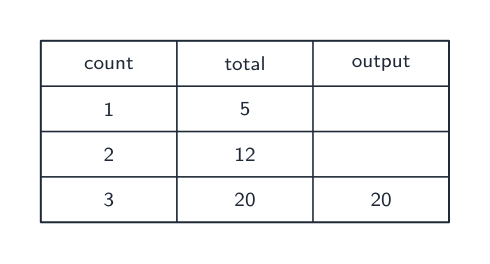
트레이스 표는 버그를 찾기 위해 프로그램 실행 시 각 변수의 값을 기록합니다
trace table은 버그를 찾기 위해 프로그램이 실행될 때 각 변수의 값을 기록함
  • **구문 오류(syntax error)**는 언어의 규칙을 위반하므로 프로그램이 실행되지 않습니다;
  • ** runtime 오류(runtime error)**는 실행 중程序를 Crash시킵니다(예: 0으로 나누기);
  • **논리 오류(logic error)**는 실행은允许하지만错误的结果을给出。

다양한 입력으로 테스트하고, print statements를 추가하여 값을 확인하며, 수작업 trace를 통해 버그를 찾습니다. 테스트 입력을 의도적으로 선택하십시오: They should demonstrate the different expected outcomes at or just beyond the extremes — 프로그램이 accept해야 할 minimum 및 maximum values와 각 value 바로 바깥에 있는 값입니다. ordinary data에서는 잘 작동하지만 빈 list, 0, 또는 range의 끝 value 하나 이상일 때 thường fails하므로, those inputs을 먼저 시도할 가치가 있습니다. One bug at a time and re-testing하는 것이 reliable method입니다.

Exam skill: 오류의 type을 이름으로 지칭하고 이를 포착할 testing strategy를 설명할 수 있어야 함 – repeated multiple-choice 및 Create-task의 theme.

세 가지 유형의 프로그래밍 오류: 구문, 논리, 실행 시간
세 가지 유형의 프로그래밍 오류: 구문, 논리, runtime

Worked example. 두 수의 average를 print하도록 designed된 프로그램이 avg = a + b / 2를 실행합니다. operations의 order를 tracing하면, /이 +보다先に run되므로 average 대신 $a+\tfrac{b}{2}$을 compute합니다. parentheses를 추가하여 fix하십시오: avg = (a + b) / 2. Testing with $a=4,\ b=6$이 fix를 confirms합니다 – buggy line이 $4+3=7$을 give하고, corrected line이 $\tfrac{10}{2}=5$을 give합니다. Known inputs으로 testing하는 것이 바로 logic error를 find하고 confirm하는 방법입니다.

Explore · ⁨탐색하기⁩

Trace the guessing-game logic and spot a logic error · ⁨추측 게임 로직을 추적하고 논리적 오류를 찾아내십시오⁩

Drag the guess and watch which branch runs. A logic error would send the same guess down the wrong branch — the program still runs, but gives the wrong message. The secret number here is 50. · ⁨추측값을 드래그하여 브랜치가 실행되는 것을 확인하세요. 논리 오류는 같은 추측값이 잘못된 브랜치로 들어가는 경우입니다. 프로그램은 여전히 실행되지만 잘못된 메시지를 출력합니다. 여기서의 비밀 번호는 50입니다.⁩

Vocabulary · ⁨어휘⁩ Train · ⁨연습하기⁩
English 한국어
collaborative/kəˈlæbrətɪv/ 협업적
Pair programming/peə ˈprəʊɡræmɪŋ/ 짝 프로그래밍(Pair programming)
input/ˈɪnpʊt/ 입력(input)
output/ˈaʊtpʊt/ 输出
debugging/ˈdiːbʌɡɪŋ/ 디버깅
syntax error/ˈsɪntæks ˈerə/ 문법 오류(syntax error)
runtime error/ˈrʌntaɪm ˈerə/ 실행 중 오류(runtime error)
logic error/ˈlɒdʒɪk ˈerə/ 논리 오류(logic error)
1.4

Exam tips · ⁨시험 팁⁩

English
  • Much of CSP is assessed through the Create and written performance tasks — explain your reasoning clearly, not just your result.
  • Know the benefits of collaboration and how diverse perspectives reduce bias in a program.
  • Use precise vocabulary (iterative development, program requirements) when you describe a design process.
  • Give and take feedback constructively; credit collaborators and sources.
  • Break a large problem into smaller modules that a team can build in parallel.
한국어
  • CSP의很大一部分通过Create任务及书面performance tasks进行assessed——解释你的reasoning,而不仅仅是result。
  • collaboration의 benefits와 diverse perspectives가 program의 bias를 줄이는 방법을 알고 있습니다.
  • design process를 기술할 때 iterative development, program requirements와 같은 precise vocabulary를 사용합니다.
  • constructive하게 feedback을 주고 받으며, collaborators 및 sources에게 credit합니다.
  • large problem을 smaller modules로 분해하여团队可以并行构建。
Vocabulary · ⁨어휘⁩ Train · ⁨연습하기⁩
English 한국어
iterative/ˈɪtərətɪv/ 반복적(iterative)
decomposition/ˌdiːkɒmpəˈzɪʃn/ 분해
Comments/ˈkɒments/ 주석
surveys/ˈsɜːveɪz/ 설문조사(Surveys)
diagrams representing the layout of the user interface 사용자 인터페이스 레이아웃을 나타내는 도표
event/ɪˈvent/ 事件
event handler/ɪˈvent ˈhændlə/ 이벤트 핸들러(event handler)

Interactive lessons on this topic · ⁨이 주제에 대한 인터랙티브 수업⁩

Work through it step by step, with instant-check exercises. · ⁨즉시 체크 기능 exercises를 통해 단계별로 진행하세요.⁩

Past Papers · ⁨과거 시험지⁩

More topics in AP Computer Science Principles · ⁨AP 컴퓨터 과학 원리⁩ · ⁨AP Computer Science Principles · ⁨AP 컴퓨터 과학 원리⁩ 내 추가 주제⁩

Log in or create account · ⁨로그인 또는 계정 만들기⁩

IGCSE, A-Level & AP