| English | 意味 |
|---|---|
| SQL/ˌes kjuː ˈel/ | 構造化クエリ言語 |
| Data Definition Language/ˈdeɪtə ˌdefɪˈnɪʃn ˈlæŋɡwɪdʒ/ | データ定義言語 |
| Data Manipulation Language/ˈdeɪtə məˌnɪpjʊˈleɪʃn ˈlæŋɡwɪdʒ/ | データ操作言語 |
| INNER JOIN/ˈɪnə dʒɔɪn/ | 内部結合 |
| aggregate functions/ˈæɡrɪɡeɪt ˈfʌŋkʃnz/ | 集計関数 |
The language your grandparents' programmers also used
- In 1974 two IBM researchers designed a query language for Codd's tables and called it SEQUEL: Structured English Query Language. The name was trimmed to SQL 结构化查询语言, and the language never went away.
- Fifty years later, every bank, airline, hospital and website you use runs on it. A student typing
SELECTtoday is writing the same statement a programmer wrote before her parents were born. - It has two halves, and the exam asks you to read either and to write both: the Data Definition Language 数据定义语言 that builds the structure, and the Data Manipulation Language 数据操纵语言 that fills, changes and questions the data.
- This lesson is the subset of SQL on the syllabus, statement by statement, with the marks each one carries.
DDL and DML
- The DBMS carries out all creation and modification of the database's structure through its DDL: creating a database, creating and altering tables, adding keys.
- It carries out all queries and maintenance of the data through its DML: selecting, inserting, updating and deleting rows.
- SQL is the industry standard for both. Sorting a statement into the right half is a common one-mark question:
CREATE TABLEis DDL,SELECTis DML.
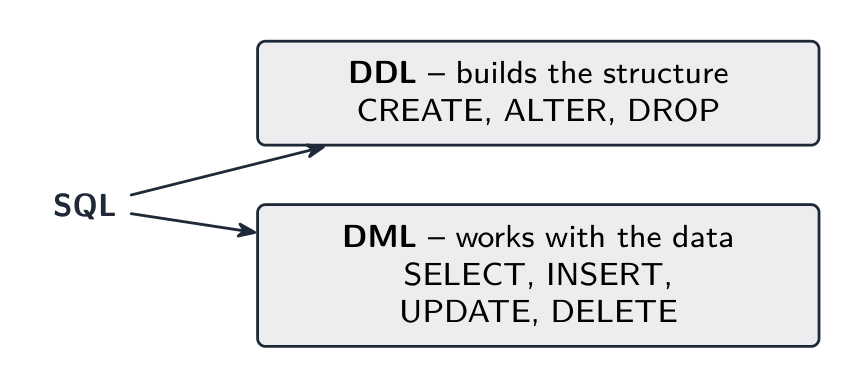
Structure on one side, data on the other
Data Definition Language (DDL) の一部はどれですか?
難易度 1/5 · 100 コイン + 今日初回完了時に小ボーナス付与
DDLは構造を変更します(CREATE, ALTER, DROP)。SELECT/INSERT/UPDATE/DELETEはDML(データの操作)です。
DDLは構造を定義し(例:CREATE TABLE)、DMLはその内部のデータを操作します(SELECT, INSERT, UPDATE, DELETE)。
難易度 1/5 · 100 コイン + 今日初回完了時に小ボーナス付与
定義と操作:DDLはテーブルを形成し、DMLは行を読み取り・変更します。
DDL: creating the structure
CREATE DATABASE Shop;

CREATE TABLE CUSTOMER (
  CustomerID INTEGER,
  Name VARCHAR(50),
  Town VARCHAR(30),
  Joined DATE,
  Active BOOLEAN,
  PRIMARY KEY (CustomerID)
);

ALTER TABLE CUSTOMER ADD Email VARCHAR(100);
- Data types on the syllabus:
CHARACTER(a fixed number of characters),VARCHAR(n)(up to n characters),BOOLEAN,INTEGER,REAL,DATE,TIME. PRIMARY KEY (field)names the key;ALTER TABLE … ADDadds an attribute to an existing table.
各データ項目に適切なSQL数据类型をマッチさせなさい。
難易度 2/5 · 140 コイン + 今日初回完了時に小ボーナス付与
2つの状態、可変長テキスト、小数点を持つ数値、カレンダー日付。INTEGERは整数カウント用、TIMEは一日の時刻用です。
Worked example: two tables with a foreign key
- Write the SQL to create an
ORDERStable withOrderIDas primary key,CustomerIDas a foreign key toCUSTOMER, and anOrderDate.
CREATE TABLE ORDERS (
  OrderID INTEGER,
  CustomerID INTEGER,
  OrderDate DATE,
  PRIMARY KEY (OrderID),
  FOREIGN KEY (CustomerID) REFERENCES CUSTOMER(CustomerID)
);
- The marks:
CREATE TABLEwith the name; each attribute with a suitable type; thePRIMARY KEY; theFOREIGN KEY … REFERENCESnaming the table and its field.
DML: asking a question with SELECT
SELECT Name, Town
FROM CUSTOMER
WHERE Town = 'London'
ORDER BY Name ASC;
SELECTlists the fields to output (*for all),FROMnames the table,WHEREkeeps only the rows that meet a condition,ORDER BYsorts the result,ASCorDESC.- Strings go in single quotes; numbers do not. Comparisons:
=,<,>,<=,>=,<>; conditions join withAND,OR,NOT;LIKE 'A%'matches text starting with A;BETWEEN 10 AND 20gives a range.

Only the rows that pass the WHERE reach the result
テーブルからデータを取得するSQLキーワードはどれですか?(単語1つ)
難易度 1/5 · 100 コイン + 今日初回完了時に小ボーナス付与
SELECT は取得するフィールドをリストアップし、FROM はテーブルの名前を指定します。
SELECT文におけるWHERE句の役割は:
難易度 1/5 · 100 コイン + 今日初回完了時に小ボーナス付与
WHERE句は条件に基づいて行をフィルタリングし、ORDER BY句でソートし、SELECTリストが列を選択します。
Worked example: write the query
- Write an SQL script to output the names and email addresses of all active customers in Manchester, in alphabetical order of name.
SELECT Name, Email
FROM CUSTOMER
WHERE Town = 'Manchester' AND Active = TRUE
ORDER BY Name;
- One mark each: the right fields after
SELECT; the right table afterFROM; theWHEREwith both conditions and the string in single quotes;ORDER BY Name. Use the exact table and field names the question gives.
SELECT文の句を記述順に配置してください。
難易度 3/5 · 200 コイン + 今日初回完了時に小ボーナス付与
フィールド、テーブル、フィルタ、ソート。ORDER BY句は常に最後であり、文はセミコロンで終わります。
Two tables: INNER JOIN
SELECT CUSTOMER.Name, ORDERS.OrderDate
FROM CUSTOMER INNER JOIN ORDERS
  ON CUSTOMER.CustomerID = ORDERS.CustomerID
WHERE ORDERS.OrderDate >= '2024-01-01';
- An INNER JOIN 连接 combines the rows of two tables where the foreign key in one matches the primary key in the other, named in the
ONclause. - Prefix a field with its table when the same name appears in both. The syllabus asks for queries over at most two tables.
INNER JOINで2つのテーブルを接続する
結合は外鍵が主鍵と等しい行を一致させます — ここではOrders.CustomerID = Customer.CustomerID — し、一致するペアをより広い1つの行に組み合わせます。
INNER JOINの用途は:
難易度 1/5 · 100 コイン + 今日初回完了時に小ボーナス付与
JOINは関係性(通常は外部キーと主キーの一致)に基づいて2つのテーブルを結合します。
Aggregates and GROUP BY
SELECT CustomerID, COUNT(*) AS NumOrders
FROM ORDERS
GROUP BY CustomerID;

SELECT AVG(Price) FROM PRODUCT;
SELECT SUM(Quantity) FROM ORDER_LINE WHERE OrderID = 1042;
- Aggregate functions 聚合函数 summarise many rows into one value:
COUNTthe rows,SUMa total,AVGa mean. GROUP BYmakes one summary row per value of a field: the number of orders per customer. Without it, an aggregate summarises the whole table.
COUNT(*)は何を返しますか?
難易度 1/5 · 100 コイン + 今日初回完了時に小ボーナス付与
COUNT(*)は行数を数え、SUM/AVG/MIN/MAXは他の集計関数です。
各顧客による注文数を出力するためには、次のすべて适用的なものを選択してください。
難易度 2/5 · 140 コイン + 今日初回完了時に小ボーナス付与
注文表から顧客ごとに1グループとして行を数えます。ソートは任意です。
Changing the data: INSERT, UPDATE, DELETE
INSERT INTO CUSTOMER (CustomerID, Name, Town, Joined, Active)
VALUES (101, 'Ada Lovelace', 'London', '2024-03-01', TRUE);

UPDATE CUSTOMER SET Town = 'Bristol' WHERE CustomerID = 101;

DELETE FROM CUSTOMER WHERE CustomerID = 101;
INSERT INTO … VALUESadds a row: list the fields, then the values in the same order.UPDATE … SET … WHEREchanges matching rows.DELETE FROM … WHEREremoves them.- Always give
UPDATEandDELETEaWHEREclause, or the change hits every row in the table.
WHERE句なしでUPDATEまたはDELETEを実行するとどうなりますか?
難易度 1/5 · 100 コイン + 今日初回完了時に小ボーナス付与
WHERE句がない場合、操作はすべての行に影響を与えます — これは一般的かつ危険なミスです。
各DML文とその機能にマッチさせください。
難易度 2/5 · 140 コイン + 今日初回完了時に小ボーナス付与
SELECTは読み取り、INSERTは追加、UPDATEは変更、DELETEは削除 — これら4つがDMLの主要動詞です。
Worked example: read the statement
SELECT Name
FROM CUSTOMER INNER JOIN ORDERS
  ON CUSTOMER.CustomerID = ORDERS.CustomerID
WHERE OrderDate = '2024-05-01'
ORDER BY Name DESC;
- State what this script outputs. The names of every customer who placed an order on 1 May 2024, one row per such order, in reverse alphabetical order.
- Read it in execution order: join the tables on the customer ID, keep the rows for that date, output the name, sort descending. A customer with two orders that day appears twice.
Marks that slip away
- Strings in single quotes, numbers bare:
Town = 'London',CustomerID = 101. ORDER BYcomes afterWHERE; a join needs itsONclause; every statement ends with a semicolon.COUNT(*)counts rows, not distinct values; the per-group question needsGROUP BY.CREATE,ALTERandPRIMARY KEYare DDL;SELECT,INSERT,UPDATE,DELETEare DML. Use the exact names the question gives.
You've got it
- DDL creates and changes the structure:
CREATE DATABASE,CREATE TABLEwith typed attributes,PRIMARY KEY,FOREIGN KEY … REFERENCES,ALTER TABLE … ADD· DML works with the data - types:
CHARACTER,VARCHAR(n),BOOLEAN,INTEGER,REAL,DATE,TIME SELECT fields FROM table WHERE condition ORDER BY field;INNER JOIN … ONfor two tables;COUNT,SUM,AVGwithGROUP BYfor one row per groupINSERT INTO … VALUES,UPDATE … SET … WHERE,DELETE FROM … WHERE: never an update or delete withoutWHERE