| English | 意味 |
|---|---|
| compiler/kəmˈpaɪlə/ | コンパイラ |
| source code/sɔːs kəʊd/ | ソースコード |
| translator/trænˈsleɪtə/ | 翻訳器 |
| machine code/məˈʃiːn kəʊd/ | 機械語 |
| assembler/əˈsemblə/ | アセンブラ |
| assembly language/əˈsemblɪ ˈlæŋɡwɪdʒ/ | アセンブリ言語 |
| object code/ˈɒbdʒekt kəʊd/ | オブジェクトコード |
| executable/ɪɡˈzekjʊtəbl/ | 実行可能ファイル |
| interpreter/ɪnˈtɜːprɪtə/ | インタープリタ |
| bytecode/ˈbaɪtkəʊd/ | バイトコード |
| portable/ˈpɔːtəbl/ | ポータブル |
| virtual machine/ˈvɜːtʃuːəl məˈʃiːn/ | 仮想マシン |
| just-in-time compilation/dʒʌst ɪn taɪm ˌkɒmpɪˈleɪʃn/ | 即時コンパイル |
| integrated development environment/ˈɪntɪɡreɪtɪd dɪˈveləpmənt enˈvaɪrənmənt/ | 統合開発環境 |
| context-sensitive prompts/ˈkɒntekst ˈsensɪtɪv prɒmpts/ | 文脈依存型プロンプト |
| auto-complete/ˈɔːtəʊ kəmˈpliːt/ | 自動補完 |
| dynamic syntax checks/daɪˈnæmɪk ˈsɪntæks tʃeks/ | 動的構文チェック |
| prettyprint/ˈpretɪprɪnt/ | コード美化 |
| breakpoints/ˈbreɪkpɔɪnts/ | ブレイクポイント |
| single stepping/ˈsɪŋɡl ˈstepɪŋ/ | ステップ実行 |
| report window/rɪˈpɔːt ˈwɪndəʊ/ | レポートウィンドウ |
Nobody believed the computer could write its own program
- In 1952 Grace Hopper built the first compiler 编译器, a program that turned a programmer's notation into machine instructions. "Nobody believed that," she said later. "I had a running compiler and nobody would touch it. They told me computers could only do arithmetic."
- Every language you have used since rests on that idea: you write source code 源代码 for people, and a translator produces the machine code 机器码 the processor runs.
- There are three kinds of translator and one famous hybrid, and the exam wants you to say which to use when, and why.
- This lesson is the translators, the trade-offs between compiling and interpreting, Java's mixture of both, and the tools an IDE puts around them.
Source code, machine code and the assembler
- The processor executes only machine code. A translator 翻译器 converts a program written for people into it.
- An assembler 汇编器 translates assembly language 汇编语言 into machine code: each mnemonic instruction,
LDD,ADD,JMP, becomes exactly one machine-code instruction, and labels and symbolic addresses are replaced by real addresses. - Assembly is used where the programmer needs direct control of the hardware: device drivers, embedded systems, the innermost loops of a game.
各翻訳器とその機能にマッチさせよ。
難易度 2/5 · 140 コイン + 今日初回完了時に小ボーナス付与
アセンブラ:アセンブリ→機械語;コンパイラ:一度でエグゼクティブへ;インタプリタ:実行時に一行ずつ。
The compiler
- A compiler translates the whole high-level program into machine code, object code 目标代码, before it is run. It produces an executable 可执行文件 file and reports all the syntax errors together, as a list, at the end of translation.
- It does not run the program. Once the code is clean, the executable runs without the compiler installed, as many times as you like.
- Fast at run time, since nothing is translated while running; but the machine code is tied to one processor and operating system.
コンパイラの経路:ソースから実行可能なプログラムへ
コンパイラがどう動作するかを確認する — プログラム全体を一度だけ翻訳してから実行する。インタプリタ(一行ずつ翻訳して実行する)と比較せよ。
コンパイラはインタプリタと異なるのは、それが:
難易度 1/5 · 100 コイン + 今日初回完了時に小ボーナス付与
コンパイラは一度でエグゼクティブへ翻訳し、コンパイラなしで動作する。インタプリタは一行ずつ動作する。
コードを書くことから実行まで、コンパイラの経路を順序立てて記せ。
難易度 3/5 · 200 コイン + 今日初回完了時に小ボーナス付与
コンパイラはプログラム全体を一度だけエグゼクティブへ翻訳し、そのファイルはコンパイラなしで動作する。
The interpreter
- An interpreter 解释器 translates one statement of the high-level program at a time and executes it immediately before moving to the next.
- No executable is produced. It stops at the first error it meets and reports it, with the line, so you fix it and run again.
- Both the source code and the interpreter must be present every time the program runs, and each run re-translates, so execution is slower; but the same source runs wherever an interpreter exists.

Translate once and ship, or translate as you go
インタプリタはいつエラーを報告するか?
難易度 1/5 · 100 コイン + 今日初回完了時に小ボーナス付与
インタプリタは一行ずつ動作するため、その行に到達した瞬間にエラーを報告する — 開発中に役立つ。
インタプリタは独立したエグゼクティブを生成しないため、プログラムを実行するにはインタプリタ自体をインストールする必要がある。
難易度 1/5 · 100 コイン + 今日初回完了時に小ボーナス付与
インタプリタは毎回一行ずつ翻訳して実行する — コンプイラとは異なり、配送用の別エグゼクティブはない。
Benefits and drawbacks, as the mark scheme lists them
| compiler | interpreter | |
|---|---|---|
| execution speed | fast, already machine code | slower, translated on every run |
| what the user needs | only the executable; the source stays private | the source code and the interpreter |
| finding errors | all listed at once after translation | each reported at its line, as you develop |
| changing the code | recompile the whole program | edit and run again immediately |
| portability | one platform; recompile for each | runs wherever an interpreter exists |
次のような場合にコンパイラを選ぶべきである:
難易度 1/5 · 100 コイン + 今日初回完了時に小ボーナス付与
コンパイル済みエグゼクティブは高速かつ独立しており、インタプリタは迅速な開発とポータブルスクリプトに適している。
プログラムの開発中にインタプリタを使用するメリットがある点はどれか?すべて選択せよ。
難易度 2/5 · 140 コイン + 今日初回完了時に小ボーナス付与
高速な編集-実行サイクルと行単位のエラー報告はインタプリタの強みである。実行時の速度はコンパイラのものである。
Worked example: an interpreter while writing, a compiler when finished
- A developer uses an interpreter while writing a program and a compiler when it is finished. Explain how each is used. [4]
- During development the interpreter runs the partly written program at once, without waiting for a complete translation. When it meets an error it reports the line, so the developer fixes it and runs again immediately: a fast edit-run cycle that makes debugging easier.
- When the program is finished, the compiler translates the whole program into an executable that runs faster, needs no translator on the user's computer, and keeps the source code private.
- Two marks for each tool: what it does, and why that suits that stage.
Java: partially compiled, partially interpreted
- Java source is compiled into bytecode 字节码, a compact, portable 可移植的 intermediate form that is not machine code for any real processor.
- A virtual machine 虚拟机, the JVM, then interprets the bytecode on whatever machine it runs on, or uses just-in-time compilation 即时编译 to turn the busiest parts into native code while the program runs.
- The compile stage catches syntax errors early; the interpret stage lets one bytecode file run anywhere a JVM exists. Java in console mode, a text program run from the command line, is the syllabus's example.

Write once, run anywhere: one bytecode file, one JVM per platform
JavaはJVM上で動作するバイトコードへコンパイルされる。主な利点は:
難易度 1/5 · 100 コイン + 今日初回完了時に小ボーナス付与
バイトコードはプラットフォーム非依存であり、どのJVMでも動作する(JITによりホットコードはネイティブに近い速度を得る)。
Javaのコンパイラはプラットフォーム非依存の ____ を生成し、その後仮想マシンが解釈する。
難易度 1/5 · 100 コイン + 今日初回完了時に小ボーナス付与
バイトコードは中間形式である:一度コンパイルされ、その後任意のプラットフォームのJVMによって実行される。これがJavaが部分的にコンパイルされ、部分的に解釈される理由である。
Worked example: why compile to bytecode and then interpret?
- Explain why Java is compiled to bytecode rather than straight to machine code.
- A compiler produces machine code for one processor and operating system, so a program compiled on one machine will not run on another.
- Java's compiler targets a virtual machine instead, so the bytecode is identical everywhere. Each platform supplies its own JVM to interpret it.
- The cost is speed: interpreting bytecode is slower than running native code, which is why the JVM adds just-in-time compilation for the hot parts.
The IDE and its four groups of features
- An integrated development environment 集成开发环境 (IDE) is one application for writing, translating, running and debugging a program. The syllabus groups its features in four.
- For coding: context-sensitive prompts 上下文相关提示 pop up the identifiers, keywords or parameters that fit at that point; auto-complete 自动补全 finishes the name.
- For initial error detection: dynamic syntax checks 动态语法检查 underline a mistake as you type, before translation. For presentation: prettyprint 代码美化 shows keywords, identifiers, strings and comments in different colours with consistent indentation; expand and collapse hides the body of a block so you see the outline.
- For debugging: breakpoints 断点 pause the program at a marked line; single stepping 单步执行 runs one line at a time; a window shows the values of variables and expressions; the report window 报告窗口 lists errors, warnings and output.
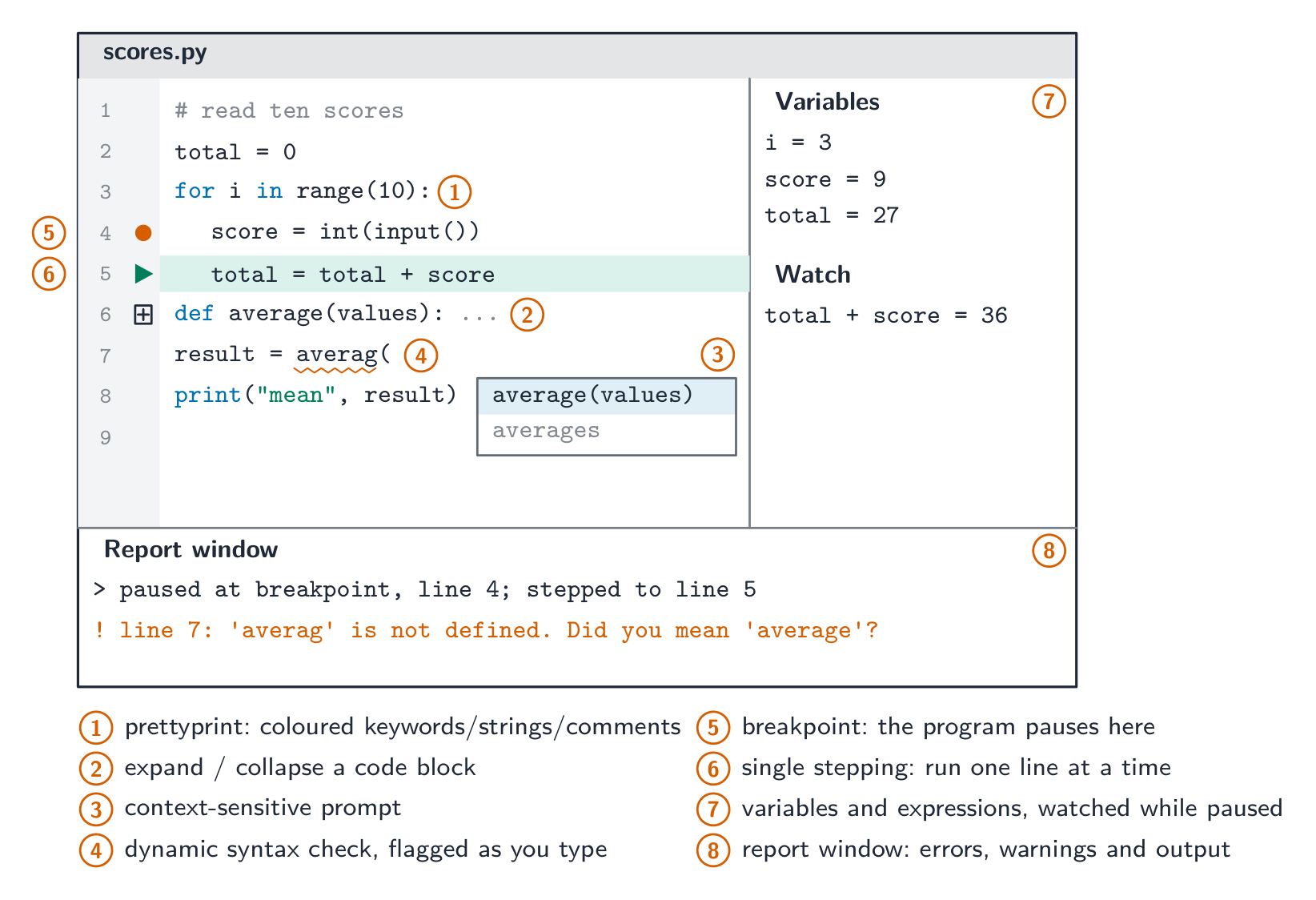
Coding, error detection, presentation, debugging
IDEのデバッガの一部となる機能はどれか?
難易度 1/5 · 100 コイン + 今日初回完了時に小ボーナス付与
デバッガは、ブレイクポイントの設定、コードの一行ずつのステップ操作、変数値のęd查を行うことを許容する。
各IDEの機能とシラバスのグループにマッチさせよ。
難易度 2/5 · 140 コイン + 今日初回完了時に小ボーナス付与
コーディング、初期エラー検出、プレゼンテーション、デバッグ:シラバスが名付ける4つのグループ、それぞれこのリストに一つずつ機能がある。
Worked example: finding the bug in Calculate()
- A function
Calculate()returns an unexpected value. Describe how the debugging features of an IDE help find the cause. [4] - Set a breakpoint on the first line of
Calculate(), so the program pauses there instead of running through. - Single-step through the function one line at a time. After each step, read the values of the variables and of any expression you have asked the IDE to watch, and compare them with what you expected.
- The first line after which a value is wrong is where the logic error is. The report window shows any run-time error messages and output along the way.

Pause, step, inspect
デバッガを使ってロジックエラーを見つける手順を順序立てて記せ。
難易度 3/5 · 200 コイン + 今日初回完了時に小ボーナス付与
Pause, step, inspect, compare, locate. 各々はシラバスが列挙するデバッグ機能の一つである。
Marks that slip away
- A compiler does not run the program. It translates the whole of it and produces an executable.
- An interpreter stops at the first error; a compiler lists them all. Do not swap these.
- "Faster" needs "at run time", and "portable" needs "the same source runs wherever an interpreter exists".
- Sort IDE features into the syllabus's four groups: a breakpoint is debugging, prettyprint is presentation, a context-sensitive prompt is coding. Bytecode is not machine code.
You've got it
- assembler: one assembly instruction to one machine-code instruction · compiler: the whole program, before it runs, an executable, all errors listed · interpreter: one statement at a time, executed at once, stops at the first error, no executable
- compiler for speed, distribution and privacy of the source; interpreter for a fast edit-run cycle, portability and beginners
- Java compiles to portable bytecode that a JVM interprets or JIT-compiles: partially compiled, partially interpreted
- IDE features in four groups: coding (context-sensitive prompts), initial error detection (dynamic syntax checks), presentation (prettyprint, expand and collapse), debugging (breakpoints, single stepping, variables, report window)