Skip to content · ⁨コンテンツへスキップ⁩

Creative Development · ⁨創造的開発⁩

AP Computer Science Principles · ⁨APコンピュータサイエンス・プリンシプルズ⁩ · Topic 1 · ⁨トピック 1⁩

View Slides · ⁨查看幻灯片⁩ Train · ⁨練習する⁩
Video lesson for this topic · ⁨このトピックのビデオレッスン⁩ Open the video page · ⁨動画ページを開く⁩
6:15

Creative Development · ⁨創造的開発⁩

Here is a program that should print the average of two numbers. It runs. It does not crash. It prints an answer — and the answer is wrong. Give it four and six…

English narration · English + 中文 subtitles burned in · ⁨英語ナレーション・英語+中文字幕 burning-in⁩

1.1

Collaboration · ⁨コラボレーション⁩

Syllabus · ⁨シラバス⁩
English

Enduring Understanding (CRD-1): Incorporating multiple perspectives through collaboration improves computing innovations as they are developed.

Learning Objective CRD-1.A: Explain how computing innovations are improved through collaboration. [Skill 1.C]

  • CRD-1.A.1 A computing innovation includes a program as an integral part of its function.
  • CRD-1.A.2 A computing innovation can be physical (e.g., self-driving car), nonphysical computing software (e.g., picture editing software), or a nonphysical computing concept (e.g., e-commerce).
  • CRD-1.A.3 Effective collaboration produces a computing innovation that reflects the diversity of talents and perspectives of those who designed it.
  • CRD-1.A.4 Collaboration that includes diverse perspectives helps avoid bias in the development of computing innovations.
  • CRD-1.A.5 Consultation and communication with users are important aspects of the development of computing innovations.
  • CRD-1.A.6 Information gathered from potential users can be used to understand the purpose of a program from diverse perspectives and to develop a program that fully incorporates these perspectives.

Learning Objective CRD-1.B: Explain how computing innovations are developed by groups of people. [Skill 1.C]

  • CRD-1.B.1 Online tools support collaboration by allowing programmers to share and provide feedback on ideas and documents.
  • CRD-1.B.2 Common models such as pair programming exist to facilitate collaboration.

Learning Objective CRD-1.C: Demonstrate effective interpersonal skills during collaboration. [Skill 1.C]

  • CRD-1.C.1 Effective collaborative teams practice interpersonal skills, including but not limited to:
    • communication
    • consensus building
    • conflict resolution
    • negotiation
日本語

持続的理解 (CRD-1): コラボレーションを通じて多様な視点を統合することは、開発される計算革新の向上に寄与します。

学習目標 CRD-1.A: 計算革新がコラボレーションによってどのように改善されるかを説明します。[スキル 1.C]

  • CRD-1.A.1 計算革新には、その機能にとって不可欠な部分としてプログラムが含まれます。
  • CRD-1.A.2 計算革新は物理的なもの(例:自動運転車)、非物理的な計算ソフトウェア(例:画像編集ソフト)、あるいは非物理的な計算概念(例:eコマース)であることがあります。
  • CRD-1.A.3 効果的なコラボレーションは、設計者の多様な才能や視点 반영した計算革新を生み出します。
  • CRD-1.A.4 多様な視点を含むコラボレーションは、計算革新の開発におけるバイアスを回避するのに役立ちます。
  • CRD-1.A.5 ユーザーとの相談およびコミュニケーションは、計算革新の開発における重要な側面です。
  • CRD-1.A.6 潜在ユーザーから収集された情報は、多様な視点からプログラムの目的を理解し、これらの視点を完全に組み込んだプログラムを開発するために使用できます。

学習目標 CRD-1.B: 計算革新が人々のグループによってどのように開発されるかを説明します。[スキル 1.C]

  • CRD-1.B.1 オンラインツールは、プログラマーがアイデアや文書 shared してフィードバックを提供することを可能にするため、コラボレーションをサポートします。
  • CRD-1.B.2 ペアプログラミングなどの一般的なモデルは、コラボレーションを促進するために存在します。

学習目標 CRD-1.C: コラボレーション中、効果的な対人スキルを実践します。[スキル 1.C]

  • CRD-1.C.1 効果的なコラボレーションチームは、以下を含む対人スキルを実践します:
    • コミュニケーション
    • コンセンサス形成
    • 紛争解決
    • 交渉

Source: College Board AP Course and Exam Description · ⁨出典: College Board AP コースおよび試験説明書⁩

English

Computing is a collaborative 协作 activity. Working in a team brings more perspectives, catches more errors, and produces better programs than working alone. Good collaboration uses consensus building, clear communication, and each member's strengths. Pair programming 结对编程 – two people at one computer, one typing and one reviewing – is a common practice. On the exam, you should be able to explain how collaboration improved a program (more ideas, fewer bugs, wider testing).

日本語
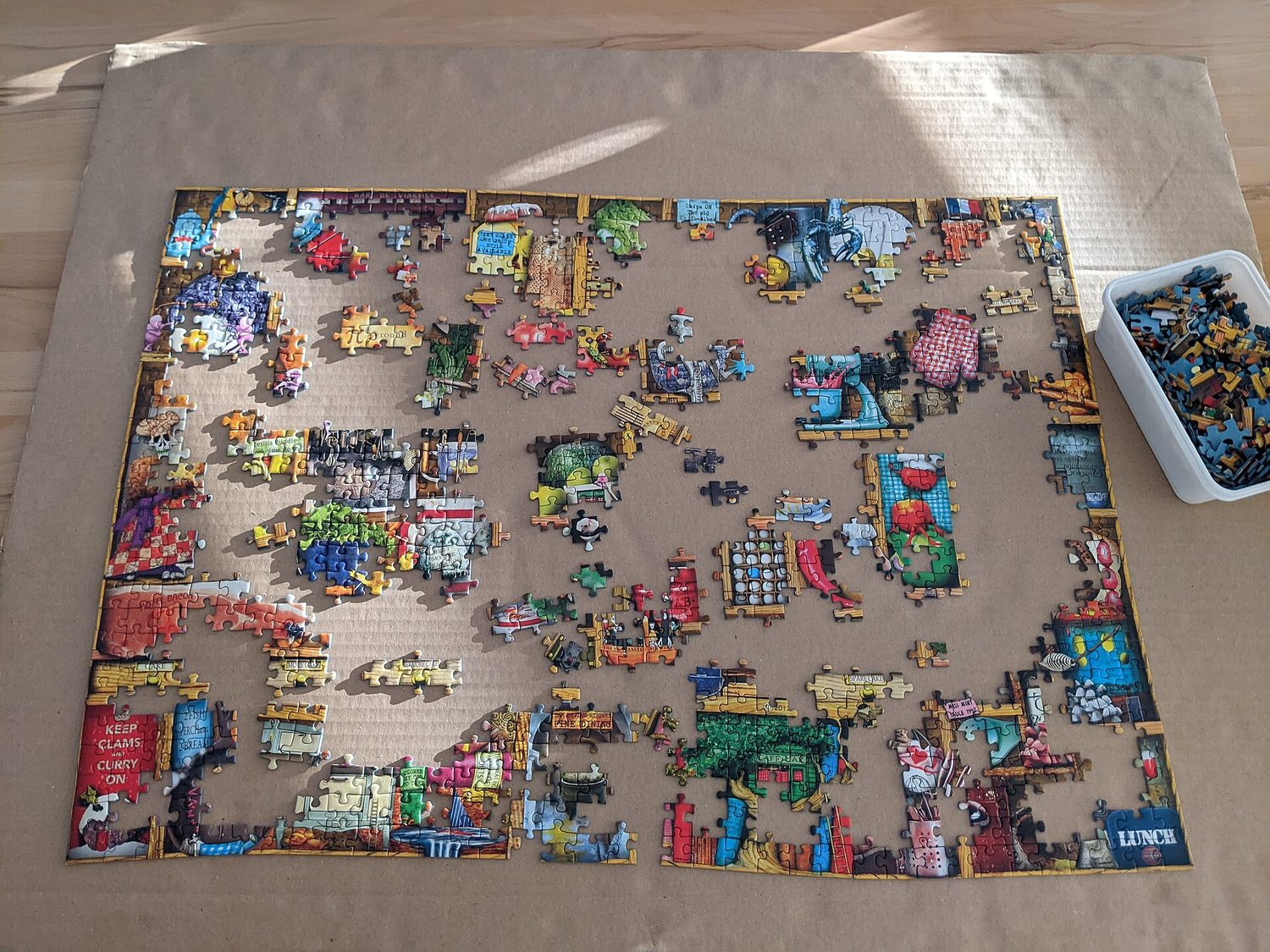
進行中のジグソーパズル:コラボレーションとモジュール設計が解決策を組み立てる

コンピューティングは協働的な活動です。チームで作業することは、単独作業よりも多様な視点を提供し、より多くのエラーを発見し、より良いプログラムを生み出します。良好なコラボレーションには、合意形成、明確なコミュニケーション、メンバーそれぞれの強み活用法が含まれます。ペアプログラミング(1台のコンピュータで2人が協力し、1人がタイプして他方がレビューする)は一般的な実践です。試験では、コラボレーションがどのようにプログラムを改善したか(アイデアが増加、バグ減少、テスト網の拡大)を説明できるようになる必要があります。

Vocabulary · ⁨語彙⁩ Train · ⁨練習する⁩
English 日本語
collaborative/kəˈlæbrətɪv/ 協働的
Pair programming/peə ˈprəʊɡræmɪŋ/ ペアプログラミング
input/ˈɪnpʊt/ 入力
output/ˈaʊtpʊt/ 出力
iterative/ˈɪtərətɪv/ 反復的
decomposition/ˌdiːkɒmpəˈzɪʃn/ 分解反応
Comments/ˈkɒments/ コメント
surveys/ˈsɜːveɪz/ 調査
diagrams representing the layout of the user interface ユーザーインターフェースのレイアウトを表す図
event/ɪˈvent/ イベント
event handler/ɪˈvent ˈhændlə/ イベントハンドラ
debugging/ˈdiːbʌɡɪŋ/ デバッグ
syntax error/ˈsɪntæks ˈerə/ 構文エラー
runtime error/ˈrʌntaɪm ˈerə/ ランタイムエラー
logic error/ˈlɒdʒɪk ˈerə/ ロジックエラー
1.2

Program Function and Purpose · ⁨プログラムの機能と目的⁩

Syllabus · ⁨シラバス⁩
English

Enduring Understanding (CRD-2): Developers create and innovate using an iterative design process that is user-focused, that incorporates implementation/feedback cycles, and that leaves ample room for experimentation and risk-taking.

Learning Objective CRD-2.A: Describe the purpose of a computing innovation. [Skill 1.A]

  • CRD-2.A.1 The purpose of computing innovations is to solve problems or to pursue interests through creative expression.
  • CRD-2.A.2 An understanding of the purpose of a computing innovation provides developers with an improved ability to develop that computing innovation.

Learning Objective CRD-2.B: Explain how a program or code segment functions. [Skill 4.A]

  • CRD-2.B.1 A program is a collection of program statements that performs a specific task when run by a computer. A program is often referred to as software.
  • CRD-2.B.2 A code segment is a collection of program statements that is part of a program.
  • CRD-2.B.3 A program needs to work for a variety of inputs and situations.
  • CRD-2.B.4 The behavior of a program is how a program functions during execution and is often described by how a user interacts with it.
  • CRD-2.B.5 A program can be described broadly by what it does, or in more detail by both what the program does and how the program statements accomplish this function.

Learning Objective CRD-2.C: Identify input(s) to a program. [Skill 3.A]

  • CRD-2.C.1 Program inputs are data sent to a computer for processing by a program. Input can come in a variety of forms, such as tactile, audio, visual, or text.
  • CRD-2.C.2 An event is associated with an action and supplies input data to a program.
  • CRD-2.C.3 Events can be generated when a key is pressed, a mouse is clicked, a program is started, or any other defined action occurs that affects the flow of execution.
  • CRD-2.C.4 Inputs usually affect the output produced by a program.
  • CRD-2.C.5 In event-driven programming, program statements are executed when triggered rather than through the sequential flow of control.
  • CRD-2.C.6 Input can come from a user or other programs.

Learning Objective CRD-2.D: Identify output(s) produced by a program. [Skill 3.A]

  • CRD-2.D.1 Program outputs are any data sent from a program to a device. Program output can come in a variety of forms, such as tactile, audio, visual, or text.
  • CRD-2.D.2 Program output is usually based on a program's input or prior state (e.g., internal values).
日本語

持続的理解 (CRD-2): 開発者は、ユーザー中心であり、実装/フィードバックサイクルを組み込み、実験やリスクテイクのための十分な余地を残す、反復的なデザインプロセスを用いてプログラムを作成・革新します。

学習目標 CRD-2.A: 計算革新の目的を説明します。[スキル 1.A]

  • CRD-2.A.1 計算革新の目的は、問題解決や創造的な表現を通じた関心の追求です。
  • CRD-2.A.2 計算革新の目的に対する理解は、開発者がその計算革新を開発する能力を向上させます。

学習目標 CRD-2.B: プログラムまたはコードセグメントがどのように機能するかを説明します。[スキル 4.A]

  • CRD-2.B.1 プログラム とは、コンピュータによって実行されることで特定のタスクを行う一連のプログラムステートメントの集合です。プログラムはしばしば ソフトウェア とも呼ばれます。
  • CRD-2.B.2 コードセグメント とは、プログラムの一部を構成する一連のプログラムステートメントの集合です。
  • CRD-2.B.3 プログラムは、多様な入力や状況に対して機能する必要があります。
  • CRD-2.B.4 プログラムの 振る舞い とは、実行中にプログラムがどのように機能するかを示すものであり、ユーザーとの相互作用によって説明されることが多いです。
  • CRD-2.B.5 プログラムは、その機能として広く説明できるか、あるいはプログラムが何を行うかおよびプログラム文がその機能をどのように達成するかという点でより詳細に説明できる。

学習目標 CRD-2.C: プログラムの入力を特定する。[スキル 3.A]

  • CRD-2.C.1 プログラム入力 は、プログラムによって処理されるためにコンピュータに送られるデータである。入力は、触覚、音声、視覚、またはテキストなど、多様な形式で提供されることがある。
  • CRD-2.C.2 イベント はアクションと関連付けられ、プログラムに入力データを提供する。
  • CRD-2.C.3 キーが押されたとき、マウスがクリックされたとき、プログラムが開始されたとき、または実行フローに影響を与える他の定義されたアクションが発生したときに、イベントが生成されることがある。
  • CRD-2.C.4 入力は通常、プログラムによって生成される出力に影響を与える。
  • CRD-2.C.5 イベント駆動_programming_では、制御の順次流れではなく、トリガーされたときにプログラム文が実行される。
  • CRD-2.C.6 入力はユーザーや他のプログラムから提供されることがある。

学習目標 CRD-2.D: プログラムによって生成される出力を特定する。[スキル 3.A]

  • CRD-2.D.1 プログラム出力 は、プログラムからデバイスへ送られるあらゆるデータである。プログラム出力は、触覚、音声、視覚、またはテキストなど、多様な形式で提供されることがある。
  • CRD-2.D.2 プログラム出力は通常、プログラムの入力や事前の状態(例:内部値)に基づいている。

Source: College Board AP Course and Exam Description · ⁨出典: College Board AP コースおよび試験説明書⁩

English

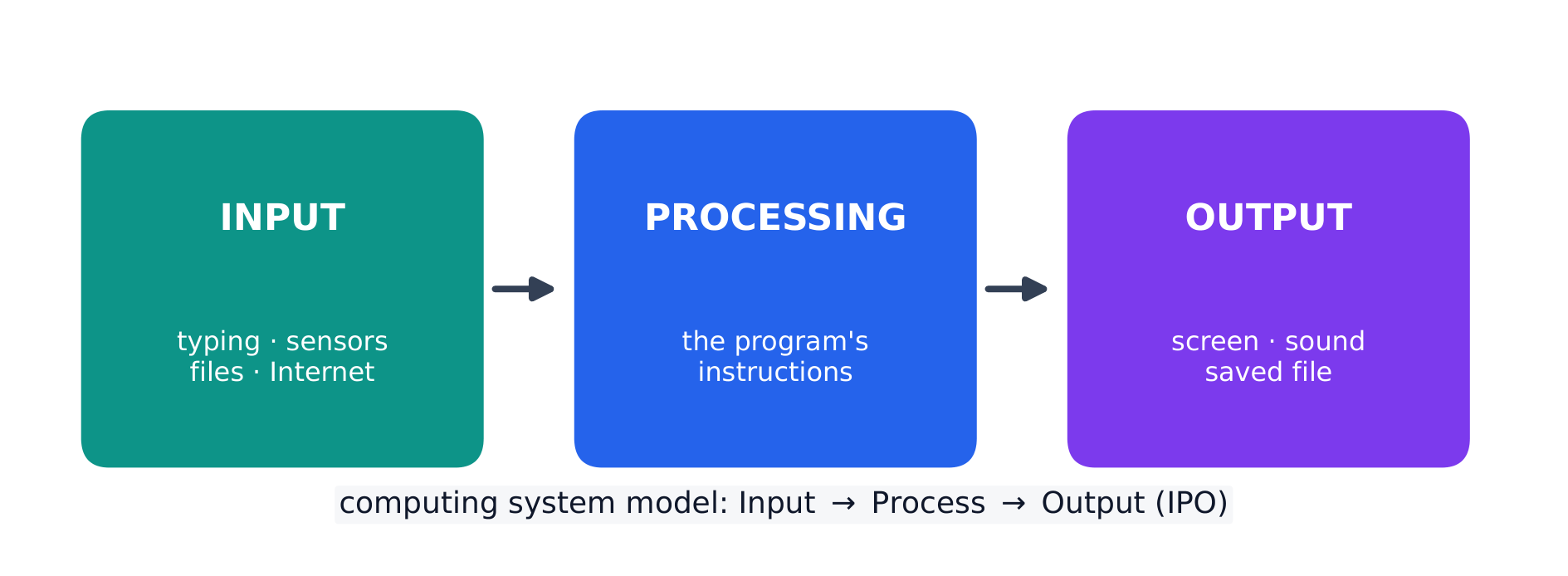
Every program is written for a purpose – it solves a problem or pursues an interest. A program takes input 输入, processes it, and produces output 输出. Inputs can come from a user, a device, a file, or another program; outputs can be visual, audible, textual, or a signal to a device. Being able to state a program's purpose, and describe its inputs and outputs clearly, is a core skill (and part of the Create performance task).

日本語

すべてのプログラムは目的のために書かれています — 問題を解決したり、興味のある事柄を追求したりします。プログラムは入力を受け取り、処理して出力を生成します。入力はユーザー、デバイス、ファイル、または他のプログラムから来ることがあり、出力は視覚的、音声的、テキスト的、あるいはデバイスへの信号である可能性があります。プログラムの目的を述べ、入力と出力を明確に記述できることは、核心的なスキルであり(Createパフォーマンスタスクの一部でもあります)。

すべてのプログラムは入力、処理、出力に分解される
すべてのプログラムは入力-処理-出力モデルに従う
Explore · ⁨探索⁩

Explore the input → processing → output model · ⁨入力 → 処理 → 出力モデルを探る⁩

Step through the IPO model. Every program takes some input, performs processing on it by following its instructions, then produces output — trace one weather-app example along the pipeline. · ⁨IPOモデルをステップバイステップで確認する。すべてのプログラムは何かの入力を受け取り、指示に従って処理を行い、出力を生み出します——天気アプリの例をパイプラインに沿ってトレースしてみましょう。⁩

1.3

Program Design and Development · ⁨プログラム設計と開発⁩

Syllabus · ⁨シラバス⁩
English

Enduring Understanding (CRD-2): Developers create and innovate using an iterative design process that is user-focused, that incorporates implementation/feedback cycles, and that leaves ample room for experimentation and risk-taking.

Learning Objective CRD-2.E: Develop a program using a development process. [Skill 1.B]

  • CRD-2.E.1 A development process can be ordered and intentional, or exploratory in nature.
  • CRD-2.E.2 There are multiple development processes. The following phases are commonly used when developing a program:
    • investigating and reflecting
    • designing
    • prototyping
    • testing
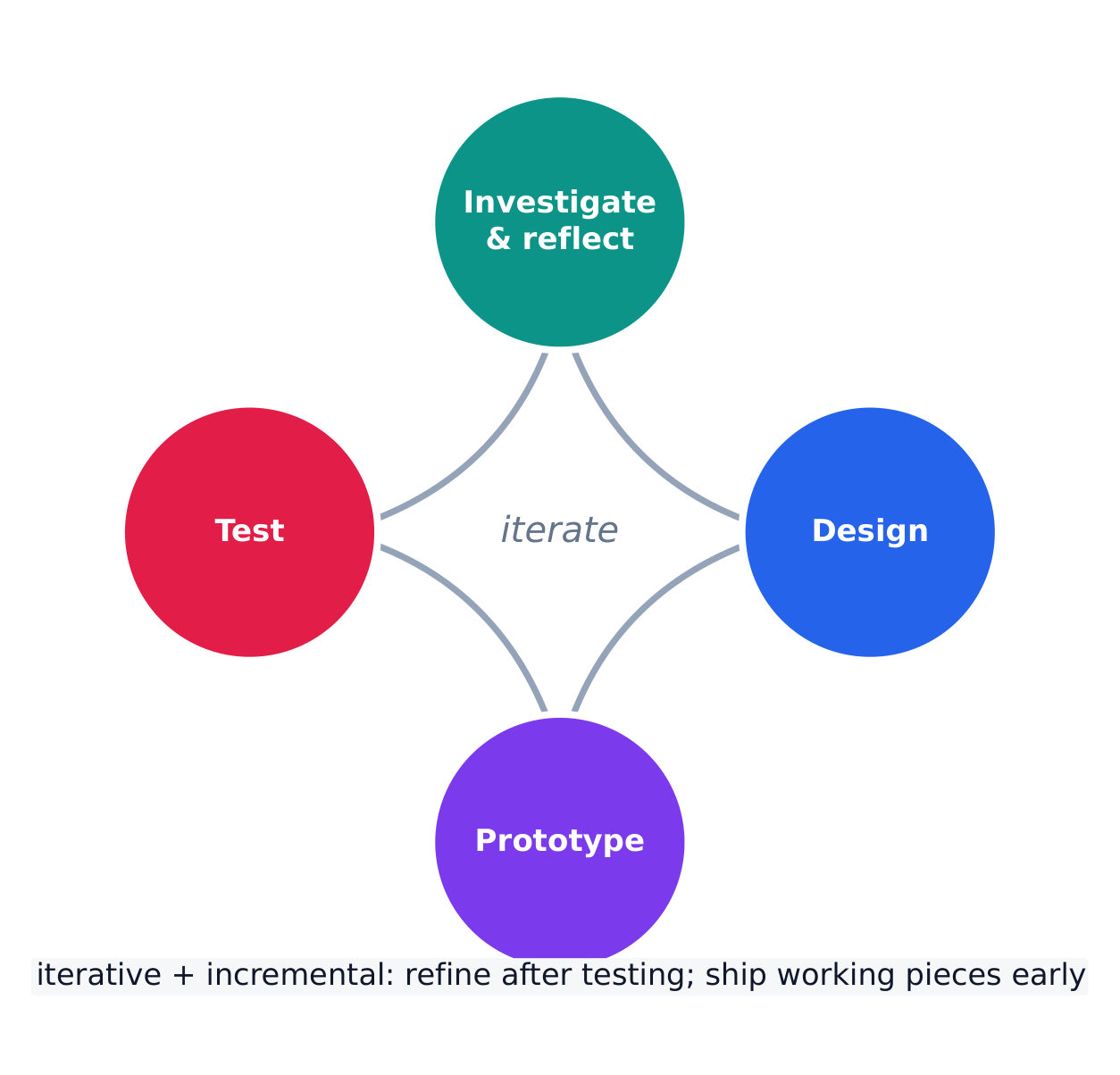
  • CRD-2.E.3 A development process that is iterative requires refinement and revision based on feedback, testing, or reflection throughout the process. This may require revisiting earlier phases of the process.
  • CRD-2.E.4 A development process that is incremental is one that breaks the problem into smaller pieces and makes sure each piece works before adding it to the whole.

Learning Objective CRD-2.F: Design a program and its user interface. [Skill 1.B]

  • CRD-2.F.1 The design of a program incorporates investigation to determine its requirements.
  • CRD-2.F.2 Investigation in a development process is useful for understanding and identifying the program constraints, as well as the concerns and interests of the people who will use the program.
  • CRD-2.F.3 Some ways investigation can be performed are as follows:
    • collecting data through surveys
    • user testing
    • interviews
    • direct observations
  • CRD-2.F.4 Program requirements describe how a program functions and may include a description of user interactions that a program must provide.
  • CRD-2.F.5 A program's specification defines the requirements for the program.
  • CRD-2.F.6 In a development process, the design phase outlines how to accomplish a given program specification.
  • CRD-2.F.7 The design phase of a program may include:
    • brainstorming
    • planning and storyboarding
    • organizing the program into modules and functional components
    • creation of diagrams that represent the layouts of the user interface
    • development of a testing strategy for the program

Learning Objective CRD-2.G: Describe the purpose of a code segment or program by writing documentation. [Skill 4.A]

  • CRD-2.G.1 Program documentation is a written description of the function of a code segment, event, procedure, or program and how it was developed.
  • CRD-2.G.2 Comments are a form of program documentation written into the program to be read by people and do not affect how a program runs.
  • CRD-2.G.3 Programmers should document a program throughout its development.
  • CRD-2.G.4 Program documentation helps in developing and maintaining correct programs when working individually or in collaborative programming environments.
  • CRD-2.G.5 Not all programming environments support comments, so other methods of documentation may be required.

Learning Objective CRD-2.H: Acknowledge code segments used from other sources. [Skill 1.C]

  • CRD-2.H.1 It is important to acknowledge any code segments that were developed collaboratively or by another source.
  • CRD-2.H.2 Acknowledgement of a code segment(s) written by someone else and used in a program can be in the program documentation. The acknowledgement should include the origin or original author's name.
日本語

持続的理解 (CRD-2): 開発者は、ユーザー中心であり、実装/フィードバックサイクルを組み込み、実験やリスクテイクのための十分な余地を残す、反復的なデザインプロセスを用いてプログラムを作成・革新します。

学習目標 CRD-2.E: 開発プロセスを使用してプログラムを開発する。[スキル 1.B]

  • CRD-2.E.1 開発プロセスは順序立てられて意図的である也可以是、探求的な性質を持つ也可以是。
  • CRD-2.E.2 複数の開発プロセスが存在する。以下のフェーズは、プログラムを開発する際に一般的に使用される:
    • 調査と反省
    • 設計
    • プロトタイピング
    • テスト
  • CRD-2.E.3 反復型開発プロセスは、プロセス全体を通じてフィードバック、テスト、または反省に基づいて修正と改訂を必要とする。これには、プロセスの早期フェーズに戻ることが含まれる可能性がある。
  • CRD-2.E.4 増分型開発プロセスとは、問題をより小さな部分に分割し、各部分が無事動作することを確認してから、それらを全体に組み込むプロセスである。

学習目標 CRD-2.F: プログラムとそのユーザーインターフェースを設計する。[スキル 1.B]

  • CRD-2.F.1 プログラムの設計には、要件を特定するための調査が含まれる。
  • CRD-2.F.2 開発プロセスにおける調査は、プログラムの制約条件を理解して特定すること、ならびにプログラムを使用する人々の懸念点や関心点を理解するために有用である。
  • CRD-2.F.3 調査を行ういくつかの方法は以下の通りである:
    • アンケートによるデータ収集
    • ユーザーテスト
    • インタビュー
    • 直接観察
  • CRD-2.F.4 プログラムの要件は、プログラムがどのように機能するかを記述し、プログラムが提供する必要があるユーザー操作の説明を含むことがある。
  • CRD-2.F.5 プログラムの仕様は、プログラムの要件を定義する。
  • CRD-2.F.6 開発プロセスにおいて、設計フェーズは、特定のプログラム仕様を達成する方法を概説する。
  • CRD-2.F.7 プログラムの設計フェーズには以下が含まれ得る:
    • ブレスト storming(ブレインストーミング)
    • 計画とストーリーボード作成
    • モジュールと機能的コンポーネントへのプログラム組織化
    • ユーザーインターフェースのレイアウトを表す図の作成
    • プログラムのためのテスト戦略の開発

学習目標 CRD-2.G: コードセグメントまたはプログラムの目的をドキュメント書きによって説明する。[スキル 4.A]

  • CRD-2.G.1 プログラムドキュメント は、コードセグメント、イベント、手続き、またはプログラムの機能、およびそれがどのように開発されたかの書面での記述である。
  • CRD-2.G.2 コメント は、人が読むためにプログラムに書き込まれたプログラムドキュメントの一形態であり、プログラムの実行方法には影響しない。
  • CRD-2.G.3 プログラマーは、プログラムの開発全体を通じてそれをドキュメント化するべきである。
  • CRD-2.G.4 プログラムドキュメントは、個人作業の場合でも共同製作環境の場合でも、正しいプログラムの開発および維持に役立つ。
  • CRD-2.G.5 すべてのプログラミング環境がコメントをサポートしているわけではないため、ドキュメント化のための他の方法が必要となる場合がある。

学習目標 CRD-2.H: 他のソースから使用されたコードセグメントを認める。[スキル 1.C]

  • CRD-2.H.1 共同制作された、または他のソースによって開発されたコードセグメントを認めることは重要である。
  • CRD-2.H.2 他者が書いたコードセグメントを使用した場合の承認は、プログラムドキュメント内に行うことができる。承認には、出所または元の著者の名前を含めるべきである。

Source: College Board AP Course and Exam Description · ⁨出典: College Board AP コースおよび試験説明書⁩

English

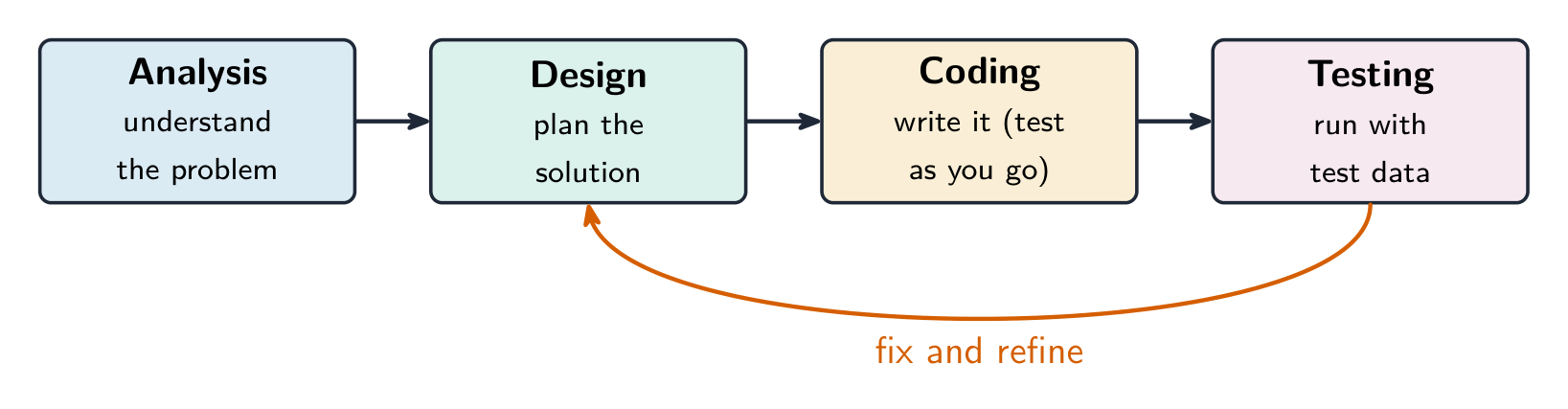
Programs are built through an iterative 迭代 process, not in one straight line: investigate the problem and users, design (often with a diagram or written plan), implement in code, and test – then repeat. A large problem is broken into smaller pieces (decomposition 分解). Comments 注释 and clear naming document the design so others (and your future self) can understand it. Development is incremental – build and test a small piece, then add the next.

Investigating what users actually need

Before any code is written, the developer investigates the problem and the people who will use the program. Three ways to do that:

  • surveys 调查问卷 sent to potential users, which collect data from many people quickly;
  • interviews and direct observation of users doing the task by hand;
  • studying existing solutions to see what already works and what frustrates people.

The findings are turned into a design. Two artefacts do that: a program requirements list saying exactly what the program must do, and diagrams representing the layout of the user interface 用户界面 — sketches showing which controls appear where, and what each one does when used. Designing the interface on paper first is cheaper than discovering after coding that the buttons are in the wrong place.

Events, and programs that wait

Not every program runs straight through from top to bottom. An event 事件 is generated when a key is pressed, a mouse is clicked, a program is started, or any other defined action occurs — and an event changes the flow of execution: the program pauses what it was doing and runs the code attached to that event, called an event handler 事件处理程序.

This is why a program with a graphical interface can appear to be doing nothing: it is waiting for the next event. The order in which those events arrive is decided by the user, not by the programmer, so the same program can run its blocks in a different order each time it is used.

日本語
マルチモニタワークステーションでデバッグするプログラマー — 反復的デザインとテスト

プログラムは一本の直線的なプロセスではなく、反復的なプロセスを通じて構築されます。問題やユーザーを調査し、設計(通常は図表や書面による計画)を行い、コードで実装し、テストを行う—そしてこれを繰り返します。大きな問題はより小さな部分に分解され(分解)、コメントや明瞭な名前付けによって設計が文書化され、他者(および将来的なご自身)が理解できるようになります。開発は増分的であり、まず小さな部分を構築・テストし、次に次の部分を追加していきます。

プログラムの開発段階と、テストが修正・洗練のためにフィードバックされる様子
ソフトウェアは反復的かつ増分的な開発プロセスによって構築されます

ユーザーが本当に必要としているものの調査

コードが記述される前に、開発者は問題点とプログラムを使用する人々を調査します。その方法として以下の3つがあります:

  • 潜在ユーザーへ送られるアンケートで、多くの人のデータを集約して迅速に収集します;
  • インタビューや、ユーザーが手作業でタスクを実行する姿の直接観察;
  • 既存の解決策の検討により、既に機能していることと、人々が不満に思っている点を把握します。

これらの発見に基づいて設計が行われます。このために用いられる2つの成果物とは、プログラムが具体的に何をすべきかを明確に示す要件リスト、およびユーザーインターフェースのレイアウトを表す図表です。これらは、どのコントロールがどこに配置され、それぞれが使用された際に何を行うかを示すスケッチです。ボタンが間違っていることに後から気づくよりも、紙上でまずインターフェースを設計した方が安価です。

イベントと、待機するプログラム

すべてのプログラムが上から下へと一貫して実行されるわけではありません。イベントはキーが押されたり、マウスがクリックされたり、プログラムが起動したり、その他の定義されたアクションが発生したりしたときに生成され、実行の流れを変化させます。つまり、プログラムは現在行っていたことを一時停止し、そのイベントに対応するイベントハンドラとして付随するコードを実行します。

これが、グラフィカルインターフェースを持つプログラムが何もしていないように見える理由です。次に来るイベントを待っているからです。これらのイベントが到達する順序はユーザーによって決定されるものであり、プログラマーによるものではありません。そのため、同じプログラムでも使用されるたびにブロックの実行順序が異なることがあります。

Explore · ⁨探索⁩

Loop through the iterative development process · ⁨反復開発プロセスを繰り返す⁩

Development is iterative — you repeat the stages, improving the program a little on each pass. Step around the loop and notice it returns to the start rather than ending after one run. · ⁨開発は反復的です——段階を繰り返し、各通しでプログラムを少しずつ改善します。ループ内を移動すると、一度実行して終わるのではなく、最初に戻ることに気づくでしょう。⁩

1.4

Identifying and Correcting Errors · ⁨エラーの特定と修正⁩

Syllabus · ⁨シラバス⁩
English

Enduring Understanding (CRD-2): Developers create and innovate using an iterative design process that is user-focused, that incorporates implementation/feedback cycles, and that leaves ample room for experimentation and risk-taking.

Learning Objective CRD-2.I: For errors in an algorithm or program: a. Identify the error. [Skill 4.C] b. Correct the error. [Skill 4.C]

  • CRD-2.I.1 A logic error is a mistake in the algorithm or program that causes it to behave incorrectly or unexpectedly.
  • CRD-2.I.2 A syntax error is a mistake in the program where the rules of the programming language are not followed.
  • CRD-2.I.3 A run-time error is a mistake in the program that occurs during the execution of a program. Programming languages define their own run-time errors.
  • CRD-2.I.4 An overflow error is an error that occurs when a computer attempts to handle a number that is outside of the defined range of values.
  • CRD-2.I.5 The following are effective ways to find and correct errors:
    • test cases
    • hand tracing
    • visualizations
    • debuggers
    • adding extra output statement(s)

Learning Objective CRD-2.J: Identify inputs and corresponding expected outputs or behaviors that can be used to check the correctness of an algorithm or program. [Skill 4.C]

  • CRD-2.J.1 In the development process, testing uses defined inputs to ensure that an algorithm or program is producing the expected outcomes. Programmers use the results from testing to revise their algorithms or programs.
  • CRD-2.J.2 Defined inputs used to test a program should demonstrate the different expected outcomes that are at or just beyond the extremes (minimum and maximum) of input data.
  • CRD-2.J.3 Program requirements are needed to identify appropriate defined inputs for testing.
日本語

持続的理解 (CRD-2): 開発者は、ユーザー中心であり、実装/フィードバックサイクルを組み込み、実験やリスクテイクのための十分な余地を残す、反復的なデザインプロセスを用いてプログラムを作成・革新します。

学習目標 CRD-2.I: アルゴリズムまたはプログラムのエラーについて: a. エラーを特定する。[スキル 4.C] b. エラーを修正する。[スキル 4.C]

  • CRD-2.I.1 ロジックエラー とは、アルゴリズムまたはプログラムに存在する間違いであり、これが正しくない、または予期せぬ挙動を引き起こすものである。
  • CRD-2.I.2 構文エラー とは、プログラムの規則が遵守されていない場合に発生する間違いである。
  • CRD-2.I.3 ランタイムエラー とは、プログラムの実行中に発生するプログラムの間違いである。プログラミング言語は独自のランタイムエラーを定義している。
  • CRD-2.I.4 オーバーフローエラー とは、コンピュータが定義された値範囲外にある数値を扱う試みをする際に発生するエラーである。
  • CRD-2.I.5 エラーを特定・修正するための有効な方法は以下の通りである:
    • テストケース
    • ハンドトレーシング
    • 可視化
    • デバッガ
    • 追加出力文の追加

学習目標 CRD-2.J: アルゴリズムやプログラムの正しさを検証するために使用できる入力と、それに対応する期待される出力または挙動を特定する。[スキル 4.C]

  • CRD-2.J.1 開発プロセスにおいて、テスト は定義された入力を用いて、アルゴリズムやプログラムが期待される結果を生み出していることを確認する。プログラマはテストの結果を用いて、自身のアルゴリズムやプログラムを修正する。
  • CRD-2.J.2 プログラムを検証するために用いる定義された入力は、入力データの極限(最小値および最大値)に相当するか、あるいはそのわずかに外側にある異なる期待される出力を示すべきである。
  • CRD-2.J.3 テストに適した定義された入力を特定するためには、プログラムの要件が必要である。

Source: College Board AP Course and Exam Description · ⁨出典: College Board AP コースおよび試験説明書⁩

English

A bug is an error in a program; debugging 调试 is finding and fixing it. Three kinds:

  • a syntax error 语法错误 breaks the language's rules, so the program will not run;
  • a runtime error 运行时错误 crashes the program while it runs (e.g. dividing by zero);
  • a logic error 逻辑错误 lets it run but gives the wrong result.

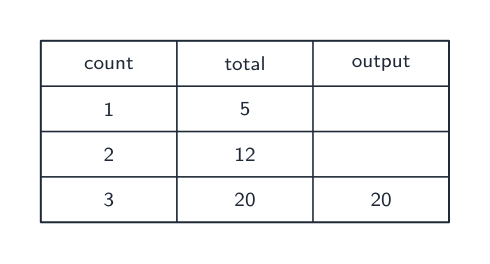
Find bugs by testing with different inputs, adding print statements to see values, and hand-tracing the code. Choose the test inputs deliberately: they should demonstrate the different expected outcomes at or just beyond the extremes — the minimum and maximum values the program should accept, and a value just outside each of them. A program that works on ordinary data very often fails on an empty list, a zero, or a value one past the end of a range, so those are the inputs worth trying first. Fixing one bug at a time and re-testing is the reliable method.

Exam skill: be able to name the type of an error and describe a testing strategy that would catch it – a recurring multiple-choice and Create-task theme.

Worked example. A program meant to print the average of two numbers instead runs avg = a + b / 2. Tracing the order of operations, / runs before +, so it computes $a+\tfrac{b}{2}$ rather than the average. Add parentheses to fix it: avg = (a + b) / 2. Testing with $a=4,\ b=6$ confirms the fix — the buggy line gives $4+3=7$, the corrected line gives $\tfrac{10}{2}=5$. Testing with known inputs is exactly how you find and confirm a logic error.

日本語

バグとはプログラムのエラーを指し、デバッグとはそれを特定して修正することです。主な3種類は以下の通りです:

トレース表は各変数の値をプログラム実行中に記録し、バグの特定に役立てます
  • 構文エラーは言語のルールを破るため、プログラムは実行できません;
  • 実行時エラーはプログラム実行中にクラッシュを引き起こします(例:ゼロでの除算);
  • 論理エラーは実行はしますが、正しくない結果を返します。

バグの特定には、異なる入力でのテスト、値を確認するための出力文の追加、および手動でのトレースを行います。テスト入力は意図的に選択すべきです。プログラムが受け付ける最小値と最大値という極端な値、およびそれらのわずかに外側にある値など、異なる想定される結果を極限値またはそのすぐ近傍で確認できるものを選ぶべきです。通常のデータでは正常に動作するプログラムでも、空のリスト、ゼロ、範囲の終端の1つ先にある値などに対しては頻繁に失敗するため、これらは最初試す価値のある入力です。一度に一つのバグを修正して再テストを行うことが確実な手法です。

試験対策: エラーの種類を名指し、それを検出できるテスト戦略を説明できる能力が求められます。これは反復的に出題される選択問題およびCreateタスクのテーマです。

プログラミングエラーの3種類:構文エラー、論理エラー、実行時エラー

** worked example.** 2つの数値の平均を出力するはずのプログラムが avg = a + b / 2 を実行してしまいます。演算の順序をトレースすると、/ が + より先に実行されるため、平均ではなく $a+\tfrac{b}{2}$ を計算してしまいます。これを修正するには括弧を追加します:avg = (a + b) / 2。$a=4,\ b=6$ でテストすると修正が成功することが確認できます。バグのある行は $4+3=7$ を出し、修正された行は $\tfrac{10}{2}=5$ を出します。既知の入力でテストすることは、論理エラーを特定し確認する手法そのものです。

Explore · ⁨探索⁩

Trace the guessing-game logic and spot a logic error · ⁨推論ゲームのロジックを追跡し、ロジックエラーを見つける⁩

Drag the guess and watch which branch runs. A logic error would send the same guess down the wrong branch — the program still runs, but gives the wrong message. The secret number here is 50. · ⁨推測値をドラッグして、どの分岐が実行されるかを確認します。論理エラーは同じ推測値を誤った分岐に送るため、プログラムは実行されますが、間違ったメッセージが表示されます。ここではシークレット番号が50です。⁩

1.4

Exam tips · ⁨試験対策⁩

English
  • Much of CSP is assessed through the Create and written performance tasks — explain your reasoning clearly, not just your result.
  • Know the benefits of collaboration and how diverse perspectives reduce bias in a program.
  • Use precise vocabulary (iterative development, program requirements) when you describe a design process.
  • Give and take feedback constructively; credit collaborators and sources.
  • Break a large problem into smaller modules that a team can build in parallel.
日本語
  • CSPの大部分はCreateタスクおよび筆記性能タスクを通じて評価されます。単なる結果だけでなく、判断の根拠も明確に説明してください。
  • コラボレーションの利点と、多様な視点如何将偏見を減らすかを知っています。
  • 設計プロセスを説明する際は、反復的開発、要件などの正確な用語を使用してください。
  • 建設的なフィードバックを提供し受け取り、共作者や出典に謝辞を添えてください。
  • チームが並列に開発できるよう、大きな問題をより小さなモジュールに分解してください。

Interactive lessons on this topic · ⁨このトピックのインタラクティブ授業⁩

Work through it step by step, with instant-check exercises. · ⁨一歩ずつ進め、即時チェック付きの問題で学習します。⁩

Past Papers · ⁨過去問⁩

More topics in AP Computer Science Principles · ⁨APコンピュータサイエンス・プリンシプルズ⁩ · ⁨AP Computer Science Principles · ⁨APコンピュータサイエンス・プリンシプルズ⁩ の他のトピック⁩

Log in or create account · ⁨ログインまたはアカウント作成⁩

IGCSE, A-Level & AP