Arrays and file handling
Diperkenalkan 13:08
Pemrograman
Berikut program pendek. Program ini membaca lima nilai ujian tes dan mencetak totalnya. Lima nilai tersebut adalah delapan, sembilan, tujuh, enam, dan sepuluh, sehingga total seharusnya empat puluh. Perhatikan…
Narasi bahasa Inggris · takarir bahasa Inggris dan 中文 yang dapat dipilih
In this lesson
| English |
|---|
| array/əˈreɪ/ |
| index/ˈɪndeks/ |
| nested/ˈnestɪd/ |
| file handling/faɪl ˈhændlɪŋ/ |
Arrays 数组 and files
- An array stores many values of the same type in one variable.
- A file lets a program keep data after it stops.
- Loops are the natural way to work through both.
One-dimensional arrays
- A 1D array is like a single list; each value is found by an index 索引 (a position number).
DECLARE Scores : ARRAY[1:5] OF INTEGER
Scores[1] ← 90
FOR I ← 1 TO 5
    INPUT Scores[I]
NEXT I
- A loop fills or reads the whole array.
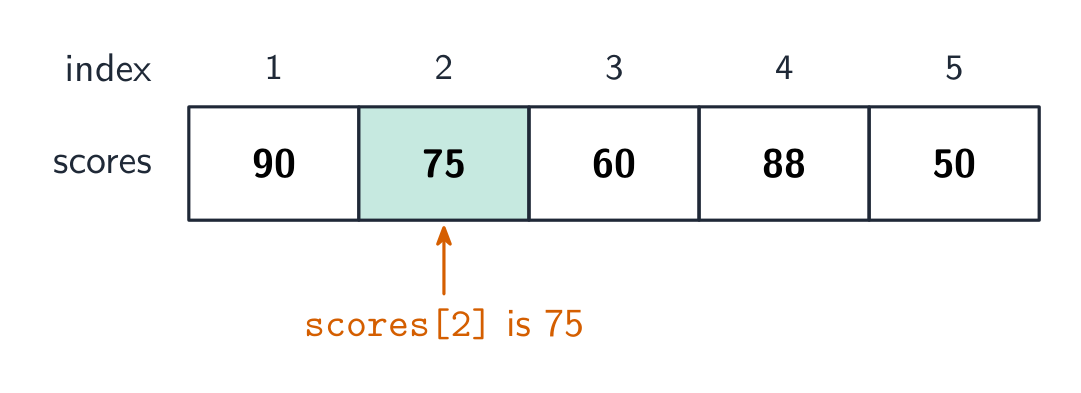
An array is:
Kesulitan 1/5 · 100 koin + bonus kecil pada penyelesaian pertama hari ini
An array stores many same-type values under one name; each is accessed by its index.
Two-dimensional arrays
- A 2D array is like a table with rows and columns, using two indexes
[row, column].
DECLARE Grid : ARRAY[1:3, 1:3] OF INTEGER
Grid[2, 3] ← 8       // row 2, column 3
- You read a 2D array with a loop inside a loop (nested 嵌套 iteration).
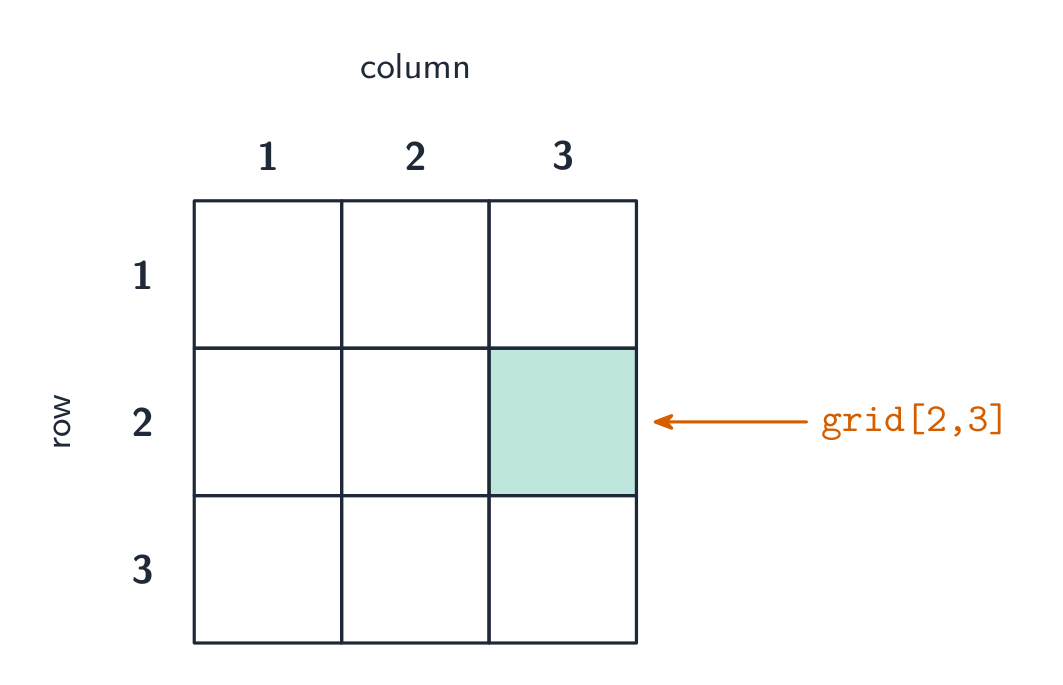
Index a 2-D array: Grid[Row, Col]
A 2-D array is a grid of values. Grid[Row, Col] reaches exactly one cell — the row first, then the column. Cambridge counts both from 1.
In grid[2, 3], which cell is accessed?
Kesulitan 1/5 · 100 koin + bonus kecil pada penyelesaian pertama hari ini
The first index is the row, the second the column — row 2, column 3.
Match each idea to what it means.
Kesulitan 2/5 · 140 koin + bonus kecil pada penyelesaian pertama hari ini
Arrays hold many values by index; a 2-D array is a grid; nested loops walk it; files are opened, used and closed.
File handling 文件处理
- A program can store data in a file so it survives after the program stops.
- Open the file, use it, then close it:
OPENFILE "data.txt" FOR WRITE
WRITEFILE "data.txt", "Hello"
CLOSEFILE "data.txt"
- Always close a file when finished (use
FOR READto read it back).
Put the steps of using a file in the correct order.
Kesulitan 3/5 · 200 koin + bonus kecil pada penyelesaian pertama hari ini
Always open first, then do the reading/writing, then close to save buffered data and free the file.
You should always close a file when you have finished using it.
Kesulitan 1/5 · 100 koin + bonus kecil pada penyelesaian pertama hari ini
Closing saves any buffered data and frees the file for other programs.
Worked example: the highest score in an array
Scores[1:5] holds 90 75 60 88 50. Write pseudocode to find the highest score.
Max ← Scores[1]
FOR Index ← 2 TO 5
    IF Scores[Index] > Max
      THEN
        Max ← Scores[Index]
    ENDIF
NEXT Index
OUTPUT Max
Maxstarts as the first element, 90. Each later element is compared with it: 75, 60, 88 and 50 are all smaller, soMaxstays 90 and 90 is output.- The loop variable
iis the index. In a 2D array such asGrid[2, 3], the first index is the row and the second is the column.
Scores memegang 90 75 60 88 50 with the first index 1. What is Scores[4]?
Kesulitan 2/5 · 140 koin + bonus kecil pada penyelesaian pertama hari ini
Counting from index 1: 90, 75, 60, 88.
Data in an array is lost when the program stops, but data written to a file is kept.
Kesulitan 1/5 · 100 koin + bonus kecil pada penyelesaian pertama hari ini
Arrays live in RAM while the program runs; a file is saved to storage.
You've got it
- a 1D array is a list reached by one index; fill/read it with a loop
- a 2D array is a table reached by
[row, column]; use nested loops - file handling: OPENFILE (READ/WRITE) → READFILE/WRITEFILE → CLOSEFILE
- always close a file when done