Skip to content · ⁨דלג לתוכן⁩

Securing Devices · ⁨אבטחת התקנים⁩

AP Cybersecurity · ⁨אבטחת מידע והסייבר - AP⁩ · Topic 4 · ⁨נושא 4⁩

Video lesson for this topic · ⁨שיעור וידאו לנושא זה⁩ Open the video page · ⁨פתח את עמוד הוידאו⁩
9:32

אבטחת התקנים

זהו שני בוקר בבית חולים עמוס. תוך פחות מדקה, המסכים במחלקה, בפארמה ובמשרד הארכיונים משתנים כולם. כל קובץ עליהם הוא…

English narration · English + 中文 subtitles burned in · ⁨קריאת קול באנגלית · תרגום אנגלי + סינית שרוף בתוך הסרטון⁩

4.1

Device Vulnerabilities and Attacks · ⁨רגישותות התקן והתקפות⁩

Syllabus · ⁨סיילבוס⁩
English

Learning Objective 4.1.A: Identify types of computing devices.

  • 4.1.A.1 Server computers are devices that provide one or more services to other computers (e.g., DNS, DHCP, FTP). Any computer can be a server, and in an enterprise environment servers typically have more processing power and storage than a personal computer.
  • 4.1.A.2 Personal computers are devices that are designed to be used by one person for work or recreational purposes (e.g., word processing, graphic design, web browsing, and media production or viewing). These include desktop, laptop, and notebook computers.
  • 4.1.A.3 Handheld computers (also called mobile computers or information appliances) are smaller than personal computers and run on battery power. These include tablets, smartphones, and wearable technology like smart watches.
  • 4.1.A.4 Embedded computers are devices that are part of a machine. Embedded devices have specific instruction sets for interfacing with the specialized components of the machine they’re embedded in. Embedded computers tend to be slower and cheaper than other computers and have minimal storage.
  • 4.1.A.5 Everyday devices with embedded computers are often called Internet of Things (IoT) devices. Embedded computers are found in transportation (e.g., cars, trains, and airplanes), devices that operate critical infrastructure (e.g., operating circuit breakers at electrical substations and pumps at water treatment plants), medical equipment (e.g., IV pumps, MRI scanners, pacemakers, and insulin pumps), and everyday devices like washing machines, coffee makers, and thermostats.

Learning Objective 4.1.B: Identify the type of malware used in a cyberattack.

  • 4.1.B.1 Malware is malicious software that can damage or destroy a device or network, or allow an adversary access to a device and the data on the device.
  • 4.1.B.2 Malware is often used as a tool to accomplish part of an adversary’s plan to achieve their ultimate goal(s). There are many types of malware, such as:
    • Viruses are malware that must be activated by a user executing or opening a file.
    • Worms spread from one computer to another without human interaction.
    • Trojans are malware embedded in other software that seems harmless. Remote access trojans (RATs) provide an adversary with remote access to the target system.
    • Ransomware encrypts a device’s files, preventing the user from accessing files on the device. The ransomware typically presents the user with a screen demanding payment and promising to give the user a decryption key for their files if the user pays within a fixed amount of time.
    • Spyware tracks a user’s actions on a computer and sends information back to an adversary.
    • A keylogger is software or hardware that logs the users keystrokes and sends the information back to the adversary. Adversaries can often extract usernames and passwords from keylogger data.
    • Logic bombs are set to trigger their effect only when a specific set of conditions are met; the conditions can include time and date, specific type or version of the operating system, character set the computer is using, etc.
    • A rootkit is sophisticated malware that gets into the target computer’s operating system and can control nearly every aspect of the system, including making the rootkit itself invisible to detection.
  • 4.1.B.3 While most malware is a file or a collection of files, fileless malware is malicious code that lives in RAM and uses legitimate programs already installed on a device to compromise it.

Learning Objective 4.1.C: Explain how adversaries can exploit common device vulnerabilities to cause loss, damage, disruption, or destruction.

  • 4.1.C.1 Adversaries can develop exploits for known vulnerabilities in software (including operating systems). Devices with unpatched software are vulnerable to these exploits, which could allow an adversary to crash a system, view user actions, enable or disable various services or components on the device (e.g., turning on a webcam or microphone), or even take control of the device to issue their own commands including commands to steal or destroy information on the device.
  • 4.1.C.2 Adversaries can take advantage of weak authentication requirements by guessing a user’s password or using social engineering to get a user to divulge their password.
  • 4.1.C.3 When systems don’t have a password on the basic input output system (BIOS) or unified extensible firmware interface (UEFI), an adversary can boot a computer into a special mode (e.g., “recovery mode”) that gives them higher-level privileges. Without BIOS or UEFI protection, adversaries can load their own operating system onto a device from an external drive and use specialized tools to alter or create user profiles, including changing user passwords.
  • 4.1.C.4 Adversaries can load malware onto an external drive, and if autorun is enabled, then a device will run the malware when the external drive is inserted.
  • 4.1.C.5 Adversaries can leverage open ports to connect to a device.
  • 4.1.C.6 Adversaries can send malicious data to devices to disrupt them or attempt to take control of them. Devices that have no firewall (or a misconfigured firewall) cannot filter out this malicious data.
  • 4.1.C.7 Adversaries often attempt to install malware on a device to disrupt or control it. Devices lacking anti-malware software are more vulnerable to this type of attack.

Learning Objective 4.1.D: Assess and document risks from device vulnerabilities.

  • 4.1.D.1 Risk from device vulnerabilities can come from unauthorized access or malware that allow an adversary to impersonate an authorized user, remotely control a device, encrypt a device’s drive to ransom the data, or wipe a device’s memory, destroying data or rendering the device inoperable. The level of risk varies depending on the criticality of the device or the services the device provides or data it stores.
  • 4.1.D.2 High risks from device vulnerabilities involve potentially compromising sensitive data or critical operations.
    • Illustrative examples for 4.1.D.2:
      • An organization has not installed the most recent update for their email server which included a patch for a known critical vulnerability.
  • 4.1.D.3 Moderate risks from device vulnerabilities can arise from weak authentication requirements or from vulnerabilities that would be less likely to be exploited.
    • Illustrative examples for 4.1.D.3:
      • A water treatment plant has embedded systems controlling pumps. The pumps can be remotely accessed via username and password for remote management for the plant, but the devices do not require multi-factor authentication (MFA).
  • 4.1.D.4 Low risks from device vulnerabilities are typically related to vulnerabilities that, if exploited, would have little impact.
    • Illustrative examples for 4.1.D.4:
      • An employee’s laptop has telnet port 23 open.
עברית

מטרות למידה 4.1.A: זיהוי סוגי מכשירי מחשוב.

  • 4.1.A.1 מחשבי שרת הם מכשירים המספקים שירות אחד או יותר למחשבים אחרים (למשל: DNS, DHCP, FTP). כל מחשב יכול להיות שרת, ובסביבת עסקים שרתים בדרך כלל בעלי יכולת עיבוד ואחסון גדולה יותר ממחשב אישי.
  • 4.1.A.2 מחשבים אישיים הם מכשירים המיועדים לשימוש על ידי אדם אחד לצורך עבודה או הפעלה (למשל: עיבוד טקסט, עיצוב גרפי, גלישת אינטרנט, וייצור או צפייה במדיה). הם כוללים מחשבים שולחניים, ניידים וnotebook.
  • 4.1.A.3 מחשבים ניידים (הנקראים גם מחשבים ניידים או מכשירי מידע) הם קטנים ממחשבים אישיים ופועלים על בסיס סוללה. כאלו כולל טאבלטים, סמארטפונים וטכנולוגיה נשית כמו שעונים חכמים.
  • 4.1.A.4 מחשבים מובנים הם התקנים החלקים ממכונה. למכשירים המובנים ישנם סטות הוראות ספציפיות להתחברות עם רכיבים ייעודיים של המכונה שבהם הם מובנים. מחשבים מובנים נוטים להיות איטיים וזולים יותר ממחשבים אחרים ולעבור על אחסון מינימלי.
  • 4.1.A.5 מכשירים יומיומיים עם מחשבים מובנים נקראים לעיתים קרובות מכשירי אינטרנט של דברים (IoT). מחשבים מובנים נמצאים בתחבורה (למשל: מכוניות, רכבות ומטוסים), במכשירים הפועלים תשתית קריטית (למשל: הפעלת מפסקי זרם בבתי חשמל ומשאבות במפעלי טיפול במים), ציוד רפואי (למשל: משאבות תנובה, סורקי MRI, מתקפי לב ומשאבות אינסולין) ובמכשירים יומיומיים כמו מכונות כביסה, מכונות קפה ותרמוסטטים.

מטרת למידה 4.1.B: לזהות את סוג התוכנה הרעה המשמשת בהתקפת אבטחת מידע.

  • 4.1.B.1 תוכנה רעה היא תוכנה מזיקה שיכולה לפגוע או להרוס התקן או רשת, או לאפשר לגורם עוין גישה להתקן ולנתונים הנמצאים בו.
  • 4.1.B.2 תוכנה רעה משמשת לעיתים קרובות ככלי להשגת חלק מהתוכנית של הגורם העוין להשגת המטרה/מטרות הסופיות שלו. קיימים סוגים רבים של תוכנה רעה, כגון:
    • וירוסים הם תוכנה רעה הדורשים הפעלה על ידי משתמש שמבצע או פותח קובץ.
    • תולעים מתפשטות ממחשב אחד לאחר ללא מעורבות אנושית.
    • טרויאנים הם תוכנה רעה המובנית בתוכנה אחרת שנראית חסרת נזק. טרויאנים לגישה מרחוק (RATs) מספקים לגורם עוין גישה מרחוק למערכת היעד.
    • תוכנת קפאי (Ransomware) מצפנת קבצים של התקן, ומונעת מהמשתמש גישה לקבצים על ההתקן. תוכנת הקפאי מציגה לרוב למשתמש מסך הדורש תשלום ומבטיח לספק לו מפתח פינוי לקבצים שלו אם השילם בתוך תקופת זמן קבועה.
    • תוכנת ריגול (Spyware) עוקבת אחר פעולות המשתמש במחשב ושולחת מידע חזרה לגורם עוין.
    • מקליד (Keylogger) הוא תוכנה או חומרה שמקלדת הקישות של המשתמש ושולחת את המידע חזרה לגורם עוין. גורמים עוינים יכולים לעיתים קרובות לחשוף שמות משתמש וסיסמאות מתוך נתוני המקליד.
    • בומבי לוגיקה מוגדרים כדי להפעיל את השפעתם רק כאשר מתקיים סט ספציפי של תנאים; התנאים יכולים לכלול זמן ותאריך, סוג או גרסה ספציפיים של מערכת ההפעלה, קבוצת האותיות שבה המחשב משתמש, ועוד.
    • רוטקית (Rootkit) היא תוכנה רעה מתוחכמת החודרת למערכת ההפעלה של המחשב היעד ויכולה לשלוט בכל פרט כמעט במערכת, כולל הופעת עצמה לחסרות גילוי.
  • 4.1.B.3 בעוד שהרוב מן התוכנה הרעה הוא קובץ או אוסף קבצים, תוכנה רעה ללא קבצים (Fileless malware) היא קוד מזיק הנמצא בזיכרון RAM ומשתמש בתוכנות חוקיות שמוקמות כבר על ההתקן כדי לפגוע בו.

מטרת למידה 4.1.C: להסביר כיצד גורמים עוינים יכולים לנצל פגמים נפוצים בהתקנים כדי לגרום להפסד, נזק, הפרעה או הרס.

  • 4.1.C.1 גורמים עוינים יכולים לפתח ניצול (Exploits) לפגמים ידועים בתוכנה (כולל מערכות הפעלה). התקנים עם תוכנה שאינה מדובקת (Unpatched) חשופים לניצולים אלו, שיכולים לאפשר לגורם עוין להקריס מערכת, לצפות בפעולות המשתמש, לאפשר או לנטרל שירותים או רכיבים שונים בהתקן (למשל: הדלקת מצלמת ווב או מיקרופון), או אף לקחת שליטה בהתקן כדי להנפיק פקודות משלו, כולל פקודות לגניבה או הרס מידע על ההתקן.
  • 4.1.C.2 גורמים עוינים יכולים לנצל דרישות אימות חלשות על ידי ניחוש סיסמת משתמש או באמצעות הנדסה חברתית כדי לגרום למשתמש לחשוף את סיסמתו.
  • 4.1.C.3 כאשר למערכות אין סיסמה במערכת הבסיס (BIOS) או בממשק הרקמה המורחב המאוחד (UEFI), גורם עוין יכול להדליק מחשב למצב מיוחד (למשל: "מצב התאוששות") שמעניק לו זכויות גבוהות יותר. ללא הגנה BIOS או UEFI, גורמים עוינים יכולים להטמיע מערכת הפעלה משלהם על ההתקן מתוך כונן חיצוני ולהשתמש בכלים ייעודיים כדי לשנות או ליצור פרופילי משתמש, כולל שינוי סיסמות משתמש.
  • 4.1.C.4 גורמים עוינים יכולים להטמיע תוכנה רעה על כונן חיצוני, ואם הפעלה אוטומטית מופעלת, אזי ההתקן יפעיל את התוכנה הרעה בעת חיבור הכונן החיצוני.
  • 4.1.C.5 התוקפים יכולים לנצל יציאות פתוחות כדי להתחבר למכשיר.
  • 4.1.C.6 התוקפים יכולים לשלוח נתונים רעים למכשירים כדי להפרעם או לנסות לקחת את השליטה עליהם. מכשירים שאינם כוללים חומת מגן (או שיש בה הגדרות לא נכונות) אינם מסוגלים לסנן נתונים אלו.
  • 4.1.C.7 התוקפים לעיתים קרובות מנסים להתקין תוכנות זדוניות במכשיר כדי להפריע לו או לשלוט בו. מכשירים שאינם כוללים תוכנת אנטי-מאלוור, רגישים יותר לסוג זה של התקפה.

מטרות למידה 4.1.D: הערכה ותיעוד סיכונים הנגזרים ממפגעי מכשירים.

  • 4.1.D.1 הסיכון ממפגעי מכשירים עשוי לנגוע בגישה בלתי מורשת או בתוכנות זדוניות המאפשרות להתוקף לחקות משתמש מורשה, לשלוט במכשיר מרחוק, לקודד את הדיסק במכשיר תמורת פיצויים, או למחוק את הזיכרון במכשיר, מה שמסכן את הנתונים או גורם למכשיר להיות לא שימושי. רמת הסיכון משתנה בהתאם למעמד החיוני של המכשיר, לשירותים שהמכשיר מספק או לנתונים שהוא מאחסן.
  • 4.1.D.2 סיכונים גבוהים ממפגעי מכשירים מעורבים באפשרות לפגוע בנתונים רגישים או בתפעול קריטי.
    • דוגמאות לדוגמאות ל-4.1.D.2:
      • ארגון לא התקין את העדכון האחרון עבור שרת הדואל שלו, שהכלל תיקון לפגוע קריטי ידוע.
  • 4.1.D.3 סיכונים בינוניים ממפגעי מכשירים עשויים לנבוע מדרישות אימות חלשות או מפגעים שהסתברות לניצולם היא נמוכה יותר.
    • דוגמאות לדוגמאות ל-4.1.D.3:
      • מתקן טיפול במים כולל מערכות מובנות המשליטות בפומפיות. הפומפיות ניתנות לגישה מרחוק באמצעות שם משתמש וסיסמה לניהול מרחוק במתקן, אך המכשירים אינם דורשים אימות רב-שלבי (MFA).
  • 4.1.D.4 סיכונים נמוכים ממפגעי מכשירים קשורים בדרך כלל לפגעים שעלולים לייצר השפעה מזערית אם יושגו.
    • דוגמאות לדוגמאות ל-4.1.D.4:
      • מחשב נייד של עובד כולל יציאת Telnet 23 פתוחה.

Source: College Board AP Course and Exam Description · ⁨מקור: תיאור הקורס והמבחן של College Board AP⁩

English

A device is any computer - a server, a personal laptop, a smartphone, or an embedded computer 嵌入式计算机 built into a machine. Everyday devices with embedded computers are called Internet of Things (IoT) 物联网 devices, and they run everything from water pumps to washing machines.

The four classes of device, and why the class matters

Class What it is Security consequence
servers shared machines running services for many users the highest-value target; one compromise reaches everyone
personal computers desktops and laptops general purpose, so they run anything the user installs
handheld computers 手持计算机 (also called mobile computers or information appliances) smaller than a PC and running on battery power — smartphones, tablets, smart watches and other wearable technology easily lost or stolen, and often carried across untrusted networks
embedded computers a computer that is part of a machine — a car's engine controller, a thermostat, a medical pump has a specialised instruction set for interfacing with its components, and tends to be slower, cheaper and to have minimal storage, so security features are often left out and updates are rare

That last row is the reason embedded and IoT devices appear so often in attack scenarios: the constraints that make them cheap are the same constraints that make them hard to defend.

The main threat to a device is malware 恶意软件 - malicious software. Learn the types:

  • Virus 病毒 - must be activated by a user opening a file.
  • Worm 蠕虫 - spreads by itself, with no human action.
  • Trojan 木马 - hides inside software that looks safe; a remote access trojan (RAT) 远程访问木马 gives the adversary remote control.
  • Ransomware 勒索软件 - encrypts your files and demands payment for the key.
  • Spyware 间谍软件 - secretly tracks what you do.
  • Keylogger 键盘记录器 - records every keystroke to steal passwords.
  • Logic bomb 逻辑炸弹 - triggers only when a condition is met (a date, a version).
  • Rootkit - deeply hides in the operating system and can even make itself invisible.

Most malware is a file, but fileless malware 无文件恶意软件 is different: it lives only in RAM 内存 and abuses legitimate programs already on the device, leaving no file for a scanner to find.

Adversaries exploit unpatched software 未打补丁的软件, weak passwords, unprotected BIOS/UEFI startup settings, and open ports. We rate device risk by the value and criticality of the device - a hospital's unpatched email server is high risk, while an employee's laptop with one unused open port is low.

עברית

התקן הוא כל מחשב - שרת, מחשב נייד אישי, טלפון חכם או מחשב מובנה המבנה בתוך מכונה. התקנים יומיומיים עם מחשבים מובנים נקראים תקני אינטרט של דברים (IoT), והם מפעילים הכל מאגרי מים ועד מכונות כביסה.

ארבע הקטגוריות של התקן, ולמה הקטגוריה חשובה

קטגוריה מה זה תוצאה אבטחה
שרתים מכונות משותפות הפועלות בשירות למספר רב של משתמשים היעד בעל הערך הגבוה ביותר; פגיעה אחת מגיעה לכולם
מחשבים אישיים מחשבים שולחניים וניידים לשימוש כללי, ולכן הם מפעילים את כל מה שהמשתמש מתקין
מחשבים ניידים (נקראים גם מחשבים ניידים או מכשירי מידע) קטנים יותר ממחשב אישי ופועלים על סוללה – טלפונים חכמים, טאבלטים, שעונים חכמים וטכנולוגיית לבוש אחרת קלים לאובדן או גניבה, ולעיתים קרובות נשארים עמם ברשתות שאין לסמוך עליהן
מחשבים מובנים מחשב שהוא חלק ממכונה – בקר מנוע ברכב, תרמוסטט, משאבת רפואית יש לו סט הוראות מיוחד להתחברות למרכיבים שלו, ונוטה להיות איטי יותר, זול יותר ולהיות בעל אחסון מינימלי, ולכן תכונות אבטחה לעיתים קרובות נשלפות עדכונים נדירים

השורה האחרונה היא הסיבה לכך שמחשבים מובנים ותקני IoT מופיעים לעיתים קרובות בתרחישי התקפה: המגבלות הופכות אותם לזולים הן המגבלות הופכות אותם לקשה להגן עליהם.

האיום הראשי על התקן הוא תוכנת זדון - תוכנה מזדונה. למד את הסוגים:

  • וירוס - חייב להיות מופעל על ידי משתמש הפותח קובץ.
  • חוליה - נפשט באופן עצמאי, ללא פעולה אנושית.
  • סוס טרויה - מסתתר בתוך תוכנה שנראית בטוחה; סוס טרויה לגישה מרחוק (RAT) נותן לתוקב שליטה מרחוק.
  • תוכנת רansomware - מצפינה את הקבצים שלך ודורשת תשלום עבור המפתח.
  • תוכנת ריגול - עוקבת בסתר אחר מה שאתה עושה.
  • Keylogger - מקליט כל לחיצת מקשי כדי לגנוב סיסמאות.
  • בומבה לוגית - מופעלת רק כאשר תנאי מסוים מתקיים (תאריך, גרסה).
  • Rootkit - מסתער עמוק בתוך מערכת ההפעלה ואף יכול להפוך את עצמו לבלתי נראה.

רוב תוכנות הזדון הן קובץ, אך תוכנת זדון ללא קובץ שונה: היא נמצאת רק ב-RAM ומנצלת תוכניות חוקיות שכבר קיימות בהתקן, ולא משאירה קובץ שמסורק יוכל למצוא.

תוקבים מנצלים תוכנה ללא תיקונים, סיסמאות חלשות, הגדרות הפעלה BIOS/UEFI ללא הגנה ופורטים פתוחים. אנו מדרגים סיכון התקן לפי הערך והחשיבות של התקן - שרת דואר ללא תיקונים בבית חולים הוא סיכון גבוה, בעוד שמחשב נייד של עובד עם פורט פתוח אחד לא בשימוש הוא סיכון נמוך.

Explore · ⁨חקור⁩

Name the malware from its behaviour · ⁨זיהוי תוכנת זרע מההתנהגות שלה⁩

Each kind of malware has one defining trait: a worm self-spreads, a virus needs a user to run it, ransomware encrypts for money, and a rootkit hides deep in the OS. · ⁨לכל סוג של תוכנת זיהוי יש תכונה אחת מכרעת: זחל מתפשט באופן אוטומטי, וירוס דורש משתמש כדי להפעיל אותו, תוכנת קפאית מצפנת למטרות כספיות, ו-רוטקית נסתרת עמוק בתוך מערכת ההפעלה.⁩

Vocabulary · ⁨מילון מונחים⁩ Train · ⁨אימון⁩
English עברית
Keylogger/ˈkiːlɒɡə/ מקליד קלפים
Logic bomb/ˈlɒdʒɪk bɒm/ פצצה לוגית
fileless malware/ˈfaɪlləs ˈmælweə/ תוכנת זיהוי ללא קבצים
RAM/ræm/ RAM
unpatched software/ʌnˈpætʃt ˈsɒftweə/ תוכנה ללא תיקוני אבטחה
cryptographic hash function/ˌkrɪptəˈɡræfɪk hæʃ ˈfʌŋkʃn/ פונקציית שורף קריפטוגרפית
4.2

Authentication · ⁨אימות⁩

Syllabus · ⁨סיילבוס⁩
English

Learning Objective 4.2.A: Explain why hashes (also called hash outputs, checksums, message digests, or digests) are used to store passwords.

  • 4.2.A.1 A cryptographic hash function (also called a message digest function) is a mathematical algorithm that takes binary data of an arbitrary length, processes it according to a set of instructions, and outputs a fixed-length binary string called the hash (or checksum or message digest). Well known cryptographic hashes include:
    • MD5
    • SHA-1, SHA-256, SHA-512 (SHA stands for Secure Hash Algorithm)
    • NTHash
    • RIPEMD-160
  • 4.2.A.2 An n-bit hash has $2^n$ possible outputs. The number of inputs is infinite, and so inevitably two different inputs will produce the same hash. This is called a collision.
  • 4.2.A.3 Cryptographic hash functions have the following properties:
    • Hashes are collision resistant; it is difficult to find two different inputs to the same hash function that produce the same output.
    • Hashes have pre-image resistance; given a hash, it is infeasible to figure out the input that generated the hash.
    • Hashes are repeatable; the same input will always produce the same hash.
    • Hashes have a fixed length; the length in bits of the hash for a specific hash function is constant regardless of the size of the input.
  • 4.2.A.4 Adversaries try to compromise hashing functions by forcing collisions in their output. If an efficient algorithm exists to force a collision for a specific hash function, then that hash function will be deprecated (no longer used in secure settings). MD5 and SHA1 are examples of deprecated hash functions.
  • 4.2.A.5 Password-based authentication services shouldn’t store passwords in plaintext, so that if an adversary gains access to the user:password directory they won’t immediately know the passwords for all users. Instead, user passwords should be hashed and the hash stored in a database. When a user enters their password, it is hashed, and the hash is compared to the hash stored on file. If the hashes match, then the user is authenticated.
  • 4.2.A.6 If two users had the same password, then their passwords would have identical hashes in the user:password directory. To prevent this, a few random bits (called salt) are hashed with a user’s password to generate the hash. Each user’s salt is unique, so even if two users have the same password they will have a different password hash because they have different salt.

Learning Objective 4.2.B: Explain how password attacks exploit vulnerabilities.

  • 4.2.B.1 If an adversary can compromise the password of a legitimate user, and that user’s organization has not enabled MFA or other authentication protections, then the adversary can act within that organization with all the access and rights available to the user.
  • 4.2.B.2 Password attacks can be classified as online or offline.
    • Online password attacks attempt user:password combinations in an active authentication portal.
    • Offline password attacks have captured a user:password database and can run password attacks against the database on their own computer. This method bypasses any account lock out protections that may be in place.
  • 4.2.B.3 Many users reuse the same passwords (or variations of the same password) for all the services and accounts they have, despite warnings not to. When an organization’s user database is stolen, the usernames, emails, and passwords are sold to adversaries or posted online. Adversaries often begin an attempt to compromise an account by trying stolen or leaked credentials for a target individual.
  • 4.2.B.4 Many users set passwords that are easy to guess, and adversaries will attempt to guess common passwords for a user’s account. Password spraying is an attack where an adversary attempts a common password against many different user accounts.
  • 4.2.B.5 Some services and devices (e.g., switches, routers, and IoT devices) are preconfigured with a default administrative user and password. Credential stuffing is an attack where an adversary attempts to gain access to these services or devices using common default credentials or account credentials that have been stolen.
  • 4.2.B.6 Offline password attacks use automated hash-cracking tools to hash possible passwords and compare them against a captured hash. Although hashes can’t be reversed, an adversary can use these tools to hash many potential passwords and compare them to the target hash. If an adversary finds a hash that matches, they can use the password that generated the hash to login to the user’s account. Offline attacks include:
    • Brute force attacks, where an adversary uses an automated tool to test all the potential passwords that a user could have
    • Dictionary attacks, where an adversary uses an automated tool to test a list of common passwords
  • 4.2.B.7 A rainbow table attack uses a list of common passwords to generate a rainbow table. A rainbow table is a table that contains each potential password and its hash. The table is then sorted by the hashes, and the adversary uses an automated tool to search the list of hashes for the captured hash. If the hashes match, then the adversary has found a password that generates the same hash, and the password will allow the adversary to login to the user’s account.

Learning Objective 4.2.C: Determine the type of authentication used to verify the identity of a user.

  • 4.2.C.1 Authentication mechanisms are technical controls that verify the identity of a user to ensure that only authorized users access a system. The proof the user provides to identify themselves is called a factor. Common authentication factors include:
    • Something the user knows (knowledge factor)
    • Something the user has (possession factor)
    • Something the user is (biometric factor)
    • Somewhere the user is (location factor)
  • 4.2.C.2 Knowledge factors can be passwords, PINs, or answers to preselected challenge questions. For a knowledge factor to be effective it needs to be something an adversary can’t easily guess; however, knowledge factors that are difficult for an adversary to figure out can also be harder for a user to remember.
  • 4.2.C.3 A possession factor is an object a user has that is unique to them, such as an access card, a bank card, a cell phone, or an authentication token. The more difficult it is for an adversary to obtain the object (or a copy of it), the more secure the possession factor is.
  • 4.2.C.4 Biometric factors measure features of the human body and can include fingerprints, palm prints, facial recognition, iris or retina scans, or voice identification. Biometric factors are difficult for an adversary to duplicate because they are unique to an individual.
  • 4.2.C.5 Location factors use information about Wi-Fi signals, GPS data, time zone settings, and even IP address information to make determinations about location. Rules can be established for allowing or denying access based on a location factor.
  • 4.2.C.6 Multifactor authentication (MFA) is when a system uses more than one factor to authenticate a user. MFA is more secure than single-factor authentication because it requires the user to provide at least two separate factors of authentication.

Learning Objective 4.2.D: Configure login settings to make a device more secure.

  • 4.2.D.1 Requiring complexity in passwords is a login setting that can be configured. When enabled, users setting a new password must include at least one character from each character set. Passwords with characters from each character set are significantly harder for an adversary to crack than passwords that use characters from only one or two character sets. The main character sets often required are:
    • Uppercase letters (A–Z)
    • Lowercase letters (a–z)
    • Numeric digits (0–9)
    • Special characters (!”#$%&’()*+,-./:;<=>?@ [ \ ] ^_`{|}~)
  • 4.2.D.2 Requiring a minimum password length is a login setting that can be configured. This means that users must have at least a certain number of characters in their password. The longer and more complex a password is, the longer it will take a digital tool to crack the password.
  • 4.2.D.3 Requiring a maximum password age is a login setting that can be configured. When configured, users will receive a prompt to change their password a certain number of days after their last password change, usually every 90 or 120 days. If a user’s password has been compromised, changing it could prevent an adversary from gaining access to the user’s account. However, some national standards recommend that organizations not require users to change their passwords on predefined intervals to discourage users from developing password patterns (e.g., PasswordFall2028).
  • 4.2.D.4 Requiring the system to store a certain number of previous user passwords is a login setting that can be configured. This prevents a user from reusing a password. Many organizations store users’ previous 5–10 password hashes to prevent reuse.
  • 4.2.D.5 Requiring a lockout period after a certain number of invalid login attempts is a login setting that can be configured. This prevents an adversary from continuously randomly attempting wrong passwords. Many organizations lock a user’s account after 3–5 invalid login attempts. The period of the lockout varies.
עברית

מטרות למידה 4.2.A: הסבר על השימוש בפונקציות היש (הנקראות גם תוצרי היש, סכומי בדיקה, חתימות הודעה או חתימות) לאחסון סיסמאות.

  • 4.2.A.1 פונקציית היש קריפטוגרפית (הנקראת גם פונקציית חתימת הודעה) היא אלגוריתם מתמטי המקבל נתונים בינאריים בעל אורך任意, מעבד אותם לפי סדרת הוראות ומפיק שרשרת בינארית בעלת אורך קבוע הנקרא היש (או סכום בדיקה או חתימת הודעה). פונקציות היש קריפטוגרפיות מוכרות כוללות:
    • MD5
    • SHA-1, SHA-256, SHA-512 (SHA הוא קיצור של Secure Hash Algorithm)
    • NTHash
    • RIPEMD-160
  • 4.2.A.2 פונקציית TODO של n ביטים מייצרת $2^n$ תוצאות אפשריות. מספר הקלטות הוא אינסופי, ולכן בהכרח שתי קלטות שונות יניבו את אותו TODO. תופעה זו נקראת התנגשות.
  • 4.2.A.3 פונקציות גיבול קריפטוגרפיות בעלות את המאפיינים הבאים:
    • הגיבולים עמידים להתנגשות; קשה למצוא שתי קלטות שונות לפונקציית גיבול אותה שתובילו לאותה תוצאה.
    • לגיבולים יש עמידות בפני חיפוש הפוך; נתון גיבול, קשה מאוד (לא מעשי) לזהות את הקלטה שהפיקה אותו.
    • הגיבולים חוזרים על עצמם; אותה קלטה תוביל תמיד לאותו גיבול.
    • לגיבולים יש אורך קבוע; האורך בביטים של הגיבול עבור פונקציית גיבול ספציפית הוא קבוע ללא קשר לגודל הקלטה.
  • 4.2.A.4 מתקיפים מנסים לפגוע בפונקציות גיבול על ידי הכנת התנגשות בתוצאתן. אם קיים אלגוריתם יעיל להכנת התנגשות עבור פונקציית גיבול ספציפית, אזי פונקציית גיבול זו תוסרה מהשימוש (לא תשמש בסביבות מאובטחות). MD5 ו-SHA1 הן דוגמאות לפונקציות גיבול שהוסרו מהשימוש.
  • 4.2.A.5 שירותי אימות מבוססי סיסמאות לא צריכים לאחסן סיסמאות בטקסט פשוט, כדי שאם מתקיף יגיע לגישה לתיקית משתמש:סיסמה, הוא לא ידע מיד את הסיסמאות של כל המשתמשים. במקום זאת, סיסמאות המשתמש צריכות להיות TODO וה-TODO ייאחסן במאגר נתונים. כאשר משתמש מזין את הסיסמה שלו, היא TODO, וה-TODO מושווה ל-TODO המאוחסן בתיקיה. אם ה-TODOs תואמים, המשתמש מאומת.
  • 4.2.A.6 אם לשני משתמשים הייתה אותה סיסמה, אז ה-TODOs שלהן היו זהים בתיקית משתמש:סיסמה. כדי למנוע זאת, כמה ביטים אקראיים (הנקראים מלח) TODO עם הסיסמה של המשתמש כדי ליצור את ה-TODO. המלח של כל משתמש הוא ייחודי, כך שגם אם לשני משתמשים יש אותה סיסמה, להם יהיה TODO שונה כי יש להם מלח שונה.

מטרות למידה 4.2.B: הסבר כיצד התקפות סיסמאות מנצלנות נקודות תורפה.

  • 4.2.B.1 אם מתקיף מצליח לחשוף את הסיסמה של משתמש חוקי, וארגון המשתמש לא הפעיל MFA או מגנים לאימות אחרים, אזי המתקיף יכול לפעול בתוך הארגון עם כל ההגישורים והזכויות הזמינות למשתמש.
  • 4.2.B.2 התקפות סיסמאות ניתן למיין כאוונליין או אופליין.
    • התקפות סיסמאות אונליין מנסות שילובי משתמש:סיסמה בדלתור אימות פעיל.
    • התקפות סיסמאות אופליין תפסו מאגר נתונים של משתמש:סיסמה ויכולות לבצע התקפות סיסמאות נגד המאגר במחשב האישי שלהן. שיטה זו עוקפת כל הגנה על נעילת חשבון שעשויה להיות מופעלת.
  • 4.2.B.3 רבים מהמשתמשים משתמשים באותן סיסמאות (או בגרסאות של אותה סיסמה) לכל השירותים והחשבונות שלהם, למרות אזהרות נגד זאת. כאשר מאגר המשתמשים של ארגון נגנב, שמות המשתמשים, כתובות הדואר האלקטרוני והסיסמאות נמכרים למתקיפים או מפורסמים ברשת. מתקיפים לעיתים קרובות מתחילים ניסיון לחשוף חשבון על ידי ניסיון פרטי הצצה שנגנבו או דלפו עבור משתמש יעד.
  • 4.2.B.4 רבים מהמשתמשים קובעים סיסמאות שקל לנחש, ומתקיפים ינסו לנחש סיסמאות נפוצות לחשבון המשתמש. פיזור סיסמאות (Password spraying) הוא התקפה שבה מתקיף מנסה סיסמה נפוצה נגד מספר רב של חשבונות משתמשים שונים.
  • 4.2.B.5 חלק משירותים ומכשירים (למשל, מתגי רשת, נתבים ומכשירי IoT) מגיעים מוגדרים כברירת מחדל עם משתמש וסיסמת ניהול ברירת מחדל. הצפת זיהוי (Credential stuffing) היא התקפה שבה מתקיף מנסה לקבל גישה לשירותים אלו או למכשירים אלו באמצעות פרטי הצצה נפוצים ברירת מחדל או פרטי הצצה שנגנבו.
  • 4.2.B.6 התקפות סיסמאות אופליין משתמשות בכלי פיצוח גיבול אוטומטיים כדי לגבול סיסמאות אפשריות ולהשוות אותן לגיבול שנפס. למרות שלא ניתן להפוך גיבולים, מתקיף יכול להשתמש בכלים אלו כדי לגבול הרבה סיסמאות אפשריות ולהשוות אותן לגיבול היעד. אם מתקיף מוצא גיבול התואם, הוא יכול להשתמש בסיסמה שהפיקה את הגיבול כדי להתחבר לחשבון המשתמש. התקפות אופליין כוללות:
    • התקפות כוח גס (Brute force), שבהן מתקיף משתמש בכלי אוטומטי כדי לבדוק את כל הסיסמאות האפשריות שמשתמש יכול היה להשתמש בהן.
    • התקפות מילון, שבהן מתקיף משתמש בכלי אוטומטי לבדיקת רשימת סיסמאות נפוצות
  • 4.2.B.7 התקפת טבלת קשת-ענן (rainbow table) משתמשת ברשימת סיסמאות נפוצות ליצירת טבלת קשת-ענן. טבלת קשת-ענן היא טבלה המכילה כל סיסמה אפשרית ואת ההשקה שלה. לאחר מכן הטבלה מסודרת לפי ההשקות, והמתקיף משתמש בכלי אוטומטי לחפש את ההשקה הנשכדת ברשימת ההשקות. אם ההשקות תואמות, המתקיף מצא סיסמה שמייצרת את אותה השקה, והסיסמה תאפשר למתקיף להיכנס לחשבונות המשתמש.

מטרות למידה 4.2.C: זיהוי סוג האישור המשמש לאישור זהותו של משתמש.

  • 4.2.C.1 מכניזמים לאישור הם בקרות טכניות המאשרות את זהותו של משתמש כדי להבטיח שרק משתמשים מורשים יגיעו למערכת. הראיה שהמשתמש מספק כדי לזהות את עצמו נקראת גורם. גורמי אישור נפוצים כוללים:
    • דבר שמשתמש יודע (גורם ידע)
    • דבר שמשתמש מחזיק (גורם החזקה)
    • דבר שמשתמש הוא (גורם ביומטרי)
    • מקום שבו משתמש נמצא (גורם מיקום)
  • 4.2.C.2 גורמי ידע יכולים להיות סיסמאות, PINs או תשובות לשאלות אתגר שנבחרו מראש. כדי שגורם ידע יהיה אפקטיבי, עליו להיות דבר שאינו ניתן לניחוש קל על ידי מתקיף; עם זאת, גורמי ידע שקשה למתקיף לחשוף עשויים להיות גם קשים יותר למשתמש לזכור.
  • 4.2.C.3 גורם החזקה הוא חפץ שמשתמש מחזיק ואינו ייחודי לו, כמו כרטיס גישה, כרטיס בנקאי, טלפון נייד או תג auth. ככל שקשה יותר על מתקיף לקבל את החפץ (או העתק שלו), כך גורם ההחזקה בטוח יותר.
  • 4.2.C.4 גורמים ביומטריים מדדים מאפיינים בגוף האדם ועלולים לכלול טביעות אצבע, חותמות כף יד, זיהוי פנים, סריקת איס or רשתית, או זיהוי קול. גורמים ביומטריים קשים למתקיף לשחק deoarece הם ייחודיים לאדם אחד.
  • 4.2.C.5 גורמי מיקום משתמשים במידע על אותות Wi-Fi, נתוני GPS, הגדרות אזור זמן ואף מידע על כתובת IP כדי לקבוע מיקום. ניתן להגדיר כללים לאישור או לסירוב לגישה על בסיס גורם מיקום.
  • 4.2.C.6 אישור רב-גורמי (MFA) מתרחש כאשר מערכת משתמשת ביותר מגורם אחד כדי לאשר משתמש. MFA בטוח מאישור גורם יחיד כי הוא דורש מהמשתמש לספק לפחות שני גורמי אישור נפרדים.

מטרות למידה 4.2.D: הגדרת הגדרות כניסה כדי להפוך התקן לבטוח יותר.

  • 4.2.D.1 דרישה לעקיציות בסיסמאות היא הגדרת כניסה שניתן לקבוע. כאשר הפונקציה מופעלת, על משתמשים לקבוע סיסמה חדשה שתכלול לפחות תווית אחת מכל קבוצת תווים. סיסמאות הכוללות תווים מכל קבוצת תווים קשות הרבה יותר על מתקיף לשבור מאשר סיסמאות המשתמשות בתווים ממקבוצה אחת או שתי קבוצות בלבד. קבוצות התווים העיקריות הנדרשות לרוב הן:
    • אותיות גדולות (A–Z)
    • אותיות קטנות (a–z)
    • ספרות (0–9)
    • תווים מיוחדים (!"#$%&’()*+,-./:;<=>?@ [ \ ] ^_`{|}~)
  • 4.2.D.2 דרישה לאורך מינימלי לסיסמה היא הגדרת כניסה שניתן לקבוע. המשמעות היא שמשתמשים חייבים להכיל לפחות מספר מסוים של תווים בסיסמה שלהם. ככל שהסיסמה ארוכה ומורכבת יותר, כך ייקח יותר זמן לכלי דיגיטלי לשבור את הסיסמה.
  • 4.2.D.3 דרישה לגיל מוגדר למעבר סיסמה היא הגדרת התחברות שניתן לכוון. כאשר ההגדרה מופעלת, משתמשים יקבלו הודעה לשינוי הסיסמה שלהם מספר ימים לאחר השינוי האחרון במעבר הסיסמה, בדרך כלל כל 90 או 120 ימים. אם מעבר הסיסמה של משתמש נפגע, שינויו עשוי למנוע מאויב מהיכנס לחשבונם. עם זאת, חלק מהתקנים לאומיים ממליצים שארגונים לא ידרשו משתמשים לשנות את מעברי הסיסמה שלהם בתדירות קבועה כדי למנוע מהם פיתוח דפוסי סיסמות (למשל: PasswordFall2028).
  • 4.2.D.4 דרישה מהמערכת לאחסן מספר מסוים של מעברי סיסמה קודמים של משתמשים היא הגדרת התחברות שניתן לכוון. הדבר מונע ממשתמש להשתמש מחדש באותו מעבר סיסמה. ארגונים רבים מאחסנים את hash-ים של 5–10 מעברי הסיסמה הקודמים של משתמשים כדי למנוע שימוש חוזר.
  • 4.2.D.5 דרישה לתקף נעילה לאחר מספר מסוים של ניסיונות התחברות לא תקינים היא הגדרת התחברות שניתן לכוון. הדבר מונע מאויב לבצע ניסיונות אקראיים רציפים לניחוש מעברי סיסמה שגויים. ארגונים רבים נועלים את החשבון של משתמש לאחר 3–5 ניסיונות התחברות לא תקינים. תוקף הנעילה משתנה.

Source: College Board AP Course and Exam Description · ⁨מקור: תיאור הקורס והמבחן של College Board AP⁩

English
Multi-factor authentication

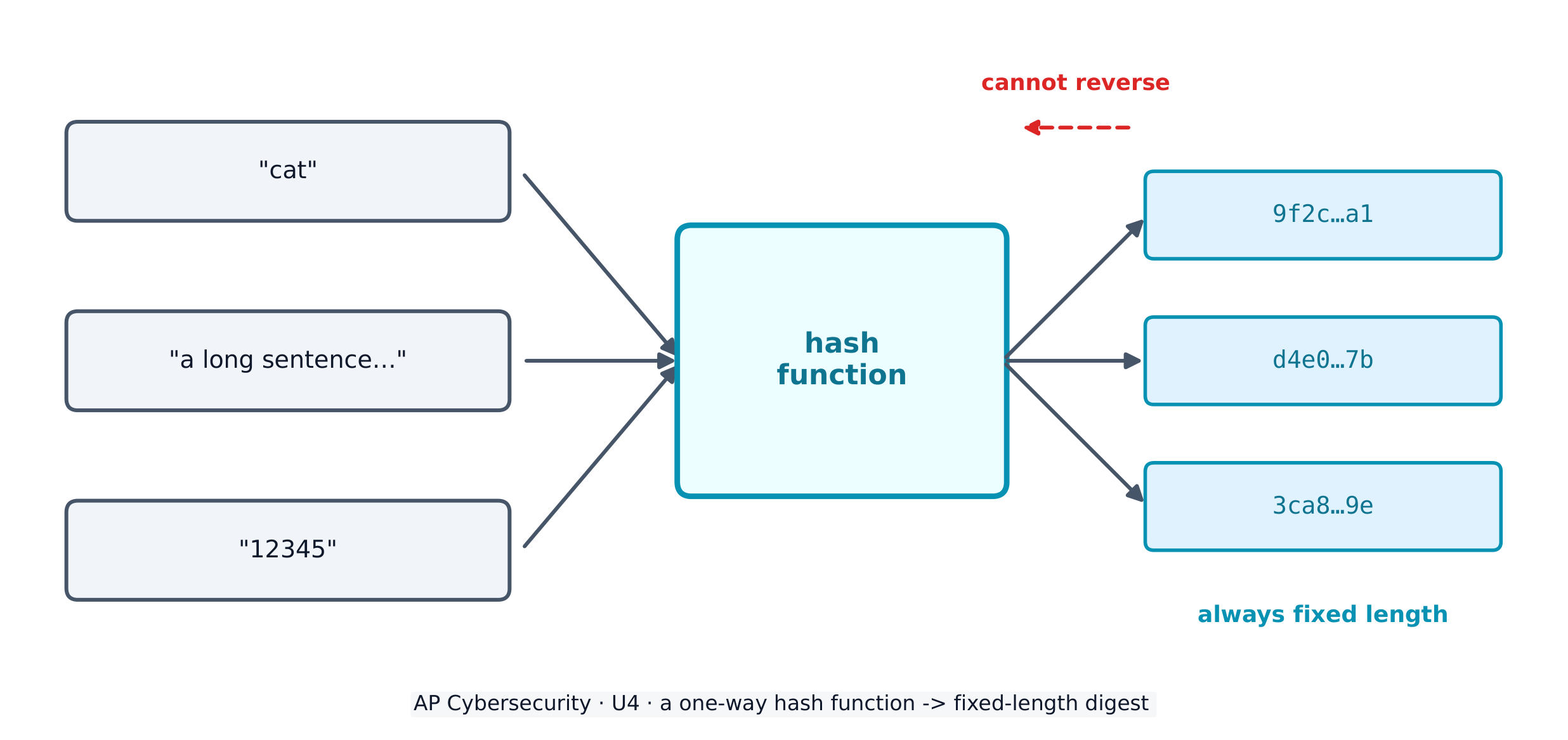
To store passwords safely, systems use a cryptographic hash function 密码散列函数 - a one-way maths algorithm that turns any input into a fixed-length string called a hash 散列值 (or digest). Hashes have three vital properties: they are collision resistant 抗碰撞 (hard to find two inputs with the same output), have pre-image resistance 抗原像 (you cannot work backwards to the input), and are repeatable (the same input always gives the same hash).

Real hash functions have names. The Secure Hash Algorithm (SHA) family – SHA-256 and SHA-512 – is today's standard. Adversaries attack a hash function by trying to force a collision (two different inputs with the same hash); once an efficient collision attack exists, that function is deprecated 弃用 (retired from secure use). MD5 and SHA-1 are the classic deprecated examples – never rely on them to protect data today.

A service never stores your plaintext password. It stores the hash; when you log in, it hashes what you typed and compares. To stop two identical passwords producing identical hashes, a few random bits called salt 盐值 are added before hashing, so every stored hash is unique.

Worked example. Two users both choose the password sunshine. Without salt, both stored hashes would be identical, so cracking one instantly cracks the other. Give each user a unique salt - say x7 and q2 - and the service hashes sunshinex7 and sunshineq2 instead. The two stored hashes now look completely different, so the adversary must attack each account separately. This is why a stolen hash database is far less dangerous when the hashes are salted.

Adversaries fight back with password attacks. Online attacks guess against a live login; offline attacks steal the hash database and crack it on their own machine (which bypasses any account-lockout protection). Techniques include:

  • brute force 暴力破解 - an automated tool tries every possible password in turn; guaranteed to work eventually, but slow, and it grows explosively with password length.
  • a dictionary attack 字典攻击 - the tool tries a list of common words and known passwords first, because most people pick guessable ones.
  • password spraying 密码喷洒 - one common password against many accounts (this dodges lockout, which counts failures per account).
  • credential stuffing 撞库 - reusing stolen or default credentials, exploiting that people reuse passwords across sites.
  • a rainbow table 彩虹表 - a precomputed table of passwords and their hashes, sorted by hash, so a captured hash can be looked up instead of recomputed.

Password policy settings

An administrator hardens accounts by configuring login settings - and the exam expects you to name them and say what each defends against:

Setting What it does The attack it slows
complexity 复杂度 require a character from each set (upper, lower, digit, special) brute force / dictionary
minimum length 最小长度 require N characters - length matters more than anything brute force (grows exponentially)
maximum age 最长有效期 force a change every ~90-120 days limits how long a stolen password is useful
password history 密码历史 store the last 5-10 hashes, block reuse stops recycling an old (possibly leaked) password
lockout 锁定 lock the account after 3-5 wrong tries brute force / online guessing

One subtlety worth a mark: some national standards now advise against forced expiry, because regular changes push users into predictable patterns like PasswordFall2028. A password manager 密码管理器 solves the real problem - it generates and stores a long, unique password per site, so none is ever reused or guessable.

Authentication factors prove who you are, and fall into categories: something you know (a password), something you have (a token or phone), something you are (a biometric 生物特征 like a fingerprint or retina scan), and somewhere you are (a location factor). Using two or more is multifactor authentication (MFA) 多因素身份验证 - far stronger than a password alone.

Removable media, and the autorun problem

An adversary can load malware onto an external drive — a USB stick, a portable disc — and leave it where someone will pick it up. If autorun 自动运行 is enabled, the device runs a program from that drive the moment it is inserted, with no click required, so the malware executes before the user has decided to trust anything.

Two controls answer this, and the exam wants both named:

  • Disable autorun, so inserting a drive never runs anything by itself.
  • Prohibit users from connecting external drives or media at all — enforced by policy and by a technical control that blocks the USB ports — which is why so many secure environments physically or logically disable them.
עברית
אימות רב-גורמי
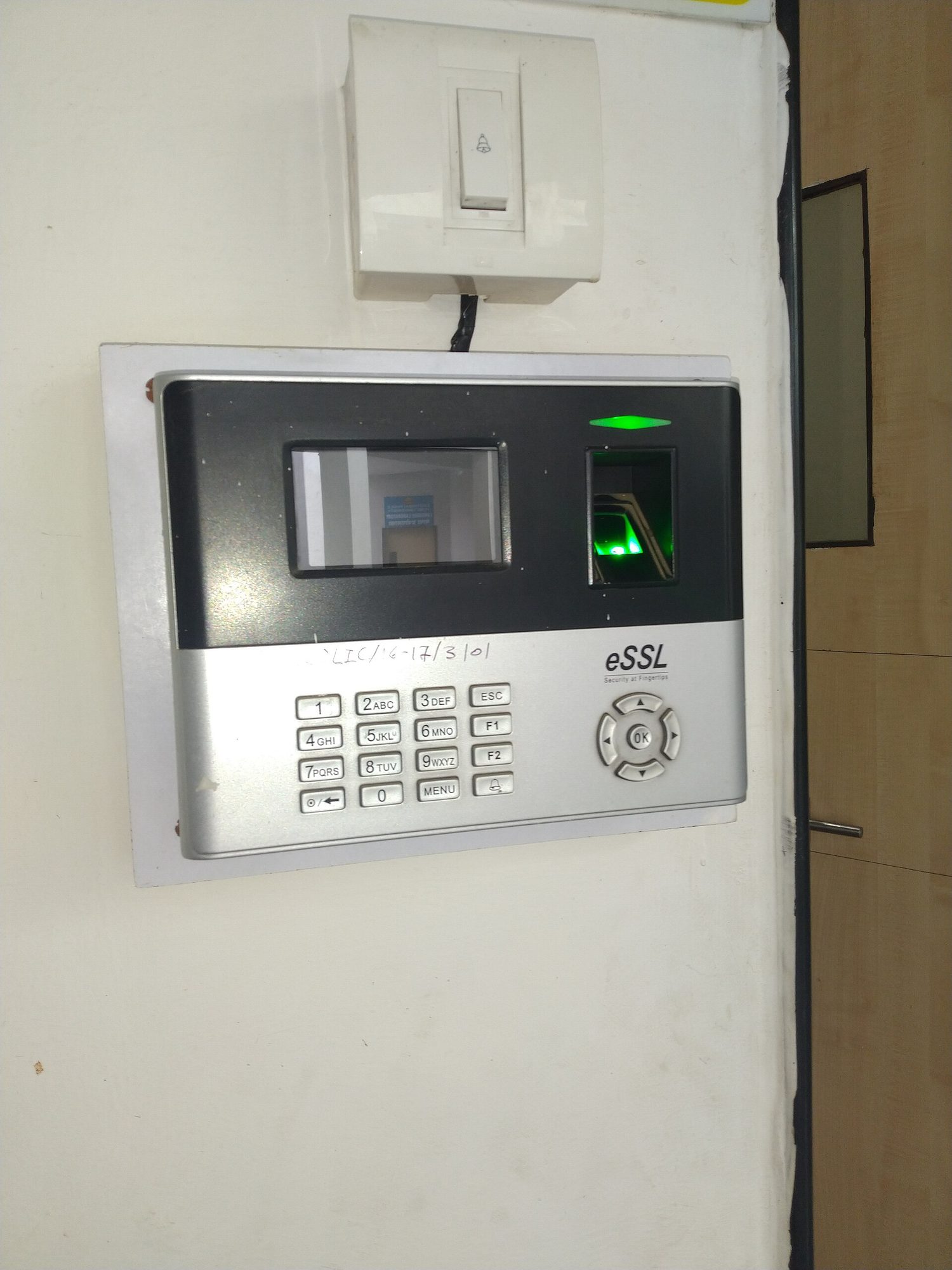
אדם לוחץ אצבע על סורק טביעת אצבע אופטי קטן
סורק טביעת אצבע: אימות ביומטרי בודק משהו שאתה (something you ARE), מה שקשה הרבה יותר למתקיף לגנוב או לנחש מאשר סיסמה

כדי לאחסן סיסמות בבטחה, מערכות משתמשות בפונקציית גיבוי קריפטוגרפית - אלגוריתם מתמטי חד-כיווני הממיר כל כניסה למחרוזת בעלת אורך קבוע הנקראת גיבוי (או digest). גיבויים ישנם שלוש תכונות קריטיות: הם עמידים נגד התנגשויות (קשה למצוא שתי כניסות עם אותה תוצאה), יש להם עמידות נגד תמונה מקדימה (לא ניתן לעבוד לאחור לכניסה), והם ניתנים לחזרה (אותה כניסה תמיד נותנת אותו גיבוי).

פונקציית גיבוי ממירה כל כניסה לתמונה מקדימה בעלת אורך קבוע, ואין אפשרות להפוך את התהליך

לפונקציות גיבוי אמיתיש יש שמות. משפחת אלגוריתם הגיבוי הבטוח (SHA) – SHA-256 ו-SHA-512 – היא הסטנדרט היום. מתקיפים פוגעים בפונקציית גיבוי על ידי ניסיון להכריח התנגשות (שתי כניסות שונות עם אותו גיבוי); ברגע שקיים תקפת התנגשות יעילה, הפונקציה נחשבת מיושנת (נשללת לשימוש בטוח). MD5 ו-SHA-1 הם דוגמאות קלאסיות לפונקציות מיושנות – לעולם אין לסמוך עליהן להגנת נתונים היום.

שירות לעולם לא מאחסן את הסיסמה המקורית שלך. הוא מאחסן את הגיבוי; כאשר אתה נכנס, הוא מבצע גיבוי על מה שהקלדת ומשווה. כדי למנוע מכך ששתי סיסמות זהות יייצרו גיבויים זהים, מוספים כמה ביטים אקראיים הנקראים מלח (salt) לפני ביצוע הגיבוי, כך שכל גיבוי מאוחסן יהיי ייחודי.

דוגמה עבודה. שני משתמשים בחרו בשתי סיסמות sunshine. ללא מלח, שני הגיבויים הארוכים יהיו זהים, ולכן פיצוץ אחד יוביל לפיצוץ המיידי של השני. תן למשתמש כל אחד מלח ייחודי – למשל x7 ו-q2 – והשירות יבצע גיבוי עבור sunshinex7 ו-sunshineq2 במקום זאת. שני הגיבויים הארוכים ייראו כעת שונים לחלוטין, ולכן המתקיף חייב לתקוף כל חשבון בנפרד. זוהי הסיבה לכך שמאגר גיבויים גנוב הוא פחות מסוכן כאשר הגיבויים מומלחים.

מתקיפים מגיבים עם תקפות סיסמות. תקפות אונליין מנחשות נגד כניסה חי; תקפות אופליין גונבות את מאגר הגיבויים ופורצות אותם במכונה שלהם (מה שעוקף כל הגנת נעילת חשבון). טכניקות כוללות:

  • כוח גס - כלי אוטומטי מנסה כל הסיסמות האפשריות בתור; מובטח לעבוד בסופו של דבר, אך איטי, והוא גדל באופן אקספוננציאלי עם אורך הסיסמה.
  • תקפת מילון - הכלי מנסה רשימה של מילים נפוצות וסיסמות ידועות תחילה, כי רוב האנשים בוחרים סיסמות שניתן לנחש.
  • פיזור סיסמות - שימוש בסיסמה אחת נפוצה נגד חשבונות רבים (זה מונע נעילה, שסופרת כישלונים לכל חשבון בנפרד).
  • הצפת זיהויים - שימוש מחודש בזיהויים גנובים או ברירת מחדל, מנצל את העובדה שאנשים משתמשים באותן סיסמות באתרים שונים.
  • טבלת קשתות - טבלה שנחשבה מראש של סיסמות וגיבויים שלהן, מסודרת לפי גיבוי, כך שגיבוי שנלקח יכול להיות נבדק במקום לחישוב מחדש.

הגדרות מדיניות סיסמות

מנהל מאבטח חשבונות על ידי הגדרת הגדרות כניסה – ובמבחן מצפים שתציין אותן ותאמר נגד מה כל אחת מגנה:

הגדרה מה היא עושה התקפה שהיא מאטה
מורכבות דורשים תווית מכל סוג (אותיות גדולות, אותיות קטנות, ספרות, מיוחד) כוח גס / מילון
אורך מינימלי דורשים N תוויות - האורך חשוב יותר מכל כוח גס (גדל אקספוננציאלית)
גיל מרבי מחייבים שינוי כל ~90-120 ימים מגביל את זמן החיים של סיסמה שגנובה
היסטוריית סיסמות שומרים את ה-5 עד 10 hashes האחרונים, חוסמים שימוש חוזר מונע מחזור מחדש של סיסמה ישנה (שאולי דלפה)
נעילה נועלים את החשבון לאחר 3-5 ניסיונות שגויים כוח גס / ניחוש מקוון

עדינות אחת ששווה ניקוד: תקנים לאומיים רבים ממליצים כעת נגד פתיחה מחויבת, משום ששינויים קבועים דוחפים משתמשים לדפוסי התנהגות צפופים כמו PasswordFall2028. מנהל סיסמות פותר את הבעיה האמיתית - הוא יוצר ושומר סיסמה ארוכה וייחודית לכל אתר, כך שאף אחת לעולם אינה מושבת או ניתנת לניחוש.

גורמי אימות מוכיחים מי אתה, וחלוקים לקטגוריות: משהו שאתה יודע (סיסמה), משהו שיש לך (טוקן או טלפון), משהו שאתה (ביומטרי כמו סריקת טביעת אצבע או רשתית), ומקום שאתה (גורם מיקום). שימוש בשניים או יותר הוא אימות רב-גורמי (MFA) - הרבה חזק יותר מסיסמה בלבד.

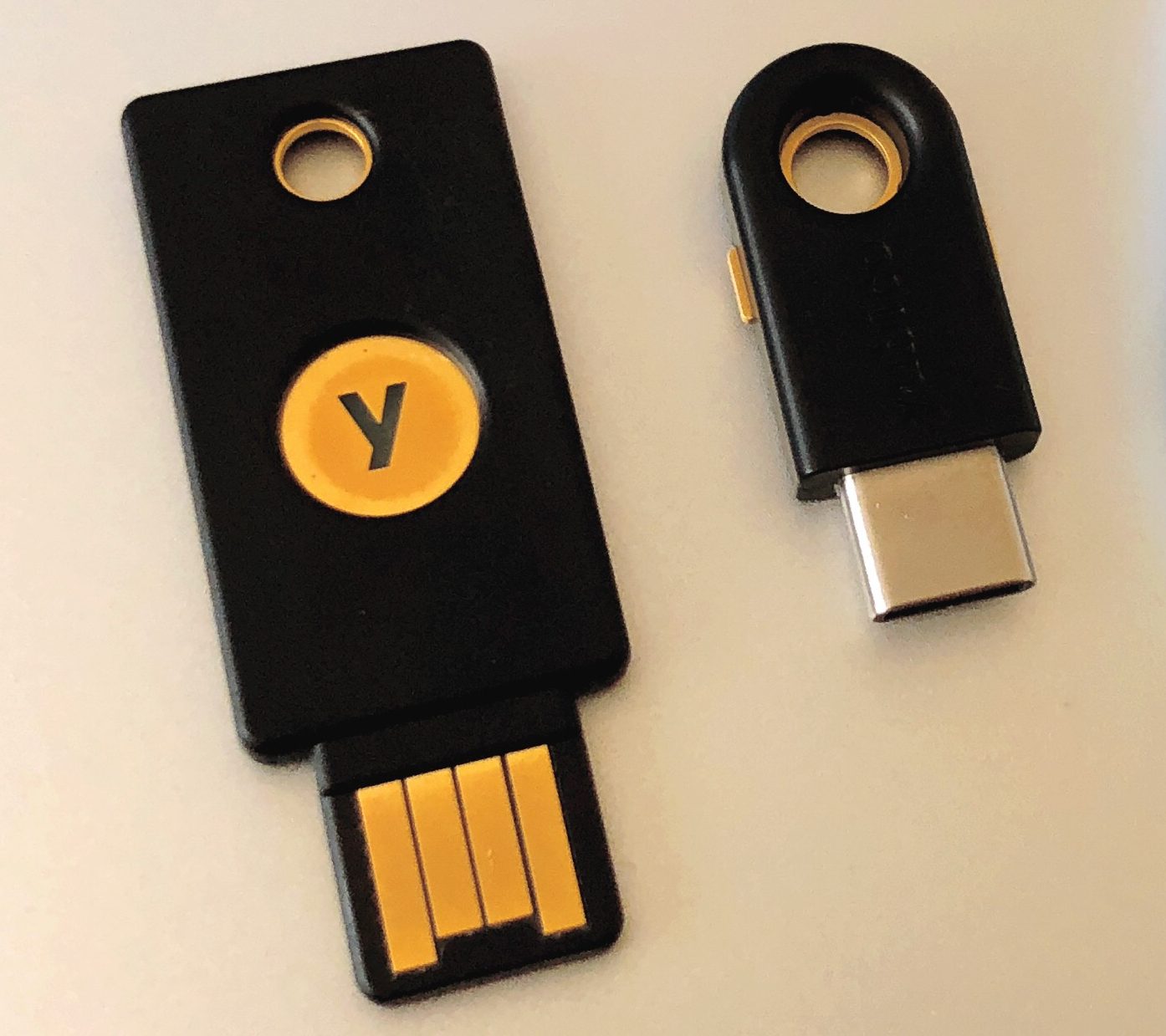
מפתחות ביטחון USB קטנים
מפתח ביטחון חומרה מאמת מי אתה באמצעות משהו שמחזיק פיזית בידך — גורם שני חזק

תמיכות הניתנות להסרה, ובעיית ההפעלה האוטומטית

תוקף יכול להטמין תוכנת זדון על כונן חיצוני - דיסק און קי, דיסק נייד - ולהשאיר אותו במקום שבו מישהו ימצא אותו. אם הפעלה אוטומטית מופעלת, המכשיר מפעיל תוכנית מהכונן הזה ברגע שהוא מוחדר, ללא צורך בלחיצה, ולכן תוכנת הזדון מתבצעת לפני שהמשתמש החליט לסמוך על משהו.

שני בקרות עונים על זה, והמבחן דורש ששניהם יהיו מפורטים:

  • לנטרל הפעלה אוטומטית, כך שהחדרת כונן לעולם לא תפעיל דבר מה מעצמו.
  • לסגור בפני משתמשים חיבור של כוננים חיצוניים או תמיכות בכלל — נכפה על ידי מדיניות ועל ידי בקרה טכנית החוסמת את יציאות ה-USB — ולכן כה הרבה סביבות מאובטחות נעלות אותן פיזית או לוגית.
Explore · ⁨חקור⁩

How a hash maps any input to a fixed slot · ⁨כיצה פונקציית גזירה (hash) מתאימה כל קלט לתיבה קבועה⁩

A hash function sends every input to a fixed-length output. The same input always lands in the same place (repeatable), and you cannot work backwards from the slot to the input. · ⁨פונקציית גזירה שולחת כל קלט לתוצאה בעלת אורך קבוע. אותו קלט תמיד יוביל לאותו מקום (ניתן לחזרה), ואין אפשרות להגיע מהתיבה לקלט המקורי.⁩

Vocabulary · ⁨מילון מונחים⁩ Train · ⁨אימון⁩
English עברית
hash/hæʃ/ שורף קריפטוגרפי
collision resistant/kəˈlɪʒn rɪˈzɪstənt/ עמיד בפני התנגשויות
pre-image resistance/priː ˈɪmɪdʒ rɪˈzɪstəns/ עמידות בפני תמונה מקדימה
deprecated/ˈdeprɪkeɪtɪd/ לא מומלץ בשימוש
salt/sɒlt/ מלח
brute force/bruːt fɔːs/ תקפי כוח גס (Brute force)
dictionary attack/ˈdɪkʃənəri əˈtæk/ תקיפת מילון
password spraying/ˈpæswɜːd ˈspreɪɪŋ/ פיזור סיסמאות
credential stuffing/krɪˈdenʃl ˈstʌfɪŋ/ הצפת נתוני זיהוי
rainbow table/ˈreɪnbəʊ ˈteɪbl/ טבלת קשתות
complexity/kəmˈpleksɪti/ מורכבות
minimum length/ˈmɪnɪməm leŋθ/ אורך מינימלי
maximum age/ˈmæksɪməm eɪdʒ/ גיל מרבי
password history/ˈpæswɜːd ˈhɪstəri/ היסטוריית סיסמאות
lockout/ˈlɒkaʊt/ נעילה
password manager/ˈpæswɜːd ˈmænɪdʒə/ מנהל סיסמות
biometric/ˌbaɪəʊˈmetrɪk/ ביומטריה
multifactor authentication (MFA)/ˌmʌltɪˈfæktə ɔːˌθentɪˈkeɪʃn/ אישור רב-שלבתי (MFA)
autorun/ˌɔːtəʊˈrʌn/ הפעלה אוטומטית
acceptable use policy/əkˈseptəbl juːs ˈpɒlɪsi/ מדיניות שימוש מקובל
Anti-malware software/ˈænti ˈmælweə ˈsɒftweə/ תוכנת אנטי-תוכנות רעות
patch/pætʃ/ תיקון אבטחה
host-based firewall/həʊst beɪst ˈfaɪəwɔːl/ חומת מגן מבוססת מארח
indicator of compromise (IoC)/ˈɪndɪkeɪtə ɒv ˈkɒmprəmaɪz/ אינדיקטור לפגיעה (IoC)
endpoint detection and response (EDR)/endˈpɔɪnt dɪˈtekʃn ænd rɪˈspɒns/ זיהוי ותגובה בקצה הרשת (EDR)
Watch lesson · ⁨צפה בשיעור⁩
4.3

Protecting Devices · ⁨הגנה על מכשירים⁩

Syllabus · ⁨סיילבוס⁩
English

Learning Objective 4.3.A: Identify managerial controls related to device security.

  • 4.3.A.1 An acceptable use policy will describe the range of activities that are permissible, prohibited, or required by users on devices owned by an organization and may include:
    • Prohibiting users from accessing specific websites or types of websites (e.g., social media or gaming)
    • Requiring users to keep software updated
    • Allowing users to connect peripheral devices
    • Prohibiting users from connecting external drives or media
  • 4.3.A.2 A password policy will detail the requirements for user passwords within an organization and may include:
    • A minimum or maximum password length
    • A minimum or maximum amount of time a user may keep the same password
    • A prohibition of password reuse
    • Rules for password construction (e.g., no dictionary words and character set requirements)
    • A suggestion to use secure password management tools instead of writing passwords down
  • 4.3.A.3 A software installation policy will describe what (if any) software users are allowed to install on their devices and usually also a process for users to request specialized software they may need to perform their role, and it may include:
    • A prohibition against users installing software on their devices
    • A process for users to request new software needed for their role
    • A list of approved software for users

Learning Objective 4.3.B: Explain how anti-malware software can make a device more secure.

  • 4.3.B.1 Anti-malware software (sometimes called antivirus software) has tools to quarantine and remove malware that can corrupt, spy on, or destroy a system. Malware contains indicators that make it detectable; these indicators are called signatures.
  • 4.3.B.2 Anti-malware software has a database of malware signatures. It periodically scans the files on a device and checks to see if any of the files match any of the signatures in its database. If there is a match, the software quarantines and removes the malicious files.

Learning Objective 4.3.C: Explain why keeping a device’s operating system and software updated makes it more secure.

  • 4.3.C.1 When vulnerabilities in operating systems and software are found, the vendor or organization that maintains the operating system software will fix it and send an update. A small update is called a patch.
  • 4.3.C.2 Ensuring that a computer’s operating system and software applications are updated to the most recent version prevents adversaries from taking advantage of a known vulnerability.

Learning Objective 4.3.D: Configure a host-based firewall.

  • 4.3.D.1 Host-based firewalls allow or deny traffic into or out of a single device. This provides an extra layer of security in case a host is connected to a compromised network.
  • 4.3.D.2 A host-based firewall is software that runs on a device and follows a set of rules (an ACL) like a network-based firewall. Firewall rules are implemented in order, applying the first rule that matches.
  • 4.3.D.3 A host-based firewall can also block specified types of outbound traffic. Host-based firewalls should always block ports or services not needed for a given device.
    • Illustrative examples for 4.3.D.3:
      • A host-based firewall is configured to block outbound FTP traffic. This prevents an adversary with remote access to the host from using FTP to exfiltrate a file to the adversary’s server.
  • 4.3.D.4 The rules for a host-based firewall can allow or deny traffic based on source or destination port or IP address, service, protocol, or application.
עברית

מטרת הלמידה 4.3.A: זיהוי בקרות מנהליות הקשורות לבטיחות המכשירים.

  • 4.3.A.1 מדיניות שימוש מקובל תפרט את טווח הפעילויות permitted, אסורות או מחייבות על ידי משתמשים על מכשירים בבעלות ארגון, ועשויה לכלול:
    • איסור על משתמשים לגשת לאתרים ספציפיים או לסוגי אתרים (למשל: רשתות חברתיות או משחקים)
    • דרישה למשתמשים לשמור על תוכנה מעודכנת
    • מתן אפשרות למשתמשים להתחבר למכשירים חיצוניים
    • איסור על משתמשים להתחבר לכוננים חיצוניים או לתקני אחסון
  • 4.3.A.2 מדיניות סיסמות תפרט את הדרישות למעברי סיסמה של משתמשים בתוך ארגון ועשויה לכלול:
    • אורך מינימום או מקסימום למעבר סיסמה
    • זמן מינימום או מקסימום שמשתמש רשאי לשמור על אותה סיסמה
    • איסור על שימוש חוזר במעבר סיסמה
    • כללים לבניית סיסמה (למשל, איסור על מילים ממילון ותנאי קבוצת תווים)
    • המלצה להשתמש בכלי ניהול סיסמאות מאובטחים במקום לרשום סיסמאות על נייר
  • 4.3.A.3 מדיניות התקנת תוכנה תכליל מה (אם כלל) תוכנה המשתמשים מוראים להתקין על ההתקנים שלהם, ודרך כלל גם תהליך עבור משתמשים לבקש תוכנה מקצועית שהם עשויים לצורך לתפקידם, ועלולה לכלול:
    • איסור על משתמשים להתקין תוכנה על ההתקנים שלהם
    • תהליך עבור משתמשים לבקש תוכנה חדשה הנדרשת לתפקידם
    • רשימת תוכנה מאושרת עבור משתמשים

מטרת הלמידה 4.3.B: הסבר כיצד תוכנת אנטי-וירוס יכולה להפוך את המכשיר לבטוח יותר.

  • 4.3.B.1 תוכנת אנטי-וירוס (לעיתים קרובות נקראת תוכנת אנטי-וירוס) כוללת כלים לבידוד והסרת תוכנות רעות שיכולות לפגוע במערכת, לרגל אחריה או להשמיד אותה. לתוכנות הרעות יש אינדיקטורים הופכים אותן לגלויות; אינדיקטורים אלו נקראים חתימות.
  • 4.3.B.2 לתוכנת אנטי-וירוס יש בסיס נתונים של חתימות תוכנות רעות. היא סורקת באופן תקופתי קבצים על המכשיר ובוקשת אם אחד מהקבפים מתאים לחתימה כלשהי בבסיס הנתונים שלה. אם יש התאמה, התוכנה מבידדת והסורת את הקבצים הזדוניים.

מטרת הלמידה 4.3.C: הסבר מדוע שמירה על עדכון מערכת ההפעלה והתוכנות במכשיר הופך אותו לבטוח יותר.

  • 4.3.C.1 כאשר נמצאות נקודות תורפה במערכות הפעלה ובתוכנות, היצרן או הארגון שמוחזק את תוכנת מערכת ההפעלה יתיקן אותה וישלח עדכון. עדכון קטן נקרא פיצ'.
  • 4.3.C.2 וידוי שמערכת ההפעלה ואפליקציות התוכנה במחשב מעודכנות לגרסה העדכנית ביותר מונע מאויבים לנצל נקודת תורפה ידועה.

מטרת הלמידה 4.3.D: תצורת חומת מגן מבוססת מארח.

  • 4.3.D.1 חומות מגן מבוססות מארח מאפשרות או שואלות תנועה הנכנסת או יוצאת ממכשיר יחיד. זה מספק שכבת ביטחון נוספת במקרה שהמארח מחובר לרשת פוגענית.
  • 4.3.D.2 חומת מגן מבוססת מארח היא תוכנה הפועלת על מכשיר ועוקבת אחרי סדרת כללים (ACL) כמו חומת מגן מבוססת רשת. כללי חומת המגן מיושמים בסדר, תוך יישום הכלל הראשון המתאים.
  • 4.3.D.3 חומת מגן מבוססת מארח יכולה גם לחסום סוגים ספציפיים של תנועה יוצאת. חומות מגן מבוססות מארח צריכות תמיד לחסום פורטים או שירותים שאינם נדרשים למכשיר נתון.
    • דוגמאות הדמיה עבור 4.3.D.3:
      • חומת מגן מבוססת מארח מוגדרת כדי לחסום תנועת FTP יוצאת. זה מונע מאויב עם גישה מרחוק למארח מלשתמש ב-FTP לשלוח קובץ לאיימתו לקובץ השרת של האויב.
  • 4.3.D.4 הכללים בחומת מגן מבוססת מארח יכולים לאפשר או לשאול תנועה בהתבסס על פורט מקור או יעד, כתובת IP, שירות, פרוטוקול או אפליקציה.

Source: College Board AP Course and Exam Description · ⁨מקור: תיאור הקורס והמבחן של College Board AP⁩

English

Managerial controls set the rules: an acceptable use policy 可接受使用政策 lists what users may and may not do, a password policy sets length and reuse rules, and a software installation policy controls what can be installed.

Technical controls do the work. Anti-malware software 反恶意软件 keeps a database of malware signatures and quarantines any file that matches. Keeping the operating system and applications updated - installing each patch 补丁 - closes known holes before adversaries can use them. A host-based firewall 主机防火墙 controls traffic in and out of one single device, blocking ports and services it does not need.

עברית

בקרות מנהליות קובעות את הכללים: מדיניות שימוש מקובל מפרטת מה משתמשים יכולים ומה הם לא יכולים לעשות, מדיניות סיסמות קובעת אורך וכללי שימוש חוזר, ומדינית התקנת תוכנה שולטת על מה ניתן להתקין.

בקרות טכניות מבצעות את העבודה. תוכנת אנטי-זדון שומרת על בסיס נתונים של חתימות של תוכנות זדון ומבודדת כל קובץ שתואם. שמירה על מערכת ההפעלה והאפליקציות מעודכנות - התקנת כל תיקון - סוגרת חורים ידועים לפני שהתוקפים יוכלו להשתמש בהם. חומת מגן מבוססת מארח שולטת בתנועה הנכנסת והיוצאת ממכשיר יחיד, וחוסמת יציאות ושירותים she does not need.

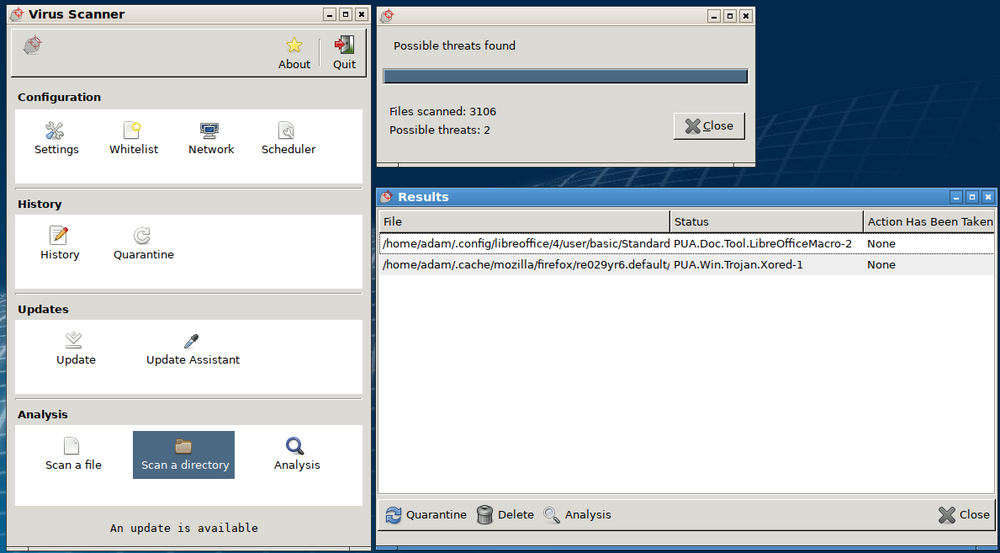
חלון סורק אנטי-זדון: 3106 קבצים נבדקו, נמצאו שני איומים, עם בקרות בידוד ועדכון
תוכנת אנטי-זדון סורקת קבצים מול בסיס חתימות ומבודדת כל התאמה — סריקה זו סימנה שני איומים
Vocabulary · ⁨מילון מונחים⁩ Train · ⁨אימון⁩
English עברית
Virus/ˈvaɪrəs/ וירוס
4.4

Detecting Attacks on Devices · ⁨זיהוי התקפות על מכשירים⁩

Syllabus · ⁨סיילבוס⁩
English

Learning Objective 4.4.A: Explain how to detect attacks against devices.

  • 4.4.A.1 System processes and settings, login attempts, file download attempts, and user actions are logged by computing systems. These logs can be used to reconstruct circumstances leading up to and during a cyber incident.
  • 4.4.A.2 An indicator of compromise (IoC) is evidence that an adversary has compromised a device or network.
  • 4.4.A.3 Authentication logs (or auth logs) record every attempted login on a system. Analysis of authentication logs can reveal attempted attacks.
  • 4.4.A.4 Host-based IoCs are discovered when analyzing logs and configuration settings. Indicators, such as the following, can be found in authentication logs, user activity logs, and system configuration files:
    • Unusual files being created or modified
    • Unexpected processes or services
    • Unauthorized changes to system configuration settings
    • Unauthorized software installation or update
  • 4.4.A.5 File-based IoCs are discovered when analyzing files on a device. Indicators are usually found in executable files and can include:
    • Files whose hash matches known malware
    • File names that are known to be created by a certain piece of malware
    • File paths that are associated with malicious activity
  • 4.4.A.6 Behavior-based IoCs are discovered when analyzing logs. Indicators can be found in authentication logs and access logs and can include:
    • Multiple failed login attempts
    • Unusual login times or locations
    • Unauthorized attempts to access sensitive data
    • Attempts to elevate user privileges on a system

Learning Objective 4.4.B: Determine controls for detecting attacks against a device.

  • 4.4.B.1 Performance is a criterion for determining a detection method. Detection tools use system memory and processing power and can impact the performance of a device. Anomaly-based detection tools use more system resources than signature-based tools. Signature-based detection is a better option for devices with less powerful system resources. Many embedded devices do not have enough system resources to run any detection tools on the device.
  • 4.4.B.2 Cost is a criterion for determining a detection method. Organizations that purchase detection software need to consider the cost of purchasing enough software licenses for the number of devices they need to monitor. Some organizations purchase an endpoint detection and response (EDR) service from a third-party vendor. Although these services are expensive, they provide a holistic, unified approach to threat detection for an organization’s devices; they typically include a centralized alert platform for monitoring possible attacks on devices.
  • 4.4.B.3 Sensitivity or criticality of the device is a criterion for determining a detection method. Devices that store or process sensitive information or provide critical services are more likely to be targeted by adversaries and benefit from a hybrid-detection model to offer maximum protection, when possible.

Learning Objective 4.4.C: Evaluate the impact of a device detection method.

  • 4.4.C.1 Speed and performance are factors in evaluating the impact of a detection method. Signature-based detection is faster than anomaly-based detection in general, and that effect is compounded on devices, which often lack the processing power to effectively run anomaly-based detection tools. Implementing resource-intensive detection tools on devices can degrade device performance.
  • 4.4.C.2 Phase of the attack is a factor in evaluating the impact of a detection method. To carry out actions on a device, adversaries must first bypass a combination of physical- or network-layer protective, deterrent, and detective security controls. Detecting and stopping an attack at the device level can prevent adversaries from accessing sensitive data or disrupting critical services.
  • 4.4.C.3 False positives versus ease of bypassing detection is a factor in evaluating the impact of a detection method. Most device-level detection tools are signature-based, and signature-based detection has a low rate of false positives. However, signature-based detection is easier for adversaries to bypass.

Learning Objective 4.4.D: Apply detection techniques to identify indicators of password attacks by analyzing log files.

  • 4.4.D.1 Online password attacks can be detected in authentication logs. A single user attempting many wrong passwords is an indicator of an online password attack. If a user:password hash database has been compromised, all the user passwords in the database should be considered insecure and all users should be forced to reset their passwords.
  • 4.4.D.2 If an authorized user is logging in from a different location or IP address than expected, or at a different time than normal, this can be an indicator that the user’s password has been compromised.
  • 4.4.D.3 An indicator of password spraying is many users trying to log in within seconds of each other from one IP address or from unusual IP addresses.
  • 4.4.D.4 An indicator of credential stuffing is a series of default user:password combinations being attempted on a device in quick succession, often from the same IP address.
  • 4.4.D.5 Offline password attacks can’t be detected, because the attack takes place on the adversary’s computer.
עברית

מטרת הלמידה 4.4.A: הסבר כיצד לזהות התקפות נגד מכשירים.

  • 4.4.A.1 מעבדים ומגurations מערכת, ניסיונות כניסה, ניסיונות הורדת קבצים ופעולות משתמש נרשמים על ידי מערכות מחשוב. רשומות אלו יכולות לשמש לשחזור נסיבות שהובילו להתקפת סייבר ולמהלכה.
  • 4.4.A.2 אינדיקטור לפגיעה (IoC) הוא עדות לכך שאויב פגע במכשיר או ברשת.
  • 4.4.A.3 רשומות אינטוריקציה (או auth logs) מקלחות כל ניסיון כניסה למערכת. ניתוח רשומות אינטוריקציה יכול לחשוף התקפות attempted.
  • 4.4.A.4 IoCs מבוססי מארח מתגלים בעת ניתוח רשומות והגדרות תצורה. אינדיקטורים, כגון הבאים, ניתן למצוא ברשומות אינטוריקציה, רשומות פעילות משתמש וקבצי תצורת מערכת:
    • קבצים בלתי רגילים שנוצרו או ששונו
    • תהליכים או שירותים בלתי צפויים
    • שינויים לא מורשים בהגדרות תצורת המערכת
    • התקנת תוכנה או עדכון לא מורשים
  • 4.4.A.5 IoCs מבוססי קבצים מתגלים בעת ניתוח קבצים על מכשיר. אינדיקטורים נמצאים לרוב בקבצי ביצוע וכוללים:
    • קבצים שהחשף שלהם תואם למalware ידוע
    • שמות קבצים הידועים כאלו שנוצרו על ידי סוג מסוים של malwared
    • נתיבי קבצים הקשורים לפעילות זדונית
  • 4.4.A.6 IoCs מבוססי התנהגות מתגלים בעת ניתוח רישומי מערכת. אינדיקטורים יכולים להימצא ברשימות הרשאות וברשימות גישה וכוללים:
    • ניסיונות התחברות כושלים מרובים
    • זמני התחברות או מיקומים חריגים
    • ניסיונות גישה לא מורשים לנתונים רגישים
    • ניסיונות להעלות את זכויות השימוש של משתמש במערכת

מטרות לימוד 4.4.B: קביעת בקרות לגילוי התקפות על מכשיר.

  • 4.4.B.1 ביצועים הם קריטריון לקביעת שיטת גילוי. כלי גילוי משתמשים בזיכרון המערכת ובכוח העיבוד ועלולים להשפיע על ביצועי המכשיר. כלים לבניית גילוי מבוססת אנומליות משתמשים במקורות מערכת יותר מאשר כלים מבוססי חתימה. גילוי מבוסס חתימה הוא אפשרות טובה יותר למכשירים עם מקורות מערכת פחות עוצמתיים. למכשירים embedded רבים אין מספיק מקורות מערכת כדי להריץ כל כלי גילוי על המכשיר.
  • 4.4.B.2 עלות היא קריטריון לקביעת שיטת גילוי. ארגונים הרוכשים תוכנת גילוי צריכים לשקול את העלות של רכישת רישיונות תוכנה מספיקים עבור מספר המכשירים שהם צריכים לעקוב אחריהם. חלק מהארגונים רוכשים שירות EDR (Endpoint Detection and Response) מספק צד שלישי. למרות שהשירותים הללו יקרים, הם מספקים גישה הוליסטית ומאוחדת לגילוי איומים עבור מכשירי הארגון; הם כוללים לרבות פלטפורמת התראות מרכזית לניטור התקפות אפשריות על מכשירים.
  • 4.4.B.3 רגישות או קריטיות המכשיר היא קריטריון לקביעת שיטת גילוי. מכשירים שאחסנים או מעבדים מידע רגיש או מספקים שירותים קריטיים נוטים יותר להיות ממוקדים על ידי אויבים ויודעים להפיק תועלת מדגם גילוי היברידי כדי לספק הגנה מקסימלית, כאשר ניתן.

מטרות לימוד 4.4.C: הערכת ההשפעה של שיטת גילוי מכשיר.

  • 4.4.C.1 מהירות וביצועים הם גורמים בהערכת ההשפעה של שיטת גילוי. גילוי מבוסס חתימה הוא מהיר יותר באופן כללי מאשר גילוי מבוסס אנומליות, והשפעה זו מתחזקת על מכשירים, שע often חסרים את כוח העיבוד הנדרש להפעלת כלי גילוי מבוססי אנומליות ביעילות. הפעלת כלי גילוי דורשי משאבים על מכשירים עלולה להחמיר את ביצועי המכשיר.
  • 4.4.C.2 שלב ההתקפה הוא גורם בהערכת ההשפעה של שיטת גילוי. כדי לבצע פעולות על מכשיר, אויבים חייבים תחילה לעקוף שילוב של בקרות ביטחון פיזיות-רשתיות מגנות, מרתעות וגילוי. גילוי ועצירת התקפה ברמת המכשיר יכול למנוע מאויבים לגשת לנתונים רגישים או להפרע לשירותים קריטיים.
  • 4.4.C.3 תוצאות חיוביות שגויות לעומת קלות העקיפה של הגילוי הוא גורם בהערכת ההשפעה של שיטת גילוי. רוב כלי הגילוי ברמת המכשיר הם מבוססי חתימה, וגילוי מבוסס חתימה יש שיעור נמוך של תוצאות חיוביות שגויות. עם זאת, גילוי מבוסס חתימה קל יותר לאויבים לעקוף.

מטרת למידה 4.4.D: יישום טכניקות זיהוי לזיהוי אינדיקציות לתקיפות סיסמאות באמצעות ניתוח קובצי רשומות.

  • 4.4.D.1 תקיפות סיסמאות מקוונות יכולות להתגלות ברשומות אימות. ניסיון של משתמש אחד להכנס עם הרבה סיסמאות שגויות הוא אינדיקציה לתקיפת סיסמה מקוונת. אם בסיס הנתונים של השאשים (hash) של סיסמאות המשתמש נפגע, יש להתייחס לכל סיסמאות המשתמשים שבבסיס כחלשות וכל המשתמשים חייבים לאפס את הסיסמאות שלהם.
  • 4.4.D.2 אם משתמש מורשה נכנס ממיקום או כתובת IP שונים מהמצופה, או בזמן שונה מהרגיל, זה עשוי להיות אינדיקציה לכך שהסיסמה שלו נפגעה.
  • 4.4.D.3 אינדיקציה ל"ריסוס סיסמאות" (password spraying) היא מספר רב של משתמשים המנסים להיכנס בתוך שניות מאחדם, מכתובת IP אחת או מכתובות IP חריגות.
  • 4.4.D.4 אינדיקציה ל"הזרמת סמכים" (credential stuffing) היא סדרה של צירופי משתמש:סיסמה ברירת-ברירת המנסים להיכנס למכשיר במהירות, לעיתים קרובות מאותה כתובת IP.
  • 4.4.D.5 תקיפות סיסמאות אונליין לא ניתן לגלות, מכיוון שהתקיפה מתרחשת במחשב המטרה.

Source: College Board AP Course and Exam Description · ⁨מקור: תיאור הקורס והמבחן של College Board AP⁩

English

Devices log logins, file changes, and processes, and these logs reveal an indicator of compromise (IoC) 入侵指标 - evidence that an adversary got in. Host-based IoCs show up as unexpected processes or changed settings; file-based IoCs are files whose hash matches known malware; behaviour-based IoCs are things like many failed logins or unusual login times.

Choosing a detection method means weighing performance (signature-based is lighter, better for weak devices), cost (an endpoint detection and response (EDR) 端点检测与响应 service is powerful but expensive), and how sensitive the device is. Reading authentication logs exposes password attacks: many wrong passwords for one user signals a guessing attack; many users failing from one IP signals password spraying; a burst of default credentials signals credential stuffing. Offline attacks, though, cannot be detected - they happen on the adversary's own computer.

Speed is itself a security factor. Signature-based detection compares what it sees against a list of known-bad patterns, so it is faster than anomaly-based detection, which must first learn what normal looks like and then measure every event against that model. Anomaly-based detection catches attacks that have no signature yet, but it costs far more processing power — and on a device that lacks it, the effect compounds: the detection runs slowly, the device degrades, and the method ends up not being implemented effectively at all.

עברית

התקנים מקליטים כניסות, שינויים בקבצים ותהליכים, והקלפים הללו חושפים מדד לפגיעה (IoC) – עדות לכך שהאויב נכנס. IoCs המבוססי אירוח מופיעים כתהליכים בלתי צפויים או הגדרות שונויות; IoCs המבוססי קבצים הם קבצים whose hash מתאים למalware ידוע; IoCs המבוססי התנהגות הם דברים כמו כניסות רבות שנכשלו או שעות כניסה חריגות.

בחירת שיטת זיהוי מחייבת איזון בין ביצועים (זיהוי מבוסס סימנים הוא קל משקל, טוב יותר להתקנים חלשים), עלות (שירות זיהוי ושימוש בתגובה בקצה (EDR) הוא עוצמתי אך יקר), וכמה הרגישות של ההתקן. קריאת קלפי אימות חושפת התקפות סיסמאות: הרבה סיסמאות שגויות עבור משתמש אחד מעידות על התקפת ניחוש; הרבה משתמשים שנכשלים מאותו IP מעידות על פיזור סיסמאות; פיצוץ של תעודות ברירת מחדל מעיד על צפיפות תעודות. התקפות לא-מחוברות, לעומת זאת, אינן ניתנות לזיהוי – הן מתרחשות במחשב האויב עצמו.

מהירות היא גורם ביטחוני בעצמו. זיהוי מבוסס סימנים משווה את מה שהוא רואה לרשימת דפוסים רעים ידועים, ולכן הוא מהיר יותר מזיהוי מבוסס אנומליה, שמחייב ללמוד תחילה מה נראה תקין ואז למדוד כל אירוע מול הדגם הזה. זיהוי מבוסס אנומליה תופס התקפות שאין להן סימן עוד, אבל זה עולה הרבה יותר באנרגיית עיבוד – ובתקן שאינו מחזיק בכך, ההשפעה מצטברת: הזיהוי עובד לאט, ההתקן מתדרדר, והשיטה בסופו של דבר אינה מיושמת בצורה יעילה כלל.

4.4

Exam tips · ⁨טיפים לבחינות⁩

English
  • Know each malware type by its defining trait: a worm self-spreads, a virus needs a user, ransomware encrypts for money, a RAT gives remote control, a rootkit hides.
  • A hash is one-way and fixed-length; salt makes identical passwords hash differently. Never say a service "stores the password" - it stores the salted hash.
  • Name real algorithms: SHA-256/SHA-512 are current; MD5 and SHA-1 are deprecated because efficient collision attacks exist.
  • Match the password attack to its log signature: one user + many wrong passwords = guessing; many users + one IP = spraying; default credentials = stuffing.
  • Sort authentication factors into know / have / are / where, and remember MFA combines two or more - a fingerprint plus a password, not two passwords.
  • Offline password attacks cannot be detected because the cracking happens on the adversary's machine - a favourite exam "gotcha".
עברית
  • הכר כל סוג malwaredon by its defining trait: a worm self-spreads, a virus needs a user, ransomware encrypts for money, a RAT gives remote control, a rootkit hides.
  • TODO: TODO is one-way and fixed-length; salt makes identical passwords hash differently. Never say a service "stores the password" - it stores the salted hash.
  • שמרו אלגוריתמים אמיתיים: SHA-256/SHA-512 הם עדכניים; MD5 ו-SHA-1 הוסרו מהשימוש כי קיימות תקיפות התנגשות יעילות.
  • התאימו התקפת סיסמה לחתימת הלוג: משתמש אחד + הרבה סיסמאות שגויות = ניחוש; משתמשים רבים + IP אחת = פיזור; סיסמאות ברירת מחדל = הצפה.
  • מיינו גורמי אימות לידע / בעלות / זהות / מיקום, וזכרו ש-MFA משלב שניים או יותר — טביעת אצבע בתוספת סיסמה, לא שתי סיסמאות.
  • התקפות סיסמה אופליין לא ניתן לזהות כי השבירה מתבצעת במכונת המטרה — זהו 'trap' אהוב בבחינות.
Vocabulary · ⁨מילון מונחים⁩ Train · ⁨אימון⁩
English עברית
embedded computer/emˈbedɪd kəmˈpjuːtə/ מחשב מובנה
Internet of Things (IoT)/ˈɪntənet ɒv θɪŋz/ אינטרנט של דברים (IoT)
handheld computers/ˈhændheld kəmˈpjuːtəz/ מחשבים ניידים
malware/ˈmælweə/ תוכנה רעה
Worm/wɜːm/ זחל מחשב
Trojan/ˈtrəʊdʒn/ חייל טרויאן
remote access trojan (RAT)/rɪˈməʊt ˈækses ˈtrəʊdʒn/ טרוjan גישה מרחוק (RAT)
Ransomware/ˈrænsəmweə/ תוכנת שחרור חטיפים
Spyware/ˈspaɪweə/ תוכנת ריגול

Interactive lessons on this topic · ⁨שיעורים אינטראקטיביים בנושא זה⁩

Work through it step by step, with instant-check exercises. · ⁨לעבור על הדברים צעד אחר צעד, עם תרגילים לבדיקה מיידית.⁩

Past Papers · ⁨מבחני עבר⁩

More topics in AP Cybersecurity · ⁨אבטחת מידע והסייבר - AP⁩ · ⁨נושאים נוספים בAP Cybersecurity · ⁨אבטחת מידע והסייבר - AP⁩⁩

Log in or create account · ⁨היכנס או צור חשבון⁩

IGCSE, A-Level & AP