Skip to content · ⁨דלג לתוכן⁩

Securing Spaces · ⁨אבטחת מקומות⁩

AP Cybersecurity · ⁨אבטחת מידע והסייבר - AP⁩ · Topic 2 · ⁨נושא 2⁩

Video lesson for this topic · ⁨שיעור וידאו לנושא זה⁩ Open the video page · ⁨פתח את עמוד הוידאו⁩
9:30

אבטחת מקומות

מנעול על שרשרת. מצלמה מעל דלת. לא מחשבים, לא קוד — אלא ביטחון. כי מתקף שאינו יכול לשבור את ההצפנה שלך יש לו תוכנית פשוטה יותר…

English narration · English + 中文 subtitles burned in · ⁨קריאת קול באנגלית · תרגום אנגלי + סינית שרוף בתוך הסרטון⁩

2.1

Cyber Foundations · ⁨בסיסי אבטחה سایber⁩

Syllabus · ⁨סיילבוס⁩
English

Learning Objective 2.1.A: Identify social engineering attacks.

  • 2.1.A.1 Social engineers use psychological tactics to manipulate targets into taking a desired action.
  • 2.1.A.2 Pretexting is when adversaries create a believable reason to contact a target.
  • 2.1.A.3 Authority is when adversaries impersonate someone with power over a target or pretend to relay instructions from that person.
  • 2.1.A.4 Intimidation is when adversaries state negative consequences if demands aren’t met.
  • 2.1.A.5 Consensus is when adversaries create social pressure by making a target believe everyone else is doing a desired action.
  • 2.1.A.6 Scarcity is when adversaries create a sense of limited availability.
  • 2.1.A.7 Familiarity is when adversaries pretend to be or know someone close to a target to establish trust.
  • 2.1.A.8 Urgency is when adversaries create a deadline that requires quick action by a target to avert negative consequences.

Learning Objective 2.1.B: Identify types of adversaries.

  • 2.1.B.1 Script kiddies are low-skilled adversaries who use tools developed by others without understanding how the tools work. They are often motivated by greed or a desire for recognition.
  • 2.1.B.2 Hacktivists are motivated by social, political, or personal causes. They compromise computers and networks to support their cause or stop perceived harm, believing their goals justify their illegal methods.
  • 2.1.B.3 Insider adversaries are unique threats because they have legitimate credentials and access to systems and data. They can be recruited by malicious third parties and can be motivated by greed or revenge.
  • 2.1.B.4 Cyberterrorists are motivated by politics or beliefs and seek to disrupt entire communities, regions, or nations through cyberattacks (e.g., attacking a power grid, water treatment plant, or other civil infrastructure). They can act independently or on behalf of governments or criminal organizations.
  • 2.1.B.5 Transnational criminal organizations seek financial gain primarily by deploying ransomware and stealing corporate intellectual property (IP) to sell in illegal markets.

Learning Objective 2.1.C: Describe the phases of a cyberattack.

  • 2.1.C.1 Cyberattacks aim to disrupt, harm, steal, or destroy devices, networks, or data. Adversaries work in phases, which may not all be used in every attack. The phases are:
    • i. Reconnaissance
    • ii. Initial access
    • iii. Persistence
    • iv. Lateral movement
    • v. Taking action
    • vi. Evading detection
  • 2.1.C.2 In the reconnaissance phase of an attack, adversaries gather as much information as possible about their target, often using open source intelligence (OSINT), which is freely available information.
  • 2.1.C.3 In the initial-access phase of an attack, adversaries establish a foothold on the target’s computer, often through social engineering or compromised or weak credentials.
  • 2.1.C.4 After gaining access during an attack, adversaries establish persistence to maintain access without needing to regain it. They may use a command and control (C2) protocol to send commands to the device and receive output, often through malware like a remote access trojan (RAT) or rootkit.
  • 2.1.C.5 In the lateral-movement phase of an attack, adversaries try to escalate their privileges by accessing computers and user accounts with elevated permissions to services and data.
  • 2.1.C.6 In the taking-action phase of an attack, adversaries act on their objectives by collecting targeted data, exfiltrating it, and disrupting services or destroying data.
  • 2.1.C.7 In the final phase of an attack, many adversaries try to evade detection by removing or editing log files and erasing other files they may have planted on devices (e.g., malware).

Learning Objective 2.1.D: Describe the risk assessment process.

  • 2.1.D.1 Risk occurs when a threat can exploit a vulnerability to compromise an asset.
  • 2.1.D.2 An asset is anything valuable. Assets include financial resources, intellectual property, data, digital infrastructure, physical property, and reputation.
  • 2.1.D.3 Risk assessment considers two factors:
    • The likelihood of an attack against a specific vulnerability
    • The severity of the projected damage from an attack against a specific vulnerability
  • 2.1.D.4 The likelihood of a vulnerability being exploited depends on many factors, including:
    • The value of the target: Adversaries are more likely to attack targets they perceive as valuable.
    • The level of skill required to exploit the vulnerability (i.e., the difficulty): Vulnerabilities with well-documented exploits often require less skill and can be carried out by more adversaries.
    • The motivation and capabilities of likely adversaries: Highly motivated and skilled adversaries are more likely to be able to perform more complex exploits.
  • 2.1.D.5 The severity of an attack is often measured by financial cost, which can also include reputational and operational impacts.
    • Illustrative examples for 2.1.D.5:
      • A hacktivist is passionate about illegal fishing practices supported by a local food production company. The main webpage of this food production company would be a high-value target for this hacktivist; defacing the webpage to expose the company’s support of illegal fishing would provide no financial gain to the adversary, but would allow them to raise awareness about an issue that motivates them.
  • 2.1.D.6 The result of a risk assessment can be quantitative or qualitative.
    • Quantitative risk assessment assigns a numeric value to a vulnerability based on a numeric scale (e.g., 1–10) or quantifiable impact, which could be financial (e.g., a $10,000 annual risk).
    • Illustrative examples for 2.1.D.6:
      • Low, medium, high, severe
      • Unlikely low impact, likely low impact, unlikely high impact, likely high impact
  • 2.1.D.7 Risk assessment documentation should include:
    • Vulnerable assets and their value
    • Descriptions of likely threats to the assets
    • Details of specific vulnerabilities for specific assets and how they would be exploited
    • An explanation of the severity of damage (financial, operational, reputational, etc.) if a specific asset were compromised, and the likelihood of that compromise occurring
    • A final rating, quantitative or qualitative, for each risk identified
    • Illustrative examples for 2.1.D.7:
      • Scaled score (e.g., 1–10)
      • Monetary value (e.g., a $10,000 risk vs. a$100,000 risk)

Learning Objective 2.1.E: Identify strategies for managing risk.

  • 2.1.E.1 Once a risk has been identified and assessed, an organization has four options for managing that risk:
    • i. Avoid
    • ii. Transfer
    • iii. Mitigate
    • iv. Accept
  • 2.1.E.2 Risk avoidance stops the activity that is generating the risk. If the activity is a critical part of an organization’s mission or purpose, then avoidance is not possible.
  • 2.1.E.3 Risk transference places the burden of the risk on another entity, such as an insurance company, a government, or consumers.
  • 2.1.E.4 Risk mitigation implements security controls to reduce the likelihood or impact of a risk.
  • 2.1.E.5 Residual risk is the risk that remains after an organization has gone through avoidance, transference, and mitigation. The residual risk is the level of risk that an organization is willing to accept. Risk acceptance acknowledges the fact that absolute security is unattainable.
  • 2.1.E.6 To conserve financial resources and employee capacity, an organization will often favor solutions that are cost effective and easy to implement and maintain. Cost-effective solutions cost less to install and maintain than the expected loss from an attack.

Learning Objective 2.1.F: Identify types of security controls.

  • 2.1.F.1 Security controls address at least one of the following principles:
    • Confidentiality ensures that only authorized individuals, systems, or processes can access data. Systems lacking confidentiality are vulnerable to data theft or destruction.
    • Integrity ensures data are accurate and trustworthy. Systems lacking integrity are vulnerable to data manipulation.
    • Availability ensures data and services are accessible to authorized individuals when needed. Systems lacking availability may experience unexpected downtime.
  • 2.1.F.2 Security controls can be classified by type.
    • Physical controls provide security in the physical space and include locks, fences, and cameras, bollards, and security guards.
    • Technical controls provide security in the digital space and include firewalls, anti-malware software, and encryption.
    • Managerial controls provide rules, guidelines, policies, and procedures that specify what security should be in place and include password policies, regular access reviews, and incident response plans (IRPs).
  • 2.1.F.3 Security controls can be classified by function.
    • Preventative controls address potential vulnerabilities with the goal of stopping an adversary from attacking and include locks and encryption.
    • Detective controls help identify attacks when they occur and include intrusion detection systems (IDSs), cameras, and security incident and event management (SIEM) systems.
    • Corrective controls fix problems and help restore systems to an operational state and include vulnerability patching, repairing a broken card reader, and intrusion prevention systems (IPSs).

Learning Objective 2.1.G: Explain why a defense-in-depth security strategy is necessary to optimally protect an organization.

  • 2.1.G.1 A defense-in-depth strategy, or layered defense, uses multiple types of security controls to protect sensitive data and systems.
  • 2.1.G.2 A defense-in-depth strategy allows an organization to address different types of threats, each with a security control most suited to mitigate it.
  • 2.1.G.3 A defense-in-depth strategy allows for resilience in data protection so when one security control is bypassed by an adversary, another security control may still prevent access to the data or system or limit the damage done to the data or system.
  • 2.1.G.4 Layers in a defense-in-depth strategy can include human, physical, network, device, application, and data.
עברית

מטרות למידה 2.1.A: זיהוי התקפות הנדסה חברתית.

  • 2.1.A.1 מהנדסים חברתיים משתמשים בטקטיקות פסיכולוגיות כדי לעורר בקרב היעד נטיות לקבלת פעולה רצויה.
  • 2.1.A.2 יצירת תרחיש (Pretexting) היא מצב שבו מתקיפים יוצרים סיבה סבירה ליצירת קשר עם יעד.
  • 2.1.A.3 סמכות היא מצב שבו מתקיפים מחקים מישהו בעל כוח על היעד או מדמים העברת הוראות ממנו.
  • 2.1.A.4 אינטimidation (הרתעה) היא מצב שבו מתקיפים מודעים למ consequences שליליות אם הדרישות לא יתקבלו.
  • 2.1.A.5 קונסנסוס הוא מצב שבו מתקיפים יוצרים לחץ חברתי על ידי כך שהיעד יאמין שכל האחרים עושים את הפעולה הרצויה.
  • 2.1.A.6 חוסר זמינות הוא מצב שבו מתקיפים יוצרים תחושה של זמינות מוגבלת.
  • 2.1.A.7 היכרות היא מצב שבו מתקיפים מדמים להיות מישהו הקרוב ליעד או מכירים אותו כדי ליצור אמון.
  • 2.1.A.8 דחיפות היא מצב שבו מתקיפים יוצרים מועד אחרון הדורש פעולה מהירה מהיעד כדי למנוע consequences שליליות.

מטרות למידה 2.1.B: זיהוי סוגי מתקיפים.

  • 2.1.B.1 "Script kiddies" הם מתקיפים בעלי מיומנויות נמוכות המשתמשים בכלים שפותחו על ידי אחרים מבלי להבין כיצד הכלים עובדים. הם לעיתים קרובות מופעלים על ידי תאובה או רצון להכרה.
  • 2.1.B.2 Hacktivists מופעלים על ידי causes חברתיים, פוליטיים או אישיים. הם מקלקלים מחשבים ורשתות כדי לתמוך ב-cause שלהם או לעצור harm נראית, באמונה שהatches שלהם מצדיקים את שיטותיהם הבלתי חוקיות.
  • 2.1.B.3 מתקיפי insider (פנים) הם איומים ייחודיים מכיוון שיש להם תעודות הסמכה חוקיות וגישה למערכות ולמידע. הם יכולים להתגייס על ידי צד שלישי רע, ויכולים להיות מופעלים על ידי תאובה או נקמה.
  • 2.1.B.4 Cyberterrorists מופעלים על ידי פוליטיקה או אמונות ושואפים להפרע בקהילות, אזורים או מדינות שלמות באמצעות התקפות سایبر (למשל, תקיפת רשת חשמל, מפעל טיפול במים או תשתיות אזרחיות אחרות). הם יכולים לפעול באופן עצמאי או בשם ממשלות או ארגוני פשע.
  • 2.1.B.5 ארגוני פשע טרנס-לאומיים שואפים לרווח פיננסי בעיקר על ידי השקעת ransomware וגניבת IP (קניין רוחני) עסקי למכירה בשווקים בלתי חוקיים.

מטרות למידה 2.1.C: תיאור שלב ההתקפה הסיברית.

  • 2.1.C.1 התקפות سایבר שואפות להפרע, לפגוע, לגנוב או להשמיד מכשירים, רשתות או מידע. המתקיפים עובדים בשלבים, שאינם בהכרח מופעלים בכל התקפה. השלבים הם:
    • i. סיור
    • ii. גישה ראשונית
    • iii. הישרדות
    • iv. תנועה אופקית
    • v. ביצוע פעולות
    • vi. הימנעות מהזיהוי
  • 2.1.C.2 בשלב הסיור המודיעינתי של התקפה, אויבים איספו ככל האפשר מידע על יעדם, לעיתים קרובות באמצעות מודיעין ממקורות פתוחים (OSINT), שהוא מידע זמין בחינם.
  • 2.1.C.3 בשלב הגישה הראשונית של התקפה, אויבים מקימים נקודת עגינה במחשב המיועד, לעיתים קרובות דרך הנדסה חברתית או דרכי סמכות משוחדות או חלשות.
  • 2.1.C.4 לאחר שרכשו גישה במהלך התקפה, אויבים מקימים קיומיות כדי לשמור על הגישה ללא צורך בהשבתה מחדש. הם עשויים להשתמש בפרוטוקול פיקוד ושליטה (C2) לשליחת פקודות למכשיר ולקבלת תפוצה, לעיתים קרובות דרך תוכנת זיהום כמו טרוजन לגישה מרחוק (RAT) או רוטקיט.
  • 2.1.C.5 בשלב התנועה האופקית של התקפה, אויבים מנסים להגביר את הרשאותיהם על ידי גישה למחשבים ולחسابי משתמשים עם רישיונות מוגברים לשירותים ולמידע.
  • 2.1.C.6 בשלב ביצוע הפעולות של התקפה, אויבים פועלים לפי המטרות שלהם על ידי איסוף מידע ממוקד, שליפתו החוצה מהמערכת והפרעת שירותים או השמדת מידע.
  • 2.1.C.7 בשלב הסופי של התקפה, רבים מאויביים מנסים להימנע מגילוי על ידי מחיקה או עריכת קובצי יומן ומחיקת קבצים אחרים שייתכן שהטילו במכשירים (למשל, תוכנת זיהום).

מטרות למידע 2.1.D: לתאר את תהליך הערכת הסיכון.

  • 2.1.D.1 סיכון מתרחש כאשר איום יכול לנצל פגיעות כדי לפגוע בנכס.
  • 2.1.D.2 נכס הוא כל דבר בעל ערך. נכסים כוללים משאבים פיננסיים, רכוש רוחני, מידע, תשתית דיגיטלית, נכסי קרקע ושמע.
  • 2.1.D.3 הערכת הסיכון לוקחת בחשבון שני גורמים:
    • הסיכוי להתקפה על פגיעות ספציפית
    • חומרת הנזק המשוער מהתקפה על פגיעות ספציפית
  • 2.1.D.4 הסיכוי לפגיעות מסוימת יהיה מנוצל תלוי בגורמים רבים, כולל:
    • הערך של היעד: אויבים נוטים יותר לתקוף יעדים שהם תופסים כבעלי ערך.
    • רמת המיומנות הנדרשת לניצול התקלה (כלומר, הקושי): תקלות עם ניצולים מוסברים היטב דורשות לעיתים פחות מיומנות ועלולות להיות מוצלחות על ידי מספר רב יותר של מתקיפים.
    • המotivation והיכולות של מתקיפים סבירים: מתקיפים בעלי מotivation גבוהה ומיומנות היא רבה נוטים יותר לצלוח בביצוע ניצולים מורכבים יותר.
  • 2.1.D.5 חומרת התקפה נמדדת לעיתים קרובות על פי העלות הכספית, שיכולה לכלול גם השפעות על המוניטין ועל הפעילות.
    • דוגמאות הדגמה עבור 2.1.D.5:
      • פעיל דיגיטלי (האקטיביסט) נלהב לגבי מעשי ציד בלתי חוקיים התומכים בחברת ייצור מזון מקומית. הדף הראשי של חברת ייצור המזון הזו יהיה מטרה בעלת ערך גבוה עבור ההאקטיביסט הזה; שחיקת הדף כדי לחשוף את תמיכת החברה בציד הבלתי חוקי לא תספק התועלת כספית למתקוף, אך תאפשר לו להעלות מודעות לנושא שמניע אותו.
  • 2.1.D.6 תוצאות הערכת הסיכון יכולות להיות כמותיות או איכותיות.
    • הערכת סיכון כמותית מייחסת ערך מספרי לחולשה על בסיס סולם מספרי (למשל, 1–10) או השפעה כמותית, שעשויים להיות כספיים (למשל, סיכון שנתי של 10,000$).
    • דוגמאות הדגמה עבור 2.1.D.6:
      • נמוך, בינוני, גבוה, חמור
      • לא סביר עם השפעה נמוכה, סביר עם השפעה נמוכה, לא סביר עם השפעה גבוהה, סביר עם השפעה גבוהה
  • 2.1.D.7 מסמכי הערכת הסיכון אמורים לכלול:
    • נכסים רגישים וערכם
    • תיאורים של איומים סבירים לנכסים
    • פרטים על חולשות ספציפיות עבור נכסים ספציפיים וכיצד הן ינוצלו
    • הסבר על חומרת הנזק (כספי, תפעולי, מוניטין, וכו') אם נכס ספציפי יתחרש, וכן על סבירות התרחשות תחרוש זה
    • דירוג סופי, כמותי או איכותי, עבור כל סיכון שזוהה
    • דוגמאות הדגמה עבור 2.1.D.7:
      • ציון בקנה מידה (למשל, 1–10)
      • ערך כספי (למשל, סיכון של $10,000 risk vs. a$100,000)

מטרות לימוד 2.1.E: זיהוי אסטרטגיות לניהול סיכונים.

  • 2.1.E.1 לאחר זיהוי ושיקול סיכון, לארגון יש ארבע אפשרויות לניהול הסיכון:
    • i. הימנעות
    • ii. העברה
    • iii. הקטנה
    • iv. קבלה
  • 2.1.E.2 הימנעות מסיכון מונעת את הפעילות המייצרת את הסיכון. אם הפעילות היא חלק קריטי ממשימת הארגון או מטרתו, אזי הימנעות אינה אפשרית.
  • 2.1.E.3 העברת סיכון מעמיסה את נטל הסיכון על צד שלי, כגון חברת ביטוח, ממשלה או צרכנים.
  • 2.1.E.4 הקטנת סיכון מגייסת בקרות אבטחה כדי להפחית את הסבירות או ההשפעה של הסיכון.
  • 2.1.E.5 סיכון שאר הוא הסיכון שנותר לאחר שהארגון עבר תהליכי הימנעות, העברה והקטנה. רמת הסיכון השארית היא הרמה שבה הארגון מוכן לקבל את הסיכון. קבלת סיכון מכירה בעובדה שאבטחה מוחלטת בלתי ניתנת להשגה.
  • 2.1.E.6 כדי לשמר משאבים פיננסיים וקיבוע עובדים, ארגון יעדיף לעיתים קרובות פתרונות שיחוסיים וקלים ליישום ולתחזוקה. פתרונות שיחוסיים עולים פחות להתקנה ולתחזוקה מאשר ההפסד הצפוי מהתקפה.

מטרות למידה 2.1.F: זיהוי סוגי הבקרות האבטחה.

  • 2.1.F.1 בקרות אבטחה טומנות בתוכן לפחות אחד מהעקרונות הבאים:
    • סודיות מבטיחה כי רק אנשים, מערכות או תהליכים מורשים יכולים לגשת לנתונים. מערכות שאין בהן סודיות חשופות לגניבת נתונים או להשמדתם.
    • שלמות מבטיחה שהנתונים מדויקים ואמינים. מערכות שאין בהן שלמות חשופות לעריכת נתונים.
    • זמינות מבטיחה שהנתונים והשירותים יהיו נגישים לאנשים מורשים כאשר נדרש. מערכות שאין בהן זמינות עלולות לחוות הפסקות פעולה בלתי צפויות.
  • 2.1.F.2 בקרות אבטחה ניתן למיין לפי סוג.
    • בקרות פיזיקליות מספקות אבטחה במרחב הפיזיקלי וכוללות נעילה, גדרות, מצלמות, עמודי הגנה ושומרים.
    • בקרות טכניות מספקות אבטחה במרחב הדיגיטלי וכוללים חומות אש, תוכנת אנטי-מאלוויר ואנצ'יפרציה.
    • בקרות מנהליות מספקות כללים, הנחיות, מדיניות ותהליכים המפרטים מה אמור להיות ממוקם באבטחה וכוללים מדיניות סיסמאות, בדיקות גישה תקופתיות ותוכניות תגובה לאירועים (IRPs).
  • 2.1.F.3 בקרות אבטחה ניתן למיין לפי פונקציה.
    • בקרים מונעים מטרתם להתמודד עם תקלות אפשריות במטרה למנוע מתקיף לתקוף, וכוללים נעילות והצפנה.
    • בקרים מאירועים מסייעים לזהות התקפות בעת התרחשותן וכוללים מערכות זיהוי התחדשות (IDSs), מצלמות ומערכות ניהול אירועים ואובייקטי אבטחה (SIEM).
    • בקרים מתקנים מתקנים בעיות וסייעים לשחזר מערכות למצב תפעולי, וכוללים תיקוני תקלות, תיקון קורא כרטיסים שבור, ומערכות מניעת התחדשות (IPSs).

מטרות לימוד 2.1.G: הסבר מדוע אסטרטגיית הגנה בעומק היא הכרחית להגנה מיטבית על ארגון.

  • 2.1.G.1 אסטרטגיית הגנה בעומק, או הגנה שכבתית, משתמשת בסוגים שונים של בקרות אבטחה כדי להגן על נתונים ומערכות רגישים.
  • 2.1.G.2 אסטרטגיית הגנה בעומק מאפשרת לארגון להתמודד עם סוגים שונים של איומים, כל אחד עם בקרת אבטחה המתאימה ביותר להפחתתו.
  • 2.1.G.3 אסטרטגיית הגנה בעומק מאפשרת עמידות בהגנת נתונים כך שכאשר בקרת אבטחה אחת עוברת על ידי אתגר, בקרת אבטחה אחרת עשויה עדיין למנוע גישה לנתונים או למערכת או להגביל את הנזק שנגרם לנתונים או למערכת.
  • 2.1.G.4 השכבות באסטרטגיית הגנה בעומק יכולות לכלול אנשים, פיזיות, רשת, מכשירים, יישומים ונתונים.
Source: College Board AP Course and Exam Description · ⁨מקור: תיאור הקורס והמבחן של College Board AP⁩

English

Before defending a system, you need a shared language. This section builds it.

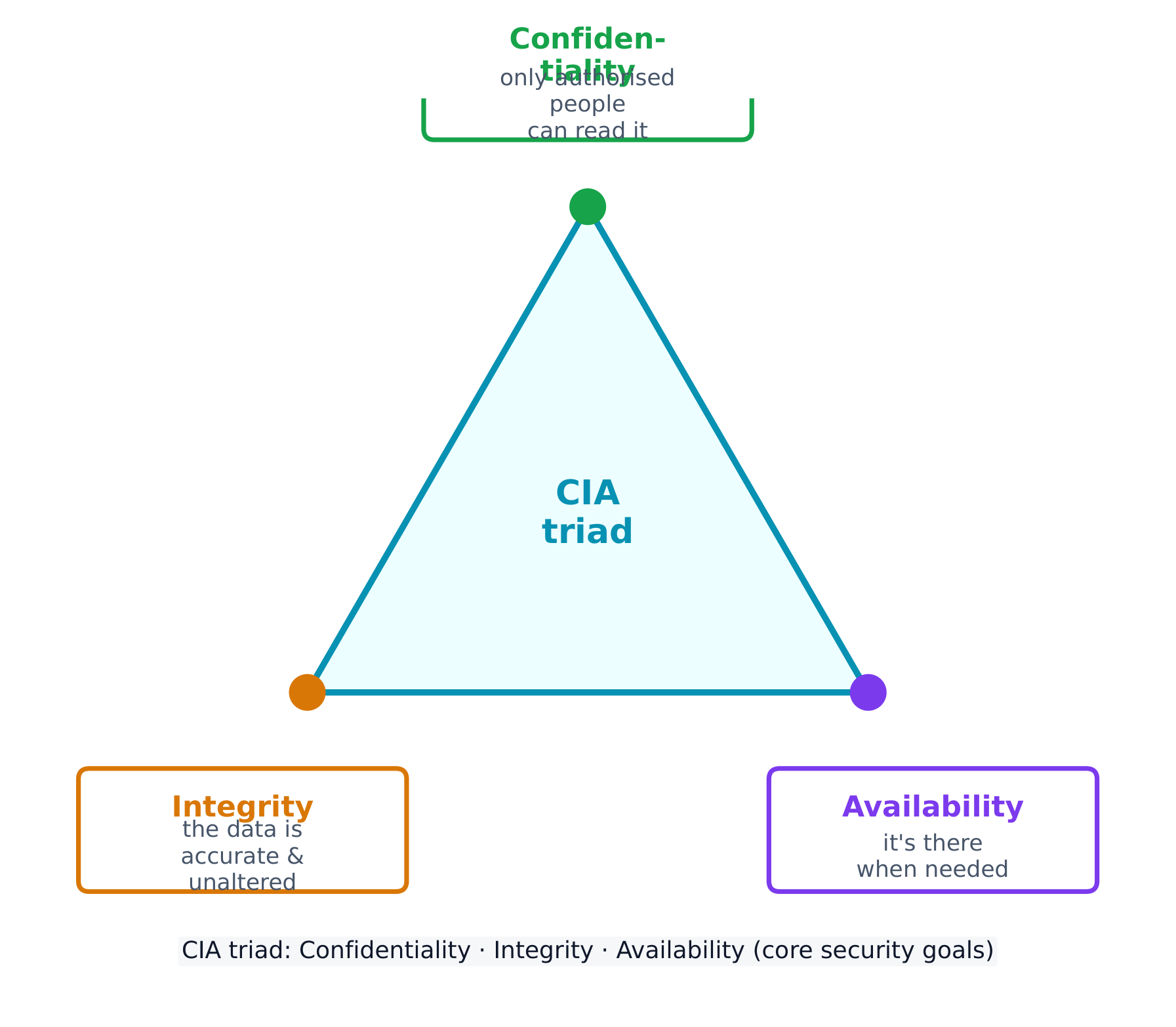
Every security control protects at least one part of the CIA triad 信息安全三要素 - the three goals of security:

  • Confidentiality 保密性 - only authorised people can read the data.
  • Integrity 完整性 - the data is accurate and unaltered.
  • Availability 可用性 - the data and services are there when needed.

Attacks come from different adversaries, classified by their goals. A script kiddie 脚本小子 reuses tools built by others for greed or recognition; a hacktivist 黑客活动分子 acts for a political, social, or personal cause; an insider 内部人员 already holds legitimate access and may act from revenge or greed; a cyberterrorist 网络恐怖分子 disrupts critical infrastructure like a power grid or water plant; and transnational criminal organisations 跨国犯罪组织 chase money through ransomware and stolen data.

Most attacks unfold in phases 阶段: reconnaissance 侦察 (gathering information, often from public OSINT 公开来源情报 sources), initial access, persistence, lateral movement 横向移动 (spreading to more systems by escalating privileges), taking action on the goal, and evading detection. Naming the phase an attacker has reached helps a defender choose the right response.

Social engineering: the seven tactics

Most attacks begin not with code but with social engineering 社会工程学 - psychological tricks that manipulate a person into doing what the adversary wants. The exam names seven tactics, and expects you to identify which one a scenario shows:

Tactic The trick
Pretexting 借口 inventing a believable reason to make contact ("I'm from IT, verifying your account")
Authority 权威 posing as someone powerful, or relaying "the boss's" instructions
Intimidation 恐吓 threatening negative consequences if a demand is not met
Consensus 从众 claiming everyone else is already doing it, to create social pressure
Scarcity 稀缺 inventing limited availability ("only 2 left")
Familiarity 熟悉 pretending to be, or to know, someone close to the target
Urgency 紧迫感 imposing a tight deadline so the target acts before thinking

the common thread is that all seven bypass a target's judgement by triggering an automatic emotional response - fear, trust, haste, or the wish to fit in. The defence is the same each time: verify through a separate, trusted channel before acting.

A risk 风险 appears when a threat 威胁 can exploit a vulnerability 漏洞 to compromise an asset 资产 (anything valuable - data, money, hardware, reputation). We assess risk by weighing two things: the likelihood 可能性 of an attack and the severity 严重性 of the damage.

Likelihood itself depends on the value of the target (adversaries chase what looks worth stealing), the skill needed to exploit the vulnerability (a well-documented exploit needs little skill, so more adversaries can use it), and the motivation and capability of likely adversaries. Severity is usually measured in financial cost, but includes reputational and operational damage too.

The final rating can be written two ways, and the exam wants you to tell them apart:

  • quantitative 定量 - a number: a score on a scale (e.g. 1-10), or a money value (e.g. "a $10,000 annual risk").
  • qualitative 定性 - a label: low / medium / high / severe, or a grid such as likely-high-impact vs unlikely-low-impact.

A written risk assessment 风险评估 should record, for each risk: the vulnerable asset and its value, the likely threats, how the specific vulnerability would be exploited, the severity if it were compromised, and a final quantitative or qualitative rating.

Once a risk is measured, an organisation has four ways to manage it:

  • Avoid 规避 - stop the risky activity (only possible if it isn't essential).
  • Transfer 转移 - shift the burden to someone else, such as an insurer.
  • Mitigate 缓解 - add controls to lower the likelihood or impact.
  • Accept 接受 - live with the leftover residual risk 剩余风险, because perfect security is impossible.

Security controls are grouped two ways. By type: physical 物理 (locks, fences, guards), technical 技术 (firewalls, anti-malware, encryption), and managerial 管理 (policies and procedures). By function: preventative 预防性 (stop an attack, like a lock), detective 检测性 (spot an attack, like a camera), and corrective 纠正性 (fix and restore, like patching).

Worked example. A hospital stores patient records on an unencrypted server in an unlocked room. Rate the risk: the asset is highly sensitive (patient data, protected by law) and the vulnerability is easy to exploit (no encryption, no access control), so this is a high risk. Now classify one fix - a door lock: by type it is a physical control, and by function it is preventative (it stops entry before an attack even begins).

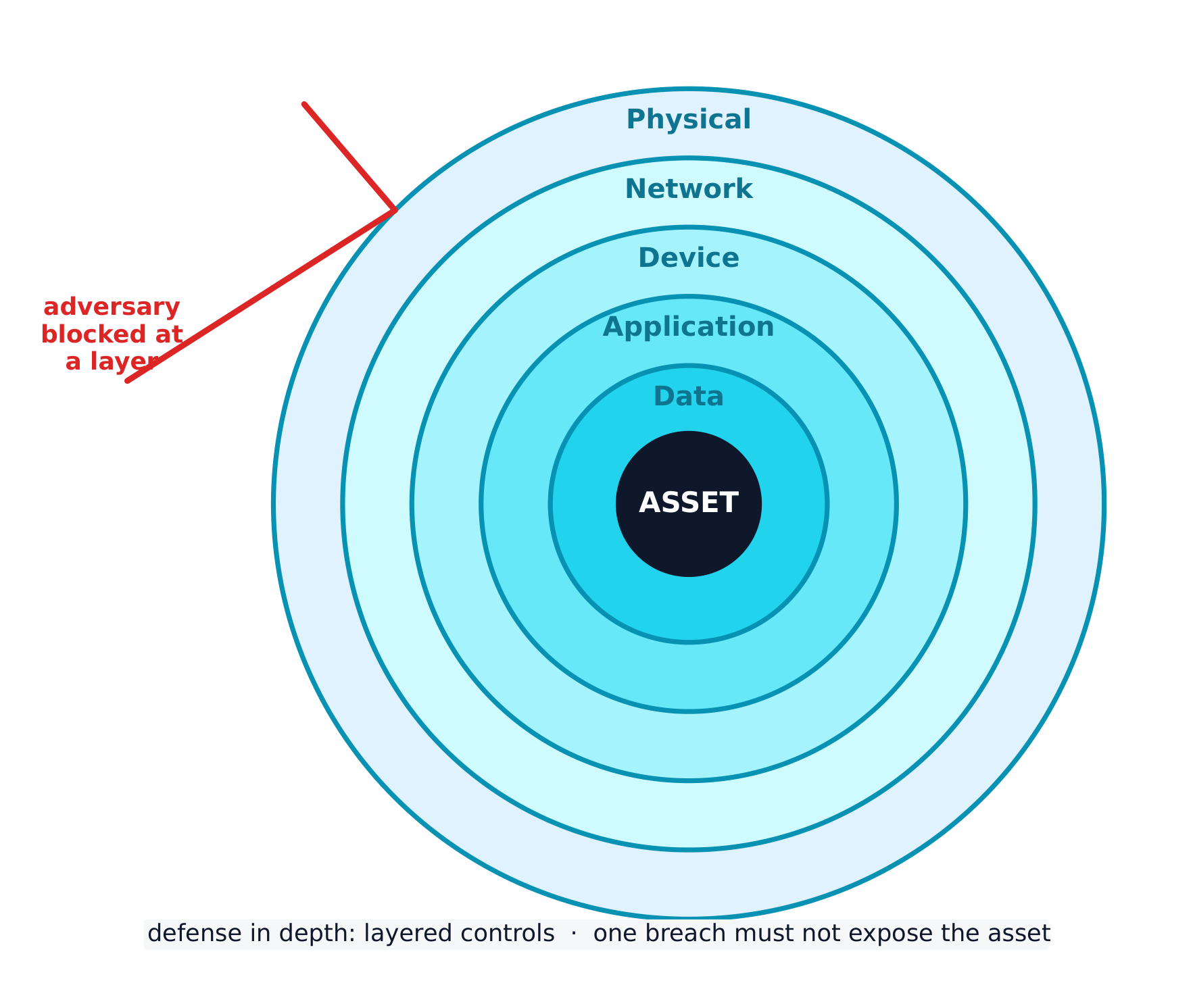
The best strategy layers many controls - a defense-in-depth 纵深防御 approach. If an adversary bypasses one layer, another still stands. Layers include human, physical, network, device, application, and data.

עברית
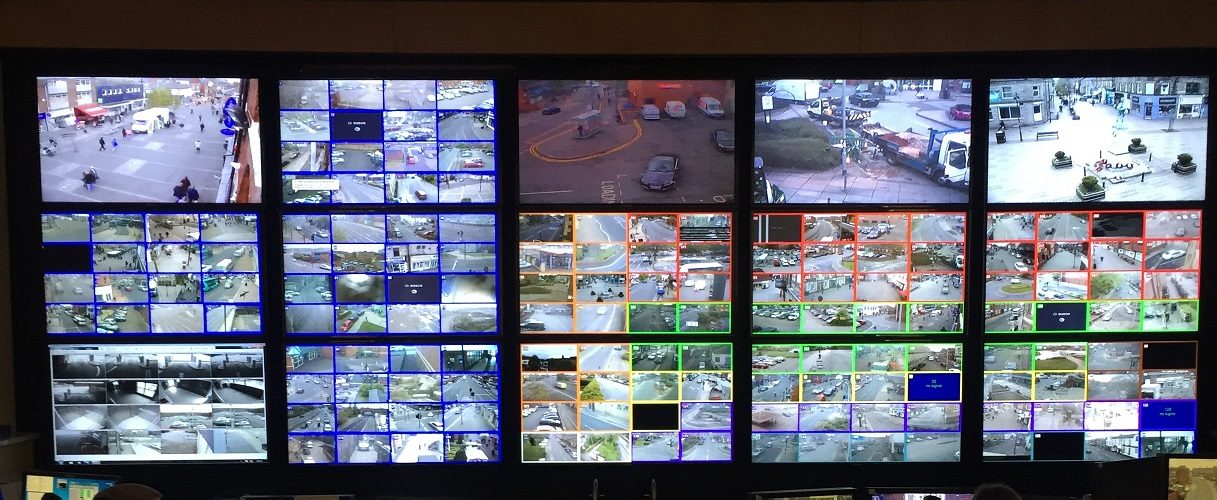
קיר מסכים: ניטור רשתות ורישום עוזרים לזהות פרוצות

לפני הגנה על מערכת, יש צורך בשפה משותפת. סעיף זה בונה אותה.

כל אמצעי ביטחון מגן לפחות על חלק אחד ממשולש ה-CIA – שלושה יעדי הביטחון:

  • סודיות - רק אנשים מורשים יכולים לקרוא את הנתונים.
  • אינטגרציה - הנתונים מדויקים ולא שונו.
  • זמינות - הנתונים והשירותים זמינים כשנדרשים.
משולש ה-CIA: שלושת היעדים שאותם תומך כל אמצעי ביטחון

התקפות נובעות מאויבים שונים, המיוגלים לפי יעדיהם. סקריפט קידי (script kiddie) משתמש בכלים שנבנו על ידי אחרים מתוך ח貪 או רצון להכרה; אקטיביסט (hacktivist) פועל למען מטרה פוליטית, חברתית או אישית; מערער פנימי (insider) כבר מחזיק בגישה חוקית ועשוי לפעול מתוך נקמתן או ח贪; טרוריסט سایبری (cyberterrorist) מפריע לתשתיות קריטיות כמו רשת חשמל או מפעל מים; וארגוני פשיעה טרנס-לאומיים (transnational criminal organisations) רדפים אחרי כסף באמצעות תוכנות קפאית (ransomware) ונתונים גנובים.

ברוב ההתקפות מתרחשות שלבים: סיור (reconnaissance - איסוף מידע, לעיתים מקורות OSINT ציבוריים), גישה ראשונית, היציבות, תנועה אופקית (lateral movement - התפשטות למערכות נוספות על ידי העלאת זכויות), ביצוע פעולה במטרה, והימנעות מהזדהות. שיוך השלב שהתוקף הגיע אליו עוזר למגן לבחור את התגובה המתאימה.

הנדסה חברתית: שבע הטקטיקות

רוב ההתקפות מתחילות לא בקוד אלא בהנדסה חברתית - טריקים פסיכולוגיים שמניעים אדם לעשות מה שהאויב רוצה. הבחינה מציינת שבע טקטיקות, ומצפה שתזהה איזו אחת המקרה מציג:

טקטיקה הטריק
היכרות (Pretexting) המצאת סיבה סבירה ליצירת קשר ("אני ממחלקת IT, מאמת את החשבון שלך")
סמכות (Authority) הצגת עצמו כאדם בעל סמכה, או העברת "הוראות המנהל"
הרתעה (Intimidation) איום בתוצאות שליליות אם הדרישה לא תתקבל
הסכמה (Consensus) טענה שכולם האחרים כבר עושים זאת, ליצירת לחץ חברתי
נדירות (Scarcity) המצאת זמינות מוגבלת ("נותרו רק 2")
היכרות (Familiarity) התlocalhostes להיות, או לדעת, מישהו קרוב למטרה
דחיפות imposed deadline so the target acts before thinking

החוט המנחה הוא שכל שבעתם עוקפים את השיקול הדעת של היעד על ידי הפעלת תגובה רגשית אוטומטית - פחד, אמון, חופז, או רצון להתאים. ההגנה זהה בכל פעם: אמת דרך ערוץ נפרד ואמין לפני פעולה.

סיכון מופיע כאשר איום יכול לנצל חוסר אבטחה כדי לפגוע ב-נכס (כל דבר בעל ערך - נתונים, כסף, ציוד, מוניטין). אנו מעריכים סיכון על ידי שיקול משקל של שני גורמים: ה-הסתברות להתקפה וה-חומרה הנזק.

ההסתברות עצמה תלויה ב-ערך היעד (אויבים רודפים אחרי מה שנראה ששווה לגניבה), ה-מיומנות הנדרשת לניצול חוסר האבטחה (ניצול מתודוא היטב דורש מעט מיומנות, ולכן יותר אויבים יכולים להשתמש בו), וה-מוטיבציה והיכולת של אוינים סבירים. החומרה נמדדת בדרך כלל בעלות פיננסית, אך כוללת גם נזק מוניטלי ותפעולי.

הדירוג הסופי ניתן לכתיבה בשתי דרכים, ובמבחן מבקשים ממך להבדיל ביניהן:

  • כמותי - מספר: ציון בסולם (למשל 1-10), או ערך כספי (למשל "סיכון שנתי של $10,000").
  • איכותי - תווית: נמוך / בינוני / גבוה / קיצוני, או טבלה כמו סביר-השפעה גבוהה לעומת לא סביר-השפעה נמוכה.

הערכת סיכונים כתובה צריכה לתעד, לכל סיכון: הנכס הרגיש וערכו, האיומים הסבירים, כיצד חוסר האבטחה הספציפי יונצל, החומרה אם יושג פגיעה, ודירוג כמותי או איכותי סופי.

לאחר שמדידת סיכון, לארגון יש ארבע דרכים לניהול שלו:

  • להימנע - לעצור את הפעילות הסיכון (אפשרי רק אם היא אינה הכרחית).
  • להעביר - להעביר את העומס למישהו אחר, כמו ביטוח.
  • להקל - להוסיף בקרות להפחתת ההסתברות או ההשפעה.
  • לקבל - לחיות עם ה-סיכון המותרש שנותר, מכיוון שאבטחה מושלמת בלתי אפשרית.

בקרות אבטחה מקובצות בשתי דרכים. לפי סוג: פיזיקלי (מנעולים, גדרות, שומרים), טכנולוגי (חומות מגן, אנטי-מאלוואר, הצפנה), ומנהלי (מדיניות ותהליכים). לפי פונקציה: מניעתית (עוצרת התקפה, כמו מנעול), גילוי (זהירה בהתקפה, כמו מצלמה), ותיקונית (מתקנת ומחזירה, כמו עדכון תוכנה).

דוגמה מפורטת. בית חולים מאחסן תיקי מטופלים על שרת ללא הצפנה בחדר ללא מנעול. דרג את הסיכון: הנכס רגיש מאוד (נתוני מטופלים, מוגן בחוק) וגם חוסר האבטחה קל לניצול (ללא הצפנה, ללא בקרת גישה), לכן זהו סיכון גבוה. כעת סמן שיטה אחת לתיקון - מנעול לדלת: לפי סוג היא בקרה פיזיקלית, ופי פונקציה היא מניעתית (היא עוצרת כניסה לפני שהתקפה מתחילה).

האסטרטגיה הטובה ביותר משלבת רבות בקרות - גישה של הגנה בעומק. אם אויף עוקף שכבה אחת, אחרת עדיין עומדת. השכבות כוללות אנושית, פיזיקלית, רשת, מכשיר, אפליקציה, ונתונים.

הגנה בעומק: רבות שכבות כך פריצה אחת לא חושפת את הנכס
Explore · ⁨חקור⁩

Classify each security control by function · ⁨מיינו כל אמצעי בטיחות לפי פונקציה⁩

A preventative control stops an attack, a detective control spots one in progress, and a corrective control fixes the damage and restores the system. · ⁨אמצעי מוניע מונע התקפה, אמצעי גילוי מזהה התקפה מתרחשת, ואמצעי תיקון מתקן נזק ומשחזר את המערכת.⁩

Explore · ⁨חקור⁩

Classify each security control by type · ⁨מיינו כל אמצעי בטיחות לפי סוג⁩

A physical control guards the physical space, a technical control works in the digital space, and a managerial control is a rule, policy, or procedure. · ⁨בקרה פיזית שומרת על החלל הפיזי, בקרה טכנית פועלת בחלל הדיגיטלי, ובקרה מנהלית היא חוק, מדיניות או תהליך.⁩

Vocabulary · ⁨מילון מונחים⁩ Train · ⁨אימון⁩
English עברית
CIA triad/ˌsiː aɪ ˈeɪ ˈtraɪæd/ משולש CIA
Confidentiality/ˌkɒnfɪˌdenʃiˈæləti/ סודיות
Integrity/ɪnˈteɡrɪti/ אינטגרציה
Availability/əˌveɪləˈbɪlɪti/ זמינות
script kiddie/skrɪpt ˈkɪdi/ סקריפט קיד
hacktivist/ˈhæktɪvɪst/ האקטיביסט
insider/ɪnˈsaɪdə/ פנימי
cyberterrorist/ˈsaɪbəterərɪst/ טרוריסט קיברנטי
transnational criminal organisations/trænˈsnæʃənl ˈkrɪmɪnl ˌɔːɡənaɪˈzeɪʃnz/ ארגוני פשיעה טרנס-לאומיים
phases/ˈfeɪzɪz/ שלבי הירח
reconnaissance/rɪˈkɒnɪsəns/ התבוננות
OSINT/ˈəʊsɪnt/ נתונים מפתח גלויים (OSINT)
lateral movement/ˈlætərəl ˈmuːvmənt/ תנועה אופקית
social engineering/ˈsəʊʃl ˌendʒɪˈnɪərɪŋ/ הנדסה חברתית
Pretexting/ˈpriːtekstɪŋ/ פריטקסט (Pretexting)
Authority/əˈθɒrɪti/ סמכות
Intimidation/ɪnˌtɪmɪˈdeɪʃn/ הרתעה
Consensus/kənˈsensəs/ הסכמה
Scarcity/ˈskeəsɪti/ נדירות
Familiarity/fəˌmɪliˈærɪti/ הכרות
Urgency/ˈɜːdʒənsi/ דחיפות
risk/rɪsk/ סיכון
threat/θret/ איום
vulnerability/ˌvʌlnərəˈbɪlɪti/ נקודת תורפה
asset/ˈæset/ נכס
likelihood/ˈlaɪklihʊd/ סבירות
severity/səˈverɪti/ חומרה
quantitative/ˈkwɒntɪteɪtɪv/ כמותי
qualitative/ˈkwɒlɪteɪtɪv/ איכותי
risk assessment/rɪsk əˈsesmənt/ הערכת סיכונים
Avoid/əˈvɔɪd/ הימנעות
Transfer/ˈtrænsfɜː/ העברה
Mitigate/ˈmɪtɪɡeɪt/ צמצום
Accept/əkˈsept/ קבלה
residual risk/rɪˈsɪdʒuːəl rɪsk/ סיכון שארית
defense-in-depth/dɪˈfens ɪn depθ/ הגנה בשכבות (defense-in-depth)
physical attacks/ˈfɪzɪkl əˈtæks/ תקיפות פיזיות
2.2

Physical Vulnerabilities and Attacks · ⁨חוסרי אבטחה פיזיקליים והתקפות⁩

Syllabus · ⁨סיילבוס⁩
English

Learning Objective 2.2.A: Identify common physical attacks.

  • 2.2.A.1 Adversaries often use social engineering when conducting a physical attack.
  • 2.2.A.2 Piggybacking is the name for an attack where an adversary uses social engineering to manipulate an authorized individual to grant the adversary access to a restricted area. Common piggybacking tactics include carrying something large to entice an authorized person to hold the door open, pretending to be an authorized person who has forgotten their access token, or pretending to be a maintenance person who needs to get into a certain area to perform an inspection or repair.
  • 2.2.A.3 Tailgating is the name for an attack where an adversary gains unauthorized access to a restricted area by following close behind an authorized individual without that individual’s awareness or knowledge.
  • 2.2.A.4 Shoulder surfing is the name for an attack where an adversary watches as a user accesses sensitive information so the adversary can use it later. Sometimes adversaries use a camera to record the target accessing the sensitive information for later analysis.
  • 2.2.A.5 Dumpster diving is the name for an attack where an adversary goes through a target’s physical trash to look for information that could be used to help the adversary reach their goal.
  • 2.2.A.6 Card cloning is the name for an attack where an adversary makes a copy of an authorized user’s access card so they can gain access to all the resources the user is authorized to access.

Learning Objective 2.2.B: Explain how threats can exploit common physical vulnerabilities to cause loss, damage, disruption, or destruction to assets.

  • 2.2.B.1 Threats include human adversaries seeking to cause harm or disruption as well as natural disasters. Natural disasters can cause physical damage or destruction to computers and data as well as disruption of digital services provided by computers.
  • 2.2.B.2 Vulnerabilities are weaknesses or flaws that could allow an asset to be compromised. Common compromises include:
    • Unauthorized access to sensitive data or restricted physical spaces
    • Disruption of services
    • Theft or destruction of digital or physical resources
    • Unauthorized modification of data
  • 2.2.B.3 When adversaries disrupt power to a device, the device and any services it provides become unavailable. To disrupt power, adversaries may damage fuses or breakers in an electrical box, unplug or cut electrical wiring, or damage power distribution systems like substations and transformers.
  • 2.2.B.4 When adversaries gain access to an area with sensitive information, they can steal or copy sensitive information.
  • 2.2.B.5 When adversaries gain physical access to a device and its ports, they can plug in a keylogger or external drive containing malware, which could allow them to collect data from a user or possibly even to gain control of the device. With direct physical access adversaries can also physically destroy a device, making the device itself, any data stored on it, and any services it provides unavailable.

Learning Objective 2.2.C: Assess and document risks from physical vulnerabilities.

  • 2.2.C.1 Physical access to devices can allow adversaries to bypass many technical controls and layers of security.
  • 2.2.C.2 High risks from physical vulnerabilities arise when sensitive information or systems are exposed in physical spaces without sufficiently restricted and controlled access.
    • Illustrative examples for 2.2.C.2:
      • A server that stores customer data is in a room with no lock which is accessed via an unmonitored hallway.
  • 2.2.C.3 Moderate risks from physical vulnerabilities arise when a noncritical or nonsensitive part of an organization is left unprotected in a way that it could act as a foothold for an adversary to gain initial access to other resources.
    • Illustrative examples for 2.2.C.3:
      • An office has a reception area beyond which access is controlled; the receptionist has a computer that connects to the office’s internal wireless network and the computer has exposed USB ports.
  • 2.2.C.4 Low risks from physical vulnerabilities arise when a vulnerable asset is of low value and the vulnerability is unlikely to be exploited.
    • Illustrative examples for 2.2.C.4:
      • Employees in an office that requires badge access have laptop computers that they leave on their desks unattended when they all go to lunch together. The computers do not contain any sensitive information, but there are no cables securing the devices to the desks.
עברית

מטרות לימוד 2.2.A: זיהוי התקפות פיזיות נפוצות.

  • 2.2.A.1 אתגרים משתמשים לעיתים קרובות בהנדסה חברתית בביצוע התקפה פיזית.
  • 2.2.A.2 Piggybacking הוא השם להתקפה שבה אתגר משתמש בהנדסה חברתית כדי להטעות איש מורשה להעניק לו גישה לאזור מוגבל. טקטיקות Piggybacking נפוצות כוללות נשיאת חפץ גדול כדי לגרום לאיש מורשה להחזיק דלת פתוחה, ההתחזות לאיש מורשה שכח את תג המעבר שלו, או ההתחזות לאיש תחזוקה שמצריך כניסה לאזור מסוים לבצע בדיקה או תיקון.
  • 2.2.A.3 Tailgating הוא השם להתקפה שבה אתגר מקבל גישה בלתי מורשת לאזור מוגבל על ידי מעקב צמוד אחרי איש מורשה מבלי שהאיש המורשה יהיה מודע לכך או יודע זאת.
  • 2.2.A.4 Shoulder surfing הוא השם להתקפה שבה אתגר צופה כאשר משתמש נכנס לנתונים רגישים כדי שהאתגר יוכל להשתמש בם לאחר מכן. לעיתים אתגרים משתמשים במצלמה לצלם את היעד כשהוא נכנס לנתונים רגישים עבור ניתוח מאוחר יותר.
  • 2.2.A.5 Dumpster diving הוא השם להתקפה שבה אתגר חופר בפח האשפה הפיזי של היעד לחפש מידע שיכול לשמש את האתגר כדי להגיע למטרתו.
  • 2.2.A.6 Card cloning הוא השם להתקפה שבה אתגר יוצר העתק של כרטיס הגישה של משתמש מורשה כדי שיוכל לקבל גישה לכל המשאבים שהמשתמש מורשה לגשת אליהם.

מטרות לימוד 2.2.B: הסבר כיצד איומים יכולים לנצל חומרי חולשן פיזיים נפוצים כדי לגרום לפסד, נזק, הפרעה או הרס לנכסים.

  • 2.2.B.1 איומים כוללים אתגרים אנושיים המחפשים לגרום לנזק או להפרעה כמו גם אסונות טבע. אסונות טבע יכולים לגרום לנזק פיזי או להרס מחשבים ונתונים כמו גם להפרעה בשירותים דיגיטליים המסופקים על ידי מחשבים.
  • 2.2.B.2 חומרי חולשן הם חולשות או פגמים שיכולים לאפשר לפעילות להיות מופקעת. הפקעות נפוצות כוללות:
    • גישה בלתי מורשת לנתונים רגישים או לאזורים פיזיים מוגבלים
    • הפרעת שירותים
    • גניבה או הרס של משאבים דיגיטליים או פיזיים
    • שינוי לא מורשה של נתונים
  • 2.2.B.3 כאשר מתקיפים מפסיקים אספקת חשמל למכשיר, המכשיר ושירותים כלשהם שהוא מספק הופכים לא זמינים. כדי להפסיק אספקת חשמל, מתקיפים עשויים לפגוע בפיוזים או במפסקים בקופסת חשמל, לנתק או לחתוך חוטים חשמליים, או לפגוע במערכות חלוקת חשמל כמו תחנות חשמל ומפסגות.
  • 2.2.B.4 כאשר מתקיפים נכנסים לגישה לאזור הכולל מידע רגיש, הם יכולים לגנוב או להעתיק מידע רגיש.
  • 2.2.B.5 כאשר מתקיפים נכנסים לגישה פיזית למכשיר ולפורטים שלו, הם יכולים לחבר מקלדת מקלקד (keylogger) או כונן חיצוני המכיל תוכנת רעל, מה שיאפשר להם לאסוף נתונים ממשתמש או אף לקבל שליטה על המכשיר. עם גישה פיזית ישירה, מתקיפים יכולים גם להרוס פיזית מכשיר, מה שהופך את המכשיר עצמו, את כל הנתונים הארוחים עליו ואת כל השירותים שהוא מספק לא זמינים.

מטרות לימוד 2.2.C: הערכת ותיעוד סיכונים הנובעים ממעורבות פיזיות.

  • 2.2.C.1 גישה פיזית למכשירים יכולה לאפשר למתקיפים לעקוף בקלות许多 controls טכניים ושלבי הגנה רבים.
  • 2.2.C.2 סיכונים גבוהים ממעורבות פיזיות נוצרים כאשר מידע רגיש או מערכות חושפות באזורים פיזיים ללא גישה מוגבלת ומנוצרת בצורה מספקת.
    • דוגמאות להמחשה עבור 2.2.C.2:
      • שרתי המאחסן נתוני לקוחות נמצא בחדר ללא נעילה הנגיש דרך מסדרון שאינו נצפה.
  • 2.2.C.3 סיכונים בינוניים ממעורבות פיזיות נוצרים כאשר חלק שאינו קריטי או שאינו רגיש בארגון מושאר בלתי מוגן בצורה שיכולה לשמש כנקודת יציאה למתקיף בכדי להשיג גישה ראשונית למשאבים אחרים.
    • דוגמאות להמחשה עבור 2.2.C.3:
      • משרד כולל אזור קבלה שממנו הגישה נשלטת; הקבלנית מחזיקה במחשב המקושר לרשת אלחוטית פנימית של המשרד, והמחשב כולל פורטי USB חשופים.
  • 2.2.C.4 סיכונים נמוכים ממעורבות פיזיות נוצרים כאשר נכס פגיע הוא בעל ערך נמוך והמעורבות סביר שלא תופעה.
    • דוגמאות להמחשה עבור 2.2.C.4:
      • עובדים במשרד הדורש כרטיס כניסה משאירים מחשבים ניידים על שולחנותיהם ללא השגחה כאשר כולם יוצאים לארוחת צהריים יחד. המחשבים אינם מכילים מידע רגיש, אך אין כבלים המחברים את המכשירים לשולחנות.

Source: College Board AP Course and Exam Description · ⁨מקור: תיאור הקורס והמבחן של College Board AP⁩

English

Digital security means nothing if an adversary can simply walk in. Common physical attacks 物理攻击 often begin with social engineering:

  • Piggybacking 尾随(获许可) - tricking an authorised person into holding a door open (for example, by carrying a heavy box).
  • Tailgating 尾随(未察觉) - slipping through a secured door behind someone without their knowledge.
  • Shoulder surfing 肩窥 - watching someone type a password or read sensitive information.
  • Dumpster diving 翻垃圾搜集情报 - searching a target's trash for useful information.
  • Card cloning 门禁卡复制 - copying an access card to enter restricted areas.

With physical access, an adversary can cut power, steal or copy data, or plug in a keylogger 键盘记录器. We rate physical risk as high when sensitive systems sit in a space without controlled access, moderate when an unimportant area could act as a foothold 立足点 to reach other resources, and low when the asset is worthless and unlikely to be attacked.

עברית

לבט דיגיטלית אין שום ערך אם אויף יכול פשוט להיכנס פנימה. התקפות פיזיקליות נפוצות לעיתים קרובות מתחילות בהנדסה חברתית:

  • הצמדה (Piggybacking) - רימוי אדם מורשה להחזיק דלת פתוחה (למשל, על ידי נשיאת קופסה כבדה).
  • מעקב אחרי דלת (Tailgating) - מעבר דרך דלת מאובטחת מאחורי מישהו ללא ידיעתו.
  • גלישת כתף (Shoulder surfing) - צפייה באדם שכותב סיסמה או קורא מידע רגיש.
  • חיפוש בפחיות אשפה (Dumpster diving) - חפירה בפסולת של יעד למציאת מידע שימושי.
  • העתקת כרטיסי כניסה - העתקת כרטיס גישה כדי להתחבר לאזורים מוגבלים.

עם גישה פיזית, מתקיף יכול לקטוע חשמל, לגנוב או להעתיק נתונים, או לחבר מקלדן מקלדת (keylogger). אנו מדרגים סיכון פיזי כ-גבוה כאשר מערכות רגישות נמצאות בחלל ללא גישה מבוקרת, בינוני כאשר אזור לא חשוב יכול לשמש כנקודת תמיכה להשגת משאבים אחרים, ונמוך כאשר הנכס אינו בעל ערך ולא צפוי להיות מותקף.

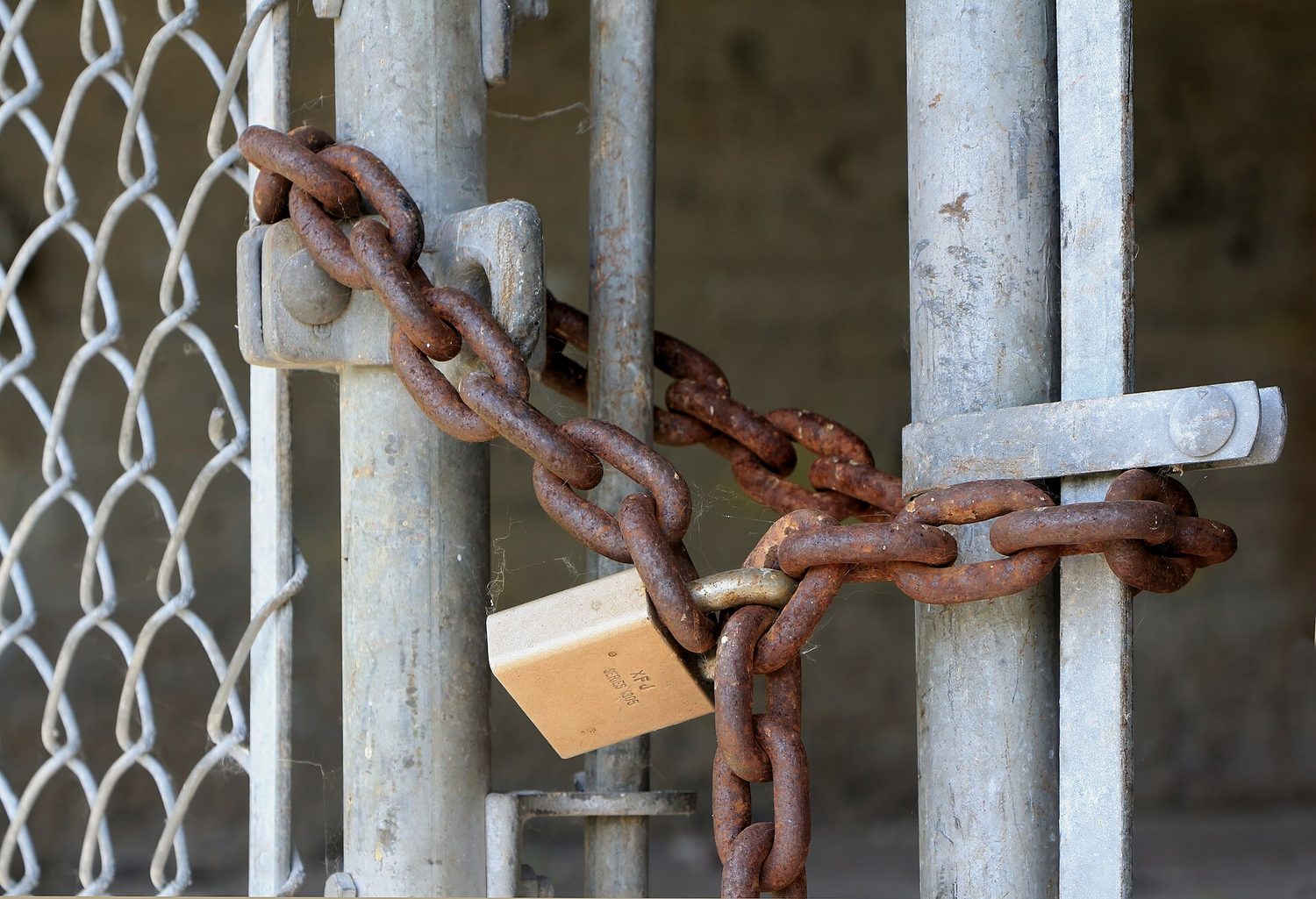
מנעולה בשרשרת: אבטחה פיזית היא השכבה הראשונה — מנעולים, דלתות ומחסומים הם קריטיים
Vocabulary · ⁨מילון מונחים⁩ Train · ⁨אימון⁩
English עברית
physical/ˈfɪzɪkl/ פיזי
technical/ˈteknɪkl/ טכני
managerial/ˌmænəˈdʒɪərɪəl/ מנהלי
preventative/prɪˈventətɪv/ מונע
detective/dɪˈtektɪv/ גילוי
corrective/kəˈrektɪv/ תיקוני
Piggybacking/ˈpɪɡɪbækɪŋ/ הצמדה (Piggybacking)
Tailgating/ˈteɪlɡeɪtɪŋ/ מעקב (Tailgating)
Shoulder surfing/ˈʃəʊldə ˈsɜːfɪŋ/ צפייה מהכתף (Shoulder surfing)
Dumpster diving/ˈdʌmpstə ˈdaɪvɪŋ/ חפירה בפחית אשפה (Dumpster diving)
Card cloning/kɑːd ˈkləʊnɪŋ/ העתקת כרטיס (Card cloning)
keylogger/ˈkiːlɒɡə/ קלטן מקשים
foothold/ˈfʊthəʊld/ נקודת בסיס
clean desk policy/kliːn desk ˈpɒlɪsi/ מדיניות שולחן נקי
2.3

Protecting Physical Spaces · ⁨הגנה על חללים פיזיים⁩

Syllabus · ⁨סיילבוס⁩
English

Learning Objective 2.3.A: Identify managerial controls related to physical security.

  • 2.3.A.1 Organizations should conduct employee security awareness training to educate employees about how they can contribute to the organization’s security by:
    • Detecting social engineering attempts like phishing
    • Not badging other people into restricted areas
    • Preventing device theft
  • 2.3.A.2 Organizations should have a workstation security policy that outlines the measures necessary to protect a physical workplace. The policy may have tiers of workstation security based on the type of data handled at a workstation. Workstation policies often require:
    • Locking devices before leaving workstations unattended to prevent unauthorized access
    • Clearing sensitive documents off workstations before leaving them unattended (sometimes called a clean desk policy)
    • Using a privacy screen filter or other physical barrier to prevent others from viewing information on the screen
    • Connecting devices to surge protectors or uninterruptible power supplies (UPS)

Learning Objective 2.3.B: Determine mitigation strategies for risks from physical vulnerabilities.

  • 2.3.B.1 To determine a relevant control, a cyber defender considers how an adversary could take advantage of a vulnerability to attack a system and how to prevent, detect, or correct the attack.
  • 2.3.B.2 Installing physical controls like fencing, gates, and bollards around a building can deter adversaries from trying to physically access an organization’s buildings.
  • 2.3.B.3 Locks on doors, server cabinets, and computers can prevent devices from being accessed or stolen.
  • 2.3.B.4 Card readers can record which employee badges are being used to access different entries at specific times and deny access to unauthorized badges.
  • 2.3.B.5 Access control vestibules and turnstiles can prevent an authorized person from intentionally or accidentally admitting an unauthorized person into a restricted area.
  • 2.3.B.6 Organizations can disable USB ports to prevent external drives from loading malware onto a computer.
  • 2.3.B.7 An uninterruptible power supply (UPS) provides a backup power source for a device in the event of a power outage. Organizations can also use power generators to provide power at a larger scale to a building or set of critical devices.
  • 2.3.B.8 Organizations prioritize risk mitigations based on the severity of the risks and the cost of the recommended mitigations.
עברית

מטרות לימוד 2.3.A: זיהוי בקרות ניהוליות הקשורות לבטיחות פיזית.

  • 2.3.A.1 ארגונים צריכים לבצע הכשרת מודעות לבטיחות לעובדים כדי ללמד אותם כיצד הם יכולים לתרום לבטיחות הארגון על ידי:
    • זיהוי ניסיונות מهندסה חברתית כמו הפישינג
    • חתימה לא מורשית של אנשים אחרים לתוך אזורים מוגבלים
    • מניעת גניבת מכשירים
  • 2.3.A.2 לערכות יש מדיניות אבטחת עומדות עבודה המפרטת את הצעדים הנדרשים להגנה על מקום העבודה הפיזי. המדיניות עשויה לכלול רמות שונות של אבטחת עומדת עבודה בהתאם לסוג הנתונים המטופלים בעומדה. מדיניות עומדת עבודה דורשת לרוב:
    • נעילת מכשירים לפני עזיבת תחנות עבודה ללא השגחה למניעת גישה לא מורשית
    • ניקוי מסמכים רגישים מתחנות העבודה לפני עזיבתם ללא השגחה (לעיתים קרובות נקרא 'מדיניות שולחן עבודה נקי')
    • השימוש במסך הגנה פרטנית או בגדר פיזי אחר כדי למנוע מאנשים אחרים לצפות במידע המוצג על המסך
    • חיבור מכשירים למגני זרמים או לספקי חשמל בלתי ניתנים להפסקה (UPS)

מטר לימוד 2.3.B: זיהוי אסטרטגיות להקלת סיכונים הנובעים ממעוואים פיזיים.

  • 2.3.B.1 כדי לקבוע בקרה רלוונטית, מגן סייבר שוקל כיצד התוקף יכול לנצל מעווא לתקוף מערכת וכיצד למנוע, לזהות או לתקן את ההתקפה.
  • 2.3.B.2 התקנת בקרות פיזיות כמו מחסומים, שערים ובלוקיות סביב מבנה יכולות להרחיק תוקפים מנסות לגשת פיזית לבנייני הארגון.
  • 2.3.B.3 נעילות בדלתות, ארונות שרתים ומחשבים יכולות למנוע גישה למכשירים או גניבתם.
  • 2.3.B.4 קוראי כרטיסים יכולים לרשום אילו תעודות מעבר משתמשות בגישה לכניסות שונות בזמנים ספציפיים ולסרב גישה לתעודות בלתי מורשות.
  • 2.3.B.5 וסטibules בקרת גישה וקרוסלים יכולים למנוע מאדם מורשה להכניס, במתכוון או בטעות, אדם בלתי מורשה לאזור מוגבל.
  • 2.3.B.6 ארגונים יכולים לכבות יציאות USB כדי למנוע מהכוננים החיצוניים להטמיע תוכנת רע במחשב.
  • 2.3.B.7 מקור כוח בלתי הפסק (UPS) מספק מקור כוח גיבוי למכשיר במקרה של הפסקת חשמל. ארגונים יכולים גם להשתמש בגנרטורים כדי לספק כוח בקנה מידה גדול יותר למבנה או לקבוצת מכשירים קריטיים.
  • 2.3.B.8 ארגונים מדורגים הקלות סיכונים לפי חומרת הסיכונים ועלות ההקלות המומלצות.

Source: College Board AP Course and Exam Description · ⁨מקור: תיאור הקורס והמבחן של College Board AP⁩

English

Managerial controls come first: security-awareness training teaches staff not to badge strangers in, and a workstation security policy requires locking devices, clearing desks (a clean desk policy 清桌政策), and using privacy screens.

Physical controls then harden the building: fences, gates, and bollards 防撞柱 deter access; locks protect doors and cabinets; card readers 读卡器 log and restrict entry; an access control vestibule 门禁前室 (a two-door airlock) stops piggybacking; disabling USB ports blocks malware drives; and an uninterruptible power supply (UPS) 不间断电源 keeps devices running through an outage. Organisations prioritise these by matching the cost of a control to the severity of the risk.

עברית

בקרות מנהליות מגיעות תחילה: הדרכת מודעות ביטחון מלמדת עובדים לא לפתוח לדלת זרים, ומדיניות אבטחת עמדות עבודה מחייבת נעילת מכשירים, פינוק שולחנות עבודה (מדינית שולחן נקי) והשתמש במסכי פרטיות.

בקרות פיזיות מחזקות את המבנה לאחר מכן: גדרות, שערים ועמודי הגנה (bollards) מרחיקים גישה; מנעולים מגנים על דלתות וארונות; קוראי כרטיסים מפרטים ומגבילים כניסה; לובי בקרת גישה (מנעול אוויר דו-דלת) מונע הצמדה; נעילת יציאות USB חוסמת דיסקיות תוכנת זיהוי; ומקור חשמל בלתי מפסק (UPS) שומר על פעילות מכשירים במהלך הפסקת חשמל. ארגונים ממיינים את הבקרות הללו על ידי התאמת העלות של הבקרה לרמת הסיכון.

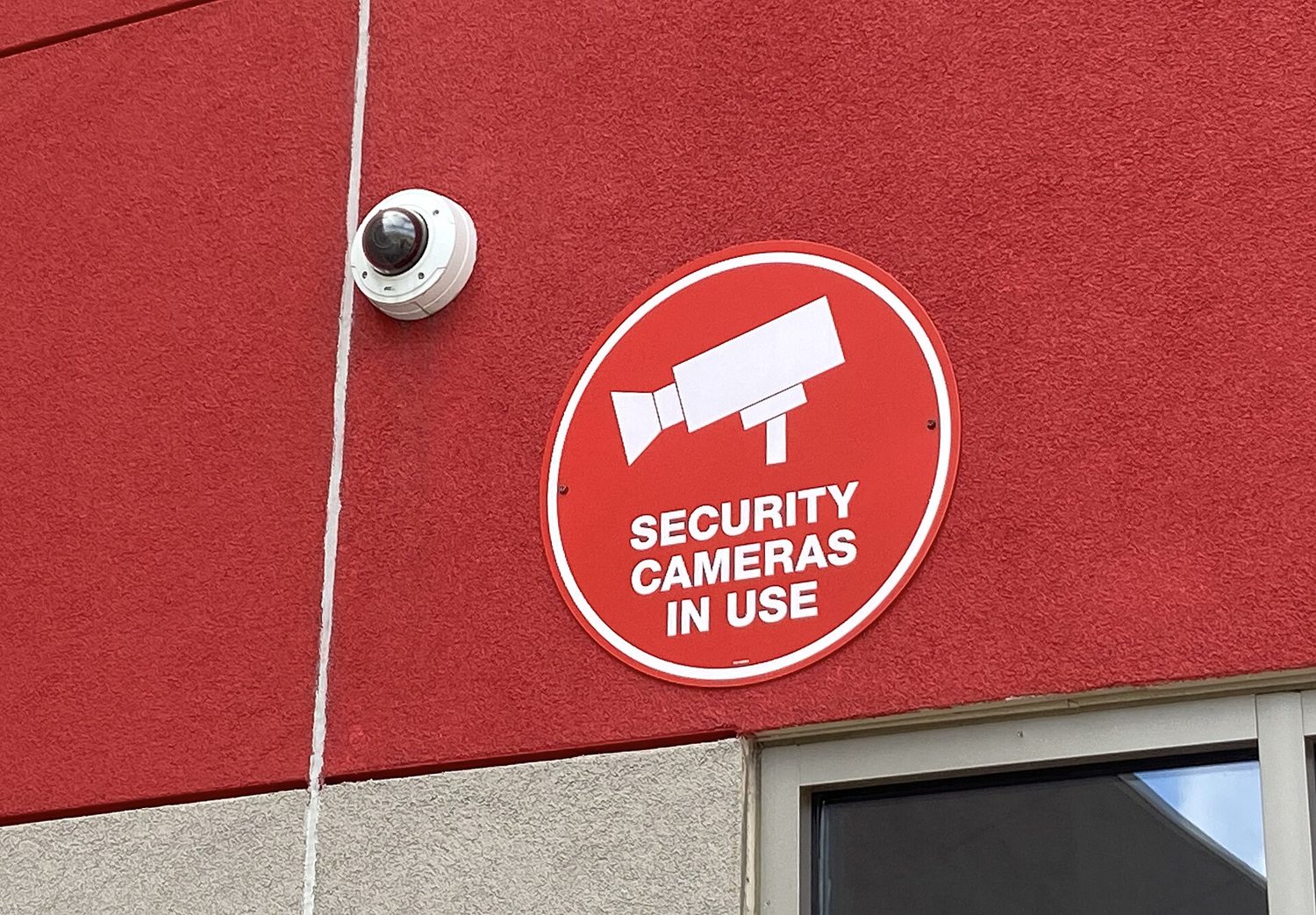
מצלמת אבטחה בצורת כיפה: בקרות פיזיות וניטור מגנים על חללים ועל רשתות גם כן
Vocabulary · ⁨מילון מונחים⁩ Train · ⁨אימון⁩
English עברית
bollards/ˈbɒlɑːdz/ עמודי מגן
card readers/kɑːd ˈriːdəz/ קוראי כרטיסים
access control vestibule/ˈækses kənˈtrəʊl ˈvestɪbjuːl/ חצר ביקורת כניסה
uninterruptible power supply (UPS)/ˌʌˌnɪntəˈrʌptɪbl ˈpaʊə səˈplaɪ/ אספקת חשמל בלתי הפסקה (UPS)
motion sensors/ˈməʊʃn ˈsensəz/ חיישני תנועה
points of ingress and egress/pɔɪnts ɒv ˈɪŋɡres ænd iːˈɡres/ נקודות כניסה ויציאה
2.4

Detecting Physical Attacks · ⁨זיהוי התקפות פיזיות⁩

Syllabus · ⁨סיילבוס⁩
English

Learning Objective 2.4.A: Identify ways security controls can detect physical attacks.

  • 2.4.A.1 Cameras can capture a visual record of an adversary’s malicious activity. The feed from a camera should be recorded and monitored for maximum effect. Recordings can be especially helpful in after-incident investigations.
  • 2.4.A.2 Security guards can monitor activity in an area and respond to suspicious activity once detected.
  • 2.4.A.3 Motion sensors can alert security to movement in an area.
  • 2.4.A.4 Employees that work in a physical space are often the first to notice the presence of an unauthorized person and can alert security.

Learning Objective 2.4.B: Determine effective placement of security controls for detecting physical attacks.

  • 2.4.B.1 When placing cameras, consideration should be given to visual coverage, angle, and the ability to be tampered with by an adversary. Consideration should also be given to what a camera in a specific area could capture an adversary doing and how that information would be helpful. Points of ingress and egress are often monitored by camera.
  • 2.4.B.2 Motion sensors should be placed in areas where traffic is unexpected, like server rooms, or areas where sensitive materials are stored and few people have access. Motion sensors in high-traffic areas create many false alarms, making the alarms less likely to be taken seriously when there is a real security event.
  • 2.4.B.3 Locks should be placed on all entries to areas containing sensitive information or systems. For areas with particularly sensitive information or systems, an organization could use an access control vestibule at the entry point to prevent piggybacking or tailgating.
  • 2.4.B.4 Security guards can be stationary or patrolling. Stationary guards can provide constant protection for a specific area, entrance, or high-value item. Patrolling guards are more difficult for an adversary to plan around and can create time pressure for an adversary. Placing stationary guards at places that funnel traffic (e.g., entry gates, main entrances or lobbies, and entrances to more secure access areas) can be highly effective, while patrolling guards are better suited for perimeters and exterior areas.

Learning Objective 2.4.C: Apply detection techniques to identify physical attacks.

  • 2.4.C.1 Cameras provide visual monitoring and a visual record of activity within a designated space. Cameras can be paired with facial recognition software that can provide alerts when unauthorized individuals enter controlled areas. Once a physical breach has been detected, defenders can use live and recorded camera footage to track an adversary’s path and actions.
  • 2.4.C.2 Motion detectors work best when paired with cameras. When a security alert is raised because a motion detector has been activated, defenders can use cameras to check the space visually and verify a physical security breach.
  • 2.4.C.3 When employees are required to use an electronic badge to unlock a door to a restricted area, a sensor can record how long the door was open. In reviewing entry logs for the door, potential piggybacking or tailgating can be detected by doors being open for longer than normal lengths of time.
עברית

מטר לימוד 2.4.A: זיהוי דרכים שבהן בקרות אבטחה יכולות לזהות התקפות פיזיות.

  • 2.4.A.1 מצלמות יכולות לתעד ויזואלית פעילות מזיקה של תוקף. הרשמת זרם המצלמה צריכה להתבצע ולהישמר למעקב כדי להשיג את האפקט המקסימלי. הרשומות יכולות להיות מועילות במיוחד בחקירות לאחר אירוע.
  • 2.4.A.2 שומרי אבטחה יכולים לעקוב אחרי פעילות באזור ולסגת לפעילות חשודה ברגע שזוהתה.
  • 2.4.A.3 חיישני תנועה יכולים לזהות תנועה באזור ולדווח על כך לאבטחה.
  • 2.4.A.4 עובדים העובדים במרחב פיזי הם לעיתים קרובות הראשונים להבחין בנוכחות של אדם לא מורשה ויכולים לדווח על כך לאבטחה.

מטרות למידה 2.4.B: קביעת מיקום יעיל של בקרות אבטחה לגילוי התקפות פיזיות.

  • 2.4.B.1 בעת הרכבת מצלמות, יש לקחת בחשבון כיסוי ויזואלי, זווית צילום והיכולת שלהן להתערבות על ידי אויב. כמו כן, יש לבחון מה יכולה מצלמה באזור ספציפי לצלם מאוויב וכיצד המידע הזה יהיה שימושי. נקודות כניסה ויציאה נצפות לעיתים קרובות באמצעות מצלמות.
  • 2.4.B.2 חיישני תנועה צריכים להיות ממוקמים באזורים בהם תנועה אינה צפויה, כמו חדר שרתים, או אזורים בהם מאובזרים רגישים מאוחסים ומעטים אנשים מגיעים אליהם. חיישני תנועה באזורים עם תנועה גבוהה יוצרים הרבה אזעקות שווא, מה שמפחית את האפשרות שהאזעקות יוקחו ברצינות כאשר מתרחשת אירוע אבטחה אמיתי.
  • 2.4.B.3 נעילה צריכה להיות מותקנת בכל הכניסות לאזורים המכילים מידע רגיש או מערכות. עבור אזורים המכילים מידע או מערכות רגישים במיוחד, ארגון יכול להשתמש בווסטיבול (חלל מעבר) לשליטת גישה בכניסה כדי למנוע כניסת "חזרה" (piggybacking/tailgating).
  • 2.4.B.4 שומרי אבטחה יכולים להיות מקובעים או משוטטים. שומרים מקובעים מספק הגנה מתמדת לאזור ספציפי, כניסה או פריט בעל ערך גבוה. שומרים משוטטים קשים יותר לאויב לתכנן מולם ועשויים ליצור לחץ זמן על האויב. הרכבת שומרים מקובעים במקומות המכוונים תנועה (כגון שערי כניסה, כניסות ראשיות או לוביות, וכניסות לאזורים עם גישה בטוחה יותר) יכולה להיות יעילה מאוד, בעוד ששומרים משוטטים מתאימים יותר לגבולות ולאזורים חיצוניים.

מטרות למידה 2.4.C: יישום טכניקות גילוי לזיהוי התקפות פיזיות.

  • 2.4.C.1 מצלמות מספקות ניטור ויזואלי ורשומה ויזואלית של פעילות בתוך מרחב מוגדר. מצלמות יכולות להיות משולבות עם תוכנת זיהוי פנים שתספק אזעקות כאשר individuals לא מורשים נכנסים לאזורים מבוקרים. לאחר זיהוי הפרה פיזית, הגנת יכולים להשתמש בצילומי מצלמה חיים וברשומות כדי לעקוב אחר מסלול ופעולותיו של האויב.
  • 2.4.C.2 חיישני תנועה עובדים הטוב ביותר כאשר משולבים עם מצלמות. כאשר מופעלת אזעקה בגלל הפעלת חיישן תנועה, הגנת יכולים להשתמש במצלמות כדי לבדוק את החלל ויזואלית ולאמת הפרה פיזית של אבטחה.
  • 2.4.C.3 כאשר לעובדים נדרש להשתמש בתג אלקטרוני לפתיחת דלת לאזור מוגבל, חיישן יכול לרשום כמה זמן הייתה הדלת פתוחה. בעת בדיקת רשומות כניסה לדלת, ניתן לזהות כניסת "חזרה" או tailgating אם הדלת נשארת פתוחה למשך זמן ארוך מהרגיל.

Source: College Board AP Course and Exam Description · ⁨מקור: תיאור הקורס והמבחן של College Board AP⁩

English

Some controls detect attacks rather than prevent them. Cameras record activity and help after-incident investigations; security guards respond to what they see; motion sensors 运动传感器 alert staff to movement; and employees themselves often notice an intruder first.

Placement matters. Cameras belong at points of ingress and egress 出入口 (entrances and exits). Motion sensors work best in low-traffic areas like server rooms - put them in a busy hallway and constant false alarms make everyone ignore them. Stationary guards protect a fixed high-value point, while patrolling guards are harder for an adversary to plan around. Reviewing door-open times in entry logs can even reveal piggybacking, because a door held open too long is suspicious.

עברית

חלק מהבקרות מזהות התקפות במקום למנוע אותן. מצלמות מצלמות פעילות ועוזרות בבדיקות לאחר האירוע; שומרים מגיבים למה שהם רואים; חיישני תנועה מזהירים עובדים על תנועה; ועובדים עצמם לעיתים קרובות מבחינים בתוקפן ראשונים.

המיקום חשוב. מצלמות צריכות להיות בנקודות כניסה ויציאה (כניסות ויציאות). חיישני תנועה עובדים הכי טוב באזורים עם תנועה נמוכה כמו חדר שרתים – אם תניחו אותם במסדרון עמוס, אזעקות שווא מתמשכות יגרמו לכולם להתעלם מהן. שומרים עומדים מגנים על נקודה קבועה בעלת ערך גבוה, בעוד ששומרים המסתובבים קשים יותר לתוקף לתכנן עליהם. בדיקת זמני פתיחת דלתות ביומני כניסה יכולה אפילו לחשוף הצמדה, שכן דלת שנשארת פתוחה זמן רב מדי היא חשודה.

2.4

Exam tips · ⁨טיפים לבחינות⁩

English
  • Memorise the CIA triad and be ready to say which goal a control protects - encryption serves confidentiality, a hash checks integrity, a backup restores availability.
  • Know the four risk responses (avoid, transfer, mitigate, accept) and the two ways to classify controls (by type: physical/technical/managerial; by function: preventative/detective/corrective).
  • Distinguish piggybacking (with consent, tricked) from tailgating (without the person's knowledge) - exam questions test this exact pair.
  • For risk-rating questions, high risk needs both high value AND easy exploitation; a "foothold to other systems" is the classic moderate risk.
  • Defense in depth is the model answer whenever a question asks why one control is not enough.
עברית
  • לזכור את משולש ה-CIA ולהיות מוכן לומר איזה מטרה הבקרה מגנה עליו – הצפנה שומרת על סודיות, פונקציית hash בודקת שלמות, וגיבוי משחזר זמינות.
  • לדעת את ארבעת תגובות הסיכון (הימנעות, העברה, הקלה, קבלה) ואת שתי הדרכים לסיווג בקרות (לפי סוג: פיזי/טכני/מנהלי; לפי פונקציה: מונעת/זורעת/מתקנת).
  • להבדיל בין הצמדה (עם הסכמה, אך מרומוי) לבין מעקב אחרי דלת (ללא הידיעת האדם) – שאלות במבחן בודקות בדיוק זוג זה.
  • בשאלות דירוג סיכון, סיכון גבוה דורש גם ערך גבוה AND ניצול קל; "נקודת תמיכה למערכות אחרות" היא הסיכון הבינוני הקלאסי.
  • הגנה בשכבות היא התשובה המודלית תמיד כאשר שאלה שואלת מדוע בקרת אחת אינה מספיקה.

Interactive lessons on this topic · ⁨שיעורים אינטראקטיביים בנושא זה⁩

Work through it step by step, with instant-check exercises. · ⁨לעבור על הדברים צעד אחר צעד, עם תרגילים לבדיקה מיידית.⁩

Past Papers · ⁨מבחני עבר⁩

More topics in AP Cybersecurity · ⁨אבטחת מידע והסייבר - AP⁩ · ⁨נושאים נוספים בAP Cybersecurity · ⁨אבטחת מידע והסייבר - AP⁩⁩

Log in or create account · ⁨היכנס או צור חשבון⁩

IGCSE, A-Level & AP