English
Learning Objective 4.1.A: Identify types of computing devices.
- 4.1.A.1 Server computers are devices that provide one or more services to other computers (e.g., DNS, DHCP, FTP). Any computer can be a server, and in an enterprise environment servers typically have more processing power and storage than a personal computer.
- 4.1.A.2 Personal computers are devices that are designed to be used by one person for work or recreational purposes (e.g., word processing, graphic design, web browsing, and media production or viewing). These include desktop, laptop, and notebook computers.
- 4.1.A.3 Handheld computers (also called mobile computers or information appliances) are smaller than personal computers and run on battery power. These include tablets, smartphones, and wearable technology like smart watches.
- 4.1.A.4 Embedded computers are devices that are part of a machine. Embedded devices have specific instruction sets for interfacing with the specialized components of the machine they’re embedded in. Embedded computers tend to be slower and cheaper than other computers and have minimal storage.
- 4.1.A.5 Everyday devices with embedded computers are often called Internet of Things (IoT) devices. Embedded computers are found in transportation (e.g., cars, trains, and airplanes), devices that operate critical infrastructure (e.g., operating circuit breakers at electrical substations and pumps at water treatment plants), medical equipment (e.g., IV pumps, MRI scanners, pacemakers, and insulin pumps), and everyday devices like washing machines, coffee makers, and thermostats.
Learning Objective 4.1.B: Identify the type of malware used in a cyberattack.
- 4.1.B.1 Malware is malicious software that can damage or destroy a device or network, or allow an adversary access to a device and the data on the device.
- 4.1.B.2 Malware is often used as a tool to accomplish part of an adversary’s plan to achieve their ultimate goal(s). There are many types of malware, such as:
- Viruses are malware that must be activated by a user executing or opening a file.
- Worms spread from one computer to another without human interaction.
- Trojans are malware embedded in other software that seems harmless. Remote access trojans (RATs) provide an adversary with remote access to the target system.
- Ransomware encrypts a device’s files, preventing the user from accessing files on the device. The ransomware typically presents the user with a screen demanding payment and promising to give the user a decryption key for their files if the user pays within a fixed amount of time.
- Spyware tracks a user’s actions on a computer and sends information back to an adversary.
- A keylogger is software or hardware that logs the users keystrokes and sends the information back to the adversary. Adversaries can often extract usernames and passwords from keylogger data.
- Logic bombs are set to trigger their effect only when a specific set of conditions are met; the conditions can include time and date, specific type or version of the operating system, character set the computer is using, etc.
- A rootkit is sophisticated malware that gets into the target computer’s operating system and can control nearly every aspect of the system, including making the rootkit itself invisible to detection.
- 4.1.B.3 While most malware is a file or a collection of files, fileless malware is malicious code that lives in RAM and uses legitimate programs already installed on a device to compromise it.
Learning Objective 4.1.C: Explain how adversaries can exploit common device vulnerabilities to cause loss, damage, disruption, or destruction.
- 4.1.C.1 Adversaries can develop exploits for known vulnerabilities in software (including operating systems). Devices with unpatched software are vulnerable to these exploits, which could allow an adversary to crash a system, view user actions, enable or disable various services or components on the device (e.g., turning on a webcam or microphone), or even take control of the device to issue their own commands including commands to steal or destroy information on the device.
- 4.1.C.2 Adversaries can take advantage of weak authentication requirements by guessing a user’s password or using social engineering to get a user to divulge their password.
- 4.1.C.3 When systems don’t have a password on the basic input output system (BIOS) or unified extensible firmware interface (UEFI), an adversary can boot a computer into a special mode (e.g., “recovery mode”) that gives them higher-level privileges. Without BIOS or UEFI protection, adversaries can load their own operating system onto a device from an external drive and use specialized tools to alter or create user profiles, including changing user passwords.
- 4.1.C.4 Adversaries can load malware onto an external drive, and if autorun is enabled, then a device will run the malware when the external drive is inserted.
- 4.1.C.5 Adversaries can leverage open ports to connect to a device.
- 4.1.C.6 Adversaries can send malicious data to devices to disrupt them or attempt to take control of them. Devices that have no firewall (or a misconfigured firewall) cannot filter out this malicious data.
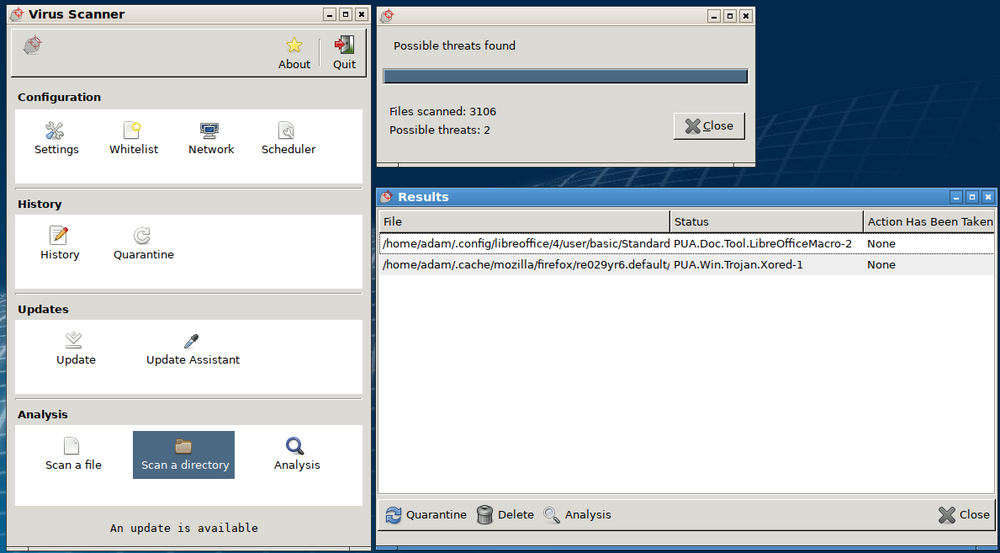
- 4.1.C.7 Adversaries often attempt to install malware on a device to disrupt or control it. Devices lacking anti-malware software are more vulnerable to this type of attack.
Learning Objective 4.1.D: Assess and document risks from device vulnerabilities.
- 4.1.D.1 Risk from device vulnerabilities can come from unauthorized access or malware that allow an adversary to impersonate an authorized user, remotely control a device, encrypt a device’s drive to ransom the data, or wipe a device’s memory, destroying data or rendering the device inoperable. The level of risk varies depending on the criticality of the device or the services the device provides or data it stores.
- 4.1.D.2 High risks from device vulnerabilities involve potentially compromising sensitive data or critical operations.
- Illustrative examples for 4.1.D.2:
- An organization has not installed the most recent update for their email server which included a patch for a known critical vulnerability.
- Illustrative examples for 4.1.D.2:
- 4.1.D.3 Moderate risks from device vulnerabilities can arise from weak authentication requirements or from vulnerabilities that would be less likely to be exploited.
- Illustrative examples for 4.1.D.3:
- A water treatment plant has embedded systems controlling pumps. The pumps can be remotely accessed via username and password for remote management for the plant, but the devices do not require multi-factor authentication (MFA).
- Illustrative examples for 4.1.D.3:
- 4.1.D.4 Low risks from device vulnerabilities are typically related to vulnerabilities that, if exploited, would have little impact.
- Illustrative examples for 4.1.D.4:
- An employee’s laptop has telnet port 23 open.
- Illustrative examples for 4.1.D.4:
العربية
هدف التعلم 4.1.A: تحديد أنواع أجهزة الحوسبة.
- 4.1.A.1 حواسيب الخادم هي أجهزة توفر خدمة واحدة أو أكثر لأجهزة أخرى (مثل DNS و DHCP و FTP). يمكن لأي جهاز كمبيوتر أن يكون خادمًا، وفي بيئة الشركات عادةً ما تمتلك الخوادم قدرات معالجة وتخزين أكبر من الكمبيوتر الشخصي.
- 4.1.A.2 الحواسيب الشخصية هي أجهزة مصممة لاستخدامها شخص واحد لأغراض العمل أو الترفيه (مثل معالجة النصوص، وتصميم الجرافيك، وتصفح الويب، وإنتاج الوسائط أو مشاهدتها). وتشمل حواسيب سطح المكتب والمحمولة ومفكرة الحاسوب.
- 4.1.A.3 الحواسيب المحمولة (تُسمى أيضًا الحواسيب النقالة أو تطبيقات المعلومات) أصغر حجمًا من الحواسيب الشخصية وتعمل بالبطارية. وتشمل الأجهزة اللوحية والهواتف الذكية والأجهزة القابلة للارتداء مثل الساعات الذكية.
- 4.1.A.4 الحواسيب المدمجة هي أجهزة جزء من آلة. تحتوي الأجهزة المدمجة على مجموعات تعليمات محددة للتواصل مع المكونات المتخصصة للآلة المدمج فيها. تميل الحواسيب المدمجة إلى أن تكون أبطأ وأرخص من الحواسيب الأخرى ولديها تخزين محدود للغاية.
- 4.1.A.5 تُطلق غالبًا على الأجهزة اليومية التي تحتوي على حواسيب مدمجة أجهزة إنترنت الأشياء (IoT). توجد حواسيب مدمجة في وسائل النقل (مثل السيارات والقطارات والطائرات)، والأجهزة التي تشغل البنية التحتية الحيوية (مثل تشغيل قواطع الدائرة في محطات التحويل الكهربائية والمضخات في محطات معالجة المياه)، والمعدات الطبية (مثل مضخات التسريب الوريدي، وماسحات الرنين المغناطيسي، ونظام ضربات القلب، ومضخات الأنسولين)، والأجهزة اليومية مثل الغسالات وآلات صنع القهوة وحراريات درجة الحرارة.
هدف التعلم 4.1.B: تحديد نوع البرمجيات الخبيثة المستخدم في هجوم سيبراني.
- 4.1.B.1 البرمجيات الخبيثة هي برامج ضارة يمكن أن تتلف أو تدمر جهازًا أو شبكة، أو تسمح للمعتدي بالوصول إلى جهاز和数据 على الجهاز.
- 4.1.B.2 غالبًا ما تُستخدم البرمجيات الخبيثة كأداة لإنجاز جزء من خطة المعتدي لتحقيق هدفه(هدفيه) النهائي(ين). هناك العديد من أنواع البرمجيات الخبيثة، مثل:
- الفيروسات: برمجيات خبيثة يجب تنشيطها بواسطة مستخدم ينفذ أو يفتح ملفًا.
- ديدان الحاسوب: تنتشر من جهاز كمبيوتر إلى آخر دون تفاعل بشري.
- أحصنة طروادة: برمجيات خبيثة مدمجة في برامج أخرى تبدو بريئة. توفر أحصنة طروادة الوصول عن بُعد (RATs) للمعتدي بالوصول عن بُعد إلى النظام المستهدف.
- برمجيات الفدية: تشفر ملفات الجهاز، مما يمنع المستخدم من الوصول إلى الملفات الموجودة على الجهاز. تعرض برمجيات الفدية عادةً شاشة للمستخدم تتطلب الدفع وتعد بإعطائه مفتاح فك التشفير لملفاته إذا دفع المستخدم خلال فترة زمنية ثابتة.
- برمجيات التجسس: تتبع إجراءات المستخدم على الكمبيوتر وترسل المعلومات إلى المعتدي.
- مجسات المفاتيح: برنامج أو عتاد يسجل مفاتيح المستخدم ويرسل المعلومات إلى المعتدي. يمكن للمعتدين غالبًا استخراج أسماء المستخدمين وكلمات المرور من بيانات مجسات المفاتيح.
- القنابل المنطقية: يتم ضبطها لتفعيل تأثيرها فقط عند استيفاء مجموعة محددة من الشروط؛ يمكن أن تشمل الشروط الوقت والتاريخ، ونوع أو إصدار معين لنظام التشغيل، ومجموعة الأحرف التي يستخدمها الكمبيوتر، إلخ.
- روت كيت: برمجيات خبيثة متطورة تدخل نظام التشغيل الخاص بالحاسوب المستهدف ويمكنها التحكم في كل جانب تقريبًا من النظام، بما في ذلك جعل روت كيت نفسه غير مرئي للكشف.
- 4.1.B.3 بينما معظم البرمجيات الخبيثة عبارة عن ملف أو مجموعة ملفات، فإن البرمجيات الخبيثة بدون ملفات هي أكواد ضارة تعيش في ذاكرة RAM وتستخدم برامج مشروعة مثبتة بالفعل على الجهاز لتقويضه.
هدف التعلم 4.1.C: شرح كيفية استغلال المعتدين الثغرات الشائعة في الأجهزة لإحداث خسائر أو أضرار أو اضطراب أو تدمير.
- 4.1.C.1 يمكن للمهاجمين تطوير استغلالات للثغرات المعروفة في البرمجيات (بما في ذلك أنظمة التشغيل). الأجهزة التي تحتوي على برمجيات غير مُحدثة عرضة لهذه الاستغلالات، والتي قد تسمح للمهاجم بإيقاف تشغيل النظام، أو مراقبة إجراءات المستخدم، أو تمكين أو تعطيل خدمات ومكونات مختلفة على الجهاز (مثل تشغيل الكاميرا أو الميكروفون)، أو حتى السيطرة على الجهاز لإصدار أوامره الخاصة بما في ذلك أوامر سرقة أو تدمير المعلومات الموجودة على الجهاز.
- 4.1.C.2 يمكن للمهاجمين الاستفادة من متطلبات المصادقة الضعيفة عن طريق تخمين كلمة مرور المستخدم أو استخدام الهندسة الاجتماعية لإقناع المستخدم بكشف كلمة مروره.
- 4.1.C.3 عندما لا يكون لنظام BIOS أو UEFI كلمة مرور، يمكن للمهاجمين بدء تشغيل الكمبيوتر في وضع خاص (مثل "وضع الاستعادة") يمنحهم امتيازات أعلى. وبدون حماية BIOS أو UEFI، يمكن للمهاجمين تحميل نظام تشغيل خاص بهم على الجهاز من وحدة تخزين خارجية واستخدام أدوات متخصصة لتعديل أو إنشاء ملفات تعريف مستخدمين، بما في ذلك تغيير كلمات المرور.
- 4.1.C.4 يمكن للمهاجمين تحميل برمجيات خبيثة على وحدة تخزين خارجية، وإذا كانت ميزة التشغيل التلقائي مفعلة، فإن الجهاز سيقوم بتشغيل البرمجيات الخبيثة عند إدخال الوحدة الخارجية.
- 4.1.C.5 يمكن للمهاجمين الاستفادة من المنافذ المفتوحة للاتصال بالجهاز.
- 4.1.C.6 يمكن للمهاجمين إرسال بيانات ضارة للأجهزة للتسبب في اضطرابها أو محاولة السيطرة عليها. الأجهزة التي لا تحتوي على جدار حماية (أو جدار حماية مضبوط بشكل خاطئ) لا يمكنها تصفية هذه البيانات الضارة.
- 4.1.C.7 يحاول المهاجمون غالبًا تثبيت برمجيات خبيثة على الجهاز للتسبب في اضطرابه أو السيطرة عليه. الأجهزة التي تفتقر إلى برامج مكافحة البرمجيات الخبيثة أكثر عرضة لهذا النوع من الهجمات.
هدف التعلم 4.1.D: تقييم ومخاطر الثغرات في الأجهزة وتوثيقها.
- 4.1.D.1 يمكن أن تأتي مخاطر الثغرات في الأجهزة من الوصول غير المصرح به أو البرمجيات الخبيثة التي تسمح للمهاجم بمحاكاة مستخدم مصرح له، أو التحكم عن بعد في الجهاز، أو تشفير قرص الجهاز لمطالبة الفدية مقابل البيانات، أو مسح ذاكرة الجهاز مما يؤدي إلى فقدان البيانات أو جعل الجهاز غير قابل للعمل. يختلف مستوى الخطر بناءً على أهمية الجهاز أو الخدمات التي يوفرها أو البيانات التي يخزنها.
- 4.1.D.2 المخاطر العالية من ثغرات الأجهزة تتعلق بخطر المساس بالبيانات الحساسة أو العمليات الحرجة.
- أمثلة توضيحية لـ 4.1.D.2:
- لم تقم مؤسسة ما بتحديث خادم البريد الإلكتروني الخاص بها إلى أحدث إصدار والذي يتضمن تحديثاً لأحد الثغرات الحرجة المعروفة.
- أمثلة توضيحية لـ 4.1.D.2:
- 4.1.D.3 المخاطر المتوسطة من ثغرات الأجهزة يمكن أن تنشأ من متطلبات مصادقة ضعيفة أو من ثغرات قد تكون أقل احتمالاً للاستغلال.
- أمثلة توضيحية لـ 4.1.D.3:
- تحتوي محطة معالجة المياه على أنظمة مدمجة تتحكم في المضخات. يمكن الوصول إلى المضخات عن بُعد عبر اسم مستخدم وكلمة مرور للإدارة عن بُعد لمحطة المعالجة، لكن الأجهزة لا تتطلب المصادقة متعددة العوامل (MFA).
- أمثلة توضيحية لـ 4.1.D.3:
- 4.1.D.4 المخاطر المنخفضة من ثغرات الأجهزة مرتبطة عادةً بثغرات، إذا تم استغلالها، فللها تأثير ضئيل.
- أمثلة توضيحية لـ 4.1.D.4:
- جهاز كمبيوتر محمول لموظف يحتوي على منفذ Telnet مفتوح (المنفذ 23).
- أمثلة توضيحية لـ 4.1.D.4: