Primary and secondary storage · 主存储器和辅助存储器
| English | 中文 | Pinyin · 拼音 |
|---|---|---|
| primary storage/ˈpraɪməri ˈstɔːrɪdʒ/ | 主存储器 | zhǔ cún chǔ qì |
| RAM/ræm/ | 随机存取存储器 | suí jī cún qǔ cún chǔ qì |
| ROM/rɒm/ | 只读存储器 | zhī dú cún chǔ qì |
| secondary storage/ˈsekəndəri ˈstɔːrɪdʒ/ | 辅助存储器 | fǔ zhù cún chǔ qì |
| virtual memory/ˈvɜːtʃuːəl ˈmeməri/ | 虚拟内存 | xū nǐ nèi cún |
| volatile/ˈvɒlətaɪl/ | 易失性 | yì shī xìng |
| non-volatile/nɒn ˈvɒlətaɪl/ | 非易失性 | fēi yì shī xìng |
| magnetic/mæɡˈnetɪk/ | 磁性 | cí xìng |
| optical/ˈɒptɪkl/ | 光学 | guāng xué |
| solid-state/ˈsɒlɪd steɪt/ | 固态 | gù tài |
Memory and storage
- Primary storage 主存储器 (RAM 随机存取存储器 and ROM 只读存储器) is memory the CPU uses directly.
- Secondary storage 辅助存储器 keeps data permanently, even with the power off.
- When RAM is full, virtual memory 虚拟内存 helps.
内存与存储
- 主存储(primary storage,RAM 和 ROM)是 CPU 直接使用的内存。
- 辅助存储(secondary storage)永久保存数据,即使断电。
- 当 RAM 满时,虚拟内存(virtual memory)帮忙。
Device and storage lab · 设备和存储实验室
Classify computing examples by what job they do in a system. · 根据计算示例在系统中的功能进行分类。
RAM vs ROM
- RAM (random access memory) — read and write, volatile 易失性 (loses data without power); holds the programs and data in use now.
- ROM (read-only memory) — read only, non-volatile 非易失性 (keeps data without power); holds the start-up instructions.
- Both are needed: ROM starts the computer, then RAM holds what you run.
Storage forms a hierarchy: registers and cache are fastest but smallest; secondary storage is slowest but largest.
Magnetic 磁性 tape stores data on a long magnetic strip; it is cheap for large backups
RAM 对 ROM
- RAM(随机存取存储器)——读和写,易失性(volatile,断电丢失数据);持有现在使用中的程序和数据。
- ROM(只读存储器)——只读,非易失性(non-volatile,断电保持数据);持有启动指令。
- 两者都需要:ROM 启动计算机,然后 RAM 持有你运行的东西。

存储形成一个层次:寄存器和缓存最快但最小;辅助存储最慢但最大。
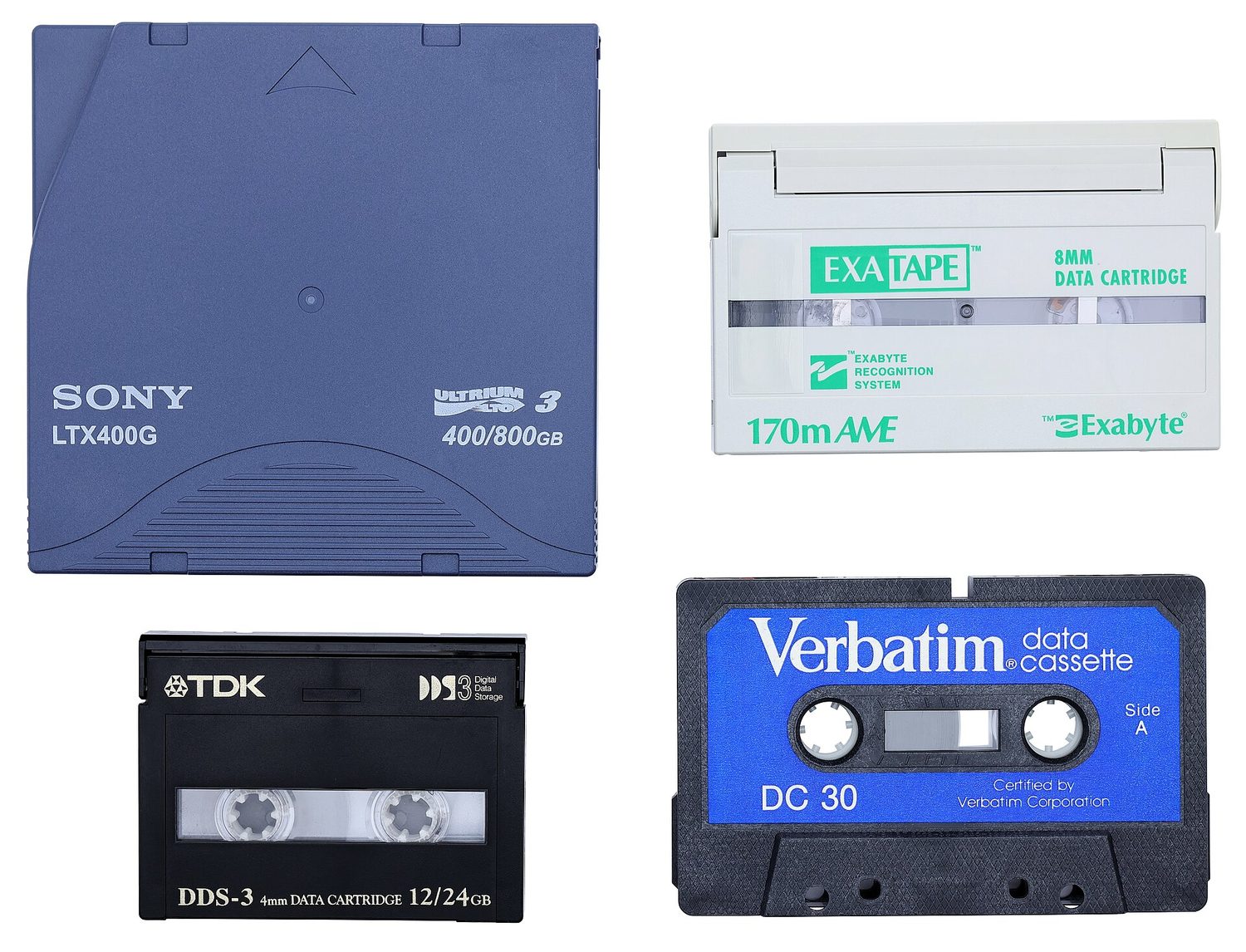
磁带把数据存储在一条长磁条上;它对大型备份很便宜
RAM is volatile (it loses its data without power) and holds the running programs, while ROM is non-volatile and holds the start-up (boot) instructions. · RAM是易失性的(断电后丢失数据),用于存放正在运行的程序;ROM是非易失性的,存放启动(引导)指令。
Volatile vs non-volatile is the key split: RAM forgets when powered off, ROM remembers. · 易失性与非易失性是主要区别:RAM断电即忘,ROM具有记忆功能。
ROM typically stores: · ROM通常存储:
ROM is non-volatile and holds the boot instructions; running programs live in RAM. · ROM是非易失性的,存放引导指令;正在运行的程序位于RAM中。
Secondary storage
- Magnetic — magnetised spots on spinning disks (HDD, tape).
- Optical 光学 — marks read by a laser (CD, DVD, Blu-ray).
- Solid-state 固态 — flash memory, no moving parts (SSD, USB drive, memory card).
- All are non-volatile and used for long-term storage.
A solid state drive (SSD) stores data in flash memory chips and has no moving parts
辅助存储
- 磁性(magnetic)——旋转磁盘上的磁化点(HDD、磁带)。
- 光学(optical)——由激光读取的标记(CD、DVD、蓝光)。
- 固态(solid-state)——闪存,没有运动部件(SSD、U 盘、存储卡)。
- 全都是非易失性且用于长期存储。

一个固态驱动器(SSD)把数据存储在闪存芯片中,没有运动部件
Match each secondary-storage type to an example. · 将每种辅助存储类型与示例匹配。
Magnetic = spinning disks; optical = laser-read discs; solid-state = flash, no moving parts. · 磁性=旋转磁盘;光学=激光读取光盘;固态=闪存,无移动部件。
A solid-state drive (SSD) stores data: · 固态硬盘(SSD)存储数据的方式是:
SSDs use flash memory and have no moving parts — faster and tougher than a hard disk. · SSD使用闪存且无移动部件——比硬盘更快更耐用。
Virtual memory
- When RAM is full, the computer uses part of the secondary storage as extra, pretend RAM — virtual memory.
- Data not needed right now is moved to the disk, freeing RAM for other programs.
- This lets you run more programs than RAM alone could hold, but it is slower (disk is much slower than RAM).
Virtual memory uses part of the secondary storage as extra RAM, so more programs can run — but the disk is slower
A USB flash drive stores data in flash memory and has no moving parts
虚拟内存
- 当 RAM 满时,计算机把辅助存储的一部分用作额外的、假装的 RAM——虚拟内存。
- 现在不需要的数据被移到磁盘,为其他程序释放 RAM。
- 这让你运行比单独 RAM 能持有的更多的程序,但它更慢(磁盘比 RAM 慢得多)。

虚拟内存把辅助存储的一部分用作额外的 RAM,所以更多程序能运行——但磁盘更慢

一个 U 盘把数据存储在闪存中,没有运动部件
Virtual memory is: · 虚拟内存是:
When RAM fills up, the OS moves idle data to disk to free RAM — slower, but it lets more programs run. · 当RAM填满时,操作系统会将空闲数据传输到磁盘以释放RAM——速度较慢,但允许运行更多程序。
You've got it
- RAM = volatile, read/write, programs in use; ROM = non-volatile, read-only, start-up
- secondary storage: magnetic (HDD), optical (CD/DVD), solid-state (SSD/flash)
- all secondary storage is non-volatile
- virtual memory uses disk as extra RAM — lets more programs run, but slower
你掌握了
- RAM = 易失性,读/写,使用中的程序;ROM = 非易失性,只读,启动
- 辅助存储:磁性(HDD)、光学(CD/DVD)、固态(SSD/闪存)
- 所有辅助存储都是非易失性
- 虚拟内存把磁盘用作额外的 RAM——让更多程序运行,但更慢