| English | 释义 | 拼音 |
|---|---|---|
| DOM/dɒm/ | 文档对象模型 | wén dàng duì xiàng mó xíng |
| event/ɪˈvent/ | 事件 | shì jiàn |
| function/ˈfʌŋkʃn/ | 函数 | hán shù |
A menu opens, but its button still says it is closed
- A visible panel and its accessibility state can disagree. A reliable interaction updates both the content and the control that describes it.
- Browser JavaScript responds to user actions. Do not put private credentials in client code; visitors can inspect and change what runs on their machines.
Find the parsed elements
- The DOM 文档对象模型 represents the document as nodes as HTML is parsed. Code can query an existing node and change its properties.
- A script running before its target is parsed may get
null. A deferred external script runs after parsing; a script at the end of the body can also work for elements already above it.
DOM 代表什么?
难度 1/5 · 今日首次完成可获 100 金币及少量额外奖励
节点随着文档解析过程逐步可用;查询无法找到尚未被解析的目标元素。
Register the response once
- An event 事件 records an action such as a click or form submission.
addEventListenerregisters a function 函数 to run when that event is dispatched. - Find the button and panel, register the listener, then update state on each click. Do not call the function while registering it if you mean to pass it as a handler.
哪种方法用于在元素上注册事件处理程序?
难度 1/5 · 今日首次完成可获 100 金币及少量额外奖励
addEventListener 用于注册如点击等事件的处理回调。
将设置此交互的步骤按顺序排列。
难度 3/5 · 今日首次完成可获 200 金币及少量额外奖励
注册先于事件响应;当事件触发时处理器运行。
Keep a usable fallback
- Save this as an HTML file. The links are initially visible; the toggle button appears only after its handler is ready.
- Click the button twice. Check that the panel and
aria-expandedchange together. The native button also responds to keyboard activation.
<!doctype html>
<html lang="en">
<head><meta charset="utf-8"><title>Club menu</title></head>
<body>
  <button id="menu-button" type="button" hidden
          aria-controls="menu-panel" aria-expanded="true">Menu</button>
  <nav id="menu-panel" aria-label="Club">
    <a href="#meeting">Meeting details</a>
  </nav>
  <main id="meeting"><h1>Meet Thursday in room 12</h1></main>
  <script>
    const button = document.querySelector('#menu-button');
    const panel = document.querySelector('#menu-panel');
    button.addEventListener('click', () => {
      panel.hidden = !panel.hidden;
      button.setAttribute('aria-expanded', String(!panel.hidden));
    });
    button.hidden = false;
  </script>
</body>
</html>
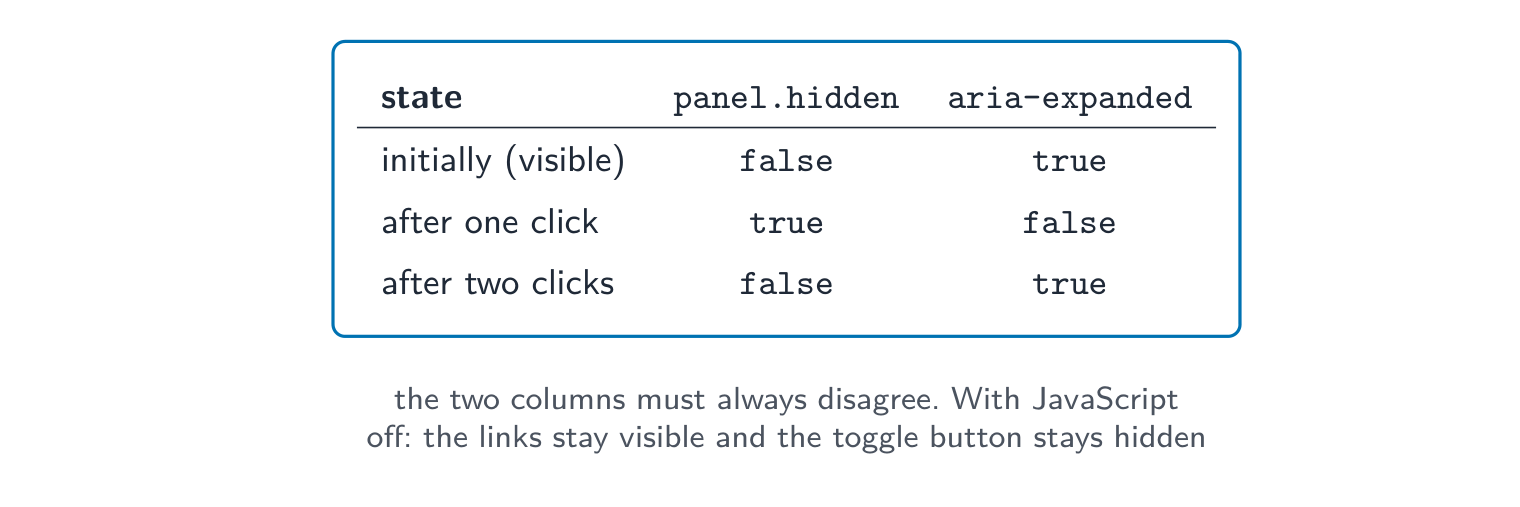
Initially: links visible, expanded true. First click: links hidden, expanded false. Second click: links visible, expanded true. With JavaScript disabled, the original links remain visible.
在工作示例中,JavaScript 已被禁用。原始的导航链接会发生什么变化?
难度 1/5 · 今日首次完成可获 100 金币及少量额外奖励
链接默认可见。按钮默认隐藏,因此增强功能的失败不会移除必要的导航。
将每个面板状态与正确的按钮状态匹配。
难度 2/5 · 今日首次完成可获 140 金币及少量额外奖励
aria-expanded描述受控区域当前是否展开。
Separate helpful checks from trusted checks
- Browser validation can give quick feedback, but the server must validate submitted values and permissions independently. A caller can bypass or alter browser code.
- Use
textContentto insert plain text rather than interpreting it as HTML. Check missing elements and errors before adding more features.
A click handler alone does not make a custom element keyboard accessible. Use the appropriate native control and verify focus and activation. Also check that your CSS does not override the panel's hidden state.
即使浏览器已验证过提交值,服务器也必须再次验证这些值。
难度 1/5 · 今日首次完成可获 100 金币及少量额外奖励
正确。调用者可以绕过或修改浏览器代码,因此服务器必须独立检查值和权限。
Trace two actions and a failure
- Record initial state and the state after two activations. Repeat using the keyboard, then check that essential navigation remains available without the script.
- Explain what runs in the browser and what still needs server checks. Test this local example without sending any real form data.
Parsed element → registered event handler → consistent state update. Preserve useful fallback content and keep trusted validation on the server.
面板最初是可见的。切换器运行两次。最终状态是什么?
难度 1/5 · 今日首次完成可获 100 金币及少量额外奖励
第一次点击将其隐藏;第二次恢复其显示。两种状态必须保持一致。
哪些检查属于此本地交互审查?选择所有适用的选项。
难度 2/5 · 今日首次完成可获 140 金币及少量额外奖励
测试操作、状态和降级方案。浏览器代码不是存储私人凭证的安全场所。