| English | 释义 | 拼音 |
|---|---|---|
| HTML/ˌeɪtʃ tiː em ˈel/ | 超文本标记语言 | chāo wén běn biāo jì yǔ yán |
| attribute/ˈætrɪbjuːt/ | 属性 | shǔ xìng |
| element/ˈelɪmənt/ | 元素 | yuán sù |
| semantic elements/səˈmæntɪk ˈelɪmənts/ | 语义化元素 | yǔ yì huà yuán sù |
It looks like a link, but Tab skips it
- A styled rectangle saying “Join” is not automatically a working link. A real anchor with a destination has browser behaviour that styling alone does not supply.
- HTML 超文本标记语言 gives content structure and meaning. CSS controls presentation; choosing meaningful HTML also supports keyboard and assistive-technology use.
为什么使用真实的标题元素来设置页面标题?
难度 1/5 · 今日首次完成可获 100 金币及少量额外奖励
标题描述文档结构。外观则可以通过CSS控制。
Read the tag and its attributes
- An element 元素 often has a start tag, content and an end tag:
<p>Meet on Thursday.</p>. An attribute 属性 supplies information in the start tag:<a href="join.html">Join</a>. - An HTML void element such as
imghas no end tag or child content. It does not “close itself”; a trailing slash is unnecessary in HTML. Nest paired tags without crossing them.
哪个属性决定了超链接的导航目标?
难度 1/5 · 今日首次完成可获 100 金币及少量额外奖励
像 如何加入 这样的超链接使用 href。
Mark the page regions by purpose
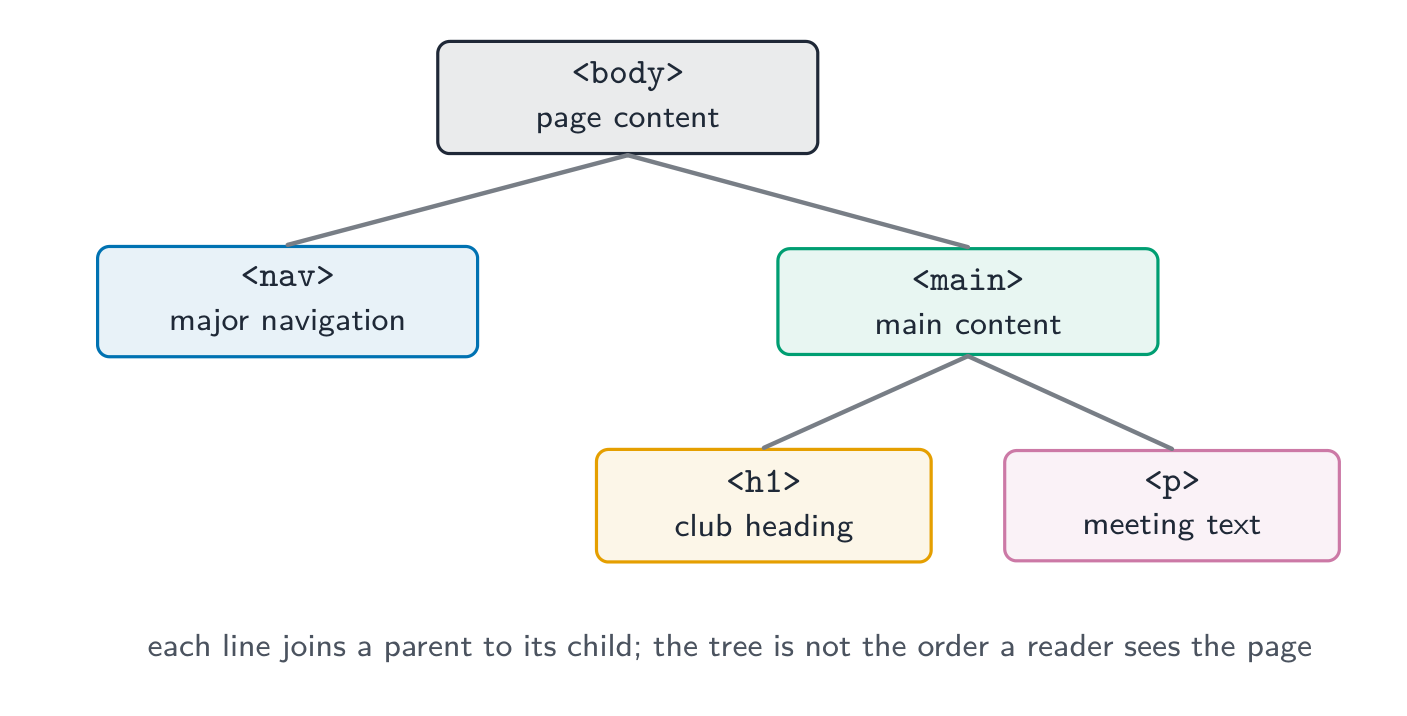
- Semantic elements 语义化元素 include
navfor major navigation andmainfor the page's main content. Use headings to describe sections anddivfor a generic grouping when no more specific element fits. - A native
awithhrefnavigates; a nativebuttonperforms an action. Semantic markup helps, but labels, behaviour and focus still need testing.
哪些元素具有这些特定的 HTML 含义?请选择所有适用项。
难度 2/5 · 今日首次完成可获 140 金币及少量额外奖励
div 是通用元素。当 div 的定义用途符合时,请使用更具体的元素。
将预期用途与合适的原生元素匹配。
难度 2/5 · 今日首次完成可获 140 金币及少量额外奖励
原生元素提供语义和默认行为,但仍需可用的标签和测试。
Build a small complete page
- Save this example as
index.htmlbeside a realjoin.html. Open it in a browser and follow the link using Tab and Enter. langidentifies the page language;titlenames the browser tab. The viewport setting lets responsive styles use the device width.
<!doctype html>
<html lang="en">
<head>
  <meta charset="utf-8">
  <meta name="viewport" content="width=device-width, initial-scale=1">
  <title>Robotics club</title>
</head>
<body>
  <nav aria-label="Main"><a href="join.html">How to join</a></nav>
  <main>
    <h1>Robotics club</h1>
    <p>Meet Thursday at 4 pm in room 12.</p>
  </main>
</body>
</html>
<a href="join.html">How to join</a> combines a destination and a useful label. <div class="link">Click here</div> provides neither native navigation nor a destination.
Choose alternatives by the image's purpose
- An informative image needs an alternative conveying its relevant meaning. A purely decorative image normally uses
alt=""so assistive technology can skip it. - For an image used as a link, describe the link's function when that information is not otherwise supplied. A complex chart also needs its important data explained in text.
Do not use headings merely to enlarge text, or repeat “image” as every alternative. Equally, do not give decorative images lengthy descriptions that interrupt the page.
信息图表需要包含传达其关键信息的替代文本,而不仅仅是“图片”。
难度 1/5 · 今日首次完成可获 100 金币及少量额外奖励
正确。替代文本必须提供相关信息;复杂图表可能还需要以文本形式呈现重要数据。
一则俱乐部新闻故事使用照片展示学生在校园种树。请写出有用的替代文本。
难度 3/5 · 今日首次完成可获 200 金币及少量额外奖励
示例:“学生在校园种树。”不要编造未提供的数量。
标题旁边的微小装饰不增加任何信息。哪种图像替代文本通常适用?
难度 1/5 · 今日首次完成可获 100 金币及少量额外奖励
空的替代文本可让辅助技术跳过纯装饰性图片。
Verify structure and behaviour
- Check the heading order, meaningful link labels, keyboard use and image alternatives. An HTML validator can detect markup errors, but cannot judge whether your wording is useful.
- Make the meeting page usable with styles turned off. Then style the content without changing headings into appearance-only shortcuts.
Choose HTML by purpose. Use native links and buttons, valid nesting and image alternatives that match the image's role.
Sources: HTML syntax and W3C decorative images.
在HTML中,img是空元素,不应包含结束标签。
难度 1/5 · 今日首次完成可获 100 金币及少量额外奖励
空元素没有子内容或结束标签。尾随斜杠是不必要的;它不会使HTML元素具有自闭合行为。