Showing and hiding (display) · Hiển thị và ẩn (display)
This page needs a recent browser (with SharedArrayBuffer support). Please update Chrome, Edge, Firefox or Safari to the latest version. · Trang này cần trình duyệt gần đây (hỗ trợ SharedArrayBuffer). Vui lòng cập nhật Chrome, Edge, Firefox hoặc Safari lên phiên bản mới nhất.
English
How boxes flow
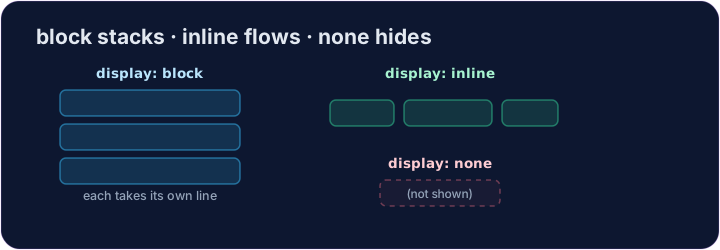
- Some elements are block: they stack on top of each other and fill the width —
<div>,<p>,<h1>. - Some are inline: they sit side by side, taking only as much room as they need —
<span>,<a>,<strong>. displaylets you change which way an element behaves.
Tiếng Việt
Cách các box di chuyển
- Một số phần tử là block (khối): chúng xếp chồng lên nhau theo chiều dọc và chiếm hết chiều rộng —
<div>,<p>,<h1>. - Một số là inline (trực tuyến): chúng ngồi cạnh nhau, chỉ chiếm đúng lượng không gian cần thiết —
<span>,<a>,<strong>. displaycho phép bạn thay đổi cách mà một phần tử hoạt động.
English
display: none
display: none;removes an element from the page completely.- It's how menus, pop-ups, and "read more" sections stay hidden until needed.
- The element is still in your HTML — it just isn't shown.
Tiếng Việt
display: none
display: none;loại bỏ hoàn toàn một phần tử khỏi trang web.- Đây là cách các menu, cửa sổ bật lên và phần "đọc thêm" được giữ ẩn cho đến khi cần thiết.
- Phần tử vẫn còn trong HTML của bạn — chỉ là nó không được hiển thị.
<style>
  .pill { display: inline; background-color: #def; padding: 6px; }
  .gone { display: none; }
</style>
<span class="pill">Visible</span>
<span class="gone">You can't see me</span>
English
Common mistakes
display: noneremoves the element and its space;visibility: hiddenkeeps its space.blockstarts a new line;inlinedoes not.
Tiếng Việt
Lỗi thường gặp
display: noneloại bỏ phần tử và không gian của nó;visibility: hiddengiữ lại không gian của nó.blockbắt đầu một dòng mới;inlinethì không.
English
Now you try
display: nonehides;display: blockmakes an element take its own line.- Hide one element, then change how another displays.
Tiếng Việt
Bây giờ bạn thử
display: noneẩn đi;display: blockkhiến một phần tử chiếm lấy dòng riêng của nó.- Ẩn một phần tử, sau đó thay đổi cách hiển thị của một phần tử khác.
Hide the secret message. Add .secret { display: none; }. · Ẩn tin nhắn bí mật. Thêm .secret { display: none; }.
Make each label sit on its own line. Add .label { display: block; }. · Để mỗi nhãn nằm trên dòng riêng của nó. Thêm .label { display: block; }.