This page needs a recent browser (with SharedArrayBuffer support). Please update Chrome, Edge, Firefox or Safari to the latest version. · Trang này cần trình duyệt gần đây (hỗ trợ SharedArrayBuffer). Vui lòng cập nhật Chrome, Edge, Firefox hoặc Safari lên phiên bản mới nhất.
English
Links
- A link takes you to another page when you click it.
- Use the
<a>tag (astands for anchor). - The web address goes in
href:<a href="...">.
Tiếng Việt
Liên kết
- Một liên kết đưa bạn đến một trang khác khi bạn nhấp vào nó.
- Sử dụng thẻ
<a>(aviết tắt của anchor). - Địa chỉ web được đặt trong
href:<a href="...">.
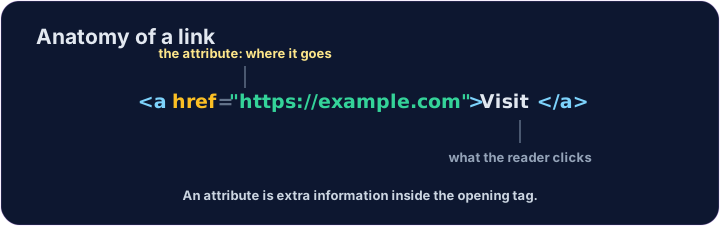
<a href="https://example.com">Visit Example</a>
English
href is an attribute
href="..."is an attribute — extra information inside the opening tag.- The text between
<a>and</a>is what the reader sees and clicks. - Use the full address, starting with
https://.
Tiếng Việt
href là một thuộc tính
href="..."là một thuộc tính — thông tin bổ sung bên trong thẻ mở.- Văn bản giữa
<a>và</a>là những gì người đọc thấy và nhấp vào. - Sử dụng địa chỉ đầy đủ, bắt đầu bằng
https://.
<p>Need facts? <a href="https://wikipedia.org">Look it up</a> now.</p>
English
Common mistakes
- A link needs an
href. - Open a link in a new tab with
target="_blank".
Tiếng Việt
Lỗi thường gặp
- Một liên kết cần có
href. - Mở liên kết trong tab mới bằng
target="_blank".
English
Now you try
- A link can stand alone, or sit inside a sentence.
- Build one of each below.
Tiếng Việt
Bây giờ bạn thử
- Một liên kết có thể đứng độc lập, hoặc nằm bên trong một câu.
- Hãy xây dựng ít nhất một ví dụ cho mỗi loại bên dưới.
Add a link to https://example.com with the words Visit Example.
Turn the words look it up into a link to https://wikipedia.org, without breaking the sentence.