Fractions, roots and sums · Phân số, căn bậc hai và tổng
This page needs a recent browser (with SharedArrayBuffer support). Please update Chrome, Edge, Firefox or Safari to the latest version. · Trang này cần trình duyệt gần đây (hỗ trợ SharedArrayBuffer). Vui lòng cập nhật Chrome, Edge, Firefox hoặc Safari lên phiên bản mới nhất.
English
A maths toolkit: amsmath
- For serious maths, load the
amsmathpackage once in the preamble:
- It adds better fractions, alignment, and dozens of symbols. Almost every maths document uses it.
Tiếng Việt
Bộ công cụ Toán học: amsmath
- Đối với toán học chuyên sâu, hãy tải gói
amsmathmột lần trong phần mở đầu:
\usepackage{amsmath}
- Nó thêm phân số tốt hơn, căn chỉnh, và hàng tá ký hiệu. Gần như tài liệu toán nào cũng sử dụng nó.
English
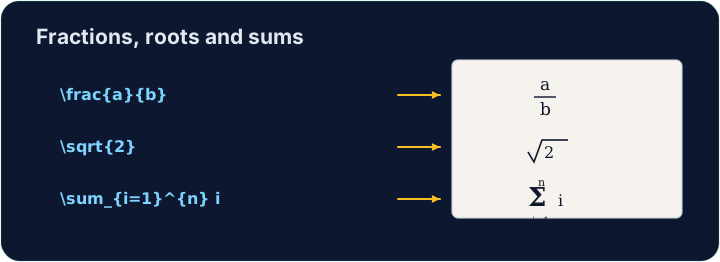
Fractions and roots
- A fraction is
\frac{top}{bottom}; a square root is\sqrt{...}:
- They nest happily:
\sqrt{\frac{1}{n}}is the square root of one-over-n.
Tiếng Việt
Phân số và căn bậc
- Một phân số là
\frac{top}{bottom}; một căn bậc hai là\sqrt{...}:
\[ \frac{a + b}{2} \qquad \sqrt{x^2 + y^2} \]
- Chúng lồng vào nhau dễ dàng:
\sqrt{\frac{1}{n}}là căn bậc hai của một-chia-n.
English
Sums and integrals
- These grow to the right size automatically:
- The
_sets the lower limit and^the upper limit — the same keys as powers.
Tiếng Việt
Tổng và tích phân
- Những cái này tự động phát triển đến kích thước phù hợp:
\[ \sum_{i=1}^{n} i \qquad \int_0^1 x^2 \, dx \]
_đặt giới hạn dưới và^đặt giới hạn trên — cùng các phím tắt như lũy thừa.
English
Common mistakes
\frac{a}{b},\sqrt{x}and\sumonly work in math mode.- Put them inside
$...$or\[ ... \].
Tiếng Việt
Lỗi thường gặp
\frac{a}{b},\sqrt{x}và\sumchỉ hoạt động trong chế độ toán.- Đặt chúng bên trong
$...$hoặc\[ ... \].
Write a fraction in the display equation. Replace the comment with \frac{1}{2} so the equation reads one-half. The amsmath package is already loaded for you. · Viết một phân số trong phương trình hiển thị. Thay thế bình luận bằng \frac{1}{2} để phương trình đọc là một nửa. Gói amsmath đã được tải sẵn cho bạn.
Click Run to compile and preview the PDF. · Nhấn Chạy để biên dịch và xem trước PDF.
Now use two more maths tools. In the display equation write a square root \sqrt{...} and a sum \sum, for example \[ \sqrt{2} + \sum_{i=1}^{n} i \]. · Bây giờ sử dụng hai công cụ toán học nữa. Trong phương trình hiển thị, viết căn bậc hai \sqrt{...} và tổng \sum, ví dụ như \[ \sqrt{2} + \sum_{i=1}^{n} i \].
Click Run to compile and preview the PDF. · Nhấn Chạy để biên dịch và xem trước PDF.