Sections and titles
Trang này cần trình duyệt gần đây (hỗ trợ SharedArrayBuffer). Vui lòng cập nhật Chrome, Edge, Firefox hoặc Safari lên phiên bản mới nhất.
English
Organising with sections
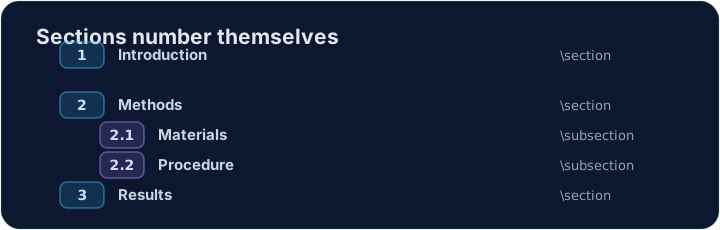
- Real documents are split into sections so readers can follow them.
- The command is simple:
\section{Introduction}
- LaTeX numbers it automatically (1, 2, 3 …) — you never count by hand.
English
Smaller pieces
- Inside a section you can add subsections:
\section{Methods}
\subsection{Materials}
\subsection{Procedure}
- These become 2.1, 2.2, and so on. Add or remove one and everything renumbers itself.
English
A title block
- A report usually starts with a title, an author, and a date.
- You declare them in the preamble, then print them with
\maketitle:
\documentclass{article}
\title{My First Report}
\author{Pat Lee}
\begin{document}
\maketitle
...
\end{document}
\maketitlegoes inside the body, usually as its first line.
English
Common mistakes
\maketitlewithout\title{...}. LaTeX stops with! LaTeX Error: No \title given.Without\author{...}it only warns and leaves the author line empty.\section Introductionwithout braces. Only the first letter,I, becomes the heading. Write\section{Introduction}.- Numbering headings by hand.
\section{1 Introduction}prints1 1 Introduction. LaTeX numbers them; use\section*{...}for no number.
Độ khó 1/5 · 100 xu + phần thưởng nhỏ khi hoàn thành lần đầu tiên hôm nay
Organise this report by adding a section heading. Put \section{Introduction} at the start of the body, then Run. Notice LaTeX numbers it for you.
Nhấn Chạy để biên dịch và xem trước PDF.
Độ khó 1/5 · 100 xu + phần thưởng nhỏ khi hoàn thành lần đầu tiên hôm nay
Give the document a title block. Add \title{...} và \author{...} in the preamble, then \maketitle as the first line of the body.
Nhấn Chạy để biên dịch và xem trước PDF.
Độ khó 1/5 · 100 xu + phần thưởng nhỏ khi hoàn thành lần đầu tiên hôm nay
Inside the Results section, add a subsection đã gọi Accuracy with \subsection{Accuracy}. LaTeX numbers it 1.1, under section 1.
Nhấn Chạy để biên dịch và xem trước PDF.