Your first document · Tài liệu đầu tiên của bạn
This page needs a recent browser (with SharedArrayBuffer support). Please update Chrome, Edge, Firefox or Safari to the latest version. · Trang này cần trình duyệt gần đây (hỗ trợ SharedArrayBuffer). Vui lòng cập nhật Chrome, Edge, Firefox hoặc Safari lên phiên bản mới nhất.
English
Your first LaTeX document
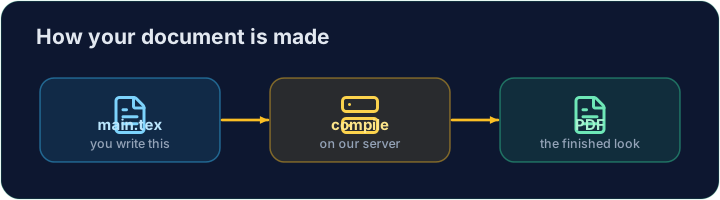
- LaTeX lets you make beautiful documents — reports, books, and especially maths.
- You write plain text with commands, and the computer turns it into a polished PDF.
- Your LaTeX is compiled on our server — press Run and the PDF appears next to your code.
Tiếng Việt
Tài liệu LaTeX đầu tiên của bạn
- LaTeX giúp bạn tạo ra các tài liệu đẹp — báo cáo, sách, đặc biệt là toán học.
- Bạn viết văn bản thường với lệnh, và máy tính biến chúng thành một PDF hoàn chỉnh.
- Tệp LaTeX của bạn được biên dịch trên máy chủ của chúng tôi — nhấn Run và PDF sẽ xuất hiện cạnh mã của bạn.
English
The shape of every document
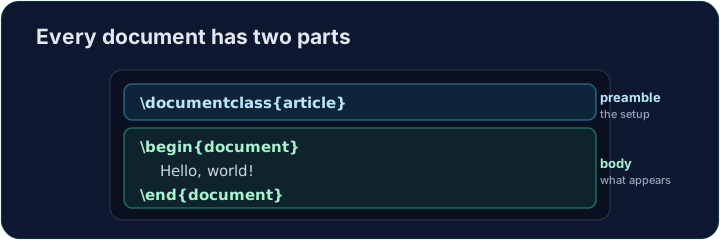
- Every document has two parts — a preamble and a body:
\documentclass{article}is the preamble: it sets the kind of document.- Everything between
\begin{document}and\end{document}is the body — the part that actually appears in the PDF.
Tiếng Việt
Cấu trúc của mỗi tài liệu
- Mọi tài liệu đều có hai phần — một preamble (phần đầu) và một body (thân):
\documentclass{article}
\begin{document}
Hello, world!
\end{document}
\documentclass{article}là preamble: nó xác định loại tài liệu.- Everything giữa
\begin{document}và\end{document}là body — phần thực sự xuất hiện trong PDF.
English
Now you try
- Below is a document skeleton. Add a greeting in the body.
- Press Run to compile it and see the PDF, then Check when you think it is right.
Tiếng Việt
Bây giờ bạn thử
- Dưới đây là khung của một tài liệu. Hãy thêm lời chào vào thân bài.
- Nhấn Run để biên dịch và xem PDF, sau đó nhấn Check khi bạn nghĩ nó đúng.
English
Common mistakes
- A document needs
\documentclass{...}and a\begin{document} ... \end{document}. - The text you want to see goes inside the document environment.
Tiếng Việt
Lỗi thường gặp
- Một tài liệu cần
\documentclass{...}và một\begin{document} ... \end{document}. - Văn bản bạn muốn hiển thị phải nằm bên trong môi trường document.
The skeleton below is a complete LaTeX document. Replace the comment in the body with a greeting (any text containing the word Hello), then click Run to compile it and see the PDF. · Khung skeleton bên dưới là một tài liệu LaTeX hoàn chỉnh. Thay thế phần bình luận trong thân bài bằng lời chào (bất kỳ văn bản nào chứa từ Hello), sau đó nhấn Chạy để biên dịch và xem PDF.
Click Run to compile and preview the PDF. · Nhấn Chạy để biên dịch và xem trước PDF.
Options in square brackets change the whole document. Make the text bigger by adding the [12pt] option: \documentclass[12pt]{article}. Run and see every letter grow. · Tùy chọn trong ngoặc vuông sẽ thay đổi toàn bộ tài liệu. Làm cho văn bản lớn hơn bằng cách thêm tùy chọn [12pt]: \documentclass[12pt]{article}. Chạy chương trình và xem từng chữ cái to ra.
Click Run to compile and preview the PDF. · Nhấn Chạy để biên dịch và xem trước PDF.