Showing and hiding (display) · การซ่อนและแสดง (display)
This page needs a recent browser (with SharedArrayBuffer support). Please update Chrome, Edge, Firefox or Safari to the latest version. · หน้านี้ต้องใช้เบราว์เซอร์ล่าสุด (รองรับ SharedArrayBuffer) กรุณาอัปเดต Chrome, Edge, Firefox หรือ Safari เป็นเวอร์ชันล่าสุด
English
How boxes flow
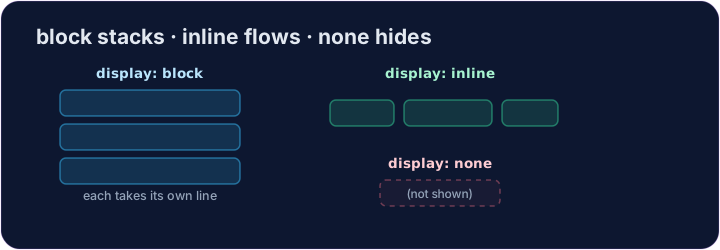
- Some elements are block: they stack on top of each other and fill the width —
<div>,<p>,<h1>. - Some are inline: they sit side by side, taking only as much room as they need —
<span>,<a>,<strong>. displaylets you change which way an element behaves.
ไทย
การไหลของกล่อง
- บางองค์ประกอบเป็นแบบ Block:它会堆叠在一起并填满宽度 —
<div>,<p>,<h1> - บางอย่างเป็นแบบ Inline:它会并排排列,只占用所需的空间 —
<span>,<a>,<strong> displayช่วยให้คุณ เปลี่ยน องค์ประกอบ behave的方式
English
display: none
display: none;removes an element from the page completely.- It's how menus, pop-ups, and "read more" sections stay hidden until needed.
- The element is still in your HTML — it just isn't shown.
ไทย
display: none
display: none;ลบ องค์ประกอบออกจากหน้าเว็บทั้งหมด- นี่คือวิธีที่เมนู ป๊อปอัพ และส่วน "อ่านเพิ่มเติม" ถูกซ่อนไว้จนกว่าจะจำเป็น
- องค์ประกอบยังคงอยู่ใน HTML ของคุณ — มันเพียงไม่ถูกแสดงเท่านั้น
<style>
  .pill { display: inline; background-color: #def; padding: 6px; }
  .gone { display: none; }
</style>
<span class="pill">Visible</span>
<span class="gone">You can't see me</span>
English
Common mistakes
display: noneremoves the element and its space;visibility: hiddenkeeps its space.blockstarts a new line;inlinedoes not.
ไทย
ข้อผิดพลาดที่พบบ่อย
display: noneลบองค์ประกอบและพื้นที่ของมัน;visibility: hidden保留其空间。blockเริ่มบรรทัดใหม่;inlineไม่เริ่มบรรทัดใหม่
English
Now you try
display: nonehides;display: blockmakes an element take its own line.- Hide one element, then change how another displays.
ไทย
ลองดูเลย
display: noneซ่อน;display: blockทำให้元素占据自己的行。- ซ่ององค์ประกอบหนึ่ง แล้วเปลี่ยนการแสดงผลของอีกองค์ประกอบหนึ่ง
Hide the secret message. Add .secret { display: none; }. · ซ่อนข้อความลับ เพิ่ม .secret { display: none; }
Make each label sit on its own line. Add .label { display: block; }. · ทำให้แต่ละฉลากอยู่ในบรรทัดของตัวเอง เพิ่ม .label { display: block; }