Colours and backgrounds · สีและพื้นหลัง
This page needs a recent browser (with SharedArrayBuffer support). Please update Chrome, Edge, Firefox or Safari to the latest version. · หน้านี้ต้องใช้เบราว์เซอร์ล่าสุด (รองรับ SharedArrayBuffer) กรุณาอัปเดต Chrome, Edge, Firefox หรือ Safari เป็นเวอร์ชันล่าสุด
English
Colours
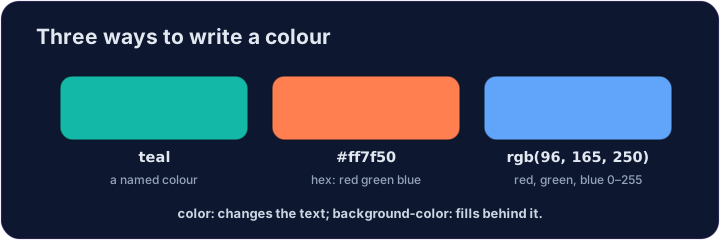
- You can name a colour:
red,blue,green,tomato,gold, and many more. - Or use a hex code like
#2a7ae2— a#followed by six letters/numbers. - Names are easy to remember; hex codes give you millions of exact colours.
ไทย
สี
- คุณสามารถ ตั้งชื่อ สี:
red,blue,green,tomato,gold,还有许多更多 - หรือใช้ รหัส hex เช่น
#2a7ae2— ซึ่งเป็น#ตามด้วยตัวอักษร/ตัวเลขหกตัว - ชื่อกีจำง่าย; รหัส hex ให้สีที่แม่นยำนับล้านสี
English
Backgrounds
colorchanges the text colour.background-colorchanges the colour behind an element.- Put
background-coloronbodyto colour the whole page.
ไทย
พื้นหลัง
colorเปลี่ยนสี ข้อความbackground-colorเปลี่ยนสี พื้นหลัง ขององค์ประกอบ- ใส่
background-colorลงในbodyเพื่อทาสีทั้งหน้า
<style>
  body { background-color: #f3f4f6; }
  h1   { color: tomato; }
</style>
<h1>Hello!</h1>
<p>A page with a soft grey background.</p>
English
Common mistakes
colorsets the text;background-colorsets the background.- A colour is a name, a
#rrggbbcode, orrgb(...).
ไทย
ข้อผิดพลาดที่พบบ่อย
colorตั้งค่าข้อความ;background-colorตั้งค่าพื้นหลัง- สีคือชื่อ, รหัส
#rrggbbหรือrgb(...)
English
Now you try
coloris the text;background-coloris behind it.- Colour the page background, then use a hex colour on the heading.
ไทย
ลองดูเลย
colorคือข้อความ;background-colorอยู่ด้านหลัง- ทาสีพื้นหลังหน้าเว็บก่อน แล้วใช้สีแบบ hex กับหัวข้อ
Give the whole page a soft background. Add body { background-color: lightyellow; }. · กำหนดพื้นหลังนุ่มนวลทั้งหน้า เพิ่ม body { background-color: lightyellow; }
Colour the heading with a hex code. Add h1 { color: #2a7ae2; } (that's a blue). · เปลี่ยนสีหัวเรื่องด้วยรหัส hex เพิ่ม h1 { color: #2a7ae2; } (นั่นคือสีฟ้า)