หน้านี้ต้องใช้เบราว์เซอร์ล่าสุด (รองรับ SharedArrayBuffer) กรุณาอัปเดต Chrome, Edge, Firefox หรือ Safari เป็นเวอร์ชันล่าสุด
ตาราง
- ตาราง แสดงข้อมูลในรูปแบบแถวและคอลัมน์
- Start with
<table>. - Each row is a
<tr>(table row).
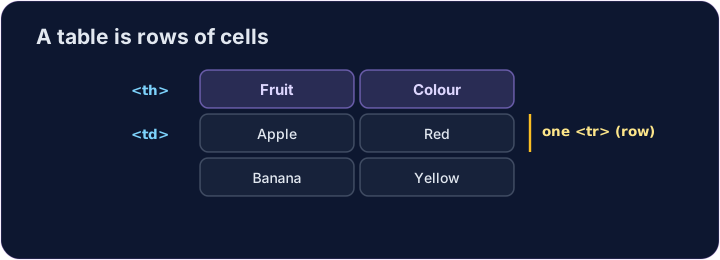
เซลล์
- Inside each row, each cell is a
<td>(table data). - For a heading cell, like a column title, use
<th>— it shows in bold. - กำหนดจำนวนเซลล์ให้เท่ากันในทุกแถว
English
<table>
  <tr><th>Fruit</th><th>Colour</th></tr>
  <tr><td>Apple</td><td>Red</td></tr>
  <tr><td>Banana</td><td>Yellow</td></tr>
</table>
ข้อผิดพลาดที่พบบ่อย
- เซลล์ (
<td>) อยู่ภายในแถว (<tr>). - Use
<th>for header cells.
ลองดูเลย
- A table is rows (
<tr>) holding cells (<td>or<th>). - สร้างตารางขนาดเล็ก แล้วเพิ่มเซลล์หัวตาราง
ความยาก 2/5 · 140 เหรียญ + บอนัสน้อยๆ เมื่อทำสำเร็จครั้งแรกในวันนี้
Make a table with สอง rows. Each row is a <tr>, and put a <td> cell inside each row.
ความยาก 2/5 · 140 เหรียญ + บอนัสน้อยๆ เมื่อทำสำเร็จครั้งแรกในวันนี้
Add a header cell so the column has a title. Use <th> instead of <td> for it.
ความยาก 2/5 · 140 เหรียญ + บอนัสน้อยๆ เมื่อทำสำเร็จครั้งแรกในวันนี้
Build a full table: a header row with two <th> cells, Name และ Score, then สอง data rows of <td> cells.