รูปภาพ
หน้านี้ต้องใช้เบราว์เซอร์ล่าสุด (รองรับ SharedArrayBuffer) กรุณาอัปเดต Chrome, Edge, Firefox หรือ Safari เป็นเวอร์ชันล่าสุด
รูปภาพ
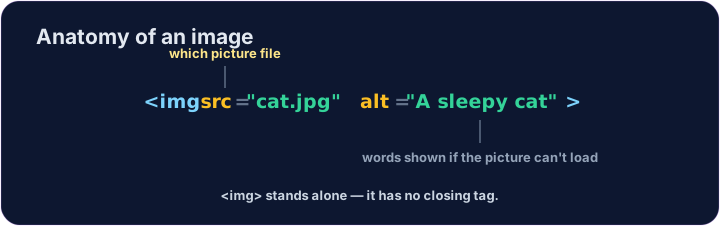
- แสดงรูปภาพด้วยแท็ก
<img> <img>เป็น แท็กเดียว — ไม่มีแท็กปิด เช่นเดียวกับ<br>- ต้องใช้แอททริบิวต์สองอย่าง:
src(ตำแหน่งของรูปภาพ) และalt(คำอธิบาย)
English
<img src="/static/code/web-basics/cat.svg" alt="A cartoon cat">
ทำไม text alt จึงสำคัญ
altคือข้อความที่ใช้ อธิบาย รูปภาพ- มันแสดงเมื่อโหลดรูปภาพไม่ได้ และโปรแกรมอ่านหน้าจอจะ อ่านออกเสียง
- For an informative image, describe its meaning briefly. For a purely decorative image, use
alt=""so screen readers can skip it. Emptyaltand a missingaltare different.
ข้อผิดพลาดที่พบบ่อย
- Give the image
srcand analtappropriate to its purpose: meaningful text for information, or an empty value for decoration. <img>ไม่มีแท็กปิดแยกต่างหาก
ลองดูเลย
- รูปภาพอยู่ที่
/static/code/web-basics/cat.svg - แสดงภาพออกมาก่อน แล้วเพิ่มข้อความ
altลงไปในรูปภาพ
ความยาก 1/5 · 100 เหรียญ + บอนัสน้อยๆ เมื่อทำสำเร็จครั้งแรกในวันนี้
Show the cat picture. Add an <img> with src="/static/code/web-basics/cat.svg".
ความยาก 1/5 · 100 เหรียญ + บอนัสน้อยๆ เมื่อทำสำเร็จครั้งแรกในวันนี้
This image has no description. Add an alt attribute that describes it, like alt="A cartoon cat".
ความยาก 1/5 · 100 เหรียญ + บอนัสน้อยๆ เมื่อทำสำเร็จครั้งแรกในวันนี้
The cat is a purely decorative flourish beside text that already gives the club information. Keep the image, but give it an empty alt value so screen readers can skip it.