Deleting rows · การลบแถว
Removing rows with DELETE
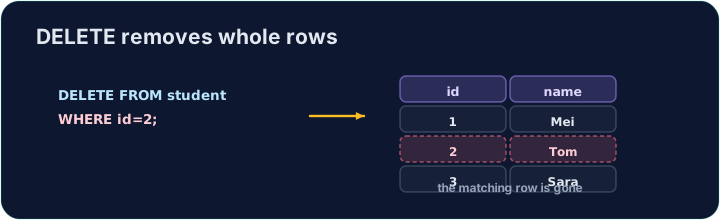
DELETE removes the rows that match a WHERE condition:
Only the matching rows are removed; the table and its other rows stay.
การลบแถวด้วย DELETE
DELETE ลบแถวที่ตรงกับเงื่อนไข WHERE
DELETE FROM product WHERE code = 'P03';
เฉพาะแถวที่ตรงกันจะถูกลบ ส่วนตารางและแถวมักจะยังคงอยู่
The same warning
Like UPDATE, a DELETE with no WHERE hits every row:
Always check your WHERE before running a DELETE. The checker runs your DELETE, then reads the table back to confirm the right row is gone.
คำเตือนเดียวกัน
เหมือน UPDATE, DELETE โดยไม่มี WHERE จะกระทบ ทุก แถว
DELETE FROM product; -- empties the whole table!
ต้องตรวจสอบ WHERE ของคุณก่อนรัน DELETE ตัวตรวจสอบรัน DELETE ของคุณ แล้วอ่านตารางกลับเพื่อยืนยันว่าแถวที่ถูกต้องหายไป
Common mistakes
DELETEwithout aWHEREempties the table — always add theWHERE.- Test a risky delete first as a
SELECTwith the sameWHERE.
ข้อผิดพลาดทั่วไป
DELETEโดยไม่มีWHEREจะทำให้ตารางว่างเปล่า — ต้องเพิ่มWHEREเสมอ- ทดสอบการลบที่มีความเสี่ยงก่อนเป็น
SELECTที่มีWHEREเดียวกัน
Delete the product with code 'P03' from the product table. (Afterwards only P01 and P02 remain.) · ลบสินค้าที่มีรหัส 'P03' ออกจากตาราง product (หลังจากนั้นจะมีเพียง P01 และ P02 เหลืออยู่)
Click Run to see the output here. · คลิก Run เพื่อดูผลลัพธ์ที่นี่
Delete can use any condition. Remove every product that costs less than 2.00 with WHERE price < 2.00. Only the Pen (0.80) goes; check which rows remain. · Delete สามารถใช้เงื่อนไขใดๆ ได้ ลบสินค้าทุกชิ้นที่มีราคา ต่ำกว่า 2.00 ด้วย WHERE price < 2.00. มีเพียงปากกา (0.80) ที่หายไป; ตรวจสอบว่าเหลือแถวอะไรบ้าง
Click Run to see the output here. · คลิก Run เพื่อดูผลลัพธ์ที่นี่