Inserting rows · การแทรกแถว
Adding rows with INSERT
INSERT adds a new row to a table. List the columns, then a matching set of VALUES:
Text goes in single quotes; numbers do not. The values must line up with the columns, in the same order.
การเพิ่มแถวด้วย INSERT
INSERT เพิ่มแถวใหม่ลงในตาราง รายการคอลัมน์แล้วตามด้วยชุดของ VALUES ที่สอดคล้องกัน
INSERT INTO product (code, title, price, in_stock)
VALUES ('P04', 'Ruler', 1.20, 75);
ข้อความใส่ในเครื่องหมายอัญacct quotes;的数字不需要引号。值必须按顺序与列对齐,顺序相同。
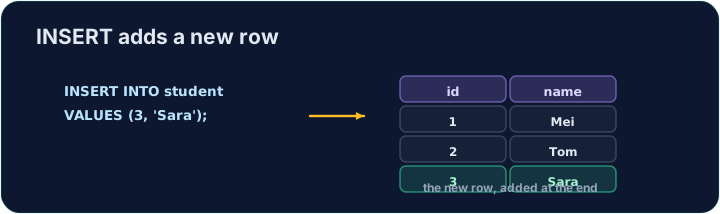
Seeing the effect
INSERT changes the data but returns no rows itself, so Run just reports how many rows changed. To see the new row, run a SELECT afterwards.
The checker does this for you: it runs your INSERT, then reads the table back to confirm your row is there.
การเห็นผลลัพธ์
INSERT เปลี่ยนข้อมูลแต่ไม่คืนค่าแถวเอง ดังนั้น Run จะรายงานเพียงจำนวนแถวที่เปลี่ยนเท่านั้น เพื่อดูแถวใหม่ ให้รัน SELECT ต่อจากนั้น
ตัวตรวจสอบทำสิ่งนี้ให้คุณ: รัน INSERT ของคุณ แล้วอ่านตารางกลับเพื่อยืนยันว่าแถวของคุณมีอยู่จริง
Common mistakes
- The values must line up with the columns in order and type.
- Quote text values with single quotes.
ข้อผิดพลาดทั่วไป
- ค่าต้องเรียงตรงกับคอลัมน์ตามลำดับและชนิด
- ใช้เครื่องหมายอัญ acct quotes ล้อมรอบค่าข้อความ
Add a new product to the product table: code 'P04', title 'Ruler', price 1.20, in_stock 75. · เพิ่มสินค้าใหม่ลงในตาราง product: รหัส 'P04', ชื่อ 'Ruler', ราคา 1.20, ในสต็อก 75
Click Run to see the output here. · คลิก Run เพื่อดูผลลัพธ์ที่นี่
Add a new customer to the customer table: id 5, name 'Eve', city 'York'. List the columns you are filling, then give the matching VALUES. · เพิ่ม ลูกค้า ใหม่ลงในตาราง customer: id 5, name 'Eve', city 'York'.列出你正在填写的列,然后给出匹配的 VALUES。
Click Run to see the output here. · คลิก Run เพื่อดูผลลัพธ์ที่นี่