Grouping with GROUP BY · การจัดกลุ่มด้วย GROUP BY
Grouping rows with GROUP BY
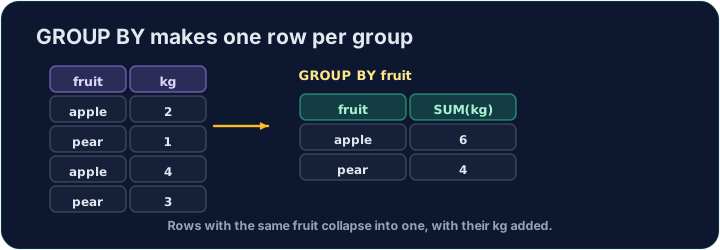
An aggregate like AVG normally summarises the whole table into one number. GROUP BY splits the rows into groups that share a value, and gives one summary row per group:
This gives one row for each form, with that form's count and average.
การรวมแถวด้วย GROUP BY
ฟังก์ชันรวมอย่าง AVG โดยปกติจะสรุป ทั้ง ตารางเหลือตัวเลขเดียว GROUP BY แบ่งแถวออกเป็น กลุ่ม ที่มีค่าร่วมกัน และให้บรรทัดสรุปหนึ่งบรรทัด ต่อกลุ่ม:
SELECT form, COUNT(*) AS n, ROUND(AVG(score), 2) AS avg_score
FROM student
GROUP BY form;
สิ่งนี้จะคืนมาหนึ่งบรรทัดสำหรับแต่ละ form พร้อมจำนวนและค่าเฉลี่ยของชั้นนั้นๆ
Filtering groups with HAVING
WHERE filters rows before grouping. To filter the groups themselves — using an aggregate — use HAVING:
This keeps only forms with 3 or more students. (WHERE cannot test COUNT(*); HAVING can.)
การกรองกลุ่มด้วย HAVING
WHERE กรอง แถว ก่อนการจัดกลุ่ม หากต้องการกรอง กลุ่ม เอง — โดยใช้ฟังก์ชันรวม — ให้ใช้ HAVING:
SELECT form, COUNT(*) AS n
FROM student
GROUP BY form
HAVING COUNT(*) >= 3;
สิ่งนี้จะเก็บเฉพาะชั้นที่มีนักเรียน 3 คนขึ้นไป (WHERE ไม่สามารถทดสอบ COUNT(*); HAVING ทำได้)
Common mistakes
- Filter groups with
HAVING, rows withWHERE. - A plain column beside an aggregate must be in
GROUP BY.
ข้อผิดพลาดทั่วไป
- กรองกลุ่มด้วย
HAVING, กรองแถวด้วยWHERE - คอลัมน์ธรรมดาข้างเคียงกับฟังก์ชันรวมต้องอยู่ใน
GROUP BY
For each form, show the form, the number of students as n, and the average score (2 d.p.) as avg_score. Group by form. · สำหรับ แต่ละ form แสดงชั้น จำนวนนักเรียนเป็น n และค่าเฉลี่ยคะแนน (2 ทศนิยม) เป็น avg_score จัดกลุ่มโดย form
Click Run to see the output here. · คลิก Run เพื่อดูผลลัพธ์ที่นี่
Show each form and its student count n, but only for forms with 3 or more students. Use HAVING. · แสดงแต่ละ form และจำนวนนักเรียน n แต่เฉพาะสำหรับชั้นที่มี 3 คนขึ้นไป ใช้ HAVING
Click Run to see the output here. · คลิก Run เพื่อดูผลลัพธ์ที่นี่