Counting and averaging · การนับและการหาค่าเฉลี่ย
Summarising with aggregate functions
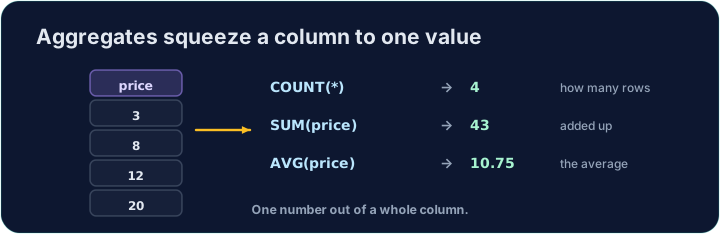
Sometimes you do not want the rows themselves, but a summary of them. Aggregate functions turn many rows into a single value:
COUNT(*)— how many rowsSUM(col)— the totalAVG(col)— the averageMIN(col)/MAX(col)— the smallest / largest
สรุปผลด้วยฟังก์ชันรวม
บางครั้งคุณไม่ต้องการตัวแถวเอง แต่ต้องการ สรุป ของมัน ฟังก์ชันรวม เปลี่ยนหลายแถวให้เป็นค่าเดียว:
COUNT(*)— จำนวนแถวSUM(col)— ผลรวมAVG(col)— ค่าเฉลี่ยMIN(col)/MAX(col)— ค่าต่ำสุด / สูงสุด
SELECT COUNT(*) FROM student;
Naming and rounding the result
Give the result a clear heading with AS. Averages often have long decimals, so wrap them in ROUND(value, 2) to keep 2 decimal places:
You can combine several aggregates in one query.
การตั้งชื่อและทอนทศนิยมผลลัพธ์
ตั้งชื่อผลลัพธ์ให้ชัดเจนด้วย AS ค่าเฉลยมักมีทศนิยมยาว ให้ห่อด้วย ROUND(value, 2) เพื่อคงทศนิยม 2 ตำแหน่ง:
SELECT COUNT(*) AS n, ROUND(AVG(score), 2) AS avg_score
FROM student;
คุณสามารถรวมฟังก์ชันรวมหลายตัวในคำสั่งเดียวได้
Common mistakes
COUNT(*)counts rows;AVG(col)averages a column.- Round an average with
ROUND(x, 2).
ข้อผิดพลาดทั่วไป
COUNT(*)นับจำนวนแถว;AVG(col)หาเฉลี่ยคอลัมน์- ทอนทศนิยมค่าเฉลี่ยด้วย
ROUND(x, 2)
In one query, show how many students there are as n, and their average score (to 2 decimal places) as avg_score. · ใน Query เดียวกัน แสดงจำนวนนักเรียนทั้งหมดเป็น n และค่าเฉลี่ยคะแนน (ทศนิยม 2 ตำแหน่ง) เป็น avg_score
Click Run to see the output here. · คลิก Run เพื่อดูผลลัพธ์ที่นี่
Show the lowest score as lowest, the highest as highest, and the total of all scores as total. · แสดงคะแนนต่ำสุดเป็น lowest คะแนนสูงสุดเป็น highest และผลรวมของคะแนนทั้งหมดเป็น total
Click Run to see the output here. · คลิก Run เพื่อดูผลลัพธ์ที่นี่