Getting input · การรับข้อมูลเข้า
Ask the user with input
input()waits for the user to type a line and press Enter.- It gives back what they typed. Store it in a variable.
- Join two strings together with
+.
ถามผู้ใช้ด้วย input
input()รอให้ผู้พิมพ์บรรทัดแล้วกด Enter- มันย้อนกลับสิ่งที่เขาพิมพ์ เก็บไว้ในตัวแปร
- เชื่อมสตริงสองอันเข้าด้วยกันด้วย
+
name = input()
print("Welcome, " + name)
When your program waits
- When you press Run, the program stops at
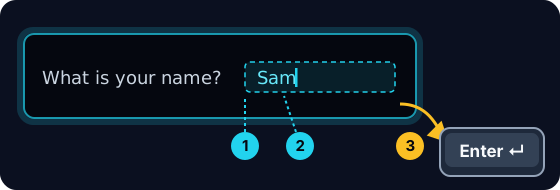
input()and waits for you. - A highlighted box appears under the code: type here, then press Enter.
- Click the box, type your answer and press Enter. Then the program continues.
เมื่อโปรแกรมของคุณรอ
- เมื่อกด รัน โปรแกรมจะหยุดที่
input()และ รอคุณ - กล่องที่เน้นจะปรากฏใต้โค้ด: พิมพ์ที่นี่ แล้วกด Enter
- คลิกที่กล่อง พิมพ์คำตอบแล้วกด Enter จากนั้นโปรแกรมจะดำเนินต่อไป
input always gives a string
- Whatever the user types comes back as a string.
- Even if they type
5, you get the text"5", not the number. - So
"5" + "5"is"55"(joined text), not10.
input ให้สตริงเสมอ
- สิ่งใดที่ผู้ใช้พิมพ์มาจะเป็น สตริง
- แม้他们会พิมพ์
5คุณจะได้ข้อความ"5"ไม่ใช่จำนวน - ดังนั้น
"5" + "5"คือ"55"(ข้อความที่รวมกัน) ไม่ใช่10
print("5" + "5") # 55 — joined text, not the number 10
Turn text into a number
int(...)turns text into a whole number:int("5")→5.float(...)turns text into a decimal:float("2.5")→2.5.- Convert first, then you can do maths.
เปลี่ยนข้อความเป็นตัวเลข
int(...)เปลี่ยนข้อความให้เป็นจำนวนเต็ม:int("5")→5.float(...)เปลี่ยนข้อความให้เป็นทศนิยม:float("2.5")→2.5.- แปลงก่อน แล้วจึงทำคณิตศาสตร์ได้
age = int(input())
print(age + 1)
Common mistakes
input()always returns a string, so wrap it inint(...)before doing maths.- The text inside
input("...")is the prompt shown to the user.
ข้อผิดพลาดที่พบบ่อย
input()จะคืนค่าเป็น string เสมอ ดังนั้นให้ห่อด้วยint(...)ก่อนทำการคำนวณทางคณิตศาสตร์- ข้อความภายใน
input("...")คือข้อความ Prompt ที่แสดงให้ผู้ใช้งานเห็น
Now you try
- When you Run, type the input yourself in the box and press Enter.
- Check answer types the task's input for you, so just read it with
input(). - Each task needs only one
input().
ลองดูเลย
- เมื่อคุณ Run ให้พิมพ์ข้อมูลเข้าในช่องเองแล้วกด Enter
- Check answer จะพิมพ์ข้อมูลเข้าให้ โดยให้คุณเพียงอ่านผลผ่าน
input() - แต่ละงานต้องการ
input()เพียง หนึ่ง ตัวเท่านั้น
Input → process → output · อินพุต → ประมวลผล → เอาต์พุต
Most programs follow one shape: get input, do something, show output. · โปรแกรมส่วนใหญ่มีรูปแบบหนึ่ง: รับอินพุต, ทำsomething, แสดงเอาต์พุต
Read a name with input(), then print Hi, then the name then !. For the input Sam, the output should be Hi, Sam!. · อ่านชื่อด้วย input(), แล้วพิมพ์ Hi, ตามด้วยชื่อ แล้ว !. สำหรับอินพุต Sam, เอาต์พุตควรจะเป็น Hi, Sam!
Click Run to see the output here. · คลิก Run เพื่อดูผลลัพธ์ที่นี่
Read a whole number with input(), convert it with int(...), then print the number plus 100. For input 7, the output should be 107. · อ่านจำนวนเต็มด้วย input() แปลงค่าด้วย int(...) แล้วพิมพ์เลขนั้น บวก 100 สำหรับอินพุต 7 ผลลัพธ์ที่ได้ควรจะเป็น 107
Click Run to see the output here. · คลิก Run เพื่อดูผลลัพธ์ที่นี่
Read a whole number, convert it with int(...), then print its square (the number times itself). For input 5, the output should be 25. · อ่านจำนวนเต็ม แปลงค่าด้วย int(...) แล้วพิมพ์ กำลังสอง ของมัน (คูณกับตัวเอง) สำหรับอินพุต 5 ผลลัพธ์ที่ได้ควรจะเป็น 25
Click Run to see the output here. · คลิก Run เพื่อดูผลลัพธ์ที่นี่
Read the width, then the height, each with int(input()). Print the area on one line and the perimeter on the next. For the inputs 3 and 5 the output is Area: 15 and Perimeter: 16. · อ่าน ความกว้าง ตามด้วย ความสูง โดยแต่ละอย่างใช้ int(input()) พิมพ์พื้นที่ในบรรทัดแรกและเส้นรอบรูปในบรรทัดถัดไป สำหรับอินพุต 3 และ 5 ผลลัพธ์คือ Area: 15 และ Perimeter: 16
Click Run to see the output here. · คลิก Run เพื่อดูผลลัพธ์ที่นี่