Reading files · การอ่านไฟล์
This page needs a recent browser (with SharedArrayBuffer support). Please update Chrome, Edge, Firefox or Safari to the latest version. · หน้านี้ต้องใช้เบราว์เซอร์ล่าสุด (รองรับ SharedArrayBuffer) กรุณาอัปเดต Chrome, Edge, Firefox หรือ Safari เป็นเวอร์ชันล่าสุด
English
Reading a file
catprints a file's contents straight to the screen:
- It is named after "concatenate" — it can also join several files together.
ไทย
อ่านไฟล์
- คำสั่ง
catจะพิมพ์เนื้อหาไฟล์ตรงลงหน้าจอ:
cat poem.txt
- ชื่อมาจากคำว่า "concatenate" — มันยังสามารถรวมไฟล์หลายไฟล์เข้าด้วยกันได้
English
Just the start or end
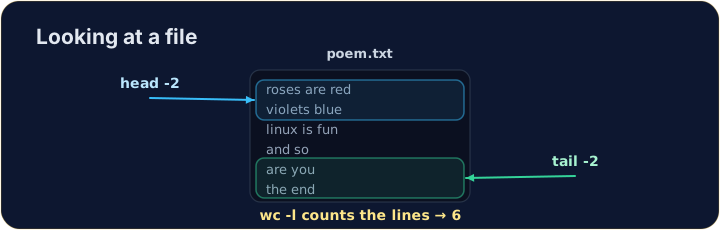
- For a long file you often want only a peek:
headshows the first lines,tailshows the last lines.
- The
-noption chooses how many lines.
ไทย
ดูเฉพาะต้นหรือปลาย
- สำหรับไฟล์ยาว คุณมักต้องการแค่ดูคร่าวๆ:
- คำสั่ง
headแสดง บรรทัดแรก, คำสั่งtailแสดง บรรทัดสุดท้าย
head -n 2 poem.txt
tail -n 1 poem.txt
- ตัวเลือก
-nเลือกจำนวนบรรทัด
English
Counting
wc(word count) measures a file. The most useful option is-lfor lines:
wc -wcounts words andwc -ccounts characters. Now try the tasks.
ไทย
การนับจำนวน
- คำสั่ง
wc(word count) วัดขนาดไฟล์ ตัวเลือกที่มีประโยชน์ที่สุดคือ-lเพื่อนับ บรรทัด:
wc -l poem.txt
- คำสั่ง
wc -wนับคำ และwc -cนับตัวอักษร ลองทำภารกิจดูสิ
English
Common mistakes
catprints a whole file at once; uselessto scroll a large one.- Press Tab to complete a long file name.
ไทย
ข้อผิดพลาดที่พบบ่อย
- คำสั่ง
catแสดงทั้งไฟล์พร้อมกัน; ใช้lessเพื่อเลื่อนดูไฟล์ขนาดใหญ่ - กด Tab เพื่อเติมชื่อไฟล์ที่ยาวอัตโนมัติ
Use cat to print the whole contents of poem.txt. · ใช้ cat เพื่อพิมพ์เนื้อหาทั้งหมดของ poem.txt
How many lines does the poem have? Use wc -l poem.txt to count them. · บทกวีนี้มีกี่บรรทัด? ใช้ wc -l poem.txt เพื่อนับจำนวน