Moving around · การเคลื่อนที่
This page needs a recent browser (with SharedArrayBuffer support). Please update Chrome, Edge, Firefox or Safari to the latest version. · หน้านี้ต้องใช้เบราว์เซอร์ล่าสุด (รองรับ SharedArrayBuffer) กรุณาอัปเดต Chrome, Edge, Firefox หรือ Safari เป็นเวอร์ชันล่าสุด
English
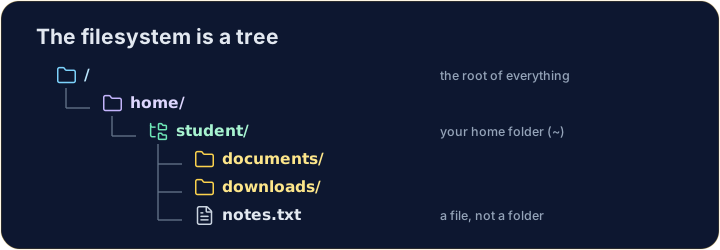
The filesystem is a tree
- Folders (called directories) hold files and other folders, like branches on a tree.
- The very top is
/, the root. Your personal folder is your home, written~.
ไทย
ระบบไฟล์คือต้นไม้
- โฟลเดอร์ (เรียกว่า directories) เก็บไฟล์และโฟลเดอร์อื่นๆ เหมือนกิ่งก้านของต้นไม้
- จุดสูงสุดคือ
/, ซึ่งเป็น root โฟลเดอร์ส่วนตัวของคุณคือ home, เขียนว่า~
English
Looking and moving
lslists what is in the current folder.cdchanges directory — it moves you into a folder:
- After
cd documents, you are inside documents. Runpwdany time to check where you are.
ไทย
การดูและการเคลื่อนที่
- คำสั่ง
lsแสดงรายการ สิ่งที่มีอยู่ในโฟลเดอร์ปัจจุบัน - คำสั่ง
cdเปลี่ยน directory —它将带你进入一个文件夹:
ls
cd documents
- หลังจากรัน
cd documentsคุณก็ อยู่ภายใน เอกสารเหล่านั้น รันpwdได้ตลอดเวลาเพื่อดูว่าคุณอยู่ที่ไหน
English
Handy shortcuts
cd ..goes up one level (to the parent folder).cdwith nothing, orcd ~, jumps straight back to your home.- A path can be relative (
documents/work) or absolute (starts with/, like/home/student).
ไทย
ทางลัดที่เป็นประโยชน์
- คำสั่ง
cd ..จะย้าย ขึ้น หนึ่งระดับ (ไปยังโฟลเดอร์แม่) - คำสั่ง
cd如果没有参数,或者cd ~,会直接跳回你的home - Path สามารถเป็น relative (เช่น
documents/work) หรือ absolute (เริ่มต้นด้วย/, เช่น/home/student)
English
Common mistakes
cdwith no argument goes to your home folder;cd ..goes up one level.pwdshows the folder you are in.
ไทย
ข้อผิดพลาดที่พบบ่อย
- คำสั่ง
cdไม่มีพารามิเตอร์จะไปที่โฟลเดอร์ home; คำสั่งcd ..จะย้ายขึ้นหนึ่งระดับ - คำสั่ง
pwdแสดงโฟลเดอร์ที่คุณกำลังอยู่ในนั้น
Explore · สำรวจ
Moving around the tree · การเคลื่อนที่ในต้นไม้
The filesystem is one tree; an absolute path is the trail from /. · ระบบไฟล์คือ ต้นไม้ one; เส้นทางสัมบูรณ์คือเส้นทางจาก /
Use ls (list) to see what is in your home folder. · ใช้ ls (list) เพื่อดูว่าอะไรอยู่ในโฟลเดอร์ home ของคุณ
Move into the documents folder with cd documents, then run pwd to prove you are there. · ย้าย เข้าไปใน โฟลเดอร์ documents ด้วย cd documents จากนั้นรัน pwd เพื่อพิสูจน์ว่าคุณอยู่ที่นั่น