Colour and links · สีและลิงก์
This page needs a recent browser (with SharedArrayBuffer support). Please update Chrome, Edge, Firefox or Safari to the latest version. · หน้านี้ต้องใช้เบราว์เซอร์ล่าสุด (รองรับ SharedArrayBuffer) กรุณาอัปเดต Chrome, Edge, Firefox หรือ Safari เป็นเวอร์ชันล่าสุด
English
Adding colour
- The
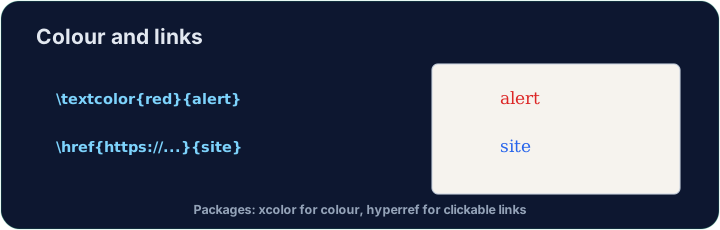
xcolorpackage lets you colour text. Load it, then wrap words:
- Built-in names include
red,blue,green,orange,gray, and more.
ไทย
การเพิ่มสี
- แพ็กเกจ
xcolorช่วยให้คุณใส่สีให้กับข้อความ โหลดมันแล้วห่อหุ้มคำพูด:
\usepackage{xcolor}
...
\textcolor{red}{This is red} and \textcolor{blue}{this is blue}.
- ชื่อ_builtin รวมถึง
red,blue,green,orange,grayและอื่นๆ อีกมากมาย
English
Highlights and your own colours
\colorbox{yellow}{text}puts a highlight behind the words.- You can even mix your own:
\textcolor{red!60}{...}is 60% red (lighter).
ไทย
ไฮไลท์และสีที่กำหนดเอง
\colorbox{yellow}{text}จะวางพื้นหลังไฮไลท์ไว้ใต้ตัวอักษร- คุณยังสามารถผสมสีของคุณเองได้:
\textcolor{red!60}{...}คือสีแดง 60% (สว่างกว่า)
English
Clickable links
- The
hyperrefpackage turns cross-references and web addresses into clickable links:
- Load
hyperreflast in your preamble — it likes to have the final word.
ไทย
ลิงก์ที่คลิกได้
- แพ็กเกจ
hyperrefเปลี่ยนการอ้างอิงข้ามส่วนและที่อยู่เว็บไซต์ให้เป็นลิงก์ที่คลิกได้:
\usepackage{hyperref}
...
Visit \href{https://ctan.org}{CTAN} for packages.
- โหลด
hyperrefสุดท้าย ในส่วนหัวเอกสาร — มันชอบที่จะมีคำพูดสุดท้าย
English
Common mistakes
- Load
xcolorfor colour andhyperreffor clickable links. - Load
hyperreflast among your packages.
ไทย
ข้อผิดพลาดที่พบบ่อย
- โหลด
xcolorสำหรับสีและhyperrefสำหรับลิงก์ที่คลิกได้ - โหลด
hyperrefสุดท้าย ระหว่างแพ็กเกจทั้งหมดของคุณ
Load xcolor, then make the word warning red with \textcolor{red}{warning}. You need both the package and the command. · โหลด xcolor จากนั้นทำให้คำ warning เป็นสีแดงด้วย \textcolor{red}{warning} คุณจำเป็นต้องใช้ทั้งแพ็กเกจและคำสั่ง
Click Run to compile and preview the PDF. · คลิก Run เพื่อคอมไพล์และดูตัวอย่าง PDF
Make a clickable link. Load hyperref, then turn the word CTAN into a link with \href{https://ctan.org}{CTAN}. Load hyperref last in the preamble. · ทำ ลิงก์ที่คลิกได้ โหลด hyperref จากนั้นแปลงคำ CTAN ให้เป็นลิงก์ด้วย \href{https://ctan.org}{CTAN} โหลด hyperref เป็นอันสุดท้ายในส่วนหัว
Click Run to compile and preview the PDF. · คลิก Run เพื่อคอมไพล์และดูตัวอย่าง PDF