Fractions, roots and sums · เศษส่วน, ราก และผลรวม
This page needs a recent browser (with SharedArrayBuffer support). Please update Chrome, Edge, Firefox or Safari to the latest version. · หน้านี้ต้องใช้เบราว์เซอร์ล่าสุด (รองรับ SharedArrayBuffer) กรุณาอัปเดต Chrome, Edge, Firefox หรือ Safari เป็นเวอร์ชันล่าสุด
English
A maths toolkit: amsmath
- For serious maths, load the
amsmathpackage once in the preamble:
- It adds better fractions, alignment, and dozens of symbols. Almost every maths document uses it.
ไทย
ชุดเครื่องมือทางคณิตศาสตร์: amsmath
- สำหรับงานคณิตศาสตร์ที่จริงจัง ให้โหลดแพ็กเกจ
amsmathครั้งเดียวในส่วน preamble:
\usepackage{amsmath}
- มันเพิ่มเศษส่วนที่ดีขึ้น การจัดแนว และสัญลักษณ์นับร้อย近乎ทุกเอกสารคณิตศาสตร์จะใช้มัน
English
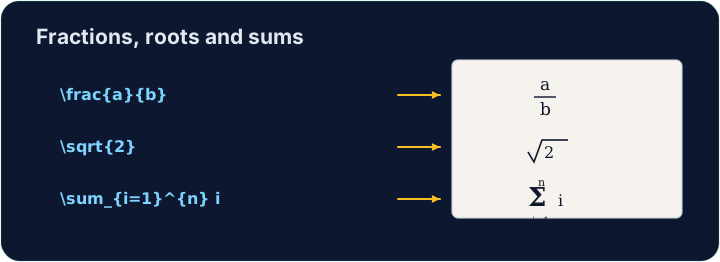
Fractions and roots
- A fraction is
\frac{top}{bottom}; a square root is\sqrt{...}:
- They nest happily:
\sqrt{\frac{1}{n}}is the square root of one-over-n.
ไทย
เศษส่วนและรากที่สอง
- เศษส่วนคือ
\frac{top}{bottom}; รากที่สองคือ\sqrt{...}:
\[ \frac{a + b}{2} \qquad \sqrt{x^2 + y^2} \]
- พวกมันสามารถซ้อนกันได้สวยงาม:
\sqrt{\frac{1}{n}}คือรากที่สองของหนึ่งหารด้วยเอ็น
English
Sums and integrals
- These grow to the right size automatically:
- The
_sets the lower limit and^the upper limit — the same keys as powers.
ไทย
ผลบวกและอินทิกรัล
- สิ่งเหล่านี้จะขยายขนาดให้พอดีโดยอัตโนมัติ:
\[ \sum_{i=1}^{n} i \qquad \int_0^1 x^2 \, dx \]
_กำหนดขอบเขตล่าง และ^กำหนดขอบเขตบน — กุญแจเดียวกันกับเลขชี้กำลัง
English
Common mistakes
\frac{a}{b},\sqrt{x}and\sumonly work in math mode.- Put them inside
$...$or\[ ... \].
ไทย
ข้อผิดพลาดที่พบบ่อย
\frac{a}{b},\sqrt{x}และ\sumทำงานได้เฉพาะในโหมดคณิตศาสตร์เท่านั้น- วางพวกมันไว้ภายใน
$...$หรือ\[ ... \]
Write a fraction in the display equation. Replace the comment with \frac{1}{2} so the equation reads one-half. The amsmath package is already loaded for you. · เขียน เศษส่วน ในสมการ display แทนที่คอมเมนต์ด้วย \frac{1}{2} เพื่อให้สมการอ่านว่าครึ่งหนึ่ง. package amsmath ถูกโหลดให้เรียบร้อยแล้ว
Click Run to compile and preview the PDF. · คลิก Run เพื่อคอมไพล์และดูตัวอย่าง PDF
Now use two more maths tools. In the display equation write a square root \sqrt{...} and a sum \sum, for example \[ \sqrt{2} + \sum_{i=1}^{n} i \]. · ตอนนี้ใช้เครื่องมือคณิตศาสตร์อีกสองอย่าง. ในสมการ display เขียนรากที่สอง \sqrt{...} และผลรวม \sum ตัวอย่างเช่น \[ \sqrt{2} + \sum_{i=1}^{n} i \].
Click Run to compile and preview the PDF. · คลิก Run เพื่อคอมไพล์และดูตัวอย่าง PDF