Bulleted and numbered lists · รายการจุดและรายการลำดับเลข
This page needs a recent browser (with SharedArrayBuffer support). Please update Chrome, Edge, Firefox or Safari to the latest version. · หน้านี้ต้องใช้เบราว์เซอร์ล่าสุด (รองรับ SharedArrayBuffer) กรุณาอัปเดต Chrome, Edge, Firefox หรือ Safari เป็นเวอร์ชันล่าสุด
English
Bulleted lists
- A bulleted list is an environment — it opens with
\beginand closes with\end:
- Every entry starts with
\item. The bullets and spacing are handled for you.
ไทย
รายการแบบมีหัวข้อ
- รายการ bullet คือ environment — เปิดด้วย
\beginและปิดด้วย\end:
\begin{itemize}
  \item First thing
  \item Second thing
\end{itemize}
- Every entry starts with
\item. The bullets and spacing are handled for you.
English
Numbered lists
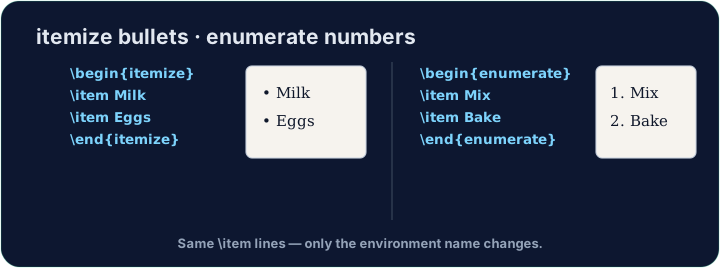
- Want 1, 2, 3 instead of bullets? Use
enumerate— everything else is the same:
- The numbers are automatic, so you can reorder items freely.
ไทย
รายการแบบมีหมายเลข
- Want 1, 2, 3 instead of bullets? Use
enumerate— everything else is the same:
\begin{enumerate}
  \item Wake up
  \item Have breakfast
\end{enumerate}
- The numbers are automatic, so you can reorder items freely.
English
Lists inside lists
- Put a list inside an
\itemto make sub-points. LaTeX indents them and changes the bullet style. - Now try turning a few lines into a tidy bulleted list.
ไทย
รายการภายในรายการ
- Put a list inside an
\itemto make sub-points. LaTeX indents them and changes the bullet style. - Now try turning a few lines into a tidy bulleted list.
English
Common mistakes
- Use
itemizefor bullets andenumeratefor numbers; each entry starts with\item. - Close the list with
\end{itemize}(orenumerate).
ไทย
ข้อผิดพลาดที่พบบ่อย
- ใช้
itemizeสำหรับรายการแบบหัวข้อย่อย และenumerateสำหรับรายการแบบตัวเลข; แต่ละรายการต้องเริ่มด้วย\item - ปิดรายการด้วย
\end{itemize}(หรือenumerate)
Turn the three foods into a bulleted list. Wrap them in \begin{itemize} … \end{itemize} and put \item before each one. · เปลี่ยนอาหารทั้งสามชนิดให้เป็น รายการจุด. ห่อหุ้ม它们在 \begin{itemize} … \end{itemize} และใส่ \item ก่อนแต่ละรายการ
Click Run to compile and preview the PDF. · คลิก Run เพื่อคอมไพล์และดูตัวอย่าง PDF
Order matters here, so use a numbered list. Wrap the three steps in \begin{enumerate} … \end{enumerate} with an \item before each. LaTeX numbers them 1, 2, 3 for you. · ลำดับมีความสำคัญที่นี่ ดังนั้นใช้ รายการลำดับเลข. ห่อหุ้มขั้นตอนทั้งสามใน \begin{enumerate} … \end{enumerate} พร้อม \item ก่อนแต่ละขั้นตอน. LaTeX จะตั้งหมายเลข 1, 2, 3 ให้คุณ
Click Run to compile and preview the PDF. · คลิก Run เพื่อคอมไพล์และดูตัวอย่าง PDF