Bold, italic and emphasis · ตัวหนา, ตัวเอียง และการเน้นความสำคัญ
This page needs a recent browser (with SharedArrayBuffer support). Please update Chrome, Edge, Firefox or Safari to the latest version. · หน้านี้ต้องใช้เบราว์เซอร์ล่าสุด (รองรับ SharedArrayBuffer) กรุณาอัปเดต Chrome, Edge, Firefox หรือ Safari เป็นเวอร์ชันล่าสุด
English
Styling words
- To change how words look, you wrap them in a command:
\textbf= bold,\textit= italic,\texttt=code-like.
ไทย
คำที่จัดรูปแบบ
- เพื่อเปลี่ยนลักษณะการแสดงผลของข้อความ คุณต้อง **ห่อหุ้ม
\textbf{bold} and \textit{italic} and \texttt{typewriter}
\textbf= bold,\textit= italic,\texttt=code-like.
English
Emphasis the smart way
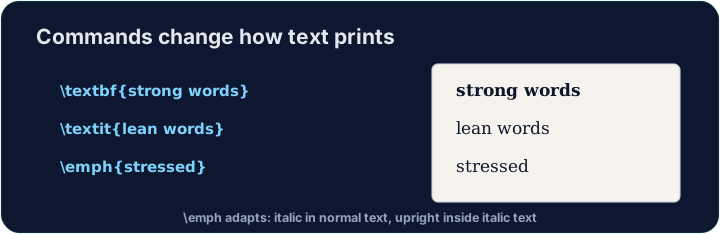
\emph{...}means "emphasise this" — usually italic, but it flips smartly inside italic text.- Prefer
\emphfor meaning, and\textitwhen you specifically want italic shapes.
ไทย
การเน้นข้อความอย่างชาญฉลาด
\emph{...}หมายความว่า "เน้นส่วนนี้" — มักจะเป็น italic แต่它会智能地翻转在已倾斜的文本内。- ควรใช้
\emphสำหรับ ความหมาย และ\textitเมื่อต้องการรูปร่าง italic โดยเฉพาะ
English
A note on quotes and dashes
- Type opening quotes with two backticks and closing with two apostrophes:
- A dash in a range is
--(en-dash, like 10--20); a pause in a sentence is---(em-dash). - These little touches are what make LaTeX documents look professional.
ไทย
ข้อควรระวังเรื่องเครื่องหมายคำนำหน้าและขีดคั่น
- พิมพ์เครื่องหมายอรรถยุกต์เปิดด้วย backtick สองตัว และปิดด้วย apostrophe สองตัว:
- ขีดคั่นในช่วงตัวเลขคือ
--(en-dash, เช่น 10--20); จุดหยุดในประโยคคือ---(em-dash). - รายละเอียดเล็กๆ น้อยๆ เหล่านี้ทำให้เอกสาร LaTeX ดูเป็นมืออาชีพ
English
Common mistakes
\textbf{...}is bold,\textit{...}italic,\emph{...}emphasis.- Every opening brace
{needs a matching}.
ไทย
ข้อผิดพลาดที่พบบ่อย
\textbf{...}คือ bold,\textit{...}คือ italic,\emph{...}คือ emphasis.- Every opening brace
{needs a matching}.
Make the word important bold with \textbf{...}, and the word gently italic with \textit{...}. Then Run to see the styles. · ทำให้คำว่า important ตัวหนาด้วย \textbf{...} และทำให้คำว่า gently ตัวเอียงด้วย \textit{...}. จากนั้น Run เพื่อดูสไตล์
Click Run to compile and preview the PDF. · คลิก Run เพื่อคอมไพล์และดูตัวอย่าง PDF
Use the right tool for the job. Mark really with \emph{...} (emphasis that flips smartly), and show the file name report.tex in \texttt{...} (typewriter font). · เลือกเครื่องมือที่เหมาะสมสำหรับงาน ทำเครื่องหมาย really ด้วย \emph{...} (เน้นข้อความที่ปรับรูปแบบอัจฉริยะ), และแสดงชื่อไฟล์ report.tex ใน \texttt{...} (ฟอนต์แบบเครื่องพิมพ์ดีด)
Click Run to compile and preview the PDF. · คลิก Run เพื่อคอมไพล์และดูตัวอย่าง PDF