Structs and typedef: . vs -> · Structs และ typedef: . vs ->
Grouping related data
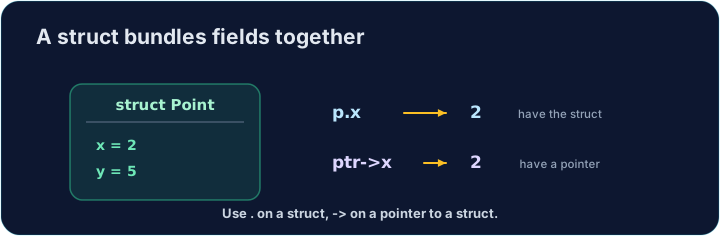
- A struct groups several values into one thing. A point has an
xand ay; a rectangle has awidthand aheight. - Each value inside is called a member (or field). They can have different types.
- Structs let you pass one tidy thing around instead of many loose variables.
การจัดกลุ่มข้อมูลที่สัมพันธ์กัน
- Struct กลุ่มหลายค่าให้เป็นสิ่งเดียว จุดหนึ่งมี
xและy; รูปสี่เหลี่ยมผืนผ้ามีwidthและheight - แต่ละค่าภายในเรียกว่า Member (หรือ Field) สามารถมีประเภทต่างกัน
- Struct ช่วยให้คุณส่งสิ่งที่เป็นระเบียบชิ้นเดียวไปมาแทนตัวแปรอิสระจำนวนมาก
struct and typedef
- You define the shape once:
struct { int x; int y; }has twointmembers. typedefgives that shape a short name. Aftertypedef struct { int x; int y; } Point;, you can writePoint p;.- In these tasks, the
typedefis already written for you in the starter.
struct และ typedef
- คุณกำหนดรูปร่างครั้งเดียว:
struct { int x; int y; }มี Memberintจำนวนสองตัว typedefให้รูปร่างนี้มีชื่อสั้น หลังจากtypedef struct { int x; int y; } Point;คุณสามารถเขียนPoint p;ได้- ในงานเหล่านี้
typedefถูกเขียนไว้ให้คุณแล้วในไฟล์เริ่มต้น
Member access with .
- For a struct value, use a dot:
p.xis thexmember ofp. - You read it (
int a = p.x;) and write it (p.y = 5;) just like a normal variable. - A function can build a struct, fill its members, and
returnthe whole thing.
การเข้าถึง Member ด้วย .
- สำหรับ Value ของ struct ใช้จุด:
p.xคือ Memberxของp - อ่านมัน (
int a = p.x;) และเขียนมัน (p.y = 5;) เหมือนตัวแปรปกติ - ฟังก์ชันสามารถสร้าง struct, เติม Members และ
returnทั้งก้อนได้
Through a pointer with ->
- When you have a pointer to a struct, use an arrow:
p->xmeans "thexof whatppoints to". p->xis just shorthand for(*p).x. The arrow is easier to read.- Passing a
Point *lets a function change the caller's struct (like pass-by-pointer for one value).
ผ่าน Pointer ด้วย ->
- เมื่อคุณมี Pointer指向 struct ให้ใช้ลูกศร:
p->xหมายความว่า "xของสิ่งที่pชี้ถึง" p->xเป็นเพียง Shorthand ของ(*p).xลูกศรอ่านง่ายกว่า- การส่ง
Point *ทำให้ฟังก์ชัน เปลี่ยนแปลง struct ของผู้เรียกได้ (เหมือน Pass-by-pointer สำหรับค่าเดียว)
#include <stdio.h>

typedef struct {
    int x;
    int y;
} Point;

int main(void) {
    Point p = {3, 4};
    Point *ptr = &p;
    ptr->x = 10;                    // changes p.x through the pointer
    printf("%d %d\n", p.x, p.y);    // 10 4
    return 0;
}
Common mistakes
- Use
.on a struct value and->on a struct pointer. typedeflets you drop the wordstructwhen declaring.
ข้อผิดพลาดที่พบบ่อย
- ใช้
.กับ Value ของ struct และ->กับ Pointer ของ struct typedefช่วยให้คุณละคำstructลงในการประกาศได้
Now you try
- Use
.on a struct value, and->when you have a pointer to a struct. - The
typedefis given in each starter. Do not write amain— the checker provides one.
ลองดูเลย
- ใช้
.กับ Value ของ struct และ->เมื่อคุณมี Pointer指向 struct typedefถูกให้ไว้ในไฟล์เริ่มต้นแต่ละฉบับ อย่า เขียนmain— ตัวตรวจสอบจะสร้างให้
Complete Point make_point(int x, int y) so it builds a Point with those values and returns it (use . on the members). The typedef is given. Do not write a main. · เติม Point make_point(int x, int y) สร้าง Point ด้วยค่าเหล่านั้นและส่งกลับ (ใช้ . กับสมาชิก) typedef ให้มา ห้าม เขียน main
Click Run to see the output here. · คลิก Run เพื่อดูผลลัพธ์ที่นี่
Complete void move_point(Point *p, int dx, int dy) so it adds dx to the point's x and dy to its y, using ->. The typedef is given. Do not write a main. · เติม void move_point(Point *p, int dx, int dy) เพื่อเพิ่ม dx เข้ากับ x ของจุด และเพิ่ม dy เข้ากับ y, ใช้ ->. typedef ถูกกำหนดให้แล้ว. ห้าม เขียน main
Click Run to see the output here. · คลิก Run เพื่อดูผลลัพธ์ที่นี่
Complete int rect_area(const Rect *r) so it returns width * height, reading the members with ->. The typedef is given. Do not write a main. · เติม int rect_area(const Rect *r) ส่ง width * height อ่านสมาชิกด้วย -> typedef ให้มา ห้าม เขียน main
Click Run to see the output here. · คลิก Run เพื่อดูผลลัพธ์ที่นี่