Records
Different types under one name
- AS topic 10.1 asks you to define a record: one identifier that holds several fields, and the fields can have different types.
- A pet has a name (a
STRING) and an age (anINTEGER). A record keeps both together under one name. TYPE…ENDTYPEdescribes the record and declares each field.
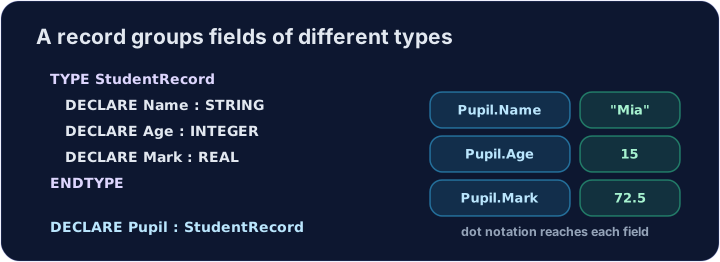
The type is the plan, the variable is the record
TYPE Petis a plan, like an empty form that says which boxes there are. It holds no data.DECLARE MyPet : Petmakes one real record that follows the plan. Values go into this variable.- So you write
MyPet.Name ← "Rex", neverPet.Name ← "Rex". - Work in this order:
TYPE…ENDTYPE, with oneDECLAREline for each field and nothing else inside.DECLAREa variable of the new type.- Store a value in each field with a dot:
MyPet.Age ← 4. - Output the fields one by one.
TYPE Pet
  DECLARE Name : STRING
  DECLARE Age : INTEGER
ENDTYPE
DECLARE MyPet : Pet
MyPet.Name ← "Rex"
MyPet.Age ← 4
OUTPUT MyPet.Name & " is " & NUM_TO_STR(MyPet.Age)
A field is read with a dot
MyPet.Nameis theNamefield ofMyPet. Use it like any other variable.OUTPUTcannot print a whole record. Output each field you need.&joins strings only.NUM_TO_STR(MyPet.Age)turns the age into a string so that it can be joined.- You may copy a whole record in one assignment:
Pupil2 ← Pupil1copies every field.
An array of records
DECLARE Form : ARRAY[1:3] OF Studentmakes three records, one in each element.- First choose the record with the index, then the field with the dot:
Form[2].Markis the mark of the second student. - A
FORloop can visit every record. The loop counter goes inside the square brackets.
TYPE Student
  DECLARE Name : STRING
  DECLARE Mark : INTEGER
ENDTYPE
DECLARE Form : ARRAY[1:3] OF Student
DECLARE Index : INTEGER
Form[1].Name ← "Ada"
Form[1].Mark ← 91
Form[2].Name ← "Bo"
Form[2].Mark ← 80
Form[3].Name ← "Cy"
Form[3].Mark ← 47
FOR Index ← 1 TO 3
  IF Form[Index].Mark >= 50 THEN
    OUTPUT Form[Index].Name & " passed"
  ENDIF
NEXT Index
Watch out
- Declare the
TYPEbefore youDECLAREa variable of that type. - Enumerated types and pointers are A2 (topic 13.1). They are not in this AS course.
- A record is not an A2 class: it has fields but no methods.
Common mistakes
| Wrong | Right | Why |
|---|---|---|
no ENDTYPE before the next line |
ENDTYPE after the last field |
the type is unfinished, so the program cannot go on |
Student.Name ← "Ada" |
StudentData.Name ← "Ada" |
Student is the plan (the type); store values in a variable such as DECLARE StudentData : Student |
OUTPUT Student |
OUTPUT StudentData.Name |
output a field, not a type or a whole record |
Name ← "Ada" inside the TYPE |
DECLARE Name : STRING |
only field declarations go inside TYPE |
Form.Mark[1] |
Form[1].Mark |
the index chooses the record, then the dot chooses the field |
Total ← Form[1] + Form[2] |
Total ← Form[1].Mark + Form[2].Mark |
add the fields, not the records |
Now you try
- Define a record, store two fields, and output them.
Independent transfer
The final task has no supplied algorithm. Plan its inputs, processing and outputs, then solve it before opening support. Check more than the sample case.
ความยาก 2/5 · 140 เหรียญ + บอนัสน้อยๆ เมื่อทำสำเร็จครั้งแรกในวันนี้
Define a Student record with Name และ Mark. Store Ada และ 91, and output Ada 91.
คลิก Run เพื่อดูผลลัพธ์ที่นี่
ความยาก 2/5 · 140 เหรียญ + บอนัสน้อยๆ เมื่อทำสำเร็จครั้งแรกในวันนี้
An array Form of two students is partly filled below. Store Bo as the second name and output it.
คลิก Run เพื่อดูผลลัพธ์ที่นี่
ความยาก 2/5 · 140 เหรียญ + บอนัสน้อยๆ เมื่อทำสำเร็จครั้งแรกในวันนี้
The array Form of two students is filled in below. Add up Form[1].Mark และ Form[2].Mark with a FOR loop and output the total (171).
คลิก Run เพื่อดูผลลัพธ์ที่นี่
ความยาก 3/5 · 200 เหรียญ + บอนัสน้อยๆ เมื่อทำสำเร็จครั้งแรกในวันนี้
Define TYPE Book with Title : STRING and Copies : INTEGER. Read two books into an array. Output the title of the book with fewer copies; on a tie choose the first.
คลิก Run เพื่อดูผลลัพธ์ที่นี่