Writing a class: fields, constructor, methods · การเขียนคลาส: ฟیلด์, คอนสตรัคเตอร์, เมทโด้
Make your own type
- So far you used classes like
StringandMaththat Java gave you. - Now you will write your own class. A class is a plan for an object.
- An object holds data (its own values) and methods (things it can do).
Make your own type
- จนถึงตอนนี้ คุณได้ใช้ Class อย่างเช่น
StringและMathที่ Java จัดให้มาแล้ว - ตอนนี้คุณจะ เขียน Class ของคุณเอง Class คือแบบแผนสำหรับ Object
- Object จะเก็บ ข้อมูล (ค่าของตนเอง) และ methods (สิ่งที่มันทำได้)
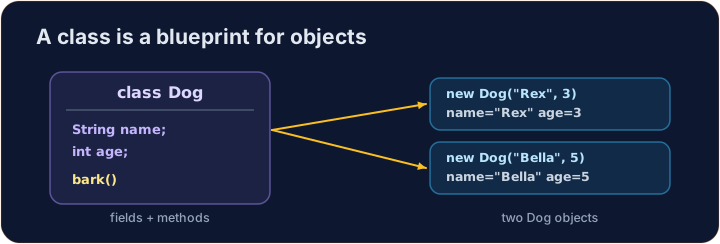
Instance variables
- Data that each object keeps is stored in instance variables (also called fields).
- You declare them inside the class, but outside any method.
- Each object gets its own copy of these variables.
ตัวแปรของอินสแตนซ์
- ข้อมูลที่แต่ละ object เก็บจะจัดเก็บอยู่ใน ตัวแปรของอินสแตนซ์ (หรือเรียกว่าฟิลด์)
- คุณประกาศพวกมันภายในคลาส แต่ภายนอกметодใดmetMethod
- แต่ละ object จะได้รับ สำเนา ของตัวแปรเหล่านี้เป็นของตัวเอง
public class Dog {
    String name;   // instance variable
    int age;       // instance variable
}
A constructor
- A constructor sets up a new object. It runs when you write
new. - It has the same name as the class and no return type (not even
void). - Use the word
thisto mean "this object's own variable".
Constructor
- Constructor ทำการตั้งค่าเริ่มต้นสำหรับ object ใหม่ มันจะถูกเรียกใช้เมื่อคุณเขียน
new - มี ชื่อเดียวกับคลาส และ ไม่มีชนิดการคืนค่า (แม้แต่
voidก็ไม่มี) - ใช้คำ
thisเพื่อหมายถึง "ตัวแปรที่เป็นของตัวเองของ object นี้"
public class Dog {
    String name;
    int age;

    // Constructor: runs when we make a new Dog
    public Dog(String name, int age) {
        this.name = name;   // this.name is the field; name is the parameter
        this.age = age;
    }
}
Instance methods
- An instance method is an action an object can do.
- It can read and change the object's own instance variables.
- You call it on an object with a dot:
myDog.speak().
MetMethod ของอินสแตนซ์
- MetMethod ของอินสแตนซ์ คือการกระทำที่ object สามารถทำได้
- มันสามารถอ่านและเปลี่ยนแปลงตัวแปรของอินสแตนซ์ที่เป็นของตัวเองของ object นั้นได้
- คุณเรียกใช้มันบน object โดยใช้จุด:
myDog.speak()
public class Dog {
    String name;
    int age;

    public Dog(String name, int age) {
        this.name = name;
        this.age = age;
    }

    // Instance method: returns a sentence about this dog
    public String describe() {
        return this.name + " is " + this.age;
    }
}
Make and use an object
- Use
new ClassName(...)to build an object. This calls the constructor. - Store it in a variable whose type is the class name.
- Then call its methods with a dot.
สร้างและใช้งาน object
- ใช้
new ClassName(...)ในการสร้าง object การนี้คือการเรียกใช้ constructor - เก็บไว้ในตัวแปรที่มีประเภทเป็นชื่อคลาส
- จากนั้นเรียกใช้ metMethod ของมันโดยใช้จุด
public class Main {
    public static void main(String[] args) {
        Dog d = new Dog("Rex", 4);
        System.out.println(d.describe());   // Rex is 4
    }
}

class Dog {
    String name;
    int age;

    public Dog(String name, int age) {
        this.name = name;
        this.age = age;
    }

    public String describe() {
        return this.name + " is " + this.age;
    }
}
Why this?
- A parameter and a field can have the same name (like
name). - Inside the constructor,
namemeans the parameter;this.namemeans the field. thisalways means the object the method was called on.
ทำไมต้อง this?
- Parameter และฟิลด์สามารถมี ชื่อเดียวกัน (เช่น
name) - ภายใน constructor,
nameหมายถึง parameter;this.nameหมายถึงฟิลด์ thisหมายถึงเสมอ object ที่ metMethod ถูกเรียกใช้
Common mistakes
- A constructor has no return type and matches the class name.
- Use
this.fieldto tell a field from a parameter of the same name.
ข้อผิดพลาดที่พบบ่อย
- Constructor ไม่มี return type และมีชื่อเดียวกับคลาส
- ใช้
this.fieldเพื่อแยกแยะฟิลด์ออกจาก parameter ที่มีชื่อเดียวกัน
Now you try
- Each task gives you a class skeleton with a TODO. Fill it in so it compiles and works.
- A hidden Harness builds your object and checks the results.
- Press Run to compile, then Check answer.
ลองดูเลย
- Each task ให้โครงร่างคลาสพร้อม TODO เติมให้ครบเพื่อให้คอมไพล์และทำงานได้
- Harness ที่ซ่อนอยู่จะสร้าง object ของคุณและตรวจสอบผลลัพธ์
- กด Run เพื่อคอมไพล์ แล้วกด Check answer
Complete the Counter class. It has an int field count that starts at 0. increment() adds 1 to it. getCount() returns the current value. · เติม Counter คลาสให้สมบูรณ์ มันมีฟیلด์ int ชื่อ count ที่เริ่มต้นที่ 0. increment() เพิ่มค่าเข้าไป 1. getCount()/value กลับคืนค่าปัจจุบัน.
Click Run to see the output here. · คลิก Run เพื่อดูผลลัพธ์ที่นี่
Complete the Rectangle class. The constructor takes width w and height h and stores them. area() returns width times height. perimeter() returns 2 times (width plus height). · เติมเต็มคลาส Rectangle Constructor รับความกว้าง w และความสูง h และเก็บไว้ area() return ความกว้างคูณความสูง perimeter() return 2 คูณ (ความกว้างบวกความสูง)
Click Run to see the output here. · คลิก Run เพื่อดูผลลัพธ์ที่นี่
Complete the Greeter class. The constructor takes a String name and stores it in the field name. greet() returns the text Hello, followed by the name and a ! (for "Ana" it returns Hello, Ana!). · เติม Greeter คลาสให้สมบูรณ์ คอนสตรัคเตอร์รับ String name และเก็บไว้ในฟیلด์ชื่อ name. greet()/value กลับคืนข้อความ Hello, ตามด้วยชื่อและ ! (สำหรับ "Ana" จะกลับคืน Hello, Ana!).
Click Run to see the output here. · คลิก Run เพื่อดูผลลัพธ์ที่นี่