Using objects: String, Math, and wrappers · การใช้ objects: String, Math, และ wrappers
Using objects
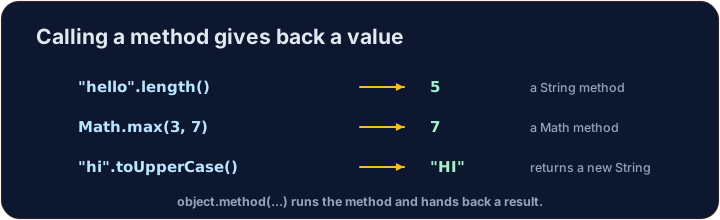
- An object is a value that knows how to do things. You call its methods with a dot
.. - A
Stringis an object.Math,Integer, andDoublegive you ready-made tools. - In this lesson you learn to make objects and use their methods.
การใช้ objects
- An objectคือ value ที่รู้วิธีทำสิ่งต่างๆ คุณเรียก methods ของมันด้วยจุด
. - A
Stringเป็น object.Math,Integer, และDoubleให้เครื่องมือสำเร็จรูปแก่คุณ - ในบทเรียนนี้คุณจะได้เรียนรู้ที่จะ สร้าง objects และ ใช้ methods ของ它们
Making objects with new
- Some objects are made with the keyword
newand a constructor. - A
Stringis special: you can write it directly with quotes, like"hi". - You can also make a separate
Stringobject withnew String("..."), but quotes are the normal way.
การสร้าง objects ด้วย new
- บาง objects ถูกสร้างด้วย keyword
newและ constructor - A
Stringเป็นพิเศษ: คุณสามารถเขียน它以 quotes ได้โดยตรง, เช่น"hi" - คุณยังสามารถสร้าง separate
Stringobject ด้วยnew String("..."), แต่ quotes เป็นวิธีปกติ
public class Main {
    public static void main(String[] args) {
        String greeting = "Hello";
        String copy = new String("Hello");
        System.out.println(greeting);
        System.out.println(copy);
    }
}
String methods
s.length()— how many characters are ins.s.charAt(i)— the character at positioni(the first position is 0).s.substring(a, b)— the part fromaup to but not includingb.s.indexOf("x")— the first position of"x", or-1if not found.
String methods
s.length()— จำนวน characters ที่มีในss.charAt(i)— character ที่ตำแหน่งi(ตำแหน่งแรกคือ 0)s.substring(a, b)— ส่วนตั้งแต่aขึ้นไปจนถึง แต่ไม่รวมbs.indexOf("x")— ตำแหน่งแรกของ"x", หรือ-1หากไม่พบ
public class Main {
    public static void main(String[] args) {
        String word = "computer";
        System.out.println(word.length());        // 8
        System.out.println(word.charAt(0));        // c
        System.out.println(word.substring(0, 4));  // comp
        System.out.println(word.indexOf("put"));   // 3
    }
}
Comparing Strings
- Use
s.equals(other)to check if two Strings have the same letters. - Do not use
==to compare Strings — it can give the wrong answer. We learn why in lesson 3. s.compareTo(other)returns0when equal, a negative number ifscomes first in order, and a positive number if it comes later.
การเปรียบเทียบ Strings
- ใช้
s.equals(other)เพื่อตรวจสอบว่าสอง Strings มี same letters หรือไม่ - อย่าใช้
==เพื่อเปรียบเทียบ Strings — มันอาจให้คำตอบผิด เราเรียนเหตุผลในบทเรียนที่ 3 s.compareTo(other)กลับมา0เมื่อเท่ากัน, -negative number ถ้าsมาอันดับก่อน, และ +positive number ถ้ามาทีหลัง
public class Main {
    public static void main(String[] args) {
        String a = "cat";
        String b = "cat";
        String c = "dog";
        System.out.println(a.equals(b));   // true
        System.out.println(a.equals(c));   // false
        System.out.println(a.compareTo(c)); // negative: "cat" is before "dog"
    }
}
Math methods
Mathholds math tools. You call them onMathitself, likeMath.abs(-5).Math.abs(x)— the size ofxwith no minus sign.Math.pow(b, e)—bto the powere(returns adouble).Math.sqrt(x)— the square root ofx(returns adouble).Math.random()— a randomdoublefrom0.0up to (not including)1.0.
Math methods
Mathเก็บเครื่องมือทางคณิตศาสตร์ คุณเรียก它們บนMathเอง, เช่นMath.abs(-5)Math.abs(x)— ขนาดของxdisclaimer minus signMath.pow(b, e)—bยกกำลังe(return一个double)Math.sqrt(x)— รากที่สองของx(return一个double)Math.random()— randomdoubleจาก0.0ถึง (但不包括)1.0
public class Main {
    public static void main(String[] args) {
        System.out.println(Math.abs(-7));       // 7
        System.out.println(Math.pow(2, 3));     // 8.0
        System.out.println(Math.sqrt(9));       // 3.0
        // Math.random() changes each run, so we do not print it here.
    }
}
Wrappers and autoboxing
intanddoubleare simple types. Their object versions areIntegerandDouble.- Java can switch between them for you. This is called autoboxing.
Integer.parseInt("42")turns text into anint.Double.parseDouble("3.5")turns text into adouble.
Wrappers และ autoboxing
intและdoubleเป็นชนิดพื้นฐาน (simple types) เวอร์ชัน object ของพวกมันคือIntegerและDouble- Java สามารถสลับระหว่างพวกมันให้คุณได้ สิ่งนี้เรียกว่า autoboxing
Integer.parseInt("42")เปลี่ยนข้อความให้เป็นintDouble.parseDouble("3.5")เปลี่ยนข้อความให้เป็นdouble
public class Main {
    public static void main(String[] args) {
        Integer boxed = 10;        // int -> Integer (autoboxing)
        int back = boxed;          // Integer -> int (unboxing)
        int n = Integer.parseInt("42");
        double d = Double.parseDouble("3.5");
        System.out.println(back + n);   // 52
        System.out.println(d);          // 3.5
    }
}
Common mistakes
- Compare Strings (and other objects) with
.equals(), not==. Math.random()returns a value from0up to (but not including)1.
ข้อผิดพลาดที่พบบ่อย
- เปรียบเทียบ Strings (และ object อื่นๆ) ด้วย
.equals()ไม่ใช่== Math.random()/value一个值 from0ขึ้นไป (แต่ไม่รวม)1
Now you try
- Each task pre-fills the class skeleton — write your code inside main, or complete the method shown.
- Press Run to compile and run, then Check answer.
- Your code compiles and runs on the server, so even the first run is fast.
ลองดูเลย
- Each task เติม skeleton class ไว้ล่วงหน้า — เขียนโค้ดของคุณ ภายใน main, หรือเติมเต็ม method ที่แสดง
- กด Run เพื่อ compile และ run, แล้วกด Check answer
- โค้ดของคุณ compile และ run บน server, ดังนั้นแม้การ run ครั้งแรกก็เร็ว
The String word is "programming". Print its length on the first line, then print the first 4 letters (use substring(0, 4)) on the second line. · String word มีค่า "programming". พิมพ์ความยาวของมันบนบรรทัดแรก, จากนั้นพิมพ์ 4 ตัวอักษรแรก (ใช้ substring(0, 4)) บนบรรทัดที่สอง
Click Run to see the output here. · คลิก Run เพื่อดูผลลัพธ์ที่นี่
Complete hypotenuse(double a, double b) so it returns the length of the longest side of a right triangle: the square root of a*a + b*b. Use Math.sqrt and Math.pow (or a*a). · เติมเต็ม hypotenuse(double a, double b) เพื่อให้ return ความยาวของด้านที่ยาวที่สุดของสามเหลี่ยมมุมฉาก: รากที่สองของ a*a + b*b. ใช้ Math.sqrt และ Math.pow (หรือ a*a)
Click Run to see the output here. · คลิก Run เพื่อดูผลลัพธ์ที่นี่
Complete sameWord(String a, String b) so it returns true when the two Strings have the same letters, and false otherwise. Use .equals (not ==). · เติมเต็ม sameWord(String a, String b) เพื่อให้ return true เมื่อสอง Strings มีตัวอักษรเหมือนกัน, และ false ในกรณีอื่น. ใช้ .equals (ไม่ใช่ ==)
Click Run to see the output here. · คลิก Run เพื่อดูผลลัพธ์ที่นี่