Mini-project: a profile card · Мини-проект: профильная карточка
This page needs a recent browser (with SharedArrayBuffer support). Please update Chrome, Edge, Firefox or Safari to the latest version. · Эта страница требует современного браузера (с поддержкой SharedArrayBuffer). Пожалуйста, обновите Chrome, Edge, Firefox или Safari до последней версии.
English
Your mini-project
- Time to put it all together and build a profile card.
- Here is what you are aiming for:
Русский
Ваш мини-проект
- Пора объединить всё вместе и создать карточку профиля.
- Вот чего вы должны достичь:
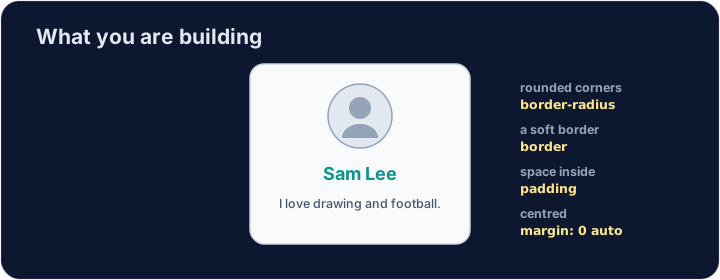
<style>
  .card { width: 280px; margin: 0 auto; padding: 20px; text-align: center;
          background-color: #f8fafc; border: 1px solid #cbd5e1; border-radius: 12px; }
  h2 { color: teal; margin: 8px 0; }
</style>
<div class="card">
  <img src="/static/code/web-basics/cat.svg" alt="My avatar" width="120">
  <h2>Sam Lee</h2>
  <p>I love drawing and football.</p>
</div>
English
What you've learned
- HTML: headings, paragraphs, lists, links, images, tables, forms, page structure.
- CSS: colours, text, the box model, spacing, sizing, and rows with Flexbox.
- That is the real foundation of every web page. You can build things now. 🎉
Русский
Что вы узнали
- HTML: заголовки, абзацы, списки, ссылки, изображения, таблицы, формы, структура страницы.
- CSS: цвета, текст, блочная модель, отступы, размеры и ряды с помощью Flexbox.
- Это настоящий фундамент каждой веб-страницы. Теперь вы можете создавать вещи. 🎉
English
Common mistakes
- Build and check one piece at a time.
- Keep the HTML structure and the CSS styling separate.
Русский
Распространенные ошибки
- Создавайте и проверяйте по одному элементу за раз.
- Сохраняйте структуру HTML и стили CSS отдельными.
English
Build your card
- The card's layout is already styled, so you can focus on filling it in.
- Each task adds one piece — content, a picture, then colour. Press ▶ often!
Русский
Создайте свою карточку
- Верстка карточки уже оформлена стилями, поэтому вы можете сосредоточиться на наполнении.
- Каждая задача добавляет один элемент — контент, изображение, затем цвет. Нажимайте ▶ часто!
Start your card. Inside the .card, add an <h2> with a name and a <p> with one line about you. · Начните свою карточку. Внутри .card добавьте <h2> с именем и <p> с одной строкой о себе.
Add a picture above the name. Add an <img src="/static/code/web-basics/cat.svg"> with alt text, just inside the card. · Добавьте изображение над именем. Добавьте элемент <img src="/static/code/web-basics/cat.svg"> с текстом alt прямо внутри карточки.
Finish it with a splash of colour. Give the h2 a colour you like, e.g. h2 { color: teal; }. · Завершите это ярким акцентом цвета. Придайте элементу h2 цвет, который вам нравится, например, h2 { color: teal; }.