Removing rows with DELETE
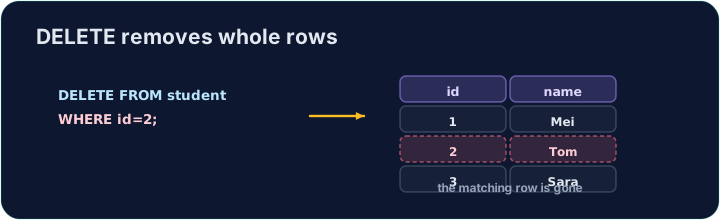
DELETE removes the rows that match a WHERE condition:
Only the matching rows are removed; the table and its other rows stay.
Удаление строк с помощью DELETE
DELETE удаляет строки, соответствующие условию WHERE:
DELETE FROM product WHERE code = 'P03';
Удаляются только соответствующие строки; таблица и остальные строки остаются.
The same warning
Like UPDATE, a DELETE with no WHERE hits every row:
Always check your WHERE before running a DELETE. The checker runs your DELETE, then reads the table back to confirm the right row is gone.
То же предупреждение
Как и UPDATE, цикл DELETE без条件WHERE обращается к каждой строке:
DELETE FROM product; -- empties the whole table!
Всегда проверяйте свой WHERE перед выполнением команды DELETE. Проверитель выполняет ваш DELETE, затем считывает таблицу обратно, чтобы убедиться, что нужная строка удалена.
Common mistakes
DELETEwithout aWHEREempties the table — always add theWHERE.- Test a risky delete first as a
SELECTwith the sameWHERE.
Частые ошибки
DELETEбезWHEREочищает таблицу — всегда добавляйтеWHERE.- Тестируйте рискованное удаление сначала как
SELECTс тем жеWHERE.
Delete the product with code 'P03' from the product table. (Afterwards only P01 and P02 remain.)
Click Run to see the output here. · Нажмите Запустить, чтобы увидеть результат здесь.
Delete can use any condition. Remove every product that costs less than 2.00 with WHERE price < 2.00. Only the Pen (0.80) goes; check which rows remain.
Click Run to see the output here. · Нажмите Запустить, чтобы увидеть результат здесь.