Sections and titles · Разделы и заголовки
This page needs a recent browser (with SharedArrayBuffer support). Please update Chrome, Edge, Firefox or Safari to the latest version. · Эта страница требует современного браузера (с поддержкой SharedArrayBuffer). Пожалуйста, обновите Chrome, Edge, Firefox или Safari до последней версии.
English
Organising with sections
- Real documents are split into sections so readers can follow them.
- The command is simple:
- LaTeX numbers it automatically (1, 2, 3 …) — you never count by hand.
Русский
Организация с помощью разделов
- Реальные документы разбиваются на разделы, чтобы читатели могли легко ориентироваться.
- Команда проста:
\section{Introduction}
- LaTeX нумерует их автоматически (1, 2, 3 …) — вам не нужно считать вручную.
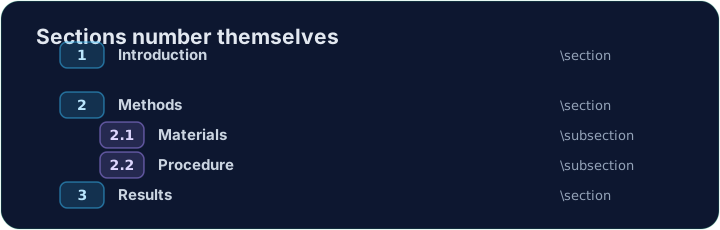
English
Smaller pieces
- Inside a section you can add subsections:
- These become 2.1, 2.2, and so on. Add or remove one and everything renumbers itself.
Русский
Мелкие части
- Внутри раздела можно добавить подразделы:
\section{Methods}
\subsection{Materials}
\subsection{Procedure}
- Они станут 2.1, 2.2 и так далее. Добавление или удаление одного из них автоматически перенумерует все остальные.
English
A title block
- A report usually starts with a title, an author, and a date.
- You declare them in the preamble, then print them with
\maketitle:
\maketitlemust go inside the body, as its first line.
Русский
Блок заголовка
- Отчет обычно начинается с названия, автора и даты.
- Вы объявляете их в преамбуле, затем выводите с помощью
\maketitle:
\documentclass{article}
\title{My First Report}
\author{Pat Lee}
\begin{document}
\maketitle
...
\end{document}
\maketitleдолжен находиться внутри тела документа, как его первая строка.
English
Common mistakes
\section{...}numbers automatically; use\section*{...}for no number.\maketitleneeds\title{...}and\author{...}set first.
Русский
Распространенные ошибки
\section{...}нумеруется автоматически; используйте\section*{...}для вывода без номера.\maketitleтребует, чтобы сначала были заданы\title{...}и\author{...}.
Organise this report by adding a section heading. Put \section{Introduction} at the start of the body, then Run. Notice LaTeX numbers it for you. · Организуйте этот отчет, добавив заголовок раздела. Поместите \section{Introduction} в начало тела документа, затем нажмите Run (Запустить). Заметьте, что LaTeX автоматически проставляет нумерацию.
Click Run to compile and preview the PDF. · Нажмите Запустить, чтобы скомпилировать и预览 PDF.
Give the document a title block. Add \title{...} and \author{...} in the preamble, then \maketitle as the first line of the body. · Придайте документу блок заголовка. Добавьте \title{...} и \author{...} в преамбулу, а затем \maketitle в первую строку тела документа.
Click Run to compile and preview the PDF. · Нажмите Запустить, чтобы скомпилировать и预览 PDF.