Your first document · Ваш первый документ
This page needs a recent browser (with SharedArrayBuffer support). Please update Chrome, Edge, Firefox or Safari to the latest version. · Эта страница требует современного браузера (с поддержкой SharedArrayBuffer). Пожалуйста, обновите Chrome, Edge, Firefox или Safari до последней версии.
English
Your first LaTeX document
- LaTeX lets you make beautiful documents — reports, books, and especially maths.
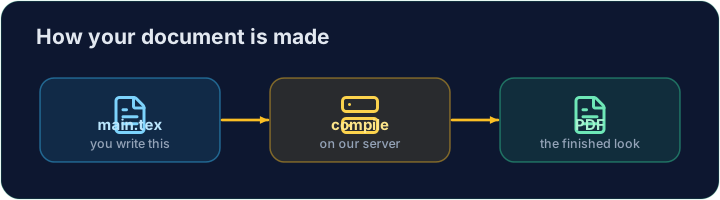
- You write plain text with commands, and the computer turns it into a polished PDF.
- Your LaTeX is compiled on our server — press Run and the PDF appears next to your code.
Русский
Ваша первая LaTeX-документация
- LaTeX позволяет создавать красивые документы — отчеты, книги и особенно математику.
- Вы пишете обычный текст с помощью команд, а компьютер превращает это в отполированный PDF.
- Ваш LaTeX компилируется на нашем сервере — нажмите Run, и PDF появится рядом с кодом.
English
The shape of every document
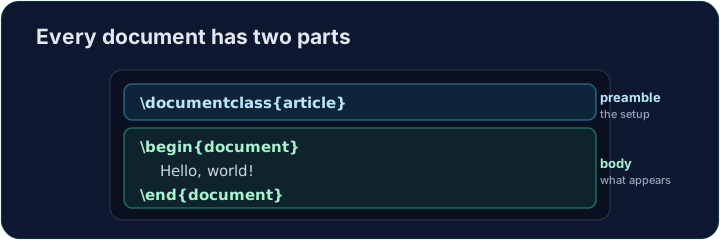
- Every document has two parts — a preamble and a body:
\documentclass{article}is the preamble: it sets the kind of document.- Everything between
\begin{document}and\end{document}is the body — the part that actually appears in the PDF.
Русский
Структура каждого документа
- Каждый документ состоит из двух частей — преамбулы и тела:
\documentclass{article}
\begin{document}
Hello, world!
\end{document}
\documentclass{article}— это преамбула: она задает тип документа.- Всё между
\begin{document}и\end{document}— это тело — та часть, которая фактически отображается в PDF.
English
Now you try
- Below is a document skeleton. Add a greeting in the body.
- Press Run to compile it and see the PDF, then Check when you think it is right.
Русский
Теперь попробуйте сами
- Ниже приведен скелет документа. Добавьте приветствие в тело.
- Нажмите Run, чтобы скомпилировать его и увидеть PDF, затем Check, когда сочтете, что всё верно.
English
Common mistakes
- A document needs
\documentclass{...}and a\begin{document} ... \end{document}. - The text you want to see goes inside the document environment.
Русский
Распространенные ошибки
- Документ требует
\documentclass{...}и\begin{document} ... \end{document}. - Текст, который должен быть виден, помещается внутрь окружения document.
The skeleton below is a complete LaTeX document. Replace the comment in the body with a greeting (any text containing the word Hello), then click Run to compile it and see the PDF. · Ниже приведён полный документ LaTeX. Замените комментарий в теле документа на приветствие (любой текст, содержащий слово Hello), затем нажмите кнопку Run (Запустить), чтобы скомпилировать его и увидеть PDF.
Click Run to compile and preview the PDF. · Нажмите Запустить, чтобы скомпилировать и预览 PDF.
Options in square brackets change the whole document. Make the text bigger by adding the [12pt] option: \documentclass[12pt]{article}. Run and see every letter grow. · Параметры в квадратных скобках меняют весь документ. Увеличьте размер текста, добавив параметр [12pt]: \documentclass[12pt]{article}. Запустите проект и увидите, как все буквы увеличатся.
Click Run to compile and preview the PDF. · Нажмите Запустить, чтобы скомпилировать и预览 PDF.