Structs and typedef: . vs ->
This page needs a recent browser (with SharedArrayBuffer support). Please update Chrome, Edge, Firefox or Safari to the latest version. · Эта страница требует современного браузера (с поддержкой SharedArrayBuffer). Пожалуйста, обновите Chrome, Edge, Firefox или Safari до последней версии.
English
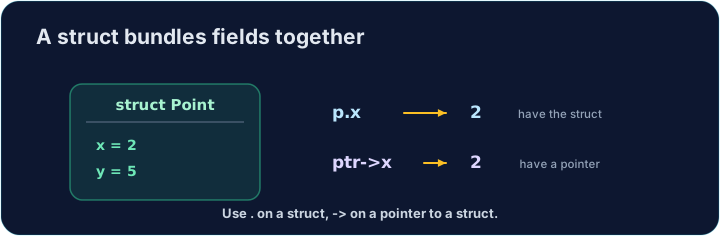
Grouping related data
- A struct groups several values into one thing. A point has an
xand ay; a rectangle has awidthand aheight. - Each value inside is called a member (or field). They can have different types.
- Structs let you pass one tidy thing around instead of many loose variables.
Русский
Группировка связанных данных
- Структура объединяет несколько значений в одну единицу. Точка имеет координату
xи координатуy; прямоугольник имеет ширинуwidthи высотуheight. - Каждое значение внутри называется членом (или полем). Они могут иметь разные типы.
- Структуры позволяют передавать одну аккуратную единицу вместо множества отдельных переменных.
English
struct and typedef
- You define the shape once:
struct { int x; int y; }has twointmembers. typedefgives that shape a short name. Aftertypedef struct { int x; int y; } Point;, you can writePoint p;.- In these tasks, the
typedefis already written for you in the starter.
Русский
struct и typedef
- Вы определяете форму один раз: структура
struct { int x; int y; }имеет два члена типаint. typedefприсваивает этой форме короткое имя. После определенияtypedef struct { int x; int y; } Point;вы можете писатьPoint p;.- В этих заданиях объявление структуры
typedefуже написано для вас в стартовом коде.
English
Member access with .
- For a struct value, use a dot:
p.xis thexmember ofp. - You read it (
int a = p.x;) and write it (p.y = 5;) just like a normal variable. - A function can build a struct, fill its members, and
returnthe whole thing.
Русский
Доступ к членам через точку
- Для значения структуры используйте точку: выражение
p.x— это член типаxструктурыp. - Вы читаете его (
int a = p.x;) и записываете (p.y = 5;) точно так же, как обычную переменную. - Функция может создать структуру, заполнить её члены и
returnвсю целиком.
English
Through a pointer with ->
- When you have a pointer to a struct, use an arrow:
p->xmeans "thexof whatppoints to". p->xis just shorthand for(*p).x. The arrow is easier to read.- Passing a
Point *lets a function change the caller's struct (like pass-by-pointer for one value).
Русский
Через указатель со стрелкой ->
- Когда у вас есть указатель на структуру, используйте стрелку:
p->xозначает "членxтого, на что указываетp". p->x— это просто сокращение для(*p).x. Стрелку легче читать.- Передача
Point *позволяет функции изменить структуру вызывающего кода (аналог передачи по указателю для одного значения).
#include <stdio.h>

typedef struct {
    int x;
    int y;
} Point;

int main(void) {
    Point p = {3, 4};
    Point *ptr = &p;
    ptr->x = 10;                    // changes p.x through the pointer
    printf("%d %d\n", p.x, p.y);    // 10 4
    return 0;
}
English
Common mistakes
- Use
.on a struct value and->on a struct pointer. typedeflets you drop the wordstructwhen declaring.
Русский
Распространенные ошибки
- Используйте
.для значения структуры и->для указателя на структуру. typedefпозволяет опустить словоstructпри объявлении.
English
Now you try
- Use
.on a struct value, and->when you have a pointer to a struct. - The
typedefis given in each starter. Do not write amain— the checker provides one.
Русский
Теперь попробуйте сами
- Используйте
.для значения структуры, а->— когда у вас есть указатель на структуру. typedefуказывается в каждом стартовом коде. Не пишите строкуmain— проверочная программа предоставляет её сама.
Complete Point make_point(int x, int y) so it builds a Point with those values and returns it (use . on the members). The typedef is given. Do not write a main.
Click Run to see the output here. · Нажмите Запустить, чтобы увидеть результат здесь.
Complete void move_point(Point *p, int dx, int dy) so it adds dx to the point's x and dy to its y, using ->. The typedef is given. Do not write a main.
Click Run to see the output here. · Нажмите Запустить, чтобы увидеть результат здесь.
Complete int rect_area(const Rect *r) so it returns width * height, reading the members with ->. The typedef is given. Do not write a main.
Click Run to see the output here. · Нажмите Запустить, чтобы увидеть результат здесь.