Writing a class: fields, constructor, methods · Написание класса: поля, конструктор, методы
Make your own type
- So far you used classes like
StringandMaththat Java gave you. - Now you will write your own class. A class is a plan for an object.
- An object holds data (its own values) and methods (things it can do).
Создание собственного типа
- До сих пор вы использовали классы, такие как
StringиMath, которые предоставила вам Java. - Теперь вы напишете собственный класс. Класс — это план для создания объекта.
- Объект содержит данные (собственные значения) и методы (действия, которые он может выполнять).
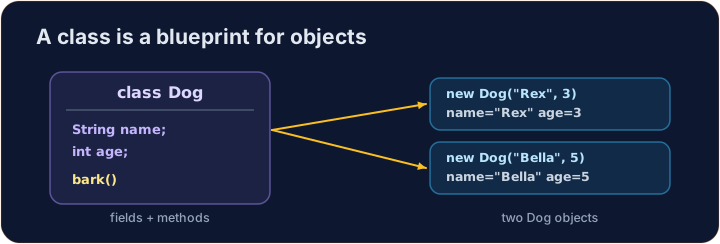
Instance variables
- Data that each object keeps is stored in instance variables (also called fields).
- You declare them inside the class, but outside any method.
- Each object gets its own copy of these variables.
Экземплярные переменные
- Данные, которые хранит каждый объект, сохраняются в экземплярных переменных (также называемых полями).
- Вы объявляете их внутри класса, но вне любого метода.
- Каждый объект получает собственную копию этих переменных.
public class Dog {
    String name;   // instance variable
    int age;       // instance variable
}
A constructor
- A constructor sets up a new object. It runs when you write
new. - It has the same name as the class and no return type (not even
void). - Use the word
thisto mean "this object's own variable".
Конструктор
- Конструктор настраивает новый объект. Он выполняется при написании
new. - Он имеет то же имя, что и класс, и не имеет возвращаемого типа (даже
void). - Используйте слово
thisдля обозначения "собственной переменной этого объекта".
public class Dog {
    String name;
    int age;

    // Constructor: runs when we make a new Dog
    public Dog(String name, int age) {
        this.name = name;   // this.name is the field; name is the parameter
        this.age = age;
    }
}
Instance methods
- An instance method is an action an object can do.
- It can read and change the object's own instance variables.
- You call it on an object with a dot:
myDog.speak().
Экземплярные методы
- Экземплярный метод — это действие, которое может выполнить объект.
- Он может читать и изменять собственные экземплярные переменные объекта.
- Вы вызываете его у объекта через точку:
myDog.speak().
public class Dog {
    String name;
    int age;

    public Dog(String name, int age) {
        this.name = name;
        this.age = age;
    }

    // Instance method: returns a sentence about this dog
    public String describe() {
        return this.name + " is " + this.age;
    }
}
Make and use an object
- Use
new ClassName(...)to build an object. This calls the constructor. - Store it in a variable whose type is the class name.
- Then call its methods with a dot.
Создание и использование объекта
- Используйте
new ClassName(...)для создания объекта. Это вызывает конструктор. - Сохраните его в переменной, тип которой совпадает с именем класса.
- Затем вызовите его методы через точку.
public class Main {
    public static void main(String[] args) {
        Dog d = new Dog("Rex", 4);
        System.out.println(d.describe());   // Rex is 4
    }
}

class Dog {
    String name;
    int age;

    public Dog(String name, int age) {
        this.name = name;
        this.age = age;
    }

    public String describe() {
        return this.name + " is " + this.age;
    }
}
Why this?
- A parameter and a field can have the same name (like
name). - Inside the constructor,
namemeans the parameter;this.namemeans the field. thisalways means the object the method was called on.
Зачем this?
- Параметр и поле могут иметь одно и то же имя (например,
name). - Внутри конструктора
nameозначает параметр;this.nameозначает поле. thisвсегда означает объект, к которому был вызван метод.
Common mistakes
- A constructor has no return type and matches the class name.
- Use
this.fieldto tell a field from a parameter of the same name.
Распространенные ошибки
- У конструктора нет возвращаемого типа, и он имеет название класса.
- Используйте
this.field, чтобы отличить поле от параметра с тем же именем.
Now you try
- Each task gives you a class skeleton with a TODO. Fill it in so it compiles and works.
- A hidden Harness builds your object and checks the results.
- Press Run to compile, then Check answer.
Теперь попробуйте сами
- В каждом задании дается каркас класса с пометкой TODO. Заполните его так, чтобы код компилировался и работал.
- Скрытый Harness создает ваш объект и проверяет результаты.
- Нажмите Run (Выполнить) для компиляции, затем Check answer (Проверить ответ).
Complete the Counter class. It has an int field count that starts at 0. increment() adds 1 to it. getCount() returns the current value. · Допишите класс Counter. У него есть поле int count, которое начинается с 0. increment() добавляет к нему 1. getCount() возвращает текущее значение.
Click Run to see the output here. · Нажмите Запустить, чтобы увидеть результат здесь.
Complete the Rectangle class. The constructor takes width w and height h and stores them. area() returns width times height. perimeter() returns 2 times (width plus height). · Завершите класс Rectangle. Конструктор принимает ширину w и высоту h и сохраняет их. Метод area() возвращает произведение ширины на высоту. Метод perimeter() возвращает результат умножения 2 на (ширину плюс высоту).
Click Run to see the output here. · Нажмите Запустить, чтобы увидеть результат здесь.
Complete the Greeter class. The constructor takes a String name and stores it in the field name. greet() returns the text Hello, followed by the name and a ! (for "Ana" it returns Hello, Ana!). · Допишите класс Greeter. Конструктор принимает строку String name и сохраняет её в поле name. greet() возвращает текст Hello, , за которым следуют имя и знак ! (для "Ana" он возвращает Hello, Ana!).
Click Run to see the output here. · Нажмите Запустить, чтобы увидеть результат здесь.